


- Posts: 321
- Thank you received: 6
3 Post Moderation Rule for New Boarders (25 Jan 2021)
New boarders will have their posts moderated - Don't worry if you cannot see your post immediately.
Waiting on 10.2.4 and 10.3
28 Oct 2016 07:58 #81476
by AppleGuru
Contact Apple maybe we are missing something... or even contact Blackmagic! But tell them resolve is not a NLE lol
Replied by AppleGuru on topic Waiting on 10.2.4 and 10.3
shane82388 wrote: Does this seem somewhat misleading that on the "Works With Final Cut Pro X" camera compatability page they say the Blackmagic Design Camera CinemaDNG (among others) are compatable?
Or at least imply it? (As far as I know and have tested, the CinemaDNG files still aren't...just ProRes obviously, even though it says CinemaDNG)
support.apple.com/en-us/HT204203
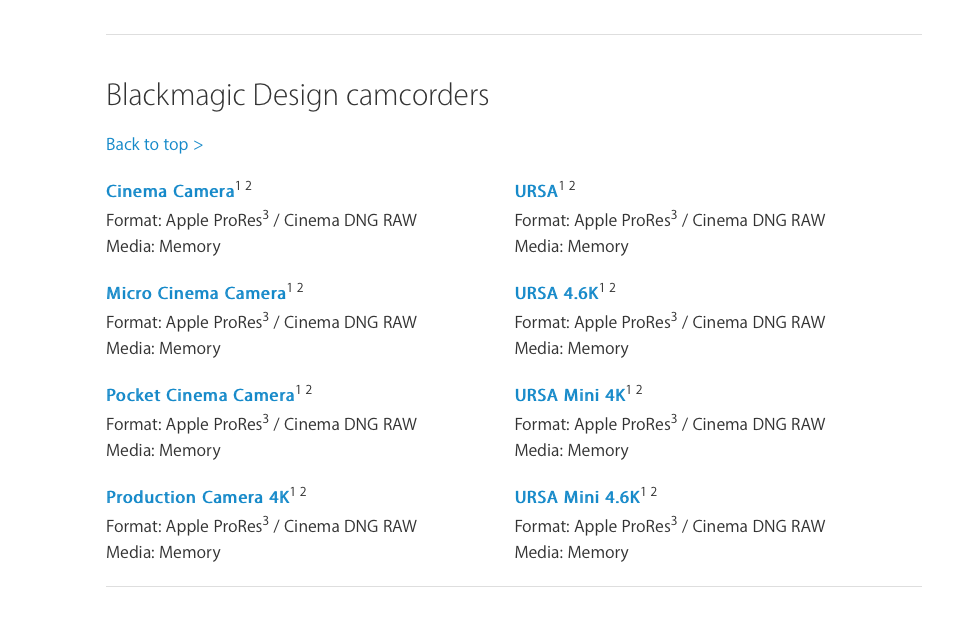
Contact Apple maybe we are missing something... or even contact Blackmagic! But tell them resolve is not a NLE lol
Please Log in to join the conversation.

28 Oct 2016 08:20 #81477
by Seamusvfx
@Ronny - A lot of people use image sequences for any sort of rendered work, Not just super high end stuff. Its not arcane, its a relevant of working, which for those of us who need to use them, limits Final Cuts utility
Same with Cinema DNG - RAW's a fundamentally different thing from ProRes or even uncompressed. While practically prores may stand in most cases, there are still relevant uses.
Just because FCP doesn't support something, that format doesn't need to be derided as irrelevant or old fashioned - it just means FCP has its limitations of scope, which all software does.
Replied by Seamusvfx on topic Waiting on 10.2.4 and 10.3
ronny courtens wrote: We had this discussion exactly one year ago: www.fcp.co/fcp-forum/4-final-cut-pro-x-f...dng-natively-in-fcpx
And we talked about it only a few days ago: www.fcp.co/forum/4-final-cut-pro-x-fcpx/...0-cinemadng-question
As technology evolves, there's not much incentive anymore to record footage in an image sequence format. That's why all modern BMD cameras can record 12-bit ProRes now, and I don't think BMD will put any effort into working on a plugin to support their old CinemaDNG anymore.
OTOH image sequences still remain useful for high-end VFX work (because this make it easier to just replace one or more frames in a very computing-intensive comp without having to recompute the entire comp), and FCP X supports exporting to any kind of image sequence for this purpose.
- Ronny
@Ronny - A lot of people use image sequences for any sort of rendered work, Not just super high end stuff. Its not arcane, its a relevant of working, which for those of us who need to use them, limits Final Cuts utility
Same with Cinema DNG - RAW's a fundamentally different thing from ProRes or even uncompressed. While practically prores may stand in most cases, there are still relevant uses.
Just because FCP doesn't support something, that format doesn't need to be derided as irrelevant or old fashioned - it just means FCP has its limitations of scope, which all software does.
Please Log in to join the conversation.
- ronny courtens
-

- Offline
- Moderator
-

Less
More
- Posts: 4455
- Thank you received: 962
28 Oct 2016 08:39 #81479
by ronny courtens
Replied by ronny courtens on topic Waiting on 10.2.4 and 10.3
I thought it was clear that I was only talking about the demise of image sequences such as CinemaDNG as a camera acquisition format, not about their use in any sort of rendered work.
As we have experienced, and others have pointed out, there is no advantage in shooting CinemaDNG instead of ProRes 4444 (HQ). And that's why I said I don't think BMD will ever bother creating a utility that would allow native handling of Cinema DNG in FCP X. RedRAW OTOH has it's advantages, and that's why RED has created a native plugin for FCP X. If you really want native support of CinemaDNG in FCP X, you should contact Blackmagic Design.
- Ronny
As we have experienced, and others have pointed out, there is no advantage in shooting CinemaDNG instead of ProRes 4444 (HQ). And that's why I said I don't think BMD will ever bother creating a utility that would allow native handling of Cinema DNG in FCP X. RedRAW OTOH has it's advantages, and that's why RED has created a native plugin for FCP X. If you really want native support of CinemaDNG in FCP X, you should contact Blackmagic Design.
- Ronny
Please Log in to join the conversation.
- nils.dettmann
-

- Offline
- Elite Member
-

Less
More
- Posts: 161
- Thank you received: 13
28 Oct 2016 10:00 #81484
by nils.dettmann
Replied by nils.dettmann on topic Waiting on 10.2.4 and 10.3
Normally I tend to be more on the sceptical side but as far as I have tested the new version there are some really huge improvements.
The role based arrangement of audio looks very promising. For the future I would hope they would get rid of the need to compound the timeline and make the Role based view available in the project itself. But as it is I´m already happy.
iXML import with files from SoundDevices recorders works well - huge improvement for me.
And one of my biggest annoyances got addressed. If you have more than one attached audio file within a clip they will now show up in the inspector in a comprehensible way.
- if all audio tracks in the attached files have different subroles they will all show in the inspector.
- audio tracks with the same subroles are mixed together and will only have one representation in the inspector.
Thus subrolling will become an important factor on import.
From what I have seen the waveforms in the inspector update instantly, when something within the clip is changed.
Back to work...
The role based arrangement of audio looks very promising. For the future I would hope they would get rid of the need to compound the timeline and make the Role based view available in the project itself. But as it is I´m already happy.
iXML import with files from SoundDevices recorders works well - huge improvement for me.
And one of my biggest annoyances got addressed. If you have more than one attached audio file within a clip they will now show up in the inspector in a comprehensible way.
- if all audio tracks in the attached files have different subroles they will all show in the inspector.
- audio tracks with the same subroles are mixed together and will only have one representation in the inspector.
Thus subrolling will become an important factor on import.
From what I have seen the waveforms in the inspector update instantly, when something within the clip is changed.
Back to work...
Please Log in to join the conversation.
- Lee Patterson
-
- Offline
- Elite Member
-
Less
More
- Posts: 239
- Thank you received: 20
28 Oct 2016 10:19 #81489
by Lee Patterson
I think that the claimis partial justifiable in that you can toggle the log switch for the camera models mentioned
Replied by Lee Patterson on topic Waiting on 10.2.4 and 10.3
AppleGuru wrote:
shane82388 wrote: Does this seem somewhat misleading that on the "Works With Final Cut Pro X" camera compatability page they say the Blackmagic Design Camera CinemaDNG (among others) are compatable?
Or at least imply it? (As far as I know and have tested, the CinemaDNG files still aren't...just ProRes obviously, even though it says CinemaDNG)
support.apple.com/en-us/HT204203
Contact Apple maybe we are missing something... or even contact Blackmagic! But tell them resolve is not a NLE lol
I think that the claimis partial justifiable in that you can toggle the log switch for the camera models mentioned
Please Log in to join the conversation.
28 Oct 2016 14:17 #81517
by PaulG
Replied by PaulG on topic Waiting on 10.2.4 and 10.3
Image sequences are not just for Cinema DNGs, but are common in time-lapse footage and animation.
Motion, Premiere, After Effects, Resolve, Compressor and even Qucktime 7 all support image sequences. FCPX can even render image sequences, but for some weird reason they haven't bothered with import.
It just needs a little checkbox on import when it sees a folder of sequential images to ask "import as sequence" just the way the other programs do. I can think of nothing other than sheer laziness that that they haven't bothered to include this functionality.
BTW! Saying that there no difference between RAW and ProRes is just plain incorrect. Besides dynamic range, RAW gives you the ability to alter color temperature and ISO settings in ways that ProRes can't. If you're shooting in a controlled lighting environment like a stage, then they're functionally equivalent. But if you're in demanding outdoor situations which are highly contasty and difficult to control, RAW is your friend...
Motion, Premiere, After Effects, Resolve, Compressor and even Qucktime 7 all support image sequences. FCPX can even render image sequences, but for some weird reason they haven't bothered with import.
It just needs a little checkbox on import when it sees a folder of sequential images to ask "import as sequence" just the way the other programs do. I can think of nothing other than sheer laziness that that they haven't bothered to include this functionality.
BTW! Saying that there no difference between RAW and ProRes is just plain incorrect. Besides dynamic range, RAW gives you the ability to alter color temperature and ISO settings in ways that ProRes can't. If you're shooting in a controlled lighting environment like a stage, then they're functionally equivalent. But if you're in demanding outdoor situations which are highly contasty and difficult to control, RAW is your friend...
Please Log in to join the conversation.

28 Oct 2016 15:24 - 29 Oct 2016 12:50 #81522
by cseeman
I think there's some misrepresentations in what you state. A 12 bit ProRes XQ file should have the same "dynamic range" as a 12 bit cDNG file. Actually I don't like using dynamic range in this context because the dynamic range of the sensor and the image captured doesn't change. The ability to make changes in post could theoretically be impacted but it's not really the case under even the most "harsh" post workflows in which there's radical changes in grading or heavy compositing.
In other words, even though color temp and ISO are "baked in" in XQ, there's no practical limit to altering it.
That XQ doesn't "bake in" color temp and ISO really has little practical advantage because you can push ProRex XQ as hard as you want.
A few years back I talked about this with Steve Bayes, Apple Product Manager at a Blackmagic road show event. He said (paraphrasing) there's no practical reason to support cDNG in FCPX. You won't see the difference in broadcast TV nor even Feature Films.
Personally I haven't seen anyone do a camera test in an Ursa or Ursa Mini comparing cDNG to ProRes XQ and how the choice of codec impacted the dynamic range recording and, for all practical purposes, the post processing.
Replied by cseeman on topic Waiting on 10.2.4 and 10.3
BTW! Saying that there no difference between RAW and ProRes is just plain incorrect. Besides dynamic range, RAW gives you the ability to alter color temperature and ISO settings in ways that ProRes can't. If you're shooting in a controlled lighting environment like a stage, then they're functionally equivalent. But if you're in demanding outdoor situations which are highly contasty and difficult to control, RAW is your friend...
I think there's some misrepresentations in what you state. A 12 bit ProRes XQ file should have the same "dynamic range" as a 12 bit cDNG file. Actually I don't like using dynamic range in this context because the dynamic range of the sensor and the image captured doesn't change. The ability to make changes in post could theoretically be impacted but it's not really the case under even the most "harsh" post workflows in which there's radical changes in grading or heavy compositing.
In other words, even though color temp and ISO are "baked in" in XQ, there's no practical limit to altering it.
That XQ doesn't "bake in" color temp and ISO really has little practical advantage because you can push ProRex XQ as hard as you want.
A few years back I talked about this with Steve Bayes, Apple Product Manager at a Blackmagic road show event. He said (paraphrasing) there's no practical reason to support cDNG in FCPX. You won't see the difference in broadcast TV nor even Feature Films.
Personally I haven't seen anyone do a camera test in an Ursa or Ursa Mini comparing cDNG to ProRes XQ and how the choice of codec impacted the dynamic range recording and, for all practical purposes, the post processing.
Last edit: 29 Oct 2016 12:50 by cseeman.
Please Log in to join the conversation.
28 Oct 2016 15:52 #81528
by PaulG
Replied by PaulG on topic Waiting on 10.2.4 and 10.3
I'm guessing that FCPX's lack of Cinema DNG support may be due to what appears to be an arms-length truce between Apple and BMD. Apple knows that round tripping to Resolve helps FCPX be perceived as "professional" and BMD may not feel it's worth it to write an interpreter for Apple if they think the ideal place to deal with RAW is within Resolve. Realtime performance may not be optimal in FCPX for CinemaDNG compared to ProRes and Apple is usually loathe to implement unsatisfying options. But I speculate...
To be honest, I haven't extensively tested XC vs RAW, so it may be indeed practical to use XC, but I'm comfortable with a RAW workflow for VFX.
To be honest, I haven't extensively tested XC vs RAW, so it may be indeed practical to use XC, but I'm comfortable with a RAW workflow for VFX.
Please Log in to join the conversation.

28 Oct 2016 18:06 #81541
by Shane M
Replied by Shane M on topic Waiting on 10.2.4 and 10.3
I may be wrong, but doesn't XQ actually take up more space than 3:1 BMD RAW? Thats not really a knock, but just kind of interesting...
Also, there is the consideration that only the Ursa/Ursa Mini actually shoot any higher flavor of ProRes than ProRes HQ...the rest of the Blackmagic Cameras stop there...but they CAN shoot 3:1 RAW...so there is that to consider, I guess.
Either way, it's probably not going to happen...hopefully future cameras start supporting the 4444 ProRes flavors though. :dry:
Also, there is the consideration that only the Ursa/Ursa Mini actually shoot any higher flavor of ProRes than ProRes HQ...the rest of the Blackmagic Cameras stop there...but they CAN shoot 3:1 RAW...so there is that to consider, I guess.
Either way, it's probably not going to happen...hopefully future cameras start supporting the 4444 ProRes flavors though. :dry:
Please Log in to join the conversation.
28 Oct 2016 18:20 #81544
by PaulG
Replied by PaulG on topic Waiting on 10.2.4 and 10.3
As it turns out, 3:1 and 4:1 CinemaDNG from BMD can't be displayed (AFIK) in anything other that Resolve, including Photoshop and After Effects, so you'd need Resolve to even deal with them.
But for those of us who shoot time-lapse using DSLRs (like Canon), it would be super helpful to have both RAW controls and image sequence support. You can bring a CR2 file into FCPX, but it treats it like a JPEG and clamps the latitude at where the thumbnail is. This is really half-assed at best.
But for those of us who shoot time-lapse using DSLRs (like Canon), it would be super helpful to have both RAW controls and image sequence support. You can bring a CR2 file into FCPX, but it treats it like a JPEG and clamps the latitude at where the thumbnail is. This is really half-assed at best.
Please Log in to join the conversation.
28 Oct 2016 22:18 #81558
by AppleGuru
Replied by AppleGuru on topic Waiting on 10.2.4 and 10.3
Regarding to FCPX and CinemaDNG I do not think we will see a plugin for FCPX from Blackmagic.
1. I imagine they want you to use there software they pack with the camera.
2. CinemaDNG is Adobe-led initiative, why you see it on Premiere and After Effects and I don't think they will want to give FCPX this option.
Not sure why you would want to editi in a image sequence that could cause issues... different story.
Yeah in the FX world it has better fit.
1. I imagine they want you to use there software they pack with the camera.
2. CinemaDNG is Adobe-led initiative, why you see it on Premiere and After Effects and I don't think they will want to give FCPX this option.
Not sure why you would want to editi in a image sequence that could cause issues... different story.
Yeah in the FX world it has better fit.
Please Log in to join the conversation.
28 Oct 2016 22:53 #81562
by PaulG
Other cameras like the Digital Bolex also support the Cinema DNG. Adobe no longer has "ownership" of the CinemaDNG as they've walked away from it.
Image Sequences are generated in a variety of ways (animation programs; cameras shooting still frames, stop motion) and they've been always been used in VFX situations. Especially in CG renders where multiple machines are rendering sequences. The advantage is that frame fixes can be done without having to render the entire sequence again. I know it's hard for video folks to wrap their heads around the need for them, but they're really bullet-proof for EFX.
Replied by PaulG on topic Waiting on 10.2.4 and 10.3
AppleGuru wrote: Regarding to FCPX and CinemaDNG I do not think we will see a plugin for FCPX from Blackmagic.
2. CinemaDNG is Adobe-led initiative, why you see it on Premiere and After Effects and I don't think they will want to give FCPX this option.
Not sure why you would want to editi in a image sequence that could cause issues... different story.
Yeah in the FX world it has better fit.
Other cameras like the Digital Bolex also support the Cinema DNG. Adobe no longer has "ownership" of the CinemaDNG as they've walked away from it.
Image Sequences are generated in a variety of ways (animation programs; cameras shooting still frames, stop motion) and they've been always been used in VFX situations. Especially in CG renders where multiple machines are rendering sequences. The advantage is that frame fixes can be done without having to render the entire sequence again. I know it's hard for video folks to wrap their heads around the need for them, but they're really bullet-proof for EFX.
Please Log in to join the conversation.
29 Oct 2016 06:47 #81574
by AppleGuru
Replied by AppleGuru on topic Waiting on 10.2.4 and 10.3
Like I said it is a different world in the CGI then in the NLE.
Rendering who stills need to Render when adjusting a frame or clip in today's NLR?
Regarding how they are generated, yes you are right there are generate in different fields bit aren't they processed in the pipleline for a better workflow.
I have never received a image sequence from a our visual effect guys, mainly prores.
Besides most CGI applications can render out the frames over a cluster of machines and still produce what ever file format that is required like a .mov.
The only time I receive a image sequence is from color grading. It that is also becomeing more and more a ProRed HQ Format.
Don't know if Adobe is not leading the development. I know they did and going by Wiki they still do.
Rendering who stills need to Render when adjusting a frame or clip in today's NLR?
Regarding how they are generated, yes you are right there are generate in different fields bit aren't they processed in the pipleline for a better workflow.
I have never received a image sequence from a our visual effect guys, mainly prores.
Besides most CGI applications can render out the frames over a cluster of machines and still produce what ever file format that is required like a .mov.
The only time I receive a image sequence is from color grading. It that is also becomeing more and more a ProRed HQ Format.
Don't know if Adobe is not leading the development. I know they did and going by Wiki they still do.
Please Log in to join the conversation.

29 Oct 2016 11:56 - 29 Oct 2016 12:39 #81587
by EditorGuy
Replied by EditorGuy on topic Waiting on 10.2.4 and 10.3
At the FCPX Creative Summit today, there was no NDA required by Apple, and they made several public statements. Someone here at the event has even
posted to his blog
about it. The pro video development team is made up of former and current professional editors, who now write programing code or do design work for Apple. They do read and take very seriously all forms of feedback, be it forum posts here and elsewhere, feedback page submissions, emails, phone calls, blog posts, etc. And they are passionately dedicated to the professional market. We're also seeing first hand just how widespread FCPX's use is around the world. If someone says it's not in very widespread use, come tell all these professionals from all over the world doing all levels of work. GREAT major upgrade release, and they stated that they'll be working to grow and evolve FCPX for a very, very long time to come. All public statements. Based on some private statements, I'd say we'll see roles based mixer in 2017 for sure.
Last edit: 29 Oct 2016 12:39 by EditorGuy.
Please Log in to join the conversation.
29 Oct 2016 12:34 #81589
by robertdee
Replied by robertdee on topic Waiting on 10.2.4 and 10.3
Great stuff! Thanks for sharing. I'm loving the new version and think it clearly shows a commitment to Pros. It's good to know they're planning for the long term.
Please Log in to join the conversation.
Less
More
- Posts: 971
- Thank you received: 46
29 Oct 2016 13:08 - 29 Oct 2016 13:14 #81591
by MsJustine
Replied by MsJustine on topic Waiting on 10.2.4 and 10.3
I guess Apple is like a parent, you as the child want all the chocolate now, and the parent says NO..You hate the word NO!!!
I would agree roles based mixing is coming, that this new UI is a work towards that, and let's be honest, Apple is not going to make the same mistake they made with 10.0!! They worked to solve problems, and 10.2 series was never going to work with a roles based mixer, that much is obvious, and in a way, I like the way Apple is going about it.. Of course I want all my chocolate now, but too much too soon makes you sick.
This slow process serves two goals, it allows time to develop the new tools, and 2nd, it allows users both experienced and newbies to get used to the new UI without feeling so overwhelmed, I think this is something BMD has failed to understand.
Yes, update the software, but make the changes slow and incremental, allow people to grow into the software, too much and you are put off, in my case this is the how I felt about Resolve, it is powerful, and maybe too many features for me to deal with, I would love to have a version that is "lite" that over times develops.
Apple have taken a very mature approach if this is how Apple have decided to go forward, small steps to a goal. It has taken me a very long time to accept this, and now with this update, and combined with the new MacBook Pro, a clear path is defined.
What was missing from the keynote, a MacPro, and maybe it was just not ready, maybe the new version is not going to be a cylinder, something amazing, the cylinder is maybe not the best idea, a box of parts is standard, maybe even the new version with be designed to fit in a rack, be a 2 Rack Unit high case, but a cylinder, NO.
I would agree roles based mixing is coming, that this new UI is a work towards that, and let's be honest, Apple is not going to make the same mistake they made with 10.0!! They worked to solve problems, and 10.2 series was never going to work with a roles based mixer, that much is obvious, and in a way, I like the way Apple is going about it.. Of course I want all my chocolate now, but too much too soon makes you sick.
This slow process serves two goals, it allows time to develop the new tools, and 2nd, it allows users both experienced and newbies to get used to the new UI without feeling so overwhelmed, I think this is something BMD has failed to understand.
Yes, update the software, but make the changes slow and incremental, allow people to grow into the software, too much and you are put off, in my case this is the how I felt about Resolve, it is powerful, and maybe too many features for me to deal with, I would love to have a version that is "lite" that over times develops.
Apple have taken a very mature approach if this is how Apple have decided to go forward, small steps to a goal. It has taken me a very long time to accept this, and now with this update, and combined with the new MacBook Pro, a clear path is defined.
What was missing from the keynote, a MacPro, and maybe it was just not ready, maybe the new version is not going to be a cylinder, something amazing, the cylinder is maybe not the best idea, a box of parts is standard, maybe even the new version with be designed to fit in a rack, be a 2 Rack Unit high case, but a cylinder, NO.
Last edit: 29 Oct 2016 13:14 by MsJustine.
Please Log in to join the conversation.
- realdavidai
-
- Offline
- New Member
-

Less
More
- Posts: 14
- Thank you received: 0
29 Oct 2016 14:57 #81593
by realdavidai
Referring to the content browsers (photos and audio) they used to be in the lower right with transitions and effects
Replied by realdavidai on topic Waiting on 10.2.4 and 10.3
AppleGuru wrote:
What do you mean? I was Alta's able to put the media in the same location as I wanted.realdavidai wrote: Excellent update, even little things like putting all source media in the same location
Referring to the content browsers (photos and audio) they used to be in the lower right with transitions and effects
Please Log in to join the conversation.
29 Oct 2016 15:12 - 29 Oct 2016 15:13 #81595
by EditorGuy
Replied by EditorGuy on topic Waiting on 10.2.4 and 10.3
"I guess Apple is like a parent, you as the child want all the chocolate now, and the parent says NO..You hate the word NO!!!"
"This slow process serves two goals, it allows time to develop the new tools, and 2nd..."
Um, it is more like, "sorry honey, but the chocolate is still cooking, and that takes time." It's not about them being a parent and telling us what is best for us. It is about them being a software developer, working really hard on some very sophisticated stuff, making it easy to use, and that simply takes a lot of time and work to design, implement, and prepare for public delivery. As soon as something is ready, they release it. How much work do you think it was to design the new interface? Add to that the time and work it took to code it all from scratch. Yeah, totally new, not revamped code. Only one reason for the long time between updates; it takes that long to design and code stuff, period. There's no psychology about how to treat end users behind this. It is 100% hard work takes that many months to do.
And for those saying it is too dark or whatever; Apple stated yesterday their goal in this is to make the interface and tools fade as much into the background as possible, while still being usable, and make your Creative Content stand out! Your eyes and creative brain should be totally focused on your work, not the tools. I agree with them, and I think they were very successful with this. And the real estate, we have MUCH MORE tools, which are much easier to access, using LESS real estate.
LOVING that I can use Shift-Comand with - and = to resize my clip hight in the Timeline and Filmstrip Even Browser.
Plus the ability to expand the Inspector (double-click the header) to get more work space there.
Hiding the Timeline pane, fantastic, loving it all.
Oh, and that stuff about colored audio roles is OK, I guess.
The browsers are logical now. "Content" is all together: Libraries, Events, photos, music/audio, titles, generators. "Influences" are together: effects and transitions. Those two are not content, they only influence content. Plus, now you can see the full length waveform of audio clips (music, sound effects), select a range to edit with, or just drag the audio, or generator, or photo to the left, the Library browser pops open, drop it directly into an Event. Couldn't do that without a great deal of effort and mouse stretching before. Remember, audio, ranges, you can bring in only a range of an audio clip, not forced to have the whole thing.
"This slow process serves two goals, it allows time to develop the new tools, and 2nd..."
Um, it is more like, "sorry honey, but the chocolate is still cooking, and that takes time." It's not about them being a parent and telling us what is best for us. It is about them being a software developer, working really hard on some very sophisticated stuff, making it easy to use, and that simply takes a lot of time and work to design, implement, and prepare for public delivery. As soon as something is ready, they release it. How much work do you think it was to design the new interface? Add to that the time and work it took to code it all from scratch. Yeah, totally new, not revamped code. Only one reason for the long time between updates; it takes that long to design and code stuff, period. There's no psychology about how to treat end users behind this. It is 100% hard work takes that many months to do.
And for those saying it is too dark or whatever; Apple stated yesterday their goal in this is to make the interface and tools fade as much into the background as possible, while still being usable, and make your Creative Content stand out! Your eyes and creative brain should be totally focused on your work, not the tools. I agree with them, and I think they were very successful with this. And the real estate, we have MUCH MORE tools, which are much easier to access, using LESS real estate.
LOVING that I can use Shift-Comand with - and = to resize my clip hight in the Timeline and Filmstrip Even Browser.
Plus the ability to expand the Inspector (double-click the header) to get more work space there.
Hiding the Timeline pane, fantastic, loving it all.
Oh, and that stuff about colored audio roles is OK, I guess.
The browsers are logical now. "Content" is all together: Libraries, Events, photos, music/audio, titles, generators. "Influences" are together: effects and transitions. Those two are not content, they only influence content. Plus, now you can see the full length waveform of audio clips (music, sound effects), select a range to edit with, or just drag the audio, or generator, or photo to the left, the Library browser pops open, drop it directly into an Event. Couldn't do that without a great deal of effort and mouse stretching before. Remember, audio, ranges, you can bring in only a range of an audio clip, not forced to have the whole thing.
Last edit: 29 Oct 2016 15:13 by EditorGuy.
Please Log in to join the conversation.
29 Oct 2016 15:37 #81597
by Schnurr
? They just adopted the UI from iMovie thats out for a couple of years to FCPX and include some features like roles etc and rearranged some buttons. Wouldn't call that a big innovation from Apple at all
Replied by Schnurr on topic Waiting on 10.2.4 and 10.3
robertdee wrote: Great stuff! Thanks for sharing. I'm loving the new version and think it clearly shows a commitment to Pros. It's good to know they're planning for the long term.
? They just adopted the UI from iMovie thats out for a couple of years to FCPX and include some features like roles etc and rearranged some buttons. Wouldn't call that a big innovation from Apple at all
Please Log in to join the conversation.
- CBlakeston
-
- Offline
- Elite Member
-
Less
More
- Posts: 175
- Thank you received: 5
29 Oct 2016 16:05 - 29 Oct 2016 16:06 #81599
by CBlakeston
Replied by CBlakeston on topic Waiting on 10.2.4 and 10.3
Editors before 10.3:
Waghh. Apple doesn't care about us. They don't do enough.
Editors after 10.3:
Waghh. Apple doesn't care about us. They updated all the wrong things and didn't implement 'x' feature I need for my specific edge case workflow.
When did we become so entitled?
Waghh. Apple doesn't care about us. They don't do enough.
Editors after 10.3:
Waghh. Apple doesn't care about us. They updated all the wrong things and didn't implement 'x' feature I need for my specific edge case workflow.
When did we become so entitled?
Last edit: 29 Oct 2016 16:06 by CBlakeston.
Please Log in to join the conversation.
