


3 Post Moderation Rule for New Boarders (25 Jan 2021)
New boarders will have their posts moderated - Don't worry if you cannot see your post immediately.
FCPX 10.1.0 PRE-RELEASE DISCUSSION
- Disproportionate Pictures
-
 Topic Author
- Offline
- Platinum Member
-

- Posts: 1433
- Thank you received: 64
It's also got me thinking about the connotations. I think it looks in favour (not confirmation by any means) that the December FCPX update will be free. Otherwise it would leave anyone who for any reason decided to stick with 10.0.9, and has already downloaded the free iMovie update, without that interactivity.
- daviddelreal
-

- Offline
- Elite Member
-

- Posts: 230
- Thank you received: 6
NocoDave wrote: .....I think it looks in favour (not confirmation by any means) that the December FCPX update will be free. Otherwise it would leave anyone who for any reason decided to stick with 10.0.9, and has already downloaded the free iMovie update, without that interactivity.
I think you're right. Although, I think the update to 10.1 will be free for those that have already purchased FCPX and I think that for those that never have purchased FCPX will have to pay for the new version once it's released.

tap5a wrote: Playing with new iMovie. I find it great that in new iMovie you can actually add music track that is not anchored to main storyline. Hopefully we'll see these kind of independent storylines/tracks also in next FCPX.

Can't sleep? Try this: fcpxpert.net ;-)
- daviddelreal
-
- Offline
- Elite Member
-
- Posts: 230
- Thank you received: 6
BenB wrote: I just mounded a folder from a networked (Airport) drive on another Mac, and I could see it in the Import window. Not sure if that is new or not. Anyone know?
This seems new too. Mavericks is opening up some potential features...
I think you're right. Although, I think the update to 10.1 will be free for those that have already purchased FCPX and I think that for those that never have purchased FCPX will have to pay for the new version once it's released.
Sorry David, I should have been clearer, that's exactly what I meant. But I do think it would be excellent marketing for Apple to give FCPX & LPX free with newly purchased Mac Pros' and MacBook Pro's.
- daviddelreal
-
- Offline
- Elite Member
-
- Posts: 230
- Thank you received: 6
NocoDave wrote: ....But I do think it would be excellent marketing for Apple to give FCPX & LPX free with newly purchased Mac Pros' and MacBook Pro's.
Now that would be awesome! However, it may be unlikely since Apple is not even including a keyboard and mouse with the new Mac Pro...
- Tom Wolsky
-

- Offline
- Moderator
-

This is not new and has been in iMovie for a number of years. The application has not changed that significantly. It had a lot if features, which perhaps professionals were unaware of.
- ronny courtens
-

- Offline
- Moderator
-
- Posts: 4455
- Thank you received: 962
But the app has changed enormously under the hood. I wouldn't have touched 11 with a pole stick for any serious work. Since I have been playing around with iMovie X I now have a totally different opinion about this app. Its speed and ease of use have grown exponentially now it's 64-bit and working on AV/Foundation, even on slower systems. I think that alone is a significant change. Plus it works with Motion templates the same as FCPX, which will make it fully compatible with X. That's an important change as well.
- Ronny
- daviddelreal
-
- Offline
- Elite Member
-
- Posts: 230
- Thank you received: 6
ronny courtens wrote: ....Plus it works with Motion templates the same as FCPX, which will make it fully compatible with X. That's an important change as well.
- Ronny
Whoa!!!! How on earth did you get a Motion template to work in iMovie???? Just opened up iMovie and tried it but can't fine how to do that.
- daviddelreal
-
- Offline
- Elite Member
-
- Posts: 230
- Thank you received: 6
- ronny courtens
-
- Offline
- Moderator
-
- Posts: 4455
- Thank you received: 962
As you can see in the screenshot I have taken a transition (Crossfade to color) I had created for FCPX into iMovie X and it works perfectly. I also have added an Adjustment Layer to the iMovie Titles Browser (you can see it on the Timeline), but of course adjustment layers don't work in iMovie as you cannot add effects to titles in this app. But Motion templates certainly work in it.
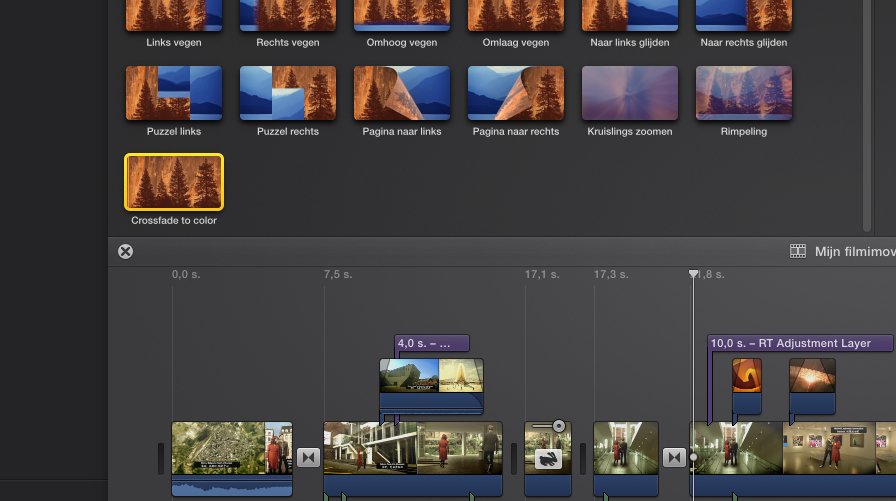
The templates are buried inside the app in a Templates folder and of course this method is not officially supported.
- Ronny
- ronny courtens
-
- Offline
- Moderator
-
- Posts: 4455
- Thank you received: 962
- Ronny
- daviddelreal
-
- Offline
- Elite Member
-
- Posts: 230
- Thank you received: 6
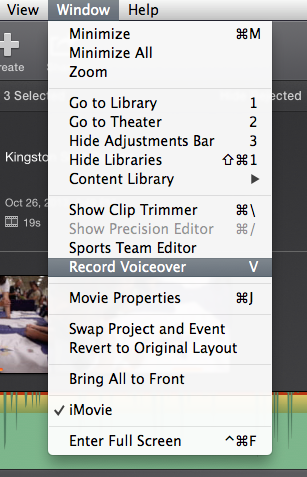
ronny courtens wrote: ...For such fast turnaround projects it has everything you need (except a Voice Over tool, but you can do that on the cam if you need to do it fast).
- Ronny
You can actually do Voiceovers too:
Man I wish I could get NeatVideo Noise Reducer to work in iMovie!
My point with all this is that Apple gave us a sneak preview of 10.1 with iMovie 10 which from what I can see is based on FCP 10.1.
- sirdavidabraham
-
- Offline
- Senior Member
-

- Musician, Geek and Spinach lover.
- Posts: 79
- Thank you received: 3
- Karsten Schlüter
-

- Offline
- Moderator
-
- Posts: 3790
- Thank you received: 718
ronny courtens wrote: … The templates are buried inside the app in a Templates folder and of course this method is not officially supported. Ronny
I'm diggin' now for about 20min - I don't find a Template folder/pkg/…

… any chance, you share me your insights, Ronny?
I'd like to test on my own ....... Motion + iMovie - what a combo! :lol:
I've worked with directors in corporate video that put together a rough edit, with spaces for graphics and titles as notes, in Adobe Premiere Pro before handing it over to me.
They could save their self a fortune. iMovie is way more than capable of suiting their needs. I could tighten it up in FCPX put the templates together in Motion and their set. Thanks for the Motion Template/iMovie info Ronny. This has me wondering if FCPX/iMovie round tripping is going to be possible, it would make sense if FCPX isn't gong to go iPad.
Maybe we'll need an iMovie forum around here somewhere.
