


- Posts: 12
- Thank you received: 0
3 Post Moderation Rule for New Boarders (25 Jan 2021)
New boarders will have their posts moderated - Don't worry if you cannot see your post immediately.
FCPX And El Capitan
- sasamedovarski
-

- Offline
- New Member
-

Less
More
21 Oct 2015 20:38 #69657
by sasamedovarski
Replied by sasamedovarski on topic FCPX And El Capitan
Unfortunately , when I installed 10.11.1 , usb stop working. I can‘t use mouse and keyboard. But I tried compressor, (through share screen) , and "yellow preview screen issue" is solved.
Can‘t wait to try FCPX...but at first I have to fix usb. :sick:
Can‘t wait to try FCPX...but at first I have to fix usb. :sick:
Please Log in to join the conversation.
21 Oct 2015 20:41 #69658
by tpayton
Replied by tpayton on topic FCPX And El Capitan
Zap your PRAM. Startup holding down command-shift-p-r and hold down until it bongs three times.
Please Log in to join the conversation.
21 Oct 2015 20:42 #69659
by tpayton
Replied by tpayton on topic FCPX And El Capitan
Here is some links:
PRAM (renamed NVRAM)
support.apple.com/en-us/HT204063
Resetting SMC:
support.apple.com/en-us/HT201295
PRAM (renamed NVRAM)
support.apple.com/en-us/HT204063
Resetting SMC:
support.apple.com/en-us/HT201295
Please Log in to join the conversation.

21 Oct 2015 20:44 #69660
by BenB
Replied by BenB on topic FCPX And El Capitan
All but one of my Native Instruments plugins loads up in LPX now. I did have to re-scan them in AU manager. Rektor still reports an issue when launching FCPX. But iZotope stuff works in both apps.
And that after NO updates from the developers. Yes, it was totally Apple's bug. And I don't consider it 100% done until I get some updates from developers. Why is FCPX still reporting an issue with an AU plugin that LPX has no issue with? Never happened before EC.
At least we're making progress...
And that after NO updates from the developers. Yes, it was totally Apple's bug. And I don't consider it 100% done until I get some updates from developers. Why is FCPX still reporting an issue with an AU plugin that LPX has no issue with? Never happened before EC.
At least we're making progress...
Please Log in to join the conversation.
- DmitriZigany
-
- Offline
- Platinum Member
-

Less
More
- Posts: 730
- Thank you received: 26
21 Oct 2015 20:59 #69661
by DmitriZigany
But, I guess I am a bit of update junkie. But there's no need to update. But there is an urge.
If I would only do what was needed I would get a proper job and not be an artist and independent/freelance film/video-maker/editor
Replied by DmitriZigany on topic FCPX And El Capitan
I was joking.ronny courtens wrote: I don't know why you should be in such a hurry updating the OS. It doesn't make any difference for video or audio work at this time anyway.
But, I guess I am a bit of update junkie. But there's no need to update. But there is an urge.
If I would only do what was needed I would get a proper job and not be an artist and independent/freelance film/video-maker/editor
Please Log in to join the conversation.
- DmitriZigany
-
- Offline
- Platinum Member
-
Less
More
- Posts: 730
- Thank you received: 26
21 Oct 2015 21:02 #69662
by DmitriZigany
Is anyone else getting RX4 to work in 10.11.1?
Replied by DmitriZigany on topic FCPX And El Capitan
So RX4 isnt't working? Did it fail to validate in 10.11? Did it rescan in 10.11.1? Seems it can be hard to get FCPX to rescan failed AUs.tpayton wrote: Does not fix Timecode display or RX4 AU for me. Maybe it fixes Logic AU issues.
Is anyone else getting RX4 to work in 10.11.1?
Please Log in to join the conversation.
21 Oct 2015 21:08 #69663
by tpayton
Replied by tpayton on topic FCPX And El Capitan
I did the manual rescan be deleting the audio prefs. I was able to get it working using an early workfaround from izotope but I heard from them that it could potentially cause problems. They said they were working with Apple on a fix.
Please Log in to join the conversation.
- DmitriZigany
-
- Offline
- Platinum Member
-
Less
More
- Posts: 730
- Thank you received: 26
21 Oct 2015 21:17 #69665
by DmitriZigany
Replied by DmitriZigany on topic FCPX And El Capitan
Thanks for the info!tpayton wrote: I did the manual rescan be deleting the audio prefs. I was able to get it working using an early workfaround from izotope but I heard from them that it could potentially cause problems. They said they were working with Apple on a fix.
Please Log in to join the conversation.

21 Oct 2015 21:20 #69666
by StingRay
Replied by StingRay on topic FCPX And El Capitan
Timecode window STILL not fixed in EC10.11.1 That'll be an Final Cut Pro X update then! 

Please Log in to join the conversation.
21 Oct 2015 21:31 #69669
by tpayton
Go download the demo of MMorphCut and you'll feel way better!
www.motionvfx.com/mplugs-97.html
Replied by tpayton on topic FCPX And El Capitan
StingRay wrote: Timecode window STILL not fixed in EC10.11.1 That'll be an Final Cut Pro X update then!
Go download the demo of MMorphCut and you'll feel way better!
www.motionvfx.com/mplugs-97.html
Please Log in to join the conversation.
- basementape
-
- Offline
- New Member
-
Less
More
- Posts: 7
- Thank you received: 2
21 Oct 2015 23:10 #69671
by basementape
Replied by basementape on topic FCPX And El Capitan
Hello everyone, To add to the El Cap discussions. I beta tested (10.11GM) in my laptop for awhile now a noticed the same timecode window bug everyone is talking about.
I then did the update in my Mac Pro (early 2009 8 Core 32 gigs of RAM 3GB GPU,) (10.11) I noticed all the same bugs including a real big one...I lost the ability in FCPX to play video in the event viewer. Saw a lot of complaints online as well with Yosemite and Mavericks, all without an answer...SO here is my answer....
I know Apple thinks clean installs are no longer needed since Mavericks. I know its a pain and it take a long time but I bit the bullet spent 2 days doing a CLEAN INSTALL of El Capitan along with fresh installs of all my pro apps....As always things run much better right off the bat...I still have the screwy timecode window...but all else is fine. I then did the (10.11.1) update which is supposed to address some bugs but it did not address the timecode window. El CAP is a RAM hog!! so I noticed my laptop running much slower but my 32GBs in the Mac Pro seem to moving right along...Also noticed faster exports in FCPX! which is welcome.
The inter web is telling rumors that apple is fixing the timecode window issue in a future update...GOOD LUCK!
I then did the update in my Mac Pro (early 2009 8 Core 32 gigs of RAM 3GB GPU,) (10.11) I noticed all the same bugs including a real big one...I lost the ability in FCPX to play video in the event viewer. Saw a lot of complaints online as well with Yosemite and Mavericks, all without an answer...SO here is my answer....
I know Apple thinks clean installs are no longer needed since Mavericks. I know its a pain and it take a long time but I bit the bullet spent 2 days doing a CLEAN INSTALL of El Capitan along with fresh installs of all my pro apps....As always things run much better right off the bat...I still have the screwy timecode window...but all else is fine. I then did the (10.11.1) update which is supposed to address some bugs but it did not address the timecode window. El CAP is a RAM hog!! so I noticed my laptop running much slower but my 32GBs in the Mac Pro seem to moving right along...Also noticed faster exports in FCPX! which is welcome.
The inter web is telling rumors that apple is fixing the timecode window issue in a future update...GOOD LUCK!
Please Log in to join the conversation.
22 Oct 2015 00:05 #69675
by BenB
Replied by BenB on topic FCPX And El Capitan
I'm running 10.11.1 with no issues except the Dashboard cosmetics. Logic Pro X seems to be humming along just fine, also.
Please Log in to join the conversation.

22 Oct 2015 01:56 #69680
by ButchM
Thanks Ronny ... I'm pretty patient ... though I historically update OS X shortly after the new releases ... after checking for known issues. In the past I never encountered any issues with the apps that I use to earn my living, hence, the info here has me on hold until the dust settles ...
Though I don't know how long I can hold out on th0se new emoji's released today ... :lol:
Replied by ButchM on topic FCPX And El Capitan
ronny courtens wrote: Hey Butch,
As always, no-one can tell when there will be another update for FCP X. The current version seems to work well with El Capitan, except for some cosmetic issues that could be resolved with a bug fix. If you are going to be between major projects soon, I would update the OS if you require any of the new features it offers.
- Ronny
Thanks Ronny ... I'm pretty patient ... though I historically update OS X shortly after the new releases ... after checking for known issues. In the past I never encountered any issues with the apps that I use to earn my living, hence, the info here has me on hold until the dust settles ...
Though I don't know how long I can hold out on th0se new emoji's released today ... :lol:
Please Log in to join the conversation.
-

- New Member
-
Less
More
- Thank you received: 0
22 Oct 2015 04:10 #69682
by
Replied by on topic FCPX And El Capitan
my MBP up to 10.11,This is very bad。so i use 10.10.5 in my works.
Please Log in to join the conversation.
- Tom Wolsky
-

- Offline
- Moderator
-

22 Oct 2015 05:11 #69684
by Tom Wolsky
Replied by Tom Wolsky on topic FCPX And El Capitan
What's very bad? What's happening in my system?
Please Log in to join the conversation.
22 Oct 2015 12:33 #69693
by BenB
Replied by BenB on topic FCPX And El Capitan
Upgrade to 10.11.1 and things should be better.
Please Log in to join the conversation.
23 Oct 2015 22:02 #69769
by DigiGal
Karsten,
Here's a solution that could possibly work for you if you can fit it into your budget.
1. Seagate Backup Plus Desktop Thunderbolt Adapter (Model Number STAE129) ASIN: B009HQCAPQ
2. Samsung 1TB 850 Pro SSD (Blackmagic Certified for 4K)
You'll need a spacer or SATA3 short extension cable to make this combo work together. If you don't quite have the budget for both right away it would be best to pick up the Seagate Thunderbolt to SATA drive adapter first before they are no longer available and you could add a Blackmagic 4K certified SSD down the road.
Why oh why is the ability to create a RAID as you've done been removed from Disk Utility in El Cap???!!! Didn't Apple promote El Cap as having an improved Disk Utility. :silly:
Replied by DigiGal on topic FCPX And El Capitan
Karsten Schlüter wrote:
Makki wrote: Slightly off topic: RAID is not longer an option in Disk Utility.
Noooooo!!!
My 100€ solution! My driving force handling 4k on MacMinii!! My poor mans Pegasus!!
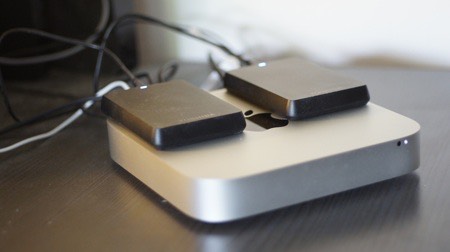
.... any idea, if - made with Yosemite - such a soft-raid gets recognized by EC?
if not, I'm in trouble .....
A 1Tb replacement (a real Raid, or, preferred, ext SSD) is not in my actual households budget!
aarrghgh
Karsten,
Here's a solution that could possibly work for you if you can fit it into your budget.
1. Seagate Backup Plus Desktop Thunderbolt Adapter (Model Number STAE129) ASIN: B009HQCAPQ
2. Samsung 1TB 850 Pro SSD (Blackmagic Certified for 4K)
You'll need a spacer or SATA3 short extension cable to make this combo work together. If you don't quite have the budget for both right away it would be best to pick up the Seagate Thunderbolt to SATA drive adapter first before they are no longer available and you could add a Blackmagic 4K certified SSD down the road.
Why oh why is the ability to create a RAID as you've done been removed from Disk Utility in El Cap???!!! Didn't Apple promote El Cap as having an improved Disk Utility. :silly:
Please Log in to join the conversation.
24 Oct 2015 01:18 #69776
by DigiGal
Replied by DigiGal on topic FCPX And El Capitan
Thought this info might be beneficial as it relates to this thread. I currently use iZotope "RX2" and "Ozone" products myself with Audiofile Engineering's "Wave Editor" and they would be useful plug-ins for FCPX. "Wave Editor" preceded their current DAW release of "Triumph".
Looks like there are still lots of good reasons to stick with Yosemite.
iZotope is advising against upgrading to El Cap...
www.izotope.com/en/community/blog/produc...Capitan+Notification
Sweetwater has also posted a compilation of various products concerning El Cap...
www.sweetwater.com/sweetcare/articles/el...ibility-information/
Looks like there are still lots of good reasons to stick with Yosemite.
iZotope is advising against upgrading to El Cap...
www.izotope.com/en/community/blog/produc...Capitan+Notification
Sweetwater has also posted a compilation of various products concerning El Cap...
www.sweetwater.com/sweetcare/articles/el...ibility-information/
Please Log in to join the conversation.

24 Oct 2015 16:13 #69786
by AppleGuru
Replied by AppleGuru on topic FCPX And El Capitan
As mentioned before the RAID function is still active just not available in the GUI.
This is suppose to change and the RAID settings will be back.
The Secure Format and Empty Trash Can might not come back do to SSD technology.
This is suppose to change and the RAID settings will be back.
The Secure Format and Empty Trash Can might not come back do to SSD technology.
Please Log in to join the conversation.
