


3 Post Moderation Rule for New Boarders (25 Jan 2021)
New boarders will have their posts moderated - Don't worry if you cannot see your post immediately.
FCPX 10.1.0 PRE-RELEASE DISCUSSION
OK, here's some tinfoil... from a geology site...
"The most common minerals of schist are mica; mica-schist contains quartz and mica"...
hmmm... LOL
Can't sleep? Try this: fcpxpert.net ;-)

Don't know if I should listen to someone talking schist!
@Alex4D
LOL it's all schist.
 Nice job on the framework/nib/string sleuthing BTW. I was doing some myself the other day, but you are clearly more patient (or OCD) than I.
Can't sleep? Try this: fcpxpert.net ;-)

daviddelreal wrote: Apple updated it's "In Action" Final Cut Pro X page last week and I noticed this photo:
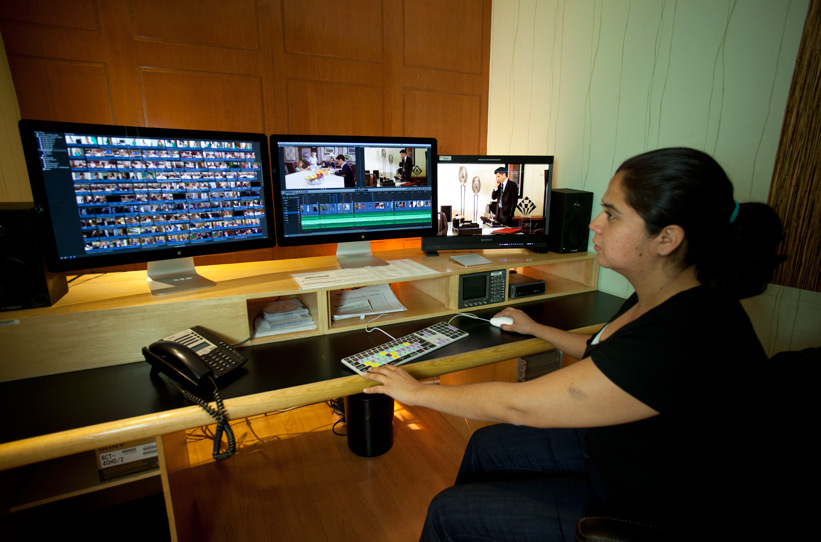
Looks like it could be FCPX 10.1 and the new Mac Pro under the desk...
So dual viewer is back?!
pollux wrote:
daviddelreal wrote: Apple updated it's "In Action" Final Cut Pro X page last week and I noticed this photo:
Looks like it could be FCPX 10.1 and the new Mac Pro under the desk...
So dual viewer is back?!
Dual viewer has been back for quite a while.
And I'm pretty sure what you're looking at is not the next version of FCP, or a new Mac Pro. If I had to guess I'd say it's probably 10.0.9 and a subwoofer. Can't sleep? Try this: fcpxpert.net ;-)
plysat wrote:
pollux wrote:
daviddelreal wrote: Apple updated it's "In Action" Final Cut Pro X page last week and I noticed this photo:
Looks like it could be FCPX 10.1 and the new Mac Pro under the desk...
So dual viewer is back?!
Dual viewer has been back for quite a while.
I asked that base on the assumption that black tube on the floor is the new Mac Pro, if that is FCPX on that screen could be the beta 10.1

I can't really call the "dual viewer" in the current version of FCPX really dual viewer TBH...
"I can't really call the "dual viewer" in the current version of FCPX really dual viewer TBH..."
Well... you can view things in it right? You just can't do anything with it.
Can't sleep? Try this: fcpxpert.net ;-)
this is one thing I miss big time . Back in v.7 I could double clicks the clip on timeline and the video pops on the preview viewer along with the canvas window. That makes comparing and matching colors between two cuts so much easier
Well, you could do what you describe now by match framing to the source with the event viewer open. But you're right, a "real" source viewer, that you could skim in etc, might be nice.
Can't sleep? Try this: fcpxpert.net ;-)
- Karsten Schlüter
-

- Offline
- Moderator
-

- Posts: 3790
- Thank you received: 718
plysat wrote: …
OK, here's some tinfoil... from a geology site...
"The most common minerals of schist are mica; mica-schist contains quartz and mica"...
Excellent find!!! :woohoo:
but it's much simpler, Mica stands for
Movie
Improvement and
Composition
Application ....
:blink:
btw: did Apple ever use abbreviations?? not to my knowledge ...
back to the sub-woofers ............

plysat wrote: But you're right, a "real" source viewer, that you could skim in etc, might be nice.
And edit audio waveforms in like in FCP7. I really don't feel I can be very precise on the timeline and I sure can't be precise in the event/file browser. I often need to assemble dialog from many different takes recorded as a single file and this is a giant headache in FCPX. I have to do it in FCP7 where I can do it crazy-fast. Plus a simple pastable 2-frame audio crossfade makes troublesome cuts sound smooth and I don't think I can copy and paste transitions in FCPX like I can in FCP7 (maybe I'm doing it wrong, I dunno). I also wish FCPX looked less like a children's toy. I don't need to be wooed by shiny things and gumdrops, etc.
FCPX is great, but it can't do everything I need it to that FCP7 can yet.
- Tom Wolsky
-

- Offline
- Moderator
-
Have you tried making selections in an audition?
As far as audio editing, I'll have to respectfully disagree. If you use filmstrip view in the Event, you can get in just as tight, or tighter, than 7. (I've got a KB shortcut assigned to switch from list-FS View)
The fade handles are just as easy as fade fx, and if all your clips are the same level, pasting the level will carry all those 1/2 frame fades to all your clips. Being able to move audio in subframe increments is a huge help when cheating dialog, you simply can't do that in any other NLE. Subframe Keyframes yes, but you can't *move* a clip in anything less than 1f increments.
IMO, audio editing in X makes doing the same thing in 7 feel like I have mittens on. I see where you're coming from as far as setting I/O points in the Event Browser. Being able to zoom the filmstrip without changing the view might be a nice option, but it's really no big deal once you get used to it... Again, just my worthless opinion.
Can't sleep? Try this: fcpxpert.net ;-)
- randychesbro
-

- Offline
- Senior Member
-

- Posts: 57
- Thank you received: 2
 I did all my mixing in FCP 7 almost the same way as I do it in X.
Plus with the range tool it is now soooo much easier to do ducking and goosing.
HOWEVER the only thing I miss is are my custom timelines. Yes I know you can minimise/expand tracks with roles but I'd really like the ability to completely customise the size of any track I wish.
Sean Lander - Editing since 1982 - AVID 1991 - FCP 1999 - FCPX 2011
I agree, though I think that's gonna be tough for them to do since there are no tracks.
Maybe a little "size" slider on each role in the index? It seems like it would be kind of messy though. I'd be happy if the "increase clip height" command that works in the browser, worked in the timeline as well. I've requested it, hopefully others have too. I think they prioritize things based on how many requests they get. Except for people who request tracks. They are ignored, as they should be. 
Can't sleep? Try this: fcpxpert.net ;-)
plysat wrote: The fade handles are just as easy as fade fx, and if all your clips are the same level, pasting the level will carry all those 1/2 frame fades to all your clips.
Those are nice but slightly different than a 2 frame crossfade. Sometimes when I put one sentence against a previous one there will be a slight difference in the speaker's breath. A 2 frame crossfade pasted on the join makes the breath change sound smooth and natural. Using the fade handles just creates a quick gap of silence and to my discerning ears it's very noticeable. Yes you can extend the audio and do a crossfade and all that but nothing as quick easy as pasting a simple transition. Also, not all clips need a crossfade. Sometimes I will cut together two or three different takes of the same sentence, sometimes even mid-word. I feel like I have mittens on when working with audio in this manner in FCPX, but that's just my worthless opinion.
"lol fair enough.
You can use secondarys to kind of approximate the 7 timeline and do the x-fade thing if you want I guess...
Can't sleep? Try this: fcpxpert.net ;-)
- daviddelreal
-
- Offline
- Elite Member
-

- Posts: 230
- Thank you received: 6
randychesbro wrote: If you look between her arms i think you can see that its a regular silver workstation mac pro.
I originally thought that too, but if you look closely you can see that it's more like an external drive stack or rack of some kind. The sides have rivets or something, to difficult to make out for sure though.
- Scrubelicious
-

- Offline
- Platinum Member
-

- Posts: 1228
- Thank you received: 114
