


- Posts: 510
- Thank you received: 53
3 Post Moderation Rule for New Boarders (25 Jan 2021)
New boarders will have their posts moderated - Don't worry if you cannot see your post immediately.
FCPX 10.1.2 POST-RELEASE DISCUSSION
28 Jun 2014 23:29 #48795
by cgbier
Replied by cgbier on topic FCPX 10.1.2 POST-RELEASE DISCUSSION
Anybody tested the round tripping with Logic?
Please Log in to join the conversation.
- daviddelreal
-

- Offline
- Elite Member
-

Less
More
- Posts: 230
- Thank you received: 6
29 Jun 2014 00:00 #48796
by daviddelreal
Wondering the same thing.
Replied by daviddelreal on topic FCPX 10.1.2 POST-RELEASE DISCUSSION
cgbier wrote: Anybody tested the round tripping with Logic?
Wondering the same thing.
Please Log in to join the conversation.
29 Jun 2014 00:45 - 29 Jun 2014 00:47 #48799
by tpayton
Replied by tpayton on topic FCPX 10.1.2 POST-RELEASE DISCUSSION
Performance is quite good in 10.1.2 for long format. I grabbed a 70 minute film my son edited that was assembled in chapters of compound clips and broke it apart so everything is in a long timeline. BTW audio was dual system and 4-6 channels for each clip. The connected audio here is just early SFX and Music Cues. In 10.1.1 this timeline was molasses, now in 10.1.2 it is very responsive.
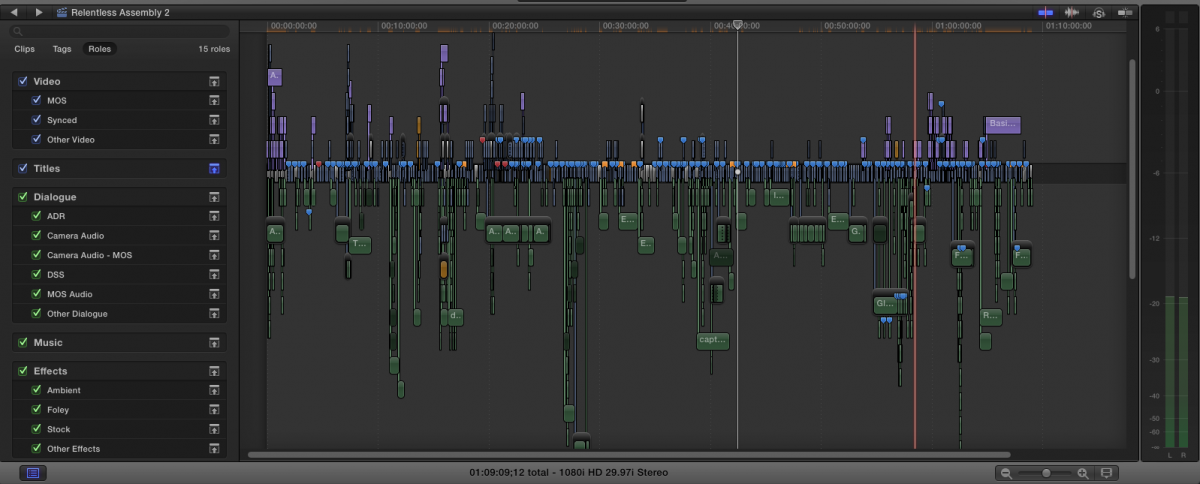
Granted I worked on the workflow with my son and I think compound clips are really the way to go for long format narrative, but for those who want to edit long format on one timeline, 10.1.2 is looking good.
Also, switching from Proxy to Original/Optimized is now virtually instantaneous. Even on this monster of a library like this.
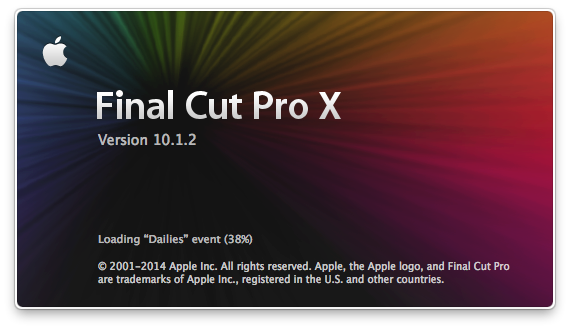
Loading this library in 10.1.2 was done in about half the time as 10.1.1. 10.1.2 also shows the progress in the app startup screen (yahoo!):
Granted I worked on the workflow with my son and I think compound clips are really the way to go for long format narrative, but for those who want to edit long format on one timeline, 10.1.2 is looking good.
Also, switching from Proxy to Original/Optimized is now virtually instantaneous. Even on this monster of a library like this.
Loading this library in 10.1.2 was done in about half the time as 10.1.1. 10.1.2 also shows the progress in the app startup screen (yahoo!):
Last edit: 29 Jun 2014 00:47 by tpayton.
Please Log in to join the conversation.
- Disproportionate Pictures
-

- Offline
- Platinum Member
-

Less
More
- Posts: 1433
- Thank you received: 64
29 Jun 2014 02:18 - 29 Jun 2014 02:19 #48802
by Disproportionate Pictures
Replied by Disproportionate Pictures on topic FCPX 10.1.2 POST-RELEASE DISCUSSION
I'd also love to hear from anyone about importing 10.1.2 Project XML into Resolve 10.1.5.
If it works, and what kind of fidelity there is now.
All these glowing reviews about performance are making me very jealous!
If it works, and what kind of fidelity there is now.
All these glowing reviews about performance are making me very jealous!
Last edit: 29 Jun 2014 02:19 by Disproportionate Pictures.
Please Log in to join the conversation.
- raulfballester
-
Topic Author
- Offline
- Senior Member
-

Less
More
- Posts: 50
- Thank you received: 0
29 Jun 2014 04:38 - 29 Jun 2014 04:40 #48807
by raulfballester
Replied by raulfballester on topic FCPX 10.1.2 POST-RELEASE DISCUSSION
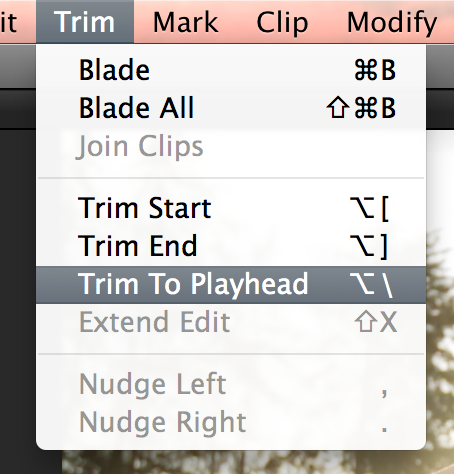
Hi, I'm just asking to be sure. This trim option -trim to playhead?- existed before 10.1.2? I don't remember but I think it's pretty cool. I attached a screenshot
Last edit: 29 Jun 2014 04:40 by raulfballester. Reason: correction
Please Log in to join the conversation.
- Disproportionate Pictures
-
- Offline
- Platinum Member
-
Less
More
- Posts: 1433
- Thank you received: 64
29 Jun 2014 04:40 #48808
by Disproportionate Pictures
Replied by Disproportionate Pictures on topic FCPX 10.1.2 POST-RELEASE DISCUSSION
It's here in 10.1.1. What does it do?
Please Log in to join the conversation.

29 Jun 2014 04:42 #48809
by Gretta
Replied by Gretta on topic FCPX 10.1.2 POST-RELEASE DISCUSSION
Great! Updating now. I agree with using CCs on long-form. I worked an 82min doc like that. Much easier for me and for my post audio guy. 2-pops on all CC 'scenes', trim back the beeps to assemble and export. Also allows me to overlap the scene mixes. But last week I worked on the full length TL for a cutdown for TV: molasses to work on. Looking forward to seeing a real speed up tomorrow morning.
Please Log in to join the conversation.
- raulfballester
-
Topic Author
- Offline
- Senior Member
-
Less
More
- Posts: 50
- Thank you received: 0
29 Jun 2014 04:44 #48810
by raulfballester
Replied by raulfballester on topic FCPX 10.1.2 POST-RELEASE DISCUSSION
It trims the closest cut to the playhead. No need Trim to Start or Trim to End, although these are useful when you have a limited keyboard
Please Log in to join the conversation.
- Jonathan Levin
-

- Offline
- Platinum Member
-
Less
More
- Posts: 786
- Thank you received: 21
29 Jun 2014 08:06 - 29 Jun 2014 08:07 #48811
by Jonathan Levin
Replied by Jonathan Levin on topic FCPX 10.1.2 POST-RELEASE DISCUSSION
Hi Everyone.
Still photo test: Spatial Conform still defaults to Fit, would loved to have that set to None. However, when you add a still image to time line, select None in Spatial Conform, at least the Scale follows simultaneously as you change size using Transform.
But there is one thing that might be a bug and if someone could confirm this that would be great, or maybe I'm doing something dumb:
Take a .PSD/still image that is 3600x2400 and place that over a clip in the timeline. Image fills frame top and bottom in viewer, scale reads 100% (which to me is inaccurate). Set Spatial Conform to None, and you should notice that the 3600x2400 image appears (to my eyes) to be how the image should look at 100%. If you look at the Scale properties after setting Spatial Conform to None, it STILL says 100%.
Stay with me. Adjust the scale of he image in the viewer with "Transform" selected and drag one of the corner blue dot handles to make that image smaller, as that happens the scale properties change which is good. Set the scale of image to about 65%
After that, change Spatial Conform back to Fit and see what happens. On my system the image no longer "Fits" top and bottom. Also Fill no longer fills the frame with the image.
And the last thing, if you set the image to 65% and are now in fill mode and then scale that up, the Scale properties go into outer space I.e. if you re-scale to about where you were at the scale reads something like 170%
I can deal with this weirdness but am I missing something here. I know I addressed the scaling issue pre-10.1.2. I think Apple at least fixed the Scale Property follows adjustment in transform.
Thanks guys.
Jonathan
Still photo test: Spatial Conform still defaults to Fit, would loved to have that set to None. However, when you add a still image to time line, select None in Spatial Conform, at least the Scale follows simultaneously as you change size using Transform.
But there is one thing that might be a bug and if someone could confirm this that would be great, or maybe I'm doing something dumb:
Take a .PSD/still image that is 3600x2400 and place that over a clip in the timeline. Image fills frame top and bottom in viewer, scale reads 100% (which to me is inaccurate). Set Spatial Conform to None, and you should notice that the 3600x2400 image appears (to my eyes) to be how the image should look at 100%. If you look at the Scale properties after setting Spatial Conform to None, it STILL says 100%.
Stay with me. Adjust the scale of he image in the viewer with "Transform" selected and drag one of the corner blue dot handles to make that image smaller, as that happens the scale properties change which is good. Set the scale of image to about 65%
After that, change Spatial Conform back to Fit and see what happens. On my system the image no longer "Fits" top and bottom. Also Fill no longer fills the frame with the image.
And the last thing, if you set the image to 65% and are now in fill mode and then scale that up, the Scale properties go into outer space I.e. if you re-scale to about where you were at the scale reads something like 170%
I can deal with this weirdness but am I missing something here. I know I addressed the scaling issue pre-10.1.2. I think Apple at least fixed the Scale Property follows adjustment in transform.
Thanks guys.
Jonathan
Last edit: 29 Jun 2014 08:07 by Jonathan Levin.
Please Log in to join the conversation.

29 Jun 2014 08:27 #48813
by benco
Replied by benco on topic FCPX 10.1.2 POST-RELEASE DISCUSSION
hi
Yes I tested the round trip with LPX 10.0.7.
It works good. Just few minor things. Retimed audio is imported as muted regions in Logic without the retiming. Logic shows a message about it which is helpful.
when roles are assigned in FCPX, Logic creates better track assignment.
On few very old projects some of the audio had some sample rate problems.
A message in Logic jumps saying "incompatible Sample rate recognized"
Overall it works as expected.
I tested with Multicam projects too and it worked great.
Select the project before exporting the XML. If the Library is selected , it exports all the available projects which makes Logic a bit "mad". I still didn't find what exactly is the difference between the various XML's.
Need more testing to do
hope it helps
Yes I tested the round trip with LPX 10.0.7.
It works good. Just few minor things. Retimed audio is imported as muted regions in Logic without the retiming. Logic shows a message about it which is helpful.
when roles are assigned in FCPX, Logic creates better track assignment.
On few very old projects some of the audio had some sample rate problems.
A message in Logic jumps saying "incompatible Sample rate recognized"
Overall it works as expected.
I tested with Multicam projects too and it worked great.
Select the project before exporting the XML. If the Library is selected , it exports all the available projects which makes Logic a bit "mad". I still didn't find what exactly is the difference between the various XML's.
Need more testing to do
hope it helps
Please Log in to join the conversation.
29 Jun 2014 08:31 #48814
by cgbier
Replied by cgbier on topic FCPX 10.1.2 POST-RELEASE DISCUSSION
Thanks, benco.
Please Log in to join the conversation.

29 Jun 2014 11:02 #48820
by BenB
Replied by BenB on topic FCPX 10.1.2 POST-RELEASE DISCUSSION
"Select the project before exporting the XML. If the Library is selected , it exports all the available projects which makes Logic a bit 'mad'. I still didn't find what exactly is the difference between the various XML's."
Well, we can not specify what goes out to an XML: Library, Event, or Project. If all you want is one Project, why export the whole Library? If you're doing media organization as an assistant, export the whole Library to hand over to your head editor, or just the Event you key worded for them.
So good to hear it works now. I'll have to test it out! Yay!
Well, we can not specify what goes out to an XML: Library, Event, or Project. If all you want is one Project, why export the whole Library? If you're doing media organization as an assistant, export the whole Library to hand over to your head editor, or just the Event you key worded for them.
So good to hear it works now. I'll have to test it out! Yay!
Please Log in to join the conversation.

29 Jun 2014 17:48 - 29 Jun 2014 17:59 #48831
by anickt
Replied by anickt on topic FCPX 10.1.2 POST-RELEASE DISCUSSION
In a library updated to 10.1.2, I have found that re-linking to external files doesn't always work. It looks like the alias is not always working properly. If I try to fix the alias I get an "error -35" which I haven't looked up to see what it is. However, re-importing those same files works fine. Anyone else see this?
Correction - it's an error 36
-36 ioErr I/O error (bummers)
seems to be mostly with PSD files....
Correction - it's an error 36
-36 ioErr I/O error (bummers)
seems to be mostly with PSD files....
Last edit: 29 Jun 2014 17:59 by anickt. Reason: correction
Please Log in to join the conversation.
29 Jun 2014 20:53 #48838
by CMessineo
Replied by CMessineo on topic FCPX 10.1.2 POST-RELEASE DISCUSSION
I'm really digging the new version - it seems snappier.
I love all the new generators.
I reported three bugs over the past few months and two got fixed (the ability to paste cropping attributes and the ability to paste attributes when an audio hum was applied). The only one they didn't fix was the ability to distort a color solid (but hopefully next time).
I love all the new generators.
I reported three bugs over the past few months and two got fixed (the ability to paste cropping attributes and the ability to paste attributes when an audio hum was applied). The only one they didn't fix was the ability to distort a color solid (but hopefully next time).
Please Log in to join the conversation.
29 Jun 2014 23:01 #48854
by FCPGuy
What we have with 10.1.2 is putting lipstick on a pig, and Apple hopes we do not notice how ugly the pig is, the pig is still ugly, as the screen design has serious flaws, the coding is still half baked, no where near professional, the addition of features was to mask the fact Apple is not going to fix the underlying issues, hide it with shiny sparkly effects and modifications.
It was not a good update, Apple it is an epic fail!![/quote]
Empty or not still will have to re-enter your Keywords.
Not sure to see this a epic fail on Apple side or on the user side? :evil:
Replied by FCPGuy on topic FCPX 10.1.2 POST-RELEASE DISCUSSION
Instead of hitting a key for a zoom mode you could also hit a key to swap from List to Filmstrip mode.MsJustine wrote: Still no zoom into clip when in listview mode, this would help in tracking down in and out points in interviews, I know I can go into filmsview mode, being able to adjust the zoom level of the clip in the browser when in list view mode would really speed things up.
This could be more a annoying since some might want to consecrate on the clips they are editing then the clips they already edited. Maybe a on or off function?MsJustine wrote: Have the software auto resize as I add clips to the timeline, this way I can see the entire timeline without having to shift+z constantly.
Disable grouping.MsJustine wrote: Most of my issues are mechanical in nature, I do have a issue that I am not sure how to describe, Listview mode is cumbersome in the way it does not show clips that are "hidden" behind dates, I created a new library, imported 1 file into the library, the file is hidden under today's date. It is under the tiny triangle drop down arrow thing.
MsJustine wrote: Keywords does not clear when you create a new project, so I have to waste time clearing out the old keywords in each of the nine slots...This could be user defined, keep or clear..
What we have with 10.1.2 is putting lipstick on a pig, and Apple hopes we do not notice how ugly the pig is, the pig is still ugly, as the screen design has serious flaws, the coding is still half baked, no where near professional, the addition of features was to mask the fact Apple is not going to fix the underlying issues, hide it with shiny sparkly effects and modifications.
It was not a good update, Apple it is an epic fail!![/quote]
Empty or not still will have to re-enter your Keywords.
Not sure to see this a epic fail on Apple side or on the user side? :evil:
Please Log in to join the conversation.
- Disproportionate Pictures
-
- Offline
- Platinum Member
-
Less
More
- Posts: 1433
- Thank you received: 64
30 Jun 2014 14:00 #48888
by Disproportionate Pictures
Replied by Disproportionate Pictures on topic FCPX 10.1.2 POST-RELEASE DISCUSSION
X2Pro update has gone live on the appStore with support for FCPXML 1.4. Yay!
Now if I can just find out how 10.1.2 XMLs import into Resolve....
Now if I can just find out how 10.1.2 XMLs import into Resolve....
Please Log in to join the conversation.
- Darren Roark
-
- Offline
- Platinum Member
-
30 Jun 2014 17:12 #48918
by Darren Roark
Replied by Darren Roark on topic FCPX 10.1.2 POST-RELEASE DISCUSSION
I know they work in Resolve 11 which can read FCPXML 1.4, haven't tried it on 10 yet, but unless they update it I don't think it can read it.
Resolve 11 feels pretty stable to me actually.
Resolve 11 feels pretty stable to me actually.
Please Log in to join the conversation.
- Disproportionate Pictures
-
- Offline
- Platinum Member
-
Less
More
- Posts: 1433
- Thank you received: 64
30 Jun 2014 19:36 #48934
by Disproportionate Pictures
Replied by Disproportionate Pictures on topic FCPX 10.1.2 POST-RELEASE DISCUSSION
If it were up to me, Darren... 
Unfortunately I'm passing files off to another post house, so obviously I have little control over which version of Resolve they're running.
Philip Hodgetts told me he believed that project XML "should" continue to translate properly-
I'll be using my wife's iMac as a test-bed with both 10.1.2 and Resolve 10.1.5 to see how things work.
Unfortunately I'm passing files off to another post house, so obviously I have little control over which version of Resolve they're running.
Philip Hodgetts told me he believed that project XML "should" continue to translate properly-
I'll be using my wife's iMac as a test-bed with both 10.1.2 and Resolve 10.1.5 to see how things work.
Please Log in to join the conversation.
- Darren Roark
-
- Offline
- Platinum Member
-
30 Jun 2014 20:13 #48939
by Darren Roark
Replied by Darren Roark on topic FCPX 10.1.2 POST-RELEASE DISCUSSION
His software as in Xto7 can make you a FCP7 XML that will get you to Resolve 10 easily from 10.1.2.
As long as you don't need to go back to FCP X, it should be fine.
As long as you don't need to go back to FCP X, it should be fine.
Please Log in to join the conversation.
- Disproportionate Pictures
-
- Offline
- Platinum Member
-
Less
More
- Posts: 1433
- Thank you received: 64
30 Jun 2014 20:23 #48940
by Disproportionate Pictures
Replied by Disproportionate Pictures on topic FCPX 10.1.2 POST-RELEASE DISCUSSION
True- the one thing that you won't get in that is your Roles info, which from what I've heard comes thru nicely with X2Pro's AAF into ProTools.
Please Log in to join the conversation.
