


3 Post Moderation Rule for New Boarders (25 Jan 2021)
New boarders will have their posts moderated - Don't worry if you cannot see your post immediately.
FCPX 10.1.2 POST-RELEASE DISCUSSION

JasonP wrote: I just discovered a new feature in FCPX 10.1.2!
You can now paste transitions onto a clip without having to create a storyline first.
You can even paste a transition to a selected clip and it will apply to both ends of the clip just like pulling it from the transitions browser.
Not new, could always do that. FYI...
Please Log in to join the conversation.
Well, it ONLY adds the number and dash to the Timeline version, NOT the Browser version. So now I have to rename the Timeline version to match.
Used to be I could select several audio clips in the Timeline, and rename them all in the Inspector at one time. Not any more!!!!! I have to select each clip in the Timeline one at a time, right-click, use the Rename Clip command to rename each individually.
Doing the amount of VO work I do daily, this is a royal PITA, to what used to be a very fast, easy process...
Please Log in to join the conversation.
- ronny courtens
-

- Offline
- Moderator
-

- Posts: 4455
- Thank you received: 962
Please Log in to join the conversation.
- ronny courtens
-
- Offline
- Moderator
-
- Posts: 4455
- Thank you received: 962
I have named my recording "TEST VO", I have recorded the first take and the recorded clip appears in the Browser and in the Timeline as "TEST VO-1", which is indeed great:
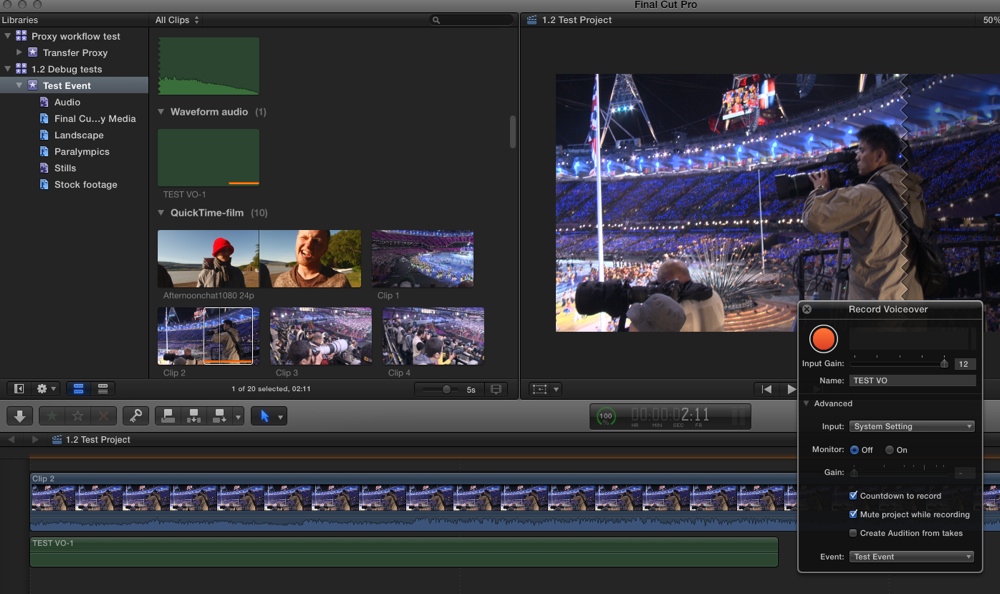
Then I record two other takes without changing the name of my recording and both takes appear in the Browser and in the Timeline with the "TEST VO" name plus the appropriate take number:
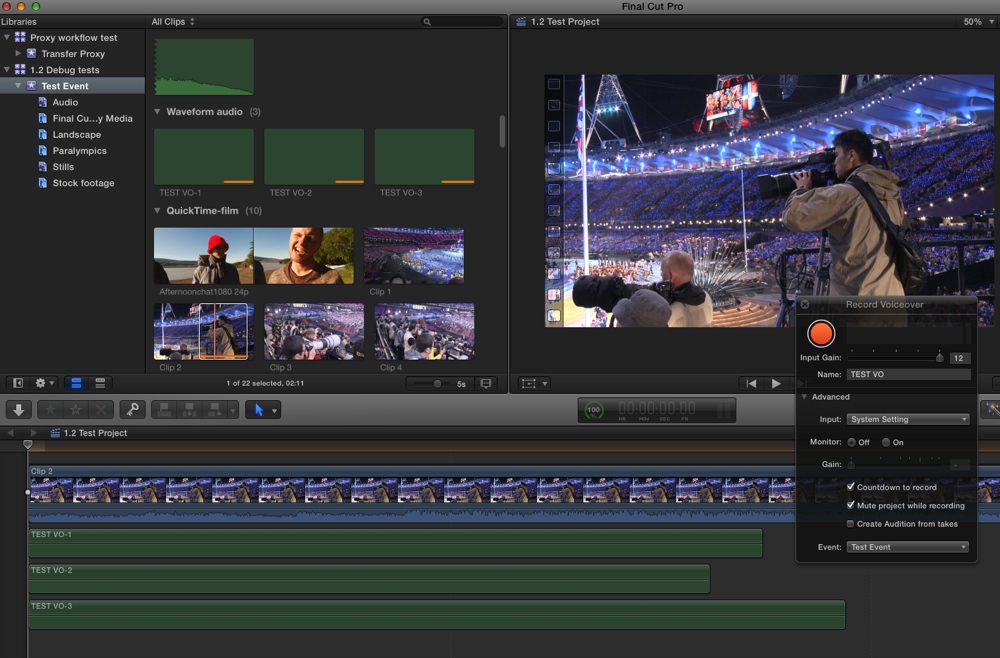
AFAIK renaming an instance of a clip in a specific timeline has no effect on the name of the parent clip in the Event. As the same clip in an Event can be used in many different Projects I think this is a good thing.
- Ronny
Please Log in to join the conversation.
Please Log in to join the conversation.
- Disproportionate Pictures
-

- Offline
- Platinum Member
-

- Posts: 1433
- Thank you received: 64
Please Log in to join the conversation.
- Darren Roark
-

- Offline
- Platinum Member
-
Disproportionate Pictures wrote: This works fine with basic audio- unfortunately I need to assign separate dialogue sub-roles for each character to individual audio components.
I completely agree that this is something that would be a major help. In the track based world, this is a pretty straightforward task. If they did have a simple way to work with subroles to do this, it would really make a much better argument against cutting with tracks.
If there could be "timeline roles" so you could highlight sections and apply roles, so that those could override on export the event roles, that could be one way to do it. In other words, that edited clip has it's own role independent of it's unedited clip in the event.
Michael Garber has a neat way to deal with different characters in an article posted a while back. Even with as clever as his workflow is, it's still a lot of extra effort that should be easier.
Please Log in to join the conversation.
- Disproportionate Pictures
-
- Offline
- Platinum Member
-
- Posts: 1433
- Thank you received: 64
Obviously this isn't as efficient as being able to do it to the master clips in the event browser.
I've already submitted feedback on this.
Please Log in to join the conversation.
Please Log in to join the conversation.
- Disproportionate Pictures
-
- Offline
- Platinum Member
-
- Posts: 1433
- Thank you received: 64
Darren Roark wrote: If there could be "timeline roles" so you could highlight sections and apply roles, so that those could override on export the event roles, that could be one way to do it. In other words, that edited clip has it's own role independent of it's unedited clip in the event.
That's actually the way it works now. If you assign a general Role to a clip, then edit it into the Project and decide to change the Role- it won't affect the original Role you set for the unedited clip in the Event Browser.
Right now all metadata filters down from Event--->Project. But any metadata (save RMDs) you alter in your Project does not filter back up. In many cases you wouldn't want to, but in some you would.
So I'd like to see a modifier key when doing certain operations in the Project to "Affect Original Clip".
Furthermore, if you edit a clip into Project, then change an element of metadata, it does not push down to already edited clips. This would also be helpful in a lot of circumstances.
More often than not, I'd like any changes I make to information about any instance of a clip anywhere to filter to all instances of that clip.
Please Log in to join the conversation.
- Darren Roark
-
- Offline
- Platinum Member
-
I've been in the habit of doing it when I import for so long that I forgot.
I was attempting to think of a simple way that you could apply roles quickly like you can keyword. But then I remembered that was your idea.
I can see why keeping the project's roles separate from the event roles is actually a good limitation especially for longer shots. Having to remember all the changes could be a mess.
Please Log in to join the conversation.
So it would be nice if there was a preference to disable making clips independent once they enter a timeline.
Same goes for renaming clips. Very annoying that you have to do it twice
It's for this reason that I've given up on recording VO directly in FCP X. (Unless I have to drop something in to specific time) it's easier to record it externally, import it, assign it a role and then edit it in.
I have a smart collection called Voice Over and also always keep Voice Over as a highlighted clip in the timeline so this is all automated with this workflow.
Sean Lander - Editing since 1982 - AVID 1991 - FCP 1999 - FCPX 2011
Please Log in to join the conversation.
- ronny courtens
-
- Offline
- Moderator
-
- Posts: 4455
- Thank you received: 962
- Ronny
Please Log in to join the conversation.
- MichaelShaneMedia
-
- Offline
- New Member
-

- Posts: 5
- Thank you received: 0
Please Log in to join the conversation.
Please Log in to join the conversation.
1. Create multicam clip from 2 video clips and 1 stereo audio clip
2. Edit multicam clip into project timeline
3. note project timeline is stereo on meters
4. sync surround sound clip with video clip.
5. Add angle to multicam clip and add sync clip as last angle
6. click on project timeline and select all clips and then change active audio angle to surround sound sync
7. show meters in timeline, currently showing stereo
8. modify settings of project timeline to surround (command J)
9. Observer meters in timeline, now showing stereo and playing back stereo
Please Log in to join the conversation.
- MichaelShaneMedia
-
- Offline
- New Member
-
- Posts: 5
- Thank you received: 0
Might be a bug. It's a rather specific and unique workflow that I'm sure is not easy to reproduce. I ended up doing Shift-F on each timeline clip to reveal in event browser, and re-edited the clip into the timeline, setup the audio settings identical to what was there, and that fixed itself. Weird! Not sure how to report this one to Apple. Oddly enough, though the multi-cam shows dual mono audio properties, it actually will play back my Stereo and/or Surround Roles appropriately, with all audio going to the proper channels.
Please Log in to join the conversation.
- MichaelShaneMedia
-
- Offline
- New Member
-
- Posts: 5
- Thank you received: 0
Please Log in to join the conversation.
MichaelShaneMedia wrote: Both the synchronized clip & the multi-cam clip independently show audio properties of a dual mono audio - which isn't the case at all.
I have found sometimes that I have to chose "Reset" on the channels assignments of audio, if I change something in a clip, or even when making a synchronized or multicam clip.
Did you try my steps above? Is that what you are doing? If not try to isolate it with some steps and others can try to help you figure out if it is indeed a bug of some kind or some config you need to do.
Please Log in to join the conversation.
- Disproportionate Pictures
-
- Offline
- Platinum Member
-
- Posts: 1433
- Thank you received: 64
My initial testing shows that Resolve 11 Beta doesn't accurately translate FCPXML 1.4 from 10.1.2 X/Y position changes into Pan/Tilt values. Resolve does do a Pan/Tilt change, but the numbers are incorrect.
In a 1080p timeline, a 4K R3D file using Spatial Conform "Fit" with a position change of
X: -668, Y: 370, Zoom: 170%
when imported into Resolve 11 is being translated into
Pan: -167, Tilt: 92, Zoom: 1.7
Zoom is correct. But Pan and Tilt are not. Manually inputting the FCPX values gives the right result.
Can anyone else confirm this?
Please Log in to join the conversation.
