


3 Post Moderation Rule for New Boarders (25 Jan 2021)
New boarders will have their posts moderated - Don't worry if you cannot see your post immediately.
What's new, fixed or different in FCP 10.3?

Paul Anderegg wrote: The most annoying issue I have run into is that the library sorting resets to name/accending everytime I open FCPX. l
Odd, it stays where I set it last when I relaunch. Feedback page for sure, ASAP. First release of a major upgrade will have some minor bugs.
Please Log in to join the conversation.
- damian.popławski
-

- Offline
- New Member
-

- Posts: 1
- Thank you received: 0

Testing FCPX 10.3 and love it so far - the only annoying problem I have is with one of the free plugin I've downloaded months ago - Pixel Studio FCPX LUT Loader. I receive the pop messeage everytime I open FCPX that this plugin is not compatible and will be disabled... I wish I could delete it since I no longer use it anyway but can't find it on my Mac...it's litterally nowhere... PLease can anyone help how can I find the directory to this plugin and delete it. I've checked Motion Templates --> effects but nothing... I'll be greatfull for any advice
Thank You!
Please Log in to join the conversation.

2. *bug* fcpx doesn't seem to handle the used media ranges well. sometimes it says a range is used, when I know for a fact that my timeline is empty. ( I've sent that off to apple)
Please Log in to join the conversation.
Please Log in to join the conversation.

Please Log in to join the conversation.
- KarlSutton
-
- Offline
- Senior Member
-

- Posts: 66
- Thank you received: 2

Please Log in to join the conversation.

www.digitalrebellion.com/promaintenance/download
Please Log in to join the conversation.
- DmitriZigany
-
- Offline
- Platinum Member
-

- Posts: 730
- Thank you received: 26
Yeah, the contrast between the white text and very dark background is a bit too much for sure... Not really a fan of the flatter look they are imposing everywhere either... Many times Apple tend to go a bit overboard with initial release and slowly retract it a bit in updates... Make sure you leave feedback to apple!KarlSutton wrote: I don't think I like this new look - it is too dark for my taste. I use Digital Performer and it has the ability to change looks - called skins - that would be a nice feature to add to FCPX. I don't mind learning where they moved things but this is not easy on my eyes.
PS - Old Digital Performer user here as well! (although, have mostly switched to Logic these days)
Please Log in to join the conversation.
- Jonathan Levin
-
 Topic Author
- Offline
- Platinum Member
-
- Posts: 786
- Thank you received: 21
Please Log in to join the conversation.
- KarlSutton
-
- Offline
- Senior Member
-
- Posts: 66
- Thank you received: 2
Please Log in to join the conversation.
Please Log in to join the conversation.
Please Log in to join the conversation.
Please Log in to join the conversation.
- Steve McGarrigle
-

- Offline
- Premium Member
-

Please Log in to join the conversation.
Please Log in to join the conversation.
- Scott Markowitz
-
- Offline
- Elite Member
-

- Posts: 161
- Thank you received: 31
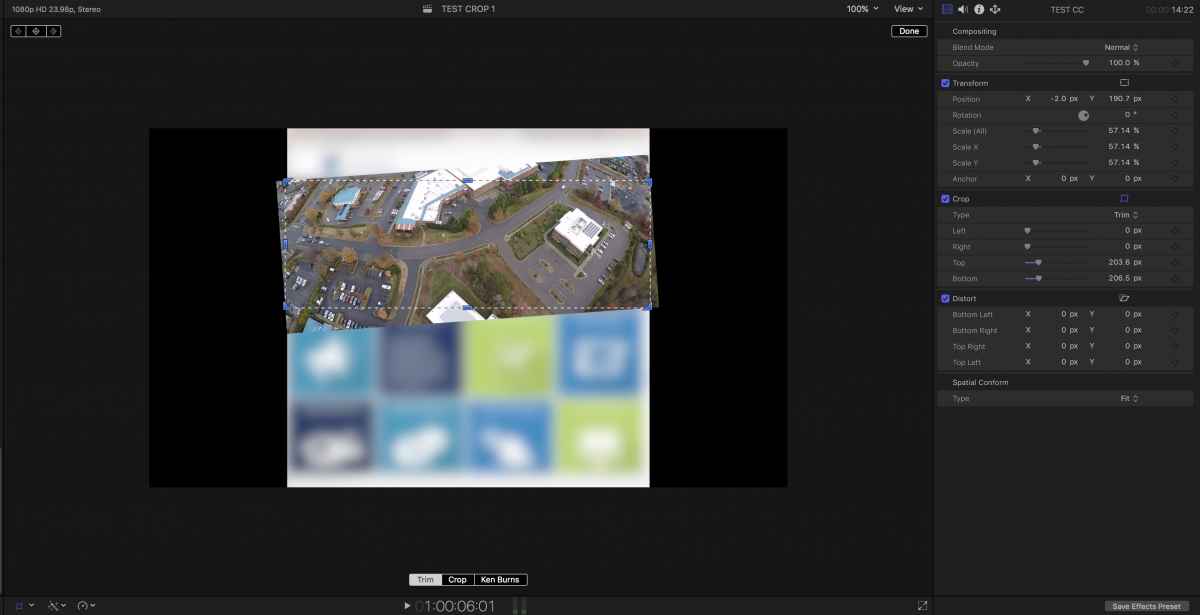
1. In a project, transform Half the clips larger than the project's dimensions and add rotation. (Enlarge clips)
2. Select All the clips in the project and make a Compound Clip
3. In same project, now crop the new Compound Clip you just made using TRIM function.
The clips that were not transformed and rotated trim correctly
The other clips do not respect the Trim Cropping on the Compound Clip.
I thought that Spatial Conform Setting might be at play, but this happens no matter what I set that to in the nested clips or to the compound clip.
Ughh!
Please Log in to join the conversation.
Please Log in to join the conversation.

This is one of those places where a few keyboard shortcuts becomes really useful. If I find myself doing a task frequently, I try to force myself to use the keyboard shortcut until I've internalized it.Drat. Well, that's not good. If you're working the timeline, it was hand to just click to timecode window and enter a number. No I have to mouse over to the screen. C'est la guerre.
ctrl-d - change duration of the selected clip(s)
ctrl-p - move playhead to specific timecode
+ or - - moves the playhead forward or back that specific timecode
Please Log in to join the conversation.
Please Log in to join the conversation.
DmitriZigany wrote: Not really a fan of the flatter look they are imposing everywhere either... Many times Apple tend to go a bit overboard with initial release and slowly retract it a bit in updates... Make sure you leave feedback to apple!
Honestly I'm surprised it took them this long to flatten the look. The flat look has been "in vogue" for 2 or 3 years now on the graphical design side of things. Look everywhere and you'll see a lack of strong gradients. Most other NLEs are flat or have been flat forever. One of the things I didn't like about FCPX is that it looked like candy, so I am glad to see the new look personally. The gradient/depth look will come back some day. Styles always make a comeback. But it could be decades.
Please Log in to join the conversation.
