


- Posts: 254
- Thank you received: 9
3 Post Moderation Rule for New Boarders (25 Jan 2021)
New boarders will have their posts moderated - Don't worry if you cannot see your post immediately.
What's new, fixed or different in FCP 10.3?
03 Nov 2016 17:24 #82091
by screendor
Replied by screendor on topic What's new, fixed or different in FCP 10.3?
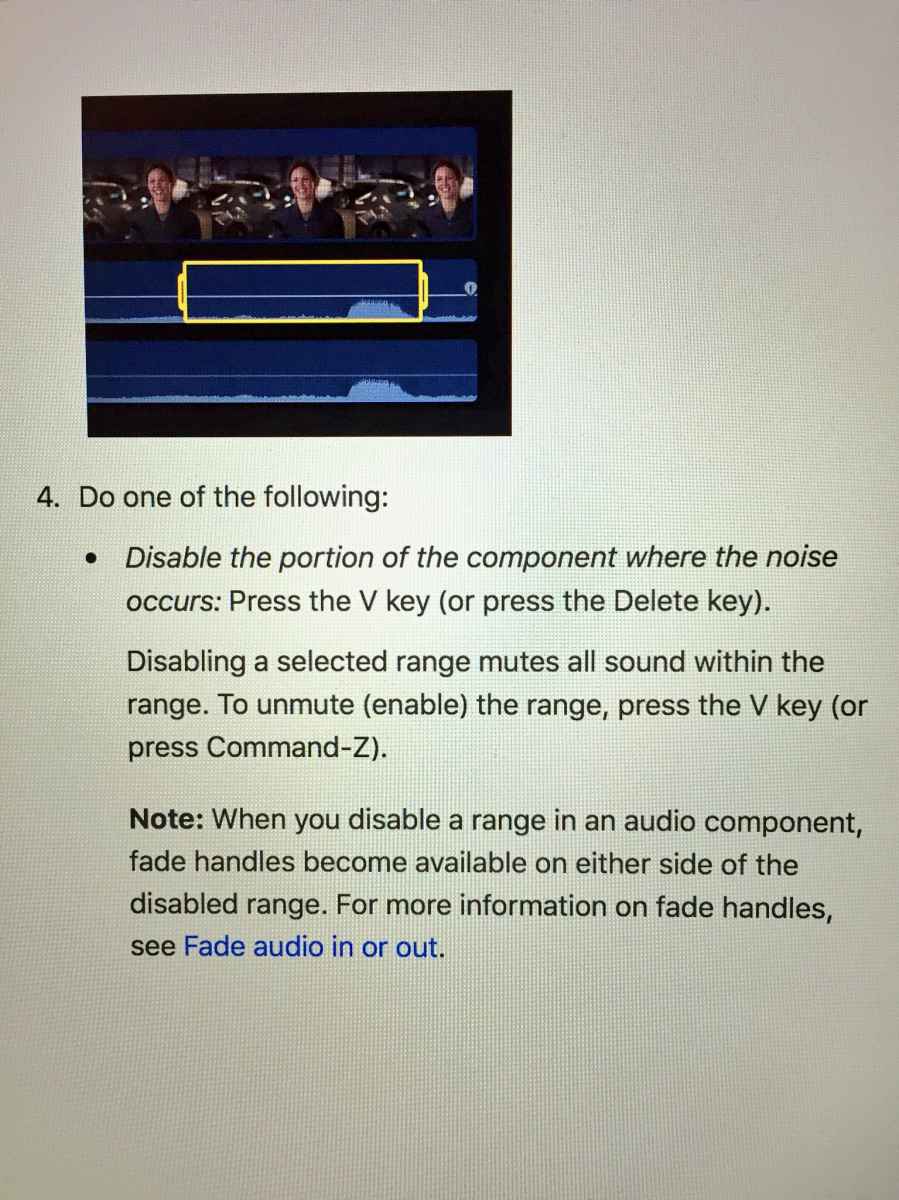
this may have bee mentioned before, but you can no longer range select audio to edit. When you select a range and hit delete, it merely mutes that section of the audio but doesn't cut it out. Which sucks, really, since that was a super helpful way to cut and pull up dialog and VO in a connected clip.
It works the old way with video clips, just not audio.
Unless there's a new command? Thoughts?
It works the old way with video clips, just not audio.
Unless there's a new command? Thoughts?
Please Log in to join the conversation.
03 Nov 2016 17:27 #82092
by screendor
Replied by screendor on topic What's new, fixed or different in FCP 10.3?
Just a follow-up--if you shift delete the range selected clip it leave a slug in which you can then delete by selecting and hitting return. But that's about 4 more steps than necessary.
Please Log in to join the conversation.


03 Nov 2016 17:33 #82093
by bcassin
Owner InnerParakeet
www.innerparakeet.com
Replied by bcassin on topic What's new, fixed or different in FCP 10.3?
Check out the answer on page 2 of the tread, message #81632, from editorguy
Owner InnerParakeet
www.innerparakeet.com
Please Log in to join the conversation.
03 Nov 2016 18:27 #82115
by screendor
Replied by screendor on topic What's new, fixed or different in FCP 10.3?
Yep, I thought I had seen a thread about this. Thanks Brian and Editorguy. BTW, I'm Mike Hadley--we worked together on a Cushman & Wakefield video a while back. Cheers!
Please Log in to join the conversation.

03 Nov 2016 20:16 - 03 Nov 2016 20:18 #82126
by FernKraft
Replied by FernKraft on topic What's new, fixed or different in FCP 10.3?
After editing in 10.3 for the week, I feel like the "audio delete" behaviour is actually a bug. My reasoning is quite simple; when you have a range of audio highlighted in that manner, I can already press disable (v) and achieve the same things as pressing 'delete'; That seems oddly redundant to me. Also, when audio is in a secondary storyline, I would expect delete to behave as it would in a video only secondarily story line, otherwise, audio essentially is no longer "magnetic on the x axis" the only way I can have the audio "ripple delete" is by doing a 'cut' command, which is defiantly not what I want to do, if I already have something in my clipboard, nor is it what the cut command is for in principle.
Am I alone in this?
Am I alone in this?
Last edit: 03 Nov 2016 20:18 by FernKraft.
Please Log in to join the conversation.

03 Nov 2016 20:27 #82127
by odedh
Replied by odedh on topic What's new, fixed or different in FCP 10.3?
It's not a bug it's written in the manual
Please Log in to join the conversation.
03 Nov 2016 20:33 #82128
by FernKraft
Replied by FernKraft on topic What's new, fixed or different in FCP 10.3?
Well colour me surprised...
I guess I feel like if I wanted it disabled I would click 'v', If i wanted it to be a gap i would press 'delete', and If I wanted it to ripple delete, i would press "backspace".
oh well...
I guess I feel like if I wanted it disabled I would click 'v', If i wanted it to be a gap i would press 'delete', and If I wanted it to ripple delete, i would press "backspace".
oh well...
Please Log in to join the conversation.
- cyuill2015
-

- Offline
- New Member
-

Less
More
- Posts: 11
- Thank you received: 0
05 Nov 2016 18:29 #82259
by cyuill2015
Replied by cyuill2015 on topic What's new, fixed or different in FCP 10.3?
I do all of my exposure and color correction using the Color Board. One thing I noticed last night is that I can make incremental changes between the whole-number Shadows/Midtones/Highlights settings by slowly, gently moving the mouse. I typically like to set Shadows to +6 in the Exposure panel. Sometimes I like something a tad lower, but +5 is too dark. Incremental exposure changes are visible both in the playback pane and scopes like the Luna Waveform even though the number does not change in the Color Board panel. I like being able to make incrementally finer adjustments than whole-number values allow. I don't know if this was possible in previous versions, but I didn't notice it.
Please Log in to join the conversation.

Less
More
- Posts: 971
- Thank you received: 46
08 Nov 2016 06:47 - 08 Nov 2016 06:52 #82409
by MsJustine
Replied by MsJustine on topic What's new, fixed or different in FCP 10.3?
Skimming on a video clip in the timeline is not working, it is blue, so it should be working, but it is not, turn the blue icon off, skimming does not work, that is I cannot skim a clip on the primary storyline, when there are connected clips, all I see is the mix of all the video at that point..strange!!!
No sorry, it was me, grrrrh, there is no way to know if clip skimming is on or off, other than hunt it down in the tool-bar-view-clip skimming, really it should have been an icon, in blue for active/ grey for inactive...
Hopefully updated soon to have this as an icon, not holding my breath!!!
No sorry, it was me, grrrrh, there is no way to know if clip skimming is on or off, other than hunt it down in the tool-bar-view-clip skimming, really it should have been an icon, in blue for active/ grey for inactive...
Hopefully updated soon to have this as an icon, not holding my breath!!!
Last edit: 08 Nov 2016 06:52 by MsJustine.
Please Log in to join the conversation.

08 Nov 2016 17:19 - 08 Nov 2016 17:22 #82446
by JoeEditor
Replied by JoeEditor on topic What's new, fixed or different in FCP 10.3?
BTW, as for the Color board, you can double-click the numerical value and type something in, even a decimal place or two, or just click it and use up/down arrow keys, to be very precise. That's aways been there.
I'm working on a couple of reality TV shows (ugh) and the audio can get complicated. I'm finding the new audio shortcuts a big help. That's just me.
I'm working on a couple of reality TV shows (ugh) and the audio can get complicated. I'm finding the new audio shortcuts a big help. That's just me.
Last edit: 08 Nov 2016 17:22 by JoeEditor.
Please Log in to join the conversation.
08 Nov 2016 18:06 #82452
by GregorPQ
Replied by GregorPQ on topic What's new, fixed or different in FCP 10.3?
For Laptop users:
You can gain a little screen estate by opening your .fcpworkspace - file with the Property List Editor (Xcode) and setting the ‘TB Is Shown’ property to 0. Now the toolbar is hidden. If you don’t have Xcode installed you can use the free PlistEdit Pro.
If u’re here you can correct a bug: If you want to see just the Browser in your layout it always opens the Library Sidebar.
That is: the FFEventLibrarySidebarHidden - property is not respected. But if you set the Frame size of the PEMediaEventOrganizerContainerModule to 0 the sidebar is gone! ….and your Workspace is the way you want it to be:)
Happy editing!
You can gain a little screen estate by opening your .fcpworkspace - file with the Property List Editor (Xcode) and setting the ‘TB Is Shown’ property to 0. Now the toolbar is hidden. If you don’t have Xcode installed you can use the free PlistEdit Pro.
If u’re here you can correct a bug: If you want to see just the Browser in your layout it always opens the Library Sidebar.
That is: the FFEventLibrarySidebarHidden - property is not respected. But if you set the Frame size of the PEMediaEventOrganizerContainerModule to 0 the sidebar is gone! ….and your Workspace is the way you want it to be:)
Happy editing!
Please Log in to join the conversation.
- finalbug.net
-

- Offline
- Platinum Member
-

- Absence of Quality is the essence of squareness.
09 Nov 2016 08:07 - 09 Nov 2016 08:11 #82473
by finalbug.net
Replied by finalbug.net on topic What's new, fixed or different in FCP 10.3?
Hi bcassin
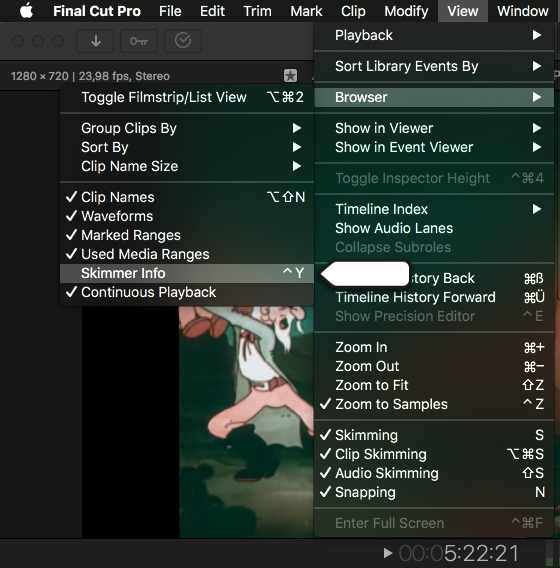
Try ticking the option in the screen shot and then hover over the clip in the Browser.
You should see your Keywords in a little HUD.
best
Paul
Opppsss attempted to Reply to some thing on page 2 and landed here!!!
Try ticking the option in the screen shot and then hover over the clip in the Browser.
You should see your Keywords in a little HUD.
best
Paul
Opppsss attempted to Reply to some thing on page 2 and landed here!!!
I've noticed that when adding keywords via a keyboard short cut I no longer get the little animation reassuring me that the keyword has been set. Only way to confirm it now is to open up the key word editor.
Last edit: 09 Nov 2016 08:11 by finalbug.net.
Please Log in to join the conversation.
- Jonathan Levin
-
 Topic Author
- Offline
- Platinum Member
-
Less
More
- Posts: 786
- Thank you received: 21
09 Nov 2016 17:00 #82490
by Jonathan Levin
Replied by Jonathan Levin on topic What's new, fixed or different in FCP 10.3?
Has the "Open in Timeline" been replaced with "Open Clip". I think it has but just wanted to double check.
Please Log in to join the conversation.

09 Nov 2016 19:23 #82499
by AppleGuru
Yes it is, but it doesn't function the same. Nobody know at this moment if it is a bug or a wanted function.
Replied by AppleGuru on topic What's new, fixed or different in FCP 10.3?
Jonathan Levin wrote: Has the "Open in Timeline" been replaced with "Open Clip". I think it has but just wanted to double check.
Yes it is, but it doesn't function the same. Nobody know at this moment if it is a bug or a wanted function.
Please Log in to join the conversation.
02 Dec 2016 10:31 #83554
by AppleGuru
Replied by AppleGuru on topic What's new, fixed or different in FCP 10.3?
Found this on the net regarding FCPX being the real NLE
Fun Twitter Vote
No Film School Check out the comments
Fun Twitter Vote
No Film School Check out the comments
Please Log in to join the conversation.
02 Dec 2016 12:14 #83561
by JoeEditor
Replied by JoeEditor on topic What's new, fixed or different in FCP 10.3?
How does it not function the same?
Please Log in to join the conversation.
- DmitriZigany
-
- Offline
- Platinum Member
-
Less
More
- Posts: 730
- Thank you received: 26
02 Dec 2016 14:14 #83566
by DmitriZigany
Replied by DmitriZigany on topic What's new, fixed or different in FCP 10.3?
After a while with FCPX 10.3 I just saw the video on the mainpage and was struck by just how much better FCPX looked before 10.3! 
I really really don't like the new look. It's harder to see and quickly find buttons etc... everything just disappears in the flat monochrome interface... And it's boring-looking... feels very un-apple... I lost a bit of my joy using the app actually...
I really really don't like the new look. It's harder to see and quickly find buttons etc... everything just disappears in the flat monochrome interface... And it's boring-looking... feels very un-apple... I lost a bit of my joy using the app actually...
Please Log in to join the conversation.
Less
More
- Posts: 971
- Thank you received: 46
02 Dec 2016 14:14 #83567
by MsJustine
Replied by MsJustine on topic What's new, fixed or different in FCP 10.3?
What defines a professional NLE? If you edit using 2 of the oldest betamax players, and someone buys the result of your efforts, you have a professional edit suite.
Professional is making money doing something, in our case, it is video and audio editing, taking many sources of video, audio, graphics, and merging them in a creative way to be viewed on a device capable of reproducing video and audio.
In the end, how we edit, on what we edit is meaningless, the average audience will not and really should not care on what NLE what they are enjoying was edited on.
Do I care if my favorite tv show was edited on an Avid, or FCP7, imovie? If it is good, then what is the problem?
Professional is making money doing something, in our case, it is video and audio editing, taking many sources of video, audio, graphics, and merging them in a creative way to be viewed on a device capable of reproducing video and audio.
In the end, how we edit, on what we edit is meaningless, the average audience will not and really should not care on what NLE what they are enjoying was edited on.
Do I care if my favorite tv show was edited on an Avid, or FCP7, imovie? If it is good, then what is the problem?
Please Log in to join the conversation.
