


- Posts: 786
- Thank you received: 21
3 Post Moderation Rule for New Boarders (25 Jan 2021)
New boarders will have their posts moderated - Don't worry if you cannot see your post immediately.
What's new, fixed or different in FCP 10.3?
- Jonathan Levin
-
 Topic Author
- Offline
- Platinum Member
-

Less
More
27 Oct 2016 19:14 - 27 Oct 2016 19:16 #81404
by Jonathan Levin
What's new, fixed or different in FCP 10.3? was created by Jonathan Levin
Let er rip...
Last edit: 27 Oct 2016 19:16 by Jonathan Levin.
Please Log in to join the conversation.
- Jonathan Levin
-
Topic Author
- Offline
- Platinum Member
-
Less
More
- Posts: 786
- Thank you received: 21
27 Oct 2016 19:59 #81414
by Jonathan Levin
Replied by Jonathan Levin on topic What's new, fixed or different in FCP 10.3?
One thing I noticed is that un-rendered clips in project are represented as a series of white dots where it used to be a red line.
Please Log in to join the conversation.

27 Oct 2016 20:10 #81416
by Redifer
Replied by Redifer on topic What's new, fixed or different in FCP 10.3?
Any word on if the keyframes have been fixed? This was my biggest beef in previous versions. Keyframes appearing away from where the playhead is unless you use the arrow keys before placing said keyframe... inability to bezier some keyframes, etc etc etc.
Please Log in to join the conversation.
27 Oct 2016 20:41 #81420
by dorin
Replied by dorin on topic What's new, fixed or different in FCP 10.3?
I hope you guys are fast learners because FCPX 10.3 is almost a new software. There are so many changes at so many levels and I'm not sure I like all of them.
Please Log in to join the conversation.

27 Oct 2016 20:51 #81421
by zzchu
Replied by zzchu on topic What's new, fixed or different in FCP 10.3?
I just noticed the timeline zoom control is no longer available. Either Cmd + or Cmd - or if you have a Trackpad--pinch works well here.
Please Log in to join the conversation.
- Scrubelicious
-

- Offline
- Platinum Member
-
Less
More
- Posts: 1228
- Thank you received: 114
27 Oct 2016 20:52 #81422
by Scrubelicious
Replied by Scrubelicious on topic What's new, fixed or different in FCP 10.3?
Okay here a few things the are new which are cool and nice in GUI:
Range Check (REC 709)

Clip Appearance and Search Filter
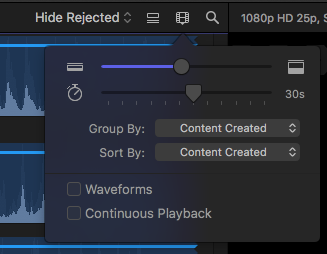
Range Check (REC 709)
Clip Appearance and Search Filter
Please Log in to join the conversation.
- Scrubelicious
-
- Offline
- Platinum Member
-
Less
More
- Posts: 1228
- Thank you received: 114
27 Oct 2016 20:54 - 27 Oct 2016 21:04 #81423
by Scrubelicious
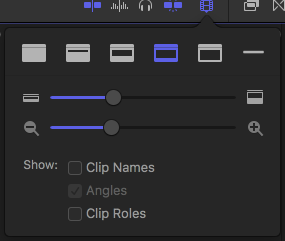
Its still there just tucked away in the Timeline Appearance Menu
Just hit me up with questions..
Replied by Scrubelicious on topic What's new, fixed or different in FCP 10.3?
zzchu wrote: I just noticed the timeline zoom control is no longer available. Either Cmd + or Cmd - or if you have a Trackpad--pinch works well here.
Its still there just tucked away in the Timeline Appearance Menu
Just hit me up with questions..
Last edit: 27 Oct 2016 21:04 by Scrubelicious.
Please Log in to join the conversation.
- Scrubelicious
-
- Offline
- Platinum Member
-
Less
More
- Posts: 1228
- Thank you received: 114
27 Oct 2016 21:07 #81424
by Scrubelicious
Replied by Scrubelicious on topic What's new, fixed or different in FCP 10.3?
P.S. check out the Flow transition.. 
Please Log in to join the conversation.
- Jonathan Levin
-
Topic Author
- Offline
- Platinum Member
-
Less
More
- Posts: 786
- Thank you received: 21
27 Oct 2016 22:05 #81428
by Jonathan Levin
Replied by Jonathan Levin on topic What's new, fixed or different in FCP 10.3?
That Disolve>Flow transition IS amazing! Seems to do that seamlessly...
Please Log in to join the conversation.
27 Oct 2016 22:34 #81431
by Redifer
Replied by Redifer on topic What's new, fixed or different in FCP 10.3?
Premiere Pro has had that for a while. The transition is called "Morph Cut". It analyzes for a short spell whereas FCPX seems to do it much faster, however. But same result.
Please Log in to join the conversation.
- verstaerker
-

- Offline
- Senior Member
-

Less
More
- Posts: 67
- Thank you received: 0
27 Oct 2016 23:03 #81434
by verstaerker
Replied by verstaerker on topic What's new, fixed or different in FCP 10.3?
am i overseeing the possibility to have two viewers? And if so the retiming-button is really badly placed then only on the second monitor
Please Log in to join the conversation.


27 Oct 2016 23:05 #81435
by FernKraft
Replied by FernKraft on topic What's new, fixed or different in FCP 10.3?
Hey gang,
I'm noticing that when you go to show audio lanes then go to not showing lanes FCPX collapses all your split edits, and now there is no "expand audio for splits" option in the menu. so you'd have to do it manually?
I feel like FCPX should honour your splits, or am I not getting something?
Otherwise everything seems great.
I'm noticing that when you go to show audio lanes then go to not showing lanes FCPX collapses all your split edits, and now there is no "expand audio for splits" option in the menu. so you'd have to do it manually?
I feel like FCPX should honour your splits, or am I not getting something?
Otherwise everything seems great.
Please Log in to join the conversation.


28 Oct 2016 01:17 #81444
by dmb
Replied by dmb on topic What's new, fixed or different in FCP 10.3?
I am very disappointed that a longstanding bug has not be fixed, related to renaming clips in the timeline. For clips renamed in the timeline, after the next restart of FCPX, the used media indicator for that clip no longer shows in the browser. I would make good use of both renaming the clip in the timeline as well as being able to count on used media ranges showing in the browser. As it is, I do not rename clips in the timeline.
I have reported this via both the public feedback page and the developer bug reporting, on several occasions. I was really hoping it would be fixed with this update.
I have reported this via both the public feedback page and the developer bug reporting, on several occasions. I was really hoping it would be fixed with this update.
Please Log in to join the conversation.
28 Oct 2016 02:53 #81456
by thgill
Replied by thgill on topic What's new, fixed or different in FCP 10.3?
Have any of you guys noticed that 10.3 seems to oddly handle Titles with text that has outlines?
When the playhead is stationary everything looks fine. However when you are scrubbing the timeline or playing back the project the text suddenly gets a bolder outline. Soon as the playhead stops it goes back to what it is suppose to be.
Very strange. This is on a brand new Sierra install with 10.3 freshly installed.
When the playhead is stationary everything looks fine. However when you are scrubbing the timeline or playing back the project the text suddenly gets a bolder outline. Soon as the playhead stops it goes back to what it is suppose to be.
Very strange. This is on a brand new Sierra install with 10.3 freshly installed.
Please Log in to join the conversation.
- verstaerker
-
- Offline
- Senior Member
-
Less
More
- Posts: 67
- Thank you received: 0
28 Oct 2016 10:09 - 28 Oct 2016 10:19 #81485
by verstaerker
Replied by verstaerker on topic What's new, fixed or different in FCP 10.3?
seriously: wtf ... it seems i cannot have anymore two viewers - one on each monitor :blink:
the event viewer opens only in the main-viewer window....
additionaly having the retime button only under the viewer is a major issue for me ... my viewer monitor is on the left side ... so i have to travel quite a lot with the cursor to reach this button :blink: :blink:
the event viewer opens only in the main-viewer window....
additionaly having the retime button only under the viewer is a major issue for me ... my viewer monitor is on the left side ... so i have to travel quite a lot with the cursor to reach this button :blink: :blink:
Last edit: 28 Oct 2016 10:19 by verstaerker.
Please Log in to join the conversation.
- aepictures
-

- Offline
- New Member
-

Less
More
- Posts: 1
- Thank you received: 0
28 Oct 2016 10:25 #81490
by aepictures
Replied by aepictures on topic What's new, fixed or different in FCP 10.3?
I can see that now we can select color space when creating a new project. On my MBA it's grayed out and fixed at REC.709.
It depends on machine's screen or I do something wrong?
It depends on machine's screen or I do something wrong?
Please Log in to join the conversation.
- verstaerker
-
- Offline
- Senior Member
-
Less
More
- Posts: 67
- Thank you received: 0
28 Oct 2016 10:42 #81495
by verstaerker
Replied by verstaerker on topic What's new, fixed or different in FCP 10.3?
i believe you need some external monitor or video-hardware that supports this
Please Log in to join the conversation.
28 Oct 2016 15:01 #81521
by jvasey
Replied by jvasey on topic question about two heads up display editing using keyboard only
In Apple's tech specs for 10.3, there is some wording referencing their two heads up display editing...but in previous versions one could only edit this way by dragging with the mouse. And you could not use the keyboard. I will not be able to download 10.3 for another week or so because of other commitments, but would be very grateful to hear from others on this.
The question is: can you do the two heads up display, showing both sides of the cut, and not use the mouse...and one use the keyboard to add/subtract frames from either side of the cut?
This feature is most useful in scripted storytelling...especially for matching action from one scene to another, i.e., a fight scene or something similar.
This may be considered a niche feature by most FCPX users, but is something I would use quite a bit. And I know others have requested it.
Has anyone been able to test this to see if Apple actually implemented it? Using keyboard only to do trimming on both sides of the cut with two heads up display?
The question is: can you do the two heads up display, showing both sides of the cut, and not use the mouse...and one use the keyboard to add/subtract frames from either side of the cut?
This feature is most useful in scripted storytelling...especially for matching action from one scene to another, i.e., a fight scene or something similar.
This may be considered a niche feature by most FCPX users, but is something I would use quite a bit. And I know others have requested it.
Has anyone been able to test this to see if Apple actually implemented it? Using keyboard only to do trimming on both sides of the cut with two heads up display?
Please Log in to join the conversation.
- Jonathan Levin
-
Topic Author
- Offline
- Platinum Member
-
Less
More
- Posts: 786
- Thank you received: 21
28 Oct 2016 15:44 #81525
by Jonathan Levin
Replied by Jonathan Levin on topic What's new, fixed or different in FCP 10.3?
verstaerker,
It looks like Command-r brings up retiming editor, as a short cut. In the Modify menu.
As far as two monitors, not sure what to make of this. Seems nice that there is a button above the Inspector that may expedite switching back and forth. But having the additional viewer on the main workspace window while having a full screen viewer on the secondary monitor was a little helpful when there are other people that are watching.
It looks like Command-r brings up retiming editor, as a short cut. In the Modify menu.
As far as two monitors, not sure what to make of this. Seems nice that there is a button above the Inspector that may expedite switching back and forth. But having the additional viewer on the main workspace window while having a full screen viewer on the secondary monitor was a little helpful when there are other people that are watching.
Please Log in to join the conversation.
- Steve McGarrigle
-

- Offline
- Premium Member
-

28 Oct 2016 15:49 #81527
by Steve McGarrigle
Replied by Steve McGarrigle on topic question about two heads up display editing using keyboard only
When recalling a custom workspace, the audio meters refuse to resize to how I have set and saved them. ( Very thin and narrow as I'm on a MacBook Pro ). Instead, they go back to their fat wide, space hogging default size every time.
Also when copying chunks of one project to another, FCPX quite often freezes but doesn't acknowledge that it has stopped responding. Meaning i have to force quit.
Apart from this though i am loving the update.
I'm currently running Yosemite but will try upgrading to Sierra over the weekend and see if these issues persist.
Also when copying chunks of one project to another, FCPX quite often freezes but doesn't acknowledge that it has stopped responding. Meaning i have to force quit.
Apart from this though i am loving the update.
I'm currently running Yosemite but will try upgrading to Sierra over the weekend and see if these issues persist.
Please Log in to join the conversation.
