


- Posts: 2609
- Thank you received: 696
3 Post Moderation Rule for New Boarders (25 Jan 2021)
New boarders will have their posts moderated - Don't worry if you cannot see your post immediately.
What's new, fixed or different in FCP 10.3?
28 Oct 2016 16:09 #81529
by joema
Replied by joema on topic 10.2.3 proxy files missing after 10.3 upgrade
I upgraded a large library and lots of the proxy files are marked "missing". It appears if I re-transcode them they appear and work OK.
Please Log in to join the conversation.

28 Oct 2016 16:36 #81532
by DFPete
Replied by DFPete on topic What's new, fixed or different in FCP 10.3?
Is it normal that everytime I start the app it asks me what library I want to open without providing a list?
Please Log in to join the conversation.

28 Oct 2016 16:36 #81533
by ianstubbs
Replied by ianstubbs on topic What's new, fixed or different in FCP 10.3?
This is a cracking update but there are clearly issues that need some attention. I (carefully) completed a project this afternoon by duplicating a library and (only) opening the duplicate in 10.3. The audio mixing worked as advertised but it was virtually impossible to use the Channel EQ filter as playback stutters, skips, stops as you adjust the parameters. Also switching the filter in and out causes a playback hesitation. We carried on and mastered the final cut for the client and then swapped back to 10.2.3 to test this out with the original library and it was silky smooth. Have reported to Apple.
Also, the Frame.io plugin needs an upgrade as it triggered the transcode but waited forever for FCPX to hand it over for uploading.
All, I'm sure, will be fixed (and maybe the stuttering would vanish if I upgraded the OS from El Capitan) in the fullness of time. For the moment I have retreated to 10.2.3 on the Mac Pro (late 2013! - where's the new one?) and will run 10.3 on my 4 year old MacBook Pro 15" Retina when I'm training.
Also, the Frame.io plugin needs an upgrade as it triggered the transcode but waited forever for FCPX to hand it over for uploading.
All, I'm sure, will be fixed (and maybe the stuttering would vanish if I upgraded the OS from El Capitan) in the fullness of time. For the moment I have retreated to 10.2.3 on the Mac Pro (late 2013! - where's the new one?) and will run 10.3 on my 4 year old MacBook Pro 15" Retina when I'm training.
Please Log in to join the conversation.
28 Oct 2016 21:04 #81550
by joema
Replied by joema on topic What's new, fixed or different in FCP 10.3?
The filmstrip clip length is not persistently retained after restarting FCPX. I can set it to a thumbnail per clip but then it reverts back to the middle of the slider.
In other testing, the I/O rate seems slower when generating thumbnails in a large library and Hawaiki AutoSplit plugin intermittently malfunctions: hawaiki.co/autosplit.html
In other testing, the I/O rate seems slower when generating thumbnails in a large library and Hawaiki AutoSplit plugin intermittently malfunctions: hawaiki.co/autosplit.html
Please Log in to join the conversation.

28 Oct 2016 21:09 #81551
by bcassin
Owner InnerParakeet
www.innerparakeet.com
Replied by bcassin on topic What's new, fixed or different in FCP 10.3?
I've noticed that when adding keywords via a keyboard short cut I no longer get the little animation reassuring me that the keyword has been set. Only way to confirm it now is to open up the key word editor.
Owner InnerParakeet
www.innerparakeet.com
Please Log in to join the conversation.
- Jonathan Levin
-
 Topic Author
- Offline
- Platinum Member
-

Less
More
- Posts: 786
- Thank you received: 21
28 Oct 2016 21:12 #81552
by Jonathan Levin
Replied by Jonathan Levin on topic What's new, fixed or different in FCP 10.3?
DFPete.
"Is it normal that everytime I start the app it asks me what library I want to open without providing a list?"
Try going into System Prefs>General and try setting the Recents to something like 10, instead of none. I was having this issue a while back and that seemed to work after opening a few Librarys. It then "remembered" the list.
JL
"Is it normal that everytime I start the app it asks me what library I want to open without providing a list?"
Try going into System Prefs>General and try setting the Recents to something like 10, instead of none. I was having this issue a while back and that seemed to work after opening a few Librarys. It then "remembered" the list.
JL
Please Log in to join the conversation.

28 Oct 2016 21:35 #81553
by Emmanuel
Replied by Emmanuel on topic What's new, fixed or different in FCP 10.3?
Don't forget to send feedback to Apple for every oddity you find
Please Log in to join the conversation.
- Scrubelicious
-

- Offline
- Platinum Member
-
Less
More
- Posts: 1228
- Thank you received: 114
28 Oct 2016 21:48 #81554
by Scrubelicious
I had the same issue with frame.io with Final Cut Pro X 10.2.3 so I wouldn't shot from the hip and point at the 10.3 update. Frame.io did suggested a clean install with permission fix on the boot drive with success fixing the issue. They are looking into.
I will defiantly contact them after Halloween.
On my side 10.3 is running much snappier and responsive on both my personal Mac Pro (late 2013) with the 300 cards and on studio Mac Pro with the 700 cards.
Replied by Scrubelicious on topic What's new, fixed or different in FCP 10.3?
ianstubbs wrote: Also, the Frame.io plugin needs an upgrade as it triggered the transcode but waited forever for FCPX to hand it over for uploading.
All, I'm sure, will be fixed (and maybe the stuttering would vanish if I upgraded the OS from El Capitan) in the fullness of time. For the moment I have retreated to 10.2.3 on the Mac Pro (late 2013! - where's the new one?) and will run 10.3 on my 4 year old MacBook Pro 15" Retina when I'm training.
I had the same issue with frame.io with Final Cut Pro X 10.2.3 so I wouldn't shot from the hip and point at the 10.3 update. Frame.io did suggested a clean install with permission fix on the boot drive with success fixing the issue. They are looking into.
I will defiantly contact them after Halloween.
On my side 10.3 is running much snappier and responsive on both my personal Mac Pro (late 2013) with the 300 cards and on studio Mac Pro with the 700 cards.
Please Log in to join the conversation.

29 Oct 2016 05:51 - 29 Oct 2016 18:48 #81567
by EditorGuy
Set Rec 2020 in the "Library" settings, and you can chose color space in any Project's settings created in that Library.
Set Rec 709 in the "Library" settings, and you are limited to Rec 709 in all of the Projects in that Library. Thus, that option for Projects in that Library is grayed out.
Rec 2020 (wide gamut) is coming, cause outside of the new iPhone, not much records in it yet. But will be nice when it is more widely accepted.
Replied by EditorGuy on topic What's new, fixed or different in FCP 10.3?
aepictures wrote: I can see that now we can select color space when creating a new project. On my MBA it's grayed out and fixed at REC.709.
It depends on machine's screen or I do something wrong?
Set Rec 2020 in the "Library" settings, and you can chose color space in any Project's settings created in that Library.
Set Rec 709 in the "Library" settings, and you are limited to Rec 709 in all of the Projects in that Library. Thus, that option for Projects in that Library is grayed out.
Rec 2020 (wide gamut) is coming, cause outside of the new iPhone, not much records in it yet. But will be nice when it is more widely accepted.
Last edit: 29 Oct 2016 18:48 by EditorGuy.
Please Log in to join the conversation.
- Andreas Kiel
-

- Offline
- Platinum Member
-
Less
More
- Posts: 1077
- Thank you received: 189
29 Oct 2016 15:01 #81594
by Andreas Kiel
Replied by Andreas Kiel on topic What's new, fixed or different in FCP 10.3?
A helpful feature for people like me: define any title for default Text and Lower thirds.
- Andreas
- Andreas
Please Log in to join the conversation.
29 Oct 2016 16:00 #81598
by EditorGuy
Replied by EditorGuy on topic What's new, fixed or different in FCP 10.3?
Apple Pro Video Format 2.0.5.0
support.apple.com/kb/DL1898?viewlocale=en_US&locale=en_US
support.apple.com/kb/DL1898?viewlocale=en_US&locale=en_US
Please Log in to join the conversation.

29 Oct 2016 17:12 #81605
by AL
Replied by AL on topic What's new, fixed or different in FCP 10.3?
I updated my edit station at work and spent about 8 hours working on 10.3 yesterday. I like the flat look, at first it felt a little confusing but it's just a matter of getting used to. At the end of the day I was already more adapted to it. I love some of the little things like the ability to double click inspector to expand it to the full height of your screen or how in the inspector it's easier to jump to previous/next keyframe.
To my surprise I found it really annoying how the timeline scaling slider was moved. Didn't realize how much I used it until it was removed. The default keyboard shortcut Cmd & +/- feels slower because I have to use both hands or at least move my hand from the mouse, so for now I just made a custom shortcut that I can use with just one hand.
I preferred the old red line, it was easier to see than the new style. I also preferred to see the background tasks dashboard (or whatever they call that) right above the timeline. It was easier to glance while working, now it feels I have to look for it instead of kind of just seeing it there all the time. You know, little things, but they start to matter when you work on FCPX all day every day.
Overall I like the update and once I learn to utilize all the new features I think it'll allow me to work faster.
To my surprise I found it really annoying how the timeline scaling slider was moved. Didn't realize how much I used it until it was removed. The default keyboard shortcut Cmd & +/- feels slower because I have to use both hands or at least move my hand from the mouse, so for now I just made a custom shortcut that I can use with just one hand.
Jonathan Levin wrote: One thing I noticed is that un-rendered clips in project are represented as a series of white dots where it used to be a red line.
I preferred the old red line, it was easier to see than the new style. I also preferred to see the background tasks dashboard (or whatever they call that) right above the timeline. It was easier to glance while working, now it feels I have to look for it instead of kind of just seeing it there all the time. You know, little things, but they start to matter when you work on FCPX all day every day.
Overall I like the update and once I learn to utilize all the new features I think it'll allow me to work faster.
Please Log in to join the conversation.
- Scrubelicious
-
- Offline
- Platinum Member
-
Less
More
- Posts: 1228
- Thank you received: 114
29 Oct 2016 19:17 #81616
by Scrubelicious
Replied by Scrubelicious on topic What's new, fixed or different in FCP 10.3?
I agree, I do not like the Timeline controls tucked away in another menu.
Another step to access a command. I finally got used to it... Usually use hot keys to zoom in and out.
But adjusting the timeline settings was sexier before .
Another step to access a command. I finally got used to it... Usually use hot keys to zoom in and out.
But adjusting the timeline settings was sexier before .
Please Log in to join the conversation.

29 Oct 2016 21:53 #81621
by screendor
Replied by screendor on topic What's new, fixed or different in FCP 10.3?
Has anyone tried Neat video with 10.3? Does it work? Any other well known plug in not yet updated for 10.3?
Please Log in to join the conversation.


29 Oct 2016 23:45 - 30 Oct 2016 00:15 #81622
by dmb
Replied by dmb on topic What's new, fixed or different in FCP 10.3?
In FCPX 10.3, the lines denoting connections between the timeline and connected clips are gone, replaced by small dots on the timeline. I find the dots hard to work with; they are difficult to see and, depending on the number of connected clips, it can be difficult to determine which dot is associated with which clip. In earlier versions, these connection lines could be either enabled or disabled by the user. However, I can not find where to enable them in 10.3, if, indeed, it is possible to do so. I have searched all the menus, and can not locate a keyboard shortcut to do so. Has anyone found such a command?
If not, and you prefer the option to show connection lines, please submit feedback to Apple. Or, if you'd like to do a guy a favor, submit feedback in any event!
Edit - thanks to the ever knowledgeable Tom W. for this: it turns out that when the clip in the timeline is selected, the connection line appears. Hopefully I'll get used to this.
If not, and you prefer the option to show connection lines, please submit feedback to Apple. Or, if you'd like to do a guy a favor, submit feedback in any event!
Edit - thanks to the ever knowledgeable Tom W. for this: it turns out that when the clip in the timeline is selected, the connection line appears. Hopefully I'll get used to this.
Last edit: 30 Oct 2016 00:15 by dmb. Reason: Additional information.
Please Log in to join the conversation.
30 Oct 2016 04:54 - 30 Oct 2016 05:16 #81627
by bcassin
Owner InnerParakeet
www.innerparakeet.com
Replied by bcassin on topic What's new, fixed or different in FCP 10.3?
I think I have found a new audio trim behavior/ bug/ oversight I am not psyched about.
In previous versions I could select a range on a connected audio clip and trim it by pressing Delete.
Selecting range before delete (trim):
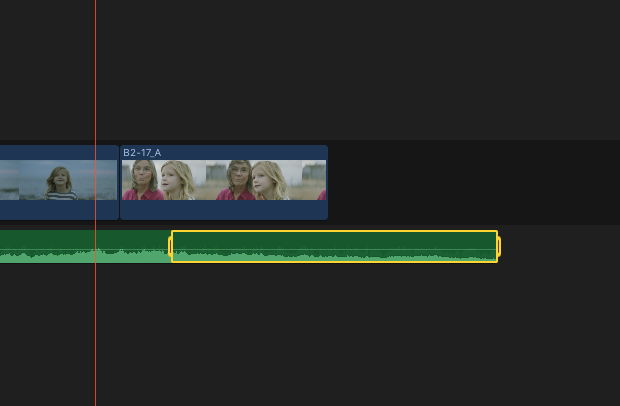
Pressing delete in previous versions would yield this:
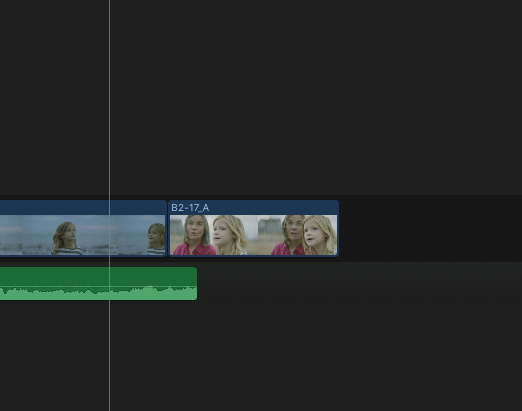
Now pressing delete yields this:
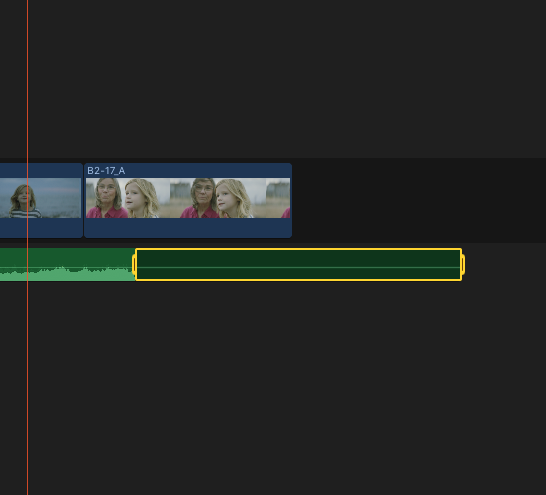
(this was normal edit behavior when I would edit within audio components in previous versions, but now seems to have become standard).
It seems the only way to trim connected audio clips is by using an extend edit, replace with gap (which makes no sense because it trims like an "extract" edit and leaves no gap), or a trim start/ end command?!?! Trimming with Delete works as expected in connected video clips.
The ramifications for me are huge, especially with music editing within a storyline.
Am I missing something?
PS same behavior holds true for audio clips that have been put in their own storyline.
In previous versions I could select a range on a connected audio clip and trim it by pressing Delete.
Selecting range before delete (trim):
Pressing delete in previous versions would yield this:
Now pressing delete yields this:
(this was normal edit behavior when I would edit within audio components in previous versions, but now seems to have become standard).
It seems the only way to trim connected audio clips is by using an extend edit, replace with gap (which makes no sense because it trims like an "extract" edit and leaves no gap), or a trim start/ end command?!?! Trimming with Delete works as expected in connected video clips.
The ramifications for me are huge, especially with music editing within a storyline.
Am I missing something?
PS same behavior holds true for audio clips that have been put in their own storyline.
Owner InnerParakeet
www.innerparakeet.com
Last edit: 30 Oct 2016 05:16 by bcassin.
Please Log in to join the conversation.
30 Oct 2016 05:23 #81629
by EditorGuy
Replied by EditorGuy on topic What's new, fixed or different in FCP 10.3?
Yes, delete a range for an audio clip mutes that segment of the clip. To delete, Shift-Delete the range. New behavior.
Please Log in to join the conversation.
30 Oct 2016 05:25 #81630
by EditorGuy
Coremelt has a new video noise removal plugin coming out. It is in development now. Will be a fraction the cost of Neat.
Replied by EditorGuy on topic What's new, fixed or different in FCP 10.3?
screendor wrote: Has anyone tried Neat video with 10.3? Does it work? Any other well known plug in not yet updated for 10.3?
Coremelt has a new video noise removal plugin coming out. It is in development now. Will be a fraction the cost of Neat.
Please Log in to join the conversation.
30 Oct 2016 05:44 - 30 Oct 2016 05:45 #81631
by bcassin
Owner InnerParakeet
www.innerparakeet.com
Replied by bcassin on topic What's new, fixed or different in FCP 10.3?
Thanks for the reply EditorGuy,
I understand that it's a new behavior, but consider trying to do a delete edit in a storyline with a music clip in it.
For example: You want to trim out 3 bars of a song.
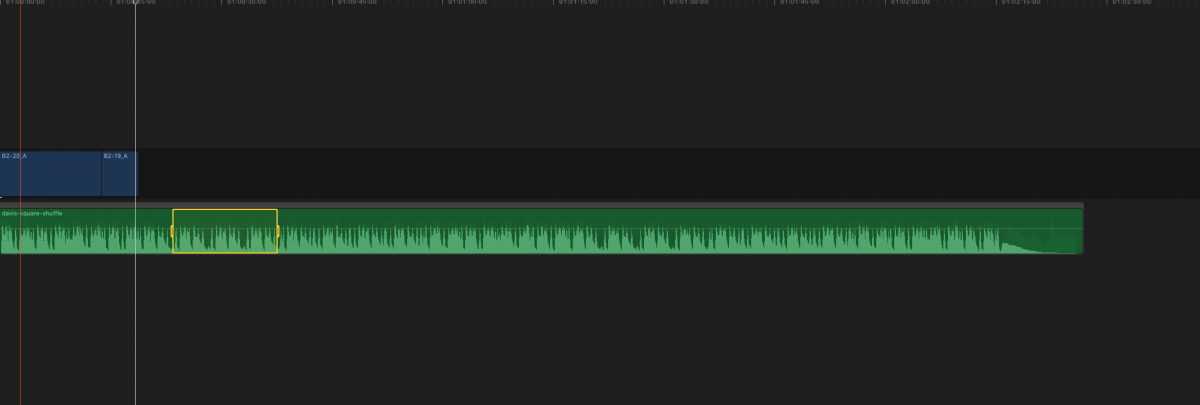
Pressing Shift-Delete yields this:
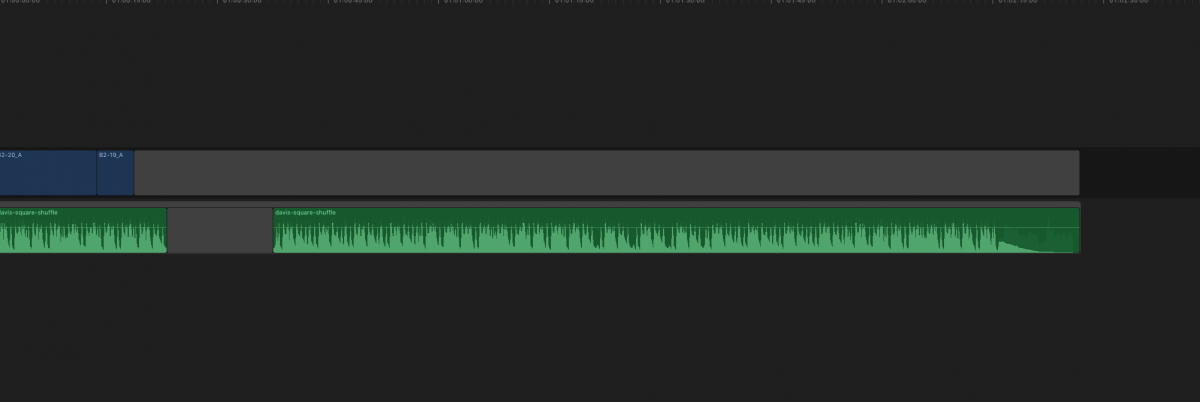
This adds 2 steps to trimming audio storylines (or for audio only clips in the primary story line for that matter) from the above example because now I have to highlight the gap clip and the press delete.
I can do Delete trims to video all day long. Seems like an oversight to me.
I understand that it's a new behavior, but consider trying to do a delete edit in a storyline with a music clip in it.
For example: You want to trim out 3 bars of a song.
Pressing Shift-Delete yields this:
This adds 2 steps to trimming audio storylines (or for audio only clips in the primary story line for that matter) from the above example because now I have to highlight the gap clip and the press delete.
I can do Delete trims to video all day long. Seems like an oversight to me.
Owner InnerParakeet
www.innerparakeet.com
Last edit: 30 Oct 2016 05:45 by bcassin.
Please Log in to join the conversation.
