


- Posts: 4455
- Thank you received: 962
3 Post Moderation Rule for New Boarders (25 Jan 2021)
New boarders will have their posts moderated - Don't worry if you cannot see your post immediately.
Waiting on 10.2.4 and 10.3
- ronny courtens
-

- Offline
- Moderator
-

Less
More
11 May 2016 17:59 #76594
by ronny courtens
Replied by ronny courtens on topic Waiting on 10.2.4 and 10.3
Hey Guy,
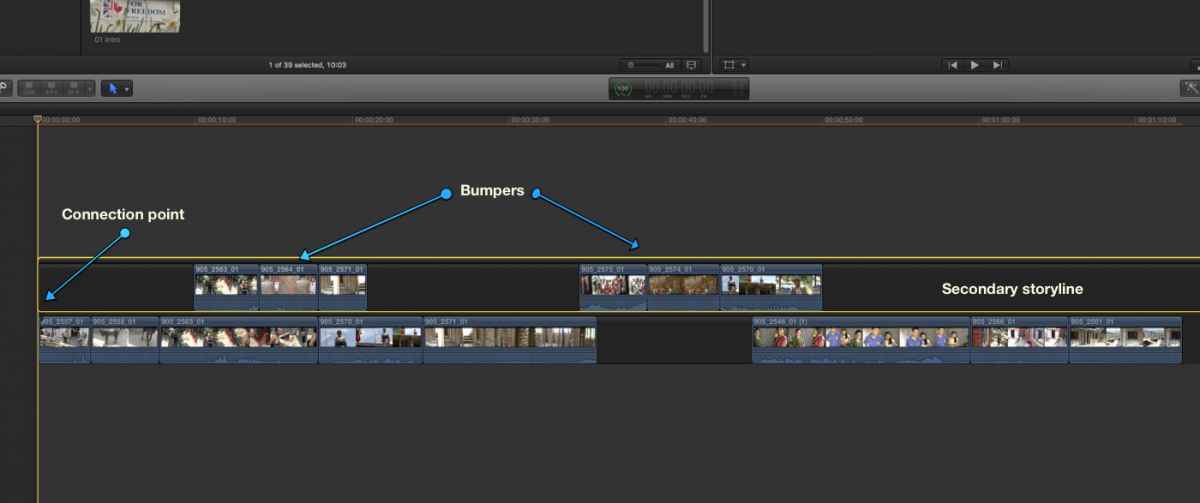
Place your bumpers in a secondary storyline that is connected to the first clip on your primary storyline. This way you can edit the content in the primary as much as you wish, the bumpers will always remain pinned at the same place in time.
- Ronny
Place your bumpers in a secondary storyline that is connected to the first clip on your primary storyline. This way you can edit the content in the primary as much as you wish, the bumpers will always remain pinned at the same place in time.
- Ronny
Please Log in to join the conversation.
- Unfenswinger
-

- Offline
- Banned
-

Less
More
- Posts: 58
- Thank you received: 5
11 May 2016 18:38 #76597
by Unfenswinger
Replied by Unfenswinger on topic Waiting on 10.2.4 and 10.3
Hi Ronny,
Yeah, that's exactly my workaround! I normally have a Gap clip at the beginning of my projects where I connect secondary timelines, adjustment layers and main music track etc etc. Trouble with using a secondary storylines like this it looks suspiciously like a track!! :lol:
I just think clip pinning would keep the timeline neater and allow time critical events to stay on the main timeline, maybe I'm trying to go against the flow.
Cheers
Yeah, that's exactly my workaround! I normally have a Gap clip at the beginning of my projects where I connect secondary timelines, adjustment layers and main music track etc etc. Trouble with using a secondary storylines like this it looks suspiciously like a track!! :lol:
I just think clip pinning would keep the timeline neater and allow time critical events to stay on the main timeline, maybe I'm trying to go against the flow.
Cheers
Please Log in to join the conversation.
- ronny courtens
-
- Offline
- Moderator
-
Less
More
- Posts: 4455
- Thank you received: 962
11 May 2016 18:41 #76598
by ronny courtens
Replied by ronny courtens on topic Waiting on 10.2.4 and 10.3
Nope, you make a good point and it's certainly an interesting idea. But now that every other NLE wants to look like FCP X, I don't mind using a technique in FCP X that looks like a track :evil:
- Ronny
- Ronny
Please Log in to join the conversation.

11 May 2016 20:15 #76601
by DFPete
Replied by DFPete on topic Waiting on 10.2.4 and 10.3
Flexible gap Clips would be a cool feature:)
Please Log in to join the conversation.
11 May 2016 21:25 #76604
by BenB
Replied by BenB on topic Waiting on 10.2.4 and 10.3
I'd have to see the Timeline. I supervise post for a TV show, and we have to have our commercial slots perfectly timed. I assume you're talking about something similar. Yes, it is tricky now, but we do it. A Timecode Ruler Marker would be a good start, if we could only get that.
Please Log in to join the conversation.

11 May 2016 23:38 #76608
by FernKraft
Replied by FernKraft on topic Waiting on 10.2.4 and 10.3
Not sure if it helps your "static timeline work flow, but one thing I've been doing lately is working within a compound clip as a "act 1/segment". This allows me to visually see, (while in the compound clip) when I am getting to the end of the allowed time, (it turns all "zebra striped/doNOTenter" I find it really makes for an elegant "master time line" and allows for us to very quickly see the layout of the whole film, scene by scene, act by act, or whatever it may be.
You can start by taking a gap clip of a determined about of time, say 5 minutes, then making a compound clip of that gap, then when you jump into the compound clip, you can pretty much remove the gap, and just start editing. It means you get a visual cue when you are over your "limit", that's when you can start to panic about quality of story vs. length of story (haha)
Hope it helps
You can start by taking a gap clip of a determined about of time, say 5 minutes, then making a compound clip of that gap, then when you jump into the compound clip, you can pretty much remove the gap, and just start editing. It means you get a visual cue when you are over your "limit", that's when you can start to panic about quality of story vs. length of story (haha)
Hope it helps
Please Log in to join the conversation.
12 May 2016 00:33 #76609
by BenB
Replied by BenB on topic Waiting on 10.2.4 and 10.3
Yes, one of the tricks we use, also. Glad you mentioned that FernKraft.
Please Log in to join the conversation.
12 May 2016 01:45 #76611
by Schwyhart
Replied by Schwyhart on topic Waiting on 10.2.4 and 10.3
A timeline ruler marker would be AWESOME! That's the best idea ever!
Using the Range tool sucks. It's annoying to use.
Basically, we only count the time of the actual show, not the bars & tone, and slate. Of course, we just calculate in the time of all that, but yeah, a timeline ruler maker would be quicker.
Using the Range tool sucks. It's annoying to use.
Basically, we only count the time of the actual show, not the bars & tone, and slate. Of course, we just calculate in the time of all that, but yeah, a timeline ruler maker would be quicker.
Please Log in to join the conversation.
- DmitriZigany
-
- Offline
- Platinum Member
-

Less
More
- Posts: 730
- Thank you received: 26
12 May 2016 12:07 #76626
by DmitriZigany
Replied by DmitriZigany on topic Waiting on 10.2.4 and 10.3
That would be nice. But even more, I wish there were ways to apply Reel names, camera angles, Camera name and such data in the import window...knesaren wrote: I wish I could enter Keywords in the Import window.
Please Log in to join the conversation.
12 May 2016 12:15 #76627
by BenB
Replied by BenB on topic Waiting on 10.2.4 and 10.3
The only way I'd want more inside the Import window, is if it could be done without cluttering it up. Where would all those fields and prompts go? Only way I see this working, without creating a visual catastrophe is in a floating HUD, like in Motion. Yes, it'd be nice to have, but how would you lay that GUI out?
Please Log in to join the conversation.
12 May 2016 12:21 #76628
by canelson
You have ShotnotesX for that, so I wouldn't be holding my breath waiting for Apple to implement those options to the import window.
--
Matias Canelson
www.canelson.us
Replied by canelson on topic Waiting on 10.2.4 and 10.3
DmitriZigany wrote: That would be nice. But even more, I wish there were ways to apply Reel names, camera angles, Camera name and such data in the import window...
You have ShotnotesX for that, so I wouldn't be holding my breath waiting for Apple to implement those options to the import window.
--
Matias Canelson
www.canelson.us
Please Log in to join the conversation.
- Karsten Schlüter
-

- Offline
- Moderator
-
Less
More
- Posts: 3790
- Thank you received: 718
12 May 2016 15:53 #76644
by Karsten Schlüter
the actual Keyword Editor in FCPX is a HUD, so no big deal, I'd say....
and the left column offers tons of empty space, lower left....
Replied by Karsten Schlüter on topic Waiting on 10.2.4 and 10.3
BenB wrote: … Only way I see this working, without creating a visual catastrophe is in a floating HUD, …
the actual Keyword Editor in FCPX is a HUD, so no big deal, I'd say....
and the left column offers tons of empty space, lower left....
Please Log in to join the conversation.
13 May 2016 09:57 #76668
by BenB
Replied by BenB on topic Waiting on 10.2.4 and 10.3
On my desktop screen, yes, but not on my MBP screen...
First rule of architecture is, don't fill empty space, just because it's empty, it has a purpose.
First rule of architecture is, don't fill empty space, just because it's empty, it has a purpose.
Please Log in to join the conversation.
13 May 2016 11:39 #76674
by robertdee
Replied by robertdee on topic Waiting on 10.2.4 and 10.3
Timeline ruler marker would be a great addition. What I'd really like to see tweaked is to have undo/redo work for making selections in clips. I'm regularly making several range selections in the same clip when reviewing the footage in the browser and TOO often I accidentally press 'I' rather than CMD_Shift_I and undo all the selects Ive made. Currently undoing and having them reselected doesn't work which is beyond irritating. That I'd like fixed.
Please Log in to join the conversation.
- nils.dettmann
-
- Offline
- Elite Member
-

Less
More
- Posts: 161
- Thank you received: 13
15 May 2016 20:38 #76730
by nils.dettmann
Replied by nils.dettmann on topic Waiting on 10.2.4 and 10.3
One thing I would like to see and I could imagine coming is some sort of deep integrity check on the internal library on startup.
I don´t know if that would be possible to be implemented by an external developer. Probably not too easy, otherwise there would be more tools messing with the library (.flexlibrary,.fcpevent).
From my personal experience stability improved a lot over the years but still there are instances when FCPX acts weird and the latest backups already contain the same problem. Especially related to relinking.
Is there any documentation on the internal sqlite database?
I don´t know if that would be possible to be implemented by an external developer. Probably not too easy, otherwise there would be more tools messing with the library (.flexlibrary,.fcpevent).
From my personal experience stability improved a lot over the years but still there are instances when FCPX acts weird and the latest backups already contain the same problem. Especially related to relinking.
Is there any documentation on the internal sqlite database?
Please Log in to join the conversation.
- DmitriZigany
-
- Offline
- Platinum Member
-
Less
More
- Posts: 730
- Thank you received: 26
15 May 2016 22:47 #76732
by DmitriZigany
Replied by DmitriZigany on topic Waiting on 10.2.4 and 10.3
Could just be a "more options" button to expand it with more fields... And unless you do that it's the same if you don't want/need it.BenB wrote: The only way I'd want more inside the Import window, is if it could be done without cluttering it up. Where would all those fields and prompts go? Only way I see this working, without creating a visual catastrophe is in a floating HUD, like in Motion. Yes, it'd be nice to have, but how would you lay that GUI out?
Please Log in to join the conversation.
- daviddelreal
-
- Offline
- Elite Member
-
Less
More
- Posts: 230
- Thank you received: 6
16 May 2016 17:34 #76802
by daviddelreal
Replied by daviddelreal on topic Waiting on 10.2.4 and 10.3
OSX update today, FCPX tomorrow???
Please Log in to join the conversation.
17 May 2016 13:00 #76833
by BenB
No correlation between the two historically.
Replied by BenB on topic Waiting on 10.2.4 and 10.3
daviddelreal wrote: OSX update today, FCPX tomorrow???
No correlation between the two historically.
Please Log in to join the conversation.
17 May 2016 13:10 #76834
by robertdee

Replied by robertdee on topic Waiting on 10.2.4 and 10.3
Please Log in to join the conversation.
- Steve McGarrigle
-

- Offline
- Premium Member
-

17 May 2016 13:18 #76835
by Steve McGarrigle
Replied by Steve McGarrigle on topic Waiting on 10.2.4 and 10.3
Either this is 'Waiting for Godot' or Professor Xavier and Magneto have fallen upon hard times. :lol:
Please Log in to join the conversation.
