


- Posts: 1228
- Thank you received: 114
3 Post Moderation Rule for New Boarders (25 Jan 2021)
New boarders will have their posts moderated - Don't worry if you cannot see your post immediately.
Share menu disabled
- Scrubelicious
-

- Offline
- Platinum Member
-

Less
More
27 Jul 2011 03:01 #563
by Scrubelicious
Replied by Scrubelicious on topic Re: Share menu disabled
Excellence153 where is your Final Cut Pro X sitting in or located at?
Just to make sure it is in the main Application folder right?
Just to make sure it is in the main Application folder right?
Please Log in to join the conversation.
27 Jul 2011 14:15 #572
by Indio
Replied by Indio on topic Re: Share menu disabled
do you have also compressor4 installed ?
Please Log in to join the conversation.
27 Jul 2011 19:53 #580
by KeithW
Replied by KeithW on topic Re: Share menu disabled
Hit the [TAB] key, then check the "share" menu. Keep repeating until it is enabled. I haven't figured this out totally yet but it appears that tabbing changes the focus of FCP X window panes like "command-tab" changes applications in Mac OS X.
Please Log in to join the conversation.
- excellence153
-
 Topic Author
- Offline
- Junior Member
-

Less
More
- Posts: 23
- Thank you received: 0
27 Jul 2011 20:05 #581
by excellence153
Replied by excellence153 on topic Re: Share menu disabled
@Scrubelicious - Yes, it's in the main Application folder. Has been this whole time.
@Indio - Yes.
@KeithW - Didn't work.
I'm currently busy with school work, but I'll be trying out the Permission thing later tonight/tomorrow.
@Indio - Yes.
@KeithW - Didn't work.
I'm currently busy with school work, but I'll be trying out the Permission thing later tonight/tomorrow.
Please Log in to join the conversation.
27 Jul 2011 20:10 #582
by KeithW
Replied by KeithW on topic Re: Share menu disabled
make sure the Effects browser is closed. otherwise the program will attempt to tab through every option giving you the impression that nothing is working. If this does not work for you then I am stunned.
Please Log in to join the conversation.
- excellence153
-
Topic Author
- Offline
- Junior Member
-
Less
More
- Posts: 23
- Thank you received: 0
27 Jul 2011 20:14 #583
by excellence153
Replied by excellence153 on topic Re: Share menu disabled
Yes, the effects browser is closed.
Please Log in to join the conversation.
- davidinwellington
-
- Offline
- New Member
-

Less
More
- Posts: 1
- Thank you received: 0
28 Jul 2011 16:15 #613
by davidinwellington
Replied by davidinwellington on topic Re: Share menu disabled
Make sure you mouse select in the timeline window before going to the share menu otherwise items will be greyed out.
Please Log in to join the conversation.
07 Aug 2011 09:13 #742
by dbhertel
Replied by dbhertel on topic Re: Share menu disabled
I've got the same situation, share menu disabled. I've searched the net, followed all misc advice (such as ensuring project is selected, etc.). same problem.
I've read this thread and tried:
- new user (same problem still);
- repair permissions (same problem still)
I'm probably going to try the copy/delete/reinstall idea too. I'm leery of this just because I'm not a mac techie and concerned that just copying the FCP directory is all I need to do to save the install program? my concern comes from my experience using Windows where the registry gets bits buried in their too, so copying a program off to an external drive wouldn't always work on a PC. On a mac, this suggestion that we can simply copy off all the files from the directory and that will preserve all necessary bits for a later install is intriguing.
i'm open to any more ideas to get the FCPX share menu to work too...
Dave
I've read this thread and tried:
- new user (same problem still);
- repair permissions (same problem still)
I'm probably going to try the copy/delete/reinstall idea too. I'm leery of this just because I'm not a mac techie and concerned that just copying the FCP directory is all I need to do to save the install program? my concern comes from my experience using Windows where the registry gets bits buried in their too, so copying a program off to an external drive wouldn't always work on a PC. On a mac, this suggestion that we can simply copy off all the files from the directory and that will preserve all necessary bits for a later install is intriguing.
i'm open to any more ideas to get the FCPX share menu to work too...
Dave
Please Log in to join the conversation.
08 Aug 2011 20:59 #749
by tpayton
Replied by tpayton on topic Re: Share menu disabled
The Mac handles apps completely differently than Windows. No registry or anything like that. Most recent apps (well except Adobe apps) are completely self contained as one package or icon. Some apps require that you put them in the Applications folder but that is about it.
Have no fear!
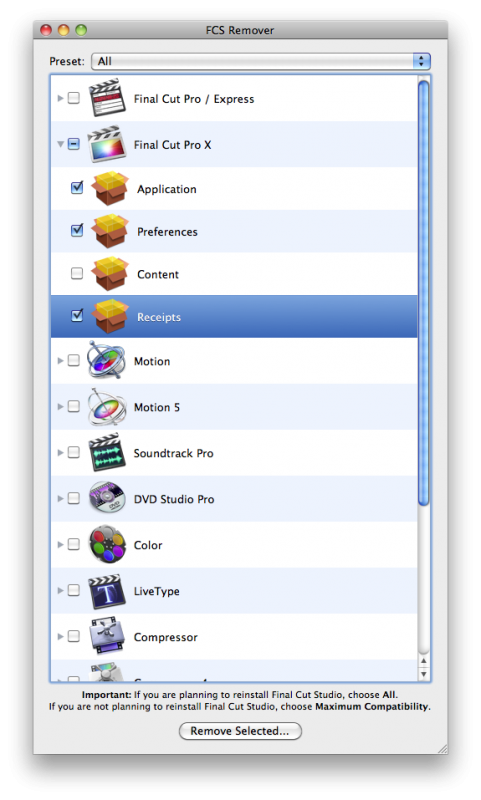
Remember, you can't just drag the App to the trash. Copy it to an external drive/flash drive then eject the flash drive and then YOU MUST use the FCS Remover. Be sure to export any command sets (keyboard shortcuts) first. And note your preferences.
I just did this on my main edit machine. Now I don't know if it will fix your problem, but you should try it. I've attached a screen shots of what to do when using FCS Remover.
BTW. If this doesn't work. I would do the remove again but this time re-download FCP from the Mac App store. If that doesn't work something else is up. Send me a private message and we can screen share or something to get your mac fixed up.
Have no fear!
Remember, you can't just drag the App to the trash. Copy it to an external drive/flash drive then eject the flash drive and then YOU MUST use the FCS Remover. Be sure to export any command sets (keyboard shortcuts) first. And note your preferences.
I just did this on my main edit machine. Now I don't know if it will fix your problem, but you should try it. I've attached a screen shots of what to do when using FCS Remover.
BTW. If this doesn't work. I would do the remove again but this time re-download FCP from the Mac App store. If that doesn't work something else is up. Send me a private message and we can screen share or something to get your mac fixed up.
Please Log in to join the conversation.
08 Aug 2011 21:36 #750
by dbhertel
Replied by dbhertel on topic Re: Share menu disabled
Thanks for the informative & helpful response -- I really appreciate that. Also, good to know the mac OS doesn't bury app-bits in other places (like the registry on a windows box).
BTW: i've also tried your suggestion of removing the prefenences file. there were 2 .plist files and 2 .lock files... i removed all 4, restarted, etc.. but same issue. But I appreciated knowing where these bits were stored too.
I'd take you up on your offer to screen share, etc. I'm a newbie to the mac world (obviously) so may need a bit of guidance to do that (my 1st time). I've made a backup of the FCPX app to DVD and USB drive. I'll be making an attempt to do this tonight -- i'm on PST timezone in U.S.... not sure what timezone u are available?
BTW: i've also tried your suggestion of removing the prefenences file. there were 2 .plist files and 2 .lock files... i removed all 4, restarted, etc.. but same issue. But I appreciated knowing where these bits were stored too.
I'd take you up on your offer to screen share, etc. I'm a newbie to the mac world (obviously) so may need a bit of guidance to do that (my 1st time). I've made a backup of the FCPX app to DVD and USB drive. I'll be making an attempt to do this tonight -- i'm on PST timezone in U.S.... not sure what timezone u are available?
Please Log in to join the conversation.
- Scrubelicious
-
- Offline
- Platinum Member
-
Less
More
- Posts: 1228
- Thank you received: 114
08 Aug 2011 22:26 #751
by Scrubelicious
Replied by Scrubelicious on topic Re: Share menu disabled
Well final cut pro does infect your drive with pref files and some shared required files. But as mentioned use a final cut remover tool.
Please Log in to join the conversation.
08 Aug 2011 23:22 #752
by dbhertel
Replied by dbhertel on topic Re: Share menu disabled
I just re-read your post from earlier today - you mentioned some apps require they be put in the Applications folder. Is this true for FCPX ? In my install, inside the Applications folder their is a subfolder, then within that subfolder are 3 apps: FCPX, Compressor & Motion.
I'm wondering if that subfolder is an issue? I'm not on the mac at the moment but... is moving FCPX app as easy as dragging it up 1 level to the root of Applications?
I'm wondering if that subfolder is an issue? I'm not on the mac at the moment but... is moving FCPX app as easy as dragging it up 1 level to the root of Applications?
Please Log in to join the conversation.
- Scrubelicious
-
- Offline
- Platinum Member
-
Less
More
- Posts: 1228
- Thank you received: 114
08 Aug 2011 23:35 #753
by Scrubelicious
Replied by Scrubelicious on topic Re: Share menu disabled
I can't say they require it, I just know from the net that some users had this issue with the sharing menu and it was fixed when they moved it back into the application folder.
All I can say and is that my version FCPX has no issues running of the desktop on a FCP7 machine.
All I can say and is that my version FCPX has no issues running of the desktop on a FCP7 machine.
Please Log in to join the conversation.
09 Aug 2011 04:18 - 09 Aug 2011 04:20 #755
by tpayton
Replied by tpayton on topic Re: Share menu disabled
dbhertel - I tried to send you a private message but couldn't figure it out. Can you try to send me a private message on this board?
Last edit: 09 Aug 2011 04:20 by tpayton.
Please Log in to join the conversation.
- excellence153
-
Topic Author
- Offline
- Junior Member
-
Less
More
- Posts: 23
- Thank you received: 0
16 Aug 2011 20:59 #859
by excellence153
Replied by excellence153 on topic Re: Share menu disabled
I'm about to do the FCS Remover thing. Should I also move Compressor onto the external drive, or just Final Cut Pro X?
Please Log in to join the conversation.
16 Aug 2011 22:23 #860
by tpayton
Replied by tpayton on topic Re: Share menu disabled
Actually, we discovered that this is a problem with Compressor not FCP X. Compressor installs something in FCP X that disables the share menu.
Therefore I would try this (it takes a long time, but all the other fixes have failed). # 5 is super important!
1. Copy FCP X and Compressor onto an external drive.
2. Throw FCP X and Compressor in the trash and empty trash.
3. Redownload FCP X and Compressor from the Mac App Store (there won't be a charge, just make sure you use the same Apple ID you used to purchase it).
4. Goto lunch while downloading and think of how good it will be to have the share menu.
5. After downloading, don't launch FCP X or Compressor! First back those up to a external drive of some kind.
6. Launch FCP X and confirm that the share menu is available.
7. Then launch Compressor and it will install itself inside of FCP X.
8. Hopefully the share menu will be present. If not of course something else is wrong and post here again.
Therefore I would try this (it takes a long time, but all the other fixes have failed). # 5 is super important!
1. Copy FCP X and Compressor onto an external drive.
2. Throw FCP X and Compressor in the trash and empty trash.
3. Redownload FCP X and Compressor from the Mac App Store (there won't be a charge, just make sure you use the same Apple ID you used to purchase it).
4. Goto lunch while downloading and think of how good it will be to have the share menu.
5. After downloading, don't launch FCP X or Compressor! First back those up to a external drive of some kind.
6. Launch FCP X and confirm that the share menu is available.
7. Then launch Compressor and it will install itself inside of FCP X.
8. Hopefully the share menu will be present. If not of course something else is wrong and post here again.
Please Log in to join the conversation.
- excellence153
-
Topic Author
- Offline
- Junior Member
-
Less
More
- Posts: 23
- Thank you received: 0
17 Aug 2011 02:11 #867
by excellence153
Replied by excellence153 on topic Re: Share menu disabled
Step 5 is where you kind of lost me. I have to back up FCP X and Compressor AGAIN?
Please Log in to join the conversation.
17 Aug 2011 02:19 #868
by tpayton
Replied by tpayton on topic Re: Share menu disabled
Step 5. Yes you will be making a backup of FCP X and Compressor BEFORE you launch them. Launching them for the first time after downloading will install them. You don't want to do that yet. Back them up to a drive (just put them in a folder and call it, unlaunched versions or something like that.)
After backing up, then launch FCP X and confirm that the share menu is there.
BTW. Don't worry I have tested this myself. It won't effect your projects.
After backing up, then launch FCP X and confirm that the share menu is there.
BTW. Don't worry I have tested this myself. It won't effect your projects.
Please Log in to join the conversation.
- excellence153
-
Topic Author
- Offline
- Junior Member
-
Less
More
- Posts: 23
- Thank you received: 0
17 Aug 2011 06:01 #869
by excellence153
Replied by excellence153 on topic Re: Share menu disabled
I'm not worried about my projects because I haven't made any yet. 
Please Log in to join the conversation.
12 Sep 2011 15:32 #1185
by roto
Replied by roto on topic Re: Share menu disabled
Hi!
I am a new user of fcpx and i'm facing the same problem than described above. I've been using the fcpx removing tool, uninstall and re-installed fcpx many times, but the share menu is sill disabled.
Have you finally been able to figure out that issue ?
Best
I am a new user of fcpx and i'm facing the same problem than described above. I've been using the fcpx removing tool, uninstall and re-installed fcpx many times, but the share menu is sill disabled.
Have you finally been able to figure out that issue ?
Best
Please Log in to join the conversation.
