


- Posts: 23
- Thank you received: 0
3 Post Moderation Rule for New Boarders (25 Jan 2021)
New boarders will have their posts moderated - Don't worry if you cannot see your post immediately.
Share menu disabled
- excellence153
-
 Topic Author
- Offline
- Junior Member
-

Less
More
26 Jul 2011 01:52 #523
by excellence153
Share menu disabled was created by excellence153
My main reason for joining this forum is because I'm having a tough time with FCPX and my inability to export. I have a cut ready to go, but for some reason, no matter what I do, I can't export it. When I click on the Share menu, everything is greyed out. I've tried everything. And yes, the timeline is selected. Here's a screenshot:
i55.tinypic.com/rvhm5v.png
Any help is greatly appreciated. This problem is very frustrating and no one has been able to help me yet.
i55.tinypic.com/rvhm5v.png
Any help is greatly appreciated. This problem is very frustrating and no one has been able to help me yet.
Please Log in to join the conversation.
26 Jul 2011 03:42 #525
by tpayton
Replied by tpayton on topic Re: Share menu disabled
Bizzar. Try creating duplicating the project (not media just project). You don't need to select the clips. If that doesn't work create a new project, see if it is still greyed out. If so, copy and paste your timeline to that new project.
If that doesn't work. Restart.
If that doesn't work trash the FCP prefs. ~/Library/Preferences/com.apple.FinalCut.plist
One of those should work.
If that doesn't work. Restart.
If that doesn't work trash the FCP prefs. ~/Library/Preferences/com.apple.FinalCut.plist
One of those should work.
Please Log in to join the conversation.

26 Jul 2011 15:48 #534
by Indio
Replied by Indio on topic Re: Share menu disabled
Please Log in to join the conversation.
- excellence153
-
Topic Author
- Offline
- Junior Member
-
Less
More
- Posts: 23
- Thank you received: 0
26 Jul 2011 20:27 #542
by excellence153
Replied by excellence153 on topic Re: Share menu disabled
@tpayton - Duplicating didn't work, and com.apple.FinalCut.plist doesn't exist in my Preferences folder.
@Indio - My software is apparently up to date.
Well... damn.
@Indio - My software is apparently up to date.
Well... damn.
Please Log in to join the conversation.
26 Jul 2011 20:41 #543
by tpayton
Replied by tpayton on topic Re: Share menu disabled
Do you have any Final Cut Preference file in your preferences folder?
Please Log in to join the conversation.
- excellence153
-
Topic Author
- Offline
- Junior Member
-
Less
More
- Posts: 23
- Thank you received: 0
26 Jul 2011 20:50 #544
by excellence153
Replied by excellence153 on topic Re: Share menu disabled
I do not.
Please Log in to join the conversation.
26 Jul 2011 21:03 #545
by tpayton
Replied by tpayton on topic Re: Share menu disabled
Are you looking in your home directory's library folder, or your startup drive's library folder? You need your home directory's library preference folder.
It has to be there.
It has to be there.
Please Log in to join the conversation.
- excellence153
-
Topic Author
- Offline
- Junior Member
-
Less
More
- Posts: 23
- Thank you received: 0
26 Jul 2011 21:12 #546
by excellence153
Replied by excellence153 on topic Re: Share menu disabled
I trashed it, emptied trash, etc.... Still greyed out.
Please Log in to join the conversation.
26 Jul 2011 21:23 #547
by tpayton
Replied by tpayton on topic Re: Share menu disabled
Create a new user account (System Prefs > Accounts). Log into that account and launch FCP X see if the share menu is there.
Please Log in to join the conversation.
- excellence153
-
Topic Author
- Offline
- Junior Member
-
Less
More
- Posts: 23
- Thank you received: 0
26 Jul 2011 21:36 #548
by excellence153
Replied by excellence153 on topic Re: Share menu disabled
How do I log into a different account? I made the new one, but do I have to restart my computer?
Please Log in to join the conversation.
26 Jul 2011 21:38 #549
by tpayton
Replied by tpayton on topic Re: Share menu disabled
In system prefs > Accounts. Select "login options" and choose "enabled fast user switching". Then in the right side of the menu bar you will see a listing of accounts. From there select your new account.
Please Log in to join the conversation.
- excellence153
-
Topic Author
- Offline
- Junior Member
-
Less
More
- Posts: 23
- Thank you received: 0
26 Jul 2011 21:41 #550
by excellence153
Replied by excellence153 on topic Re: Share menu disabled
On the right? Do you mean on the left?
Please Log in to join the conversation.
26 Jul 2011 21:43 #551
by tpayton
Replied by tpayton on topic Re: Share menu disabled
No right. To the left of the spotlight menu.
Please Log in to join the conversation.
- excellence153
-
Topic Author
- Offline
- Junior Member
-
Less
More
- Posts: 23
- Thank you received: 0
26 Jul 2011 22:03 #553
by excellence153
Replied by excellence153 on topic Re: Share menu disabled
Okay, It's still greyed out even after all that. But I found the task box. Could the fact that Sharing is the only thing not idle have anything to do with it?
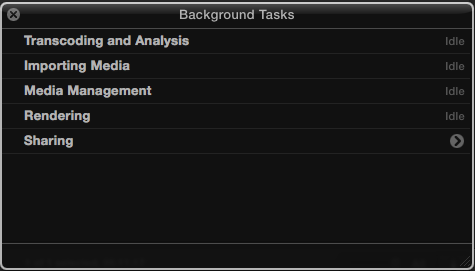
Please Log in to join the conversation.
26 Jul 2011 22:16 #554
by tpayton
Replied by tpayton on topic Re: Share menu disabled
No. That doesn't have anything to do with it as far as I know.
If I could control your machine I might have some more ideas for frankly. I would try a reinstall of FCP X. So do this. Quit FCP X. Copy the App to an external drive. Disconnect the external drive.
Then run FCS Remover and remove only FCP X.
www.digitalrebellion.com/fcsremover/
Then plug in your external drive, copy FCP X to your Applications folder and start er up. It will install itself on the first launch.
If I could control your machine I might have some more ideas for frankly. I would try a reinstall of FCP X. So do this. Quit FCP X. Copy the App to an external drive. Disconnect the external drive.
Then run FCS Remover and remove only FCP X.
www.digitalrebellion.com/fcsremover/
Then plug in your external drive, copy FCP X to your Applications folder and start er up. It will install itself on the first launch.
Please Log in to join the conversation.
- excellence153
-
Topic Author
- Offline
- Junior Member
-
Less
More
- Posts: 23
- Thank you received: 0
26 Jul 2011 22:21 #555
by excellence153
Replied by excellence153 on topic Re: Share menu disabled
Does anyone else recommend this? It seems like a lot of trouble for something that shouldn't have happened in the first place.
Please Log in to join the conversation.
- Scrubelicious
-

- Offline
- Platinum Member
-

Less
More
- Posts: 1228
- Thank you received: 114
26 Jul 2011 22:38 #556
by Scrubelicious
Replied by Scrubelicious on topic Re: Share menu disabled
Recommending? No! But incase trying to fix your issue yes.
Also did you try repairing your permissions after the install?
Also did you try repairing your permissions after the install?
Please Log in to join the conversation.
- excellence153
-
Topic Author
- Offline
- Junior Member
-
Less
More
- Posts: 23
- Thank you received: 0
26 Jul 2011 22:51 #557
by excellence153
Replied by excellence153 on topic Re: Share menu disabled
Sorry, that second part was a little over my head.
Please Log in to join the conversation.
27 Jul 2011 01:34 - 27 Jul 2011 01:37 #559
by tpayton
Replied by tpayton on topic Re: Share menu disabled
Excellene153 - My reinstall solution probably sounded a little drastic. Sorry about that. I've got a dozen machines I take care of and I typically try to go for the shortest route. 
So regarding repairing permissions. Open an app called Disk Utility. It is in Applications/Utilities. Or just type Disk Utility in spotlight. After you open it select your startup drive from the list on the left, then choose the bottom near the bottom of the window entitled "Repair Permissions". (see screen shot below) Depending on your machine it will take 5-15 minutes. Then restart you Mac and try FCP X again.

BTW. Sorry you are having all this trouble. I have 5 machines with FCP X on it, and they all do have the Share Menu, so it is really there. You'll get it fixed.
Also, if your Mac is in warranty, give Apple a call, they will walk you through fixing things, probably better than we can via this forum.
So regarding repairing permissions. Open an app called Disk Utility. It is in Applications/Utilities. Or just type Disk Utility in spotlight. After you open it select your startup drive from the list on the left, then choose the bottom near the bottom of the window entitled "Repair Permissions". (see screen shot below) Depending on your machine it will take 5-15 minutes. Then restart you Mac and try FCP X again.
BTW. Sorry you are having all this trouble. I have 5 machines with FCP X on it, and they all do have the Share Menu, so it is really there. You'll get it fixed.
Also, if your Mac is in warranty, give Apple a call, they will walk you through fixing things, probably better than we can via this forum.
Last edit: 27 Jul 2011 01:37 by tpayton. Reason: Typo
Please Log in to join the conversation.
- Scrubelicious
-
- Offline
- Platinum Member
-
Less
More
- Posts: 1228
- Thank you received: 114
27 Jul 2011 02:56 #562
by Scrubelicious
Replied by Scrubelicious on topic Re: Share menu disabled
Tpayton cool that you showed the disk utility solution. 
Maybe that will hope. If all fails I would also suggest the FCPX reinstall!
Maybe that will hope. If all fails I would also suggest the FCPX reinstall!
Please Log in to join the conversation.
