


- Posts: 16
- Thank you received: 0
3 Post Moderation Rule for New Boarders (25 Jan 2021)
New boarders will have their posts moderated - Don't worry if you cannot see your post immediately.
FCPX Titles & Generators sidebar not showing up
25 Feb 2021 19:22 #112961
by luckym
Replied by luckym on topic FCPX Titles & Generators sidebar not showing up
Thank you Ben..Will give that a try.
Please Log in to join the conversation.
- Tom Wolsky
-

- Offline
- Moderator
-

25 Feb 2021 19:27 #112963
by Tom Wolsky
Replied by Tom Wolsky on topic FCPX Titles & Generators sidebar not showing up
That’s up to you. I prefer Big Sur as an OS. Catalina always felt kludgy to me. The current OS seems better developed.
Please Log in to join the conversation.
09 Mar 2021 06:54 #113225
by luckym
Replied by luckym on topic FCPX Titles & Generators sidebar not showing up
*** Clean Reinstall of OS and FCPX did not fix ***
Today I went ahead with clean reinstallation of MAC OS Catalina and reinstalled FCPX and all the plugins and also FX Factory plugins (7.2.2)
It worked fine for a moment and I could see the titles/generators sidebar for some time and after some time it again is missing and its back to square, just like the screenshots I posted.
This is quite a frustrating issue.. any thoughts or help would be highly appreciated.
Today I went ahead with clean reinstallation of MAC OS Catalina and reinstalled FCPX and all the plugins and also FX Factory plugins (7.2.2)
It worked fine for a moment and I could see the titles/generators sidebar for some time and after some time it again is missing and its back to square, just like the screenshots I posted.
This is quite a frustrating issue.. any thoughts or help would be highly appreciated.
Please Log in to join the conversation.


09 Mar 2021 08:22 #113229
by JoeEditor
Replied by JoeEditor on topic FCPX Titles & Generators sidebar not showing up
Did you do a fresh install of them or did you restore from a backup?
Is the Motion Templates folder in disarray as before?
Is the Motion Templates folder in disarray as before?
Please Log in to join the conversation.
09 Mar 2021 08:32 #113230
by luckym
Replied by luckym on topic FCPX Titles & Generators sidebar not showing up
Ben, It was a clean OS wipe and reinstall and not from backup. The Motion templates folder got created after the FCPX was installed.
Please Log in to join the conversation.
09 Mar 2021 08:39 #113232
by luckym
Replied by luckym on topic FCPX Titles & Generators sidebar not showing up
I followed these steps for OS reinstall
1. Shut down the system
2. Press Command R and start the system, go to utilities and erase the Macintosh HD drive
3. Reinstall OS
4. It reinstalled Catalina , that was the operating system I was having before this reinstallation.
Once all this was done, I installed FCPX and fx factory.
Please let me know if i am wrong anywhere.
1. Shut down the system
2. Press Command R and start the system, go to utilities and erase the Macintosh HD drive
3. Reinstall OS
4. It reinstalled Catalina , that was the operating system I was having before this reinstallation.
Once all this was done, I installed FCPX and fx factory.
Please let me know if i am wrong anywhere.
Please Log in to join the conversation.
09 Mar 2021 14:31 #113239
by JoeEditor
Replied by JoeEditor on topic FCPX Titles & Generators sidebar not showing up
Is the Motion Templates folder in disarray as before?
Please Log in to join the conversation.
09 Mar 2021 15:01 #113240
by luckym
Replied by luckym on topic FCPX Titles & Generators sidebar not showing up
The motion templates in the Movies folder never had disarray issue.. (Can you suggest how can I even check this to be sure that its not disarray)
Whenever I install FCPX and the titles/generators and all plugins , the FCPX opens up fine and shows the titles and all the generators , but suddenly in a day or two I face the same issue that when I click on titles/generator in fcpx, it does not show up the titles installed, it will be black background..
So in short, FCPX works fine with titles/generators shortly and the issue pops up all of a sudden.
I hope I am not confusing.
Whenever I install FCPX and the titles/generators and all plugins , the FCPX opens up fine and shows the titles and all the generators , but suddenly in a day or two I face the same issue that when I click on titles/generator in fcpx, it does not show up the titles installed, it will be black background..
So in short, FCPX works fine with titles/generators shortly and the issue pops up all of a sudden.
I hope I am not confusing.
Please Log in to join the conversation.
- Tom Wolsky
-
- Offline
- Moderator
-
09 Mar 2021 15:17 #113242
by Tom Wolsky
Replied by Tom Wolsky on topic FCPX Titles & Generators sidebar not showing up
Reading through the thread again, I think you need to check if there is a hardware problem. You should also contact FxFactory for support. Some of their plugins might still need to be updated.
Please Log in to join the conversation.

20 May 2021 14:34 #114567
by boghawala
Replied by boghawala on topic FCPX Titles & Generators sidebar not showing up
I too ended up with the same problem. I did two things which worked for me and my titles sidebar was back! Firstly, my hard drive was almost full so I freed up some space. Secondly, I ran Bitdefender virus scanner and cleaned up lot of viruses. Hope this helps.
Please Log in to join the conversation.

26 May 2021 15:25 - 26 May 2021 15:27 #114669
by SadMac
I bet that after installing any antivirus on any new Mac, it will show us a bunch of viruses after scanning : ) Simply because most of them are scams!
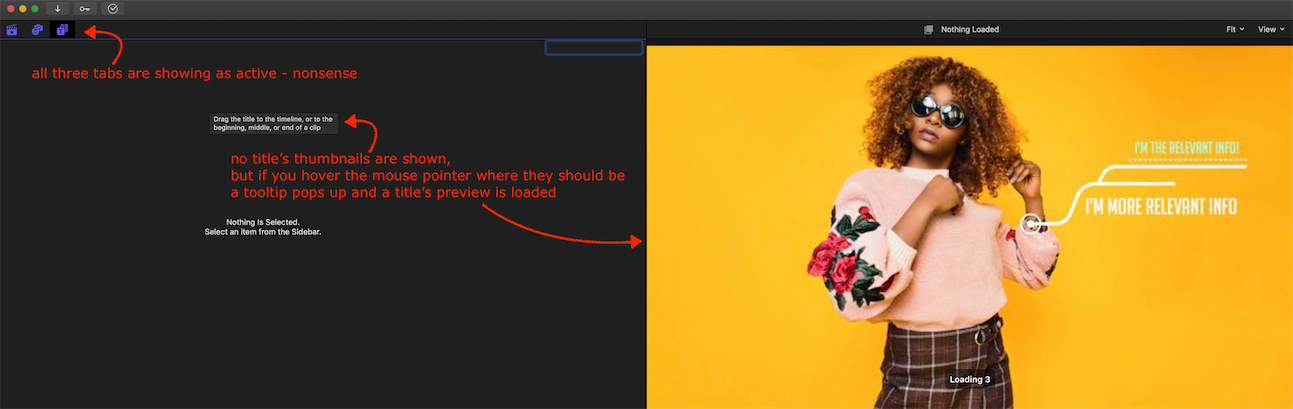
I have the same problem with Titles browser and I blame the FX Factory.
And it stays unfixed for me (just doing Titles on another Mac)
My screenshot below shows the whole situation.
Replied by SadMac on topic FCPX Titles & Generators sidebar not showing up
Haha!! That was very funny : ))boghawala wrote: virus scanner cleaned up lot of viruses
I bet that after installing any antivirus on any new Mac, it will show us a bunch of viruses after scanning : ) Simply because most of them are scams!
I have the same problem with Titles browser and I blame the FX Factory.
And it stays unfixed for me (just doing Titles on another Mac)
My screenshot below shows the whole situation.
Last edit: 26 May 2021 15:27 by SadMac.
Please Log in to join the conversation.
13 Dec 2021 12:51 #117956
by soundbite
Replied by soundbite on topic FCPX Titles & Generators sidebar not showing up
Hi - I have been experiencing this issue also. More so since moving up to Monterey.
Please Log in to join the conversation.
- stefanolaguzzi
-

- Offline
- New Member
-

Less
More
- Posts: 9
- Thank you received: 5
06 Jan 2022 20:50 #118278
by stefanolaguzzi
Replied by stefanolaguzzi on topic FCPX Titles & Generators sidebar not showing up
I correct: Hi luckym, it happens to me too. . I have Monterey ... it's a delusion!
Please Log in to join the conversation.

25 Jan 2022 20:36 #118636
by sapridyne
Replied by sapridyne on topic FCPX Titles & Generators sidebar not showing up
Had the issue on two different machines (2019 Mac Pro and 2021 M1 Max). Fix was the same: Uninstall FX Factory. Doing that makes the issue goes away. Not sure if it's related to Monterey or FCP.
Please Log in to join the conversation.
- Superfletch
-

- Offline
- New Member
-
Less
More
- Posts: 4
- Thank you received: 0
18 Mar 2022 14:17 #119538
by Superfletch
Replied by Superfletch on topic FCPX Titles & Generators sidebar not showing up
Did you happen to ever figure this out? I am having the exact same problem. I don't have any "App Cleaners" installed however and don't know what to do next. I have tried deleting preferences and I have tried deleting entire App and reinstalling to no avail. In FCPX with the libraries tab selected in the sidebar, when I click on Titles, it to highlights purple as selected and does nothing. Both icons are purple and no titles. What the hell?
Please Log in to join the conversation.
18 Mar 2022 14:22 #119539
by sapridyne
Replied by sapridyne on topic FCPX Titles & Generators sidebar not showing up
I made sure I got rid of FX Factory and only had titles from trusted sources (in my case, LenoFX and Motion VFX). Since then, things have been clean. Make sure you get rid of all remnants of FX Factory (there might be stuff in /Library/Plug-Ins, for example).
Please Log in to join the conversation.
21 Mar 2022 03:40 #119568
by luckym
Replied by luckym on topic FCPX Titles & Generators sidebar not showing up
These are the steps I follow to make it work.
1. Close FCPX
2. Go to Motion templates and copy all the titles/generators to a different drive
3. Copy it back to the same respective titles and generators folder in Motion template,
Restart FCPX
This has worked for me all the times. Give it a try...This was my own fix and if it ever happens again, I do the same.
1. Close FCPX
2. Go to Motion templates and copy all the titles/generators to a different drive
3. Copy it back to the same respective titles and generators folder in Motion template,
Restart FCPX
This has worked for me all the times. Give it a try...This was my own fix and if it ever happens again, I do the same.
Please Log in to join the conversation.

01 May 2022 21:41 #120346
by GuyPsy
Replied by GuyPsy on topic FCPX Titles & Generators sidebar not showing up
I also have this issue. I found that this issue occurs when installing lots of plugins from FxFactory. The reason that this bug is still unreported to the developers is that nobody truly downloads and pays for so much plugins, only people who uses cracked versions and they can download as much as they want but they wont report bugs to the developers. I guess this bug will be fixed only if a legal user will report it
Please Log in to join the conversation.

02 May 2022 15:37 #120361
by DaveM
Replied by DaveM on topic FCPX Titles & Generators sidebar not showing up
FYI, another data point here...
FXFactory has never been a problem for me in over 10 years. There are several "repair" tools in the Actions menu of FXFactory. Improper permissions may be part of the issue.
I currently have 70 plugins/items listed as installed in FXFactory, all paid for. No problems here... 2019 Mac Pro (Intel), macOS 12.3.1, FCP 10.6.2.
FXFactory has never been a problem for me in over 10 years. There are several "repair" tools in the Actions menu of FXFactory. Improper permissions may be part of the issue.
I currently have 70 plugins/items listed as installed in FXFactory, all paid for. No problems here... 2019 Mac Pro (Intel), macOS 12.3.1, FCP 10.6.2.
Please Log in to join the conversation.

02 May 2022 18:25 #120365
by niclas
Replied by niclas on topic FCPX Titles & Generators sidebar not showing up
This looks like a reproducible bug in Final Cut Pro where having too many motion templates installed breaks the list in Final Cut Pro.
We have already submitted this bug to Apple in the past. If you are interested in prioritizing this bug at Apple, you can help by leaving feedback through this page:
www.apple.com/feedback/finalcutpro.html
Let them know that you are affected by Final Cut Pro’s Effects list not working if you have too many Motion Templates installed.
Here is our feedback number you can reference:
FB9928467 Final Cut Pro: any effect browser will stop working when a large-enough number of templates is installed
Based on what we are seeing, this is not linked to plugins, or to FxFactory. It happens with any type of Motion Template, as long as enough of them are installed.
We have already submitted this bug to Apple in the past. If you are interested in prioritizing this bug at Apple, you can help by leaving feedback through this page:
www.apple.com/feedback/finalcutpro.html
Let them know that you are affected by Final Cut Pro’s Effects list not working if you have too many Motion Templates installed.
Here is our feedback number you can reference:
FB9928467 Final Cut Pro: any effect browser will stop working when a large-enough number of templates is installed
Based on what we are seeing, this is not linked to plugins, or to FxFactory. It happens with any type of Motion Template, as long as enough of them are installed.
Please Log in to join the conversation.
