


- Posts: 3790
- Thank you received: 718
3 Post Moderation Rule for New Boarders (25 Jan 2021)
New boarders will have their posts moderated - Don't worry if you cannot see your post immediately.
MacOS High Sierra - What works and doesn't work?
- Karsten Schlüter
-

- Offline
- Moderator
-

Less
More
06 Oct 2017 16:09 #90997
by Karsten Schlüter
Replied by Karsten Schlüter on topic MacOS High Sierra - What works and doesn't work?
The Grumpy Mod speaking here:
Can we please stay on topic?
(topic is NOT how MSJustine uses the Energy Saving panel… )
:evil:
Can we please stay on topic?
(topic is NOT how MSJustine uses the Energy Saving panel… )
:evil:
Please Log in to join the conversation.

Less
More
- Posts: 971
- Thank you received: 46
06 Oct 2017 16:10 #90998
by MsJustine
Replied by MsJustine on topic MacOS High Sierra - What works and doesn't work?
At least my laptop works, and the cost of replacement is more than replacement of my car...the cost of a 16GB version is more than year's rent....you can have no idea how ripped we are in the colonies....Resellers rip the ring out of the market...I bought the best I could afford...
Put another way, I could fly from home to Vermont and back 3 times for the cost of replacing this mac!!!
Put another way, I could fly from home to Vermont and back 3 times for the cost of replacing this mac!!!
Please Log in to join the conversation.

06 Oct 2017 17:41 #91000
by VidGreg
Replied by VidGreg on topic MacOS High Sierra - What works and doesn't work?
Hi MsJ
You have the base MBP without a dedicated GPU so you will not have the option in Energy Saver. Your GPU is the Intel SOC that shares memory with the rest of the computer and does not have dedicated separate Graphics and vRAM.
Sorry Grumpy Mod
My recommendation at this moment is that people who depend on FCPX and have SSD internal drives to NOT update to HS till FCPX is updated. This is even more important for folks that use iPhones and the new codecs HEVC/HEIF. Really not ready for prime time IMHO. Again I like APFS, just not how it is being implemented.
Hope this Helps, Greg
You have the base MBP without a dedicated GPU so you will not have the option in Energy Saver. Your GPU is the Intel SOC that shares memory with the rest of the computer and does not have dedicated separate Graphics and vRAM.
Sorry Grumpy Mod
My recommendation at this moment is that people who depend on FCPX and have SSD internal drives to NOT update to HS till FCPX is updated. This is even more important for folks that use iPhones and the new codecs HEVC/HEIF. Really not ready for prime time IMHO. Again I like APFS, just not how it is being implemented.
Hope this Helps, Greg
Please Log in to join the conversation.
- Karsten Schlüter
-
- Offline
- Moderator
-
Less
More
- Posts: 3790
- Thank you received: 718
07 Oct 2017 02:46 #91011
by Karsten Schlüter
no worries, Greg, like your very helpful and profound advices, do not like thread-jacking … the title of this thread let me expect a list of goes/no-goes, not personal advice to fix a prob :whistle:
Replied by Karsten Schlüter on topic MacOS High Sierra - What works and doesn't work?
VidGreg wrote: …Sorry Grumpy Mod
no worries, Greg, like your very helpful and profound advices, do not like thread-jacking … the title of this thread let me expect a list of goes/no-goes, not personal advice to fix a prob :whistle:
Please Log in to join the conversation.
07 Oct 2017 14:47 - 07 Oct 2017 16:13 #91014
by StingRay
I am guilty of this but would it not be more informative for users to state their hardware setup before commenting on how well HS is working with FC ? Looking at the threads above I see issues with users using fusion drives etc etc.. I think all this is rather off-putting and confusing for a user looking to see if upgrading to HS is viable. Granted, many may be using these drives.. many are also NOT ! I don't even use an iMac but what I've stated below.. a similar setup to many 'working' users. If we knew (properly, and this is my point) what you users are using we would all be better 'informed'
Setup: L2013 8 Core-32GB RAM-1TB SSD - 8TB Ext. Thunderbolt (2014 model) G-TECH RAID 0 HDD - FocusRite 2i2 Audio outboard - 27"Apple Monitor - No money in my bank account!
Replied by StingRay on topic MacOS High Sierra - What works and doesn't work?
peteramwiggins wrote: Our previous OS update info worked well, so here's a new pinned Forum post for information about Apple's new OS, High Sierra.
Please post what works, what doesn't and any other problems.
I am guilty of this but would it not be more informative for users to state their hardware setup before commenting on how well HS is working with FC ? Looking at the threads above I see issues with users using fusion drives etc etc.. I think all this is rather off-putting and confusing for a user looking to see if upgrading to HS is viable. Granted, many may be using these drives.. many are also NOT ! I don't even use an iMac but what I've stated below.. a similar setup to many 'working' users. If we knew (properly, and this is my point) what you users are using we would all be better 'informed'
Setup: L2013 8 Core-32GB RAM-1TB SSD - 8TB Ext. Thunderbolt (2014 model) G-TECH RAID 0 HDD - FocusRite 2i2 Audio outboard - 27"Apple Monitor - No money in my bank account!
Last edit: 07 Oct 2017 16:13 by StingRay.
Please Log in to join the conversation.
- Tom Wolsky
-

- Offline
- Moderator
-
07 Oct 2017 15:00 #91015
by Tom Wolsky
Replied by Tom Wolsky on topic MacOS High Sierra - What works and doesn't work?
Haven't seen it reported here but quite a number of users on the Apple forum have reported FCP when launching with LG Ultrafine and other high res monitors.
Please Log in to join the conversation.

07 Oct 2017 15:36 - 07 Oct 2017 15:37 #91017
by JoeEditor
Replied by JoeEditor on topic MacOS High Sierra - What works and doesn't work?
Speaking of "informed", what is a "L2103"? Most of us know model names, not numbers.
But the general consensus here is do NOT upgrade yet, until the updated pro apps are released. And I think it is obvious we'll be getting that in two weeks once FCP Creative Summit event begins, probably the day before, like the last two years.
But the general consensus here is do NOT upgrade yet, until the updated pro apps are released. And I think it is obvious we'll be getting that in two weeks once FCP Creative Summit event begins, probably the day before, like the last two years.
Last edit: 07 Oct 2017 15:37 by JoeEditor.
Please Log in to join the conversation.
07 Oct 2017 16:15 - 07 Oct 2017 16:16 #91019
by StingRay
pretty obvious that was a typo and I meant Late 2013! Most Mac users are aware of what a L2013 model is! :lol:
Anyway, thanks for the heads up!
Replied by StingRay on topic MacOS High Sierra - What works and doesn't work?
FCPX.guru wrote: Speaking of "informed", what is a "L2103"? Most of us know model names, not numbers.
pretty obvious that was a typo and I meant Late 2013! Most Mac users are aware of what a L2013 model is! :lol:
Anyway, thanks for the heads up!
Last edit: 07 Oct 2017 16:16 by StingRay.
Please Log in to join the conversation.


07 Oct 2017 19:18 - 07 Oct 2017 19:52 #91020
by FernKraft
Replied by FernKraft on topic MacOS High Sierra - What works and doesn't work?
TLDNR version
PROBLEM - had choppy performance system wide while using FCPX
FIX- reset nvram
(photon pro still giving problems)
Conclusion and lesson re-learned - always remember to reset NVRAM after an OS update.
FYI-this is a home non-work related machine.
PROBLEM - had choppy performance system wide while using FCPX
FIX- reset nvram
(photon pro still giving problems)
Conclusion and lesson re-learned - always remember to reset NVRAM after an OS update.
Warning: Spoiler!
* now the story as it was before my "oh yeah, I'm a dummy" moment.
At first I thought I was just having choppy playback, and I am, but it also seems that my refresh rate for the whole computer drops dramatically while attempting playback with FCPX. FCPX seems to just also be stuttering worse than the other apps and operating system. (the play head doesn't even show it's moving)
I'd say it's like the GPU is being overloaded, cause at first that's what it looked like, but oddly, the refresh rate for my mouse pointer remains smooth and constant...thoughts?
findings thus far
- happens regardless of inter-frame or Intra-frame, HD or 4k.
-Does not happen in Quicktime player with same footage
admittedly, right now i'm working over a SAN (which worked fine before the update)
Blackmagic speed test says the SAN is capable of constant speed, so i'm confident it's not SAN related entirely, but I'll try it over DAS and will report back if i find anything more or different.
Additional findings...
-Photon pro seems to just turn everything into green and black patterns.
-colour Finale seems fine, both before and after the 1.7.3 update.
hypothesis
-something to do with Metal 2 and FCPX
-something SAN related (unlikely but won't rule it out)
-gremlins are just messing with me
At first I thought I was just having choppy playback, and I am, but it also seems that my refresh rate for the whole computer drops dramatically while attempting playback with FCPX. FCPX seems to just also be stuttering worse than the other apps and operating system. (the play head doesn't even show it's moving)
I'd say it's like the GPU is being overloaded, cause at first that's what it looked like, but oddly, the refresh rate for my mouse pointer remains smooth and constant...thoughts?
findings thus far
- happens regardless of inter-frame or Intra-frame, HD or 4k.
-Does not happen in Quicktime player with same footage
admittedly, right now i'm working over a SAN (which worked fine before the update)
Blackmagic speed test says the SAN is capable of constant speed, so i'm confident it's not SAN related entirely, but I'll try it over DAS and will report back if i find anything more or different.
Additional findings...
-Photon pro seems to just turn everything into green and black patterns.
-colour Finale seems fine, both before and after the 1.7.3 update.
hypothesis
-something to do with Metal 2 and FCPX
-something SAN related (unlikely but won't rule it out)
-gremlins are just messing with me
FYI-this is a home non-work related machine.
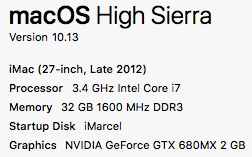
Last edit: 07 Oct 2017 19:52 by FernKraft.
Please Log in to join the conversation.

10 Oct 2017 07:37 - 10 Oct 2017 07:40 #91052
by chrisb
Yeah that was already checked off, of course.
And wouldn't really matter anyway, since "automatic" implies that FCPX would automatically take advantage of the discrete GPU anyways.
Replied by chrisb on topic MacOS High Sierra - What works and doesn't work?
Atamanov wrote: you need go to the Preferences of MacOs HS then go to "Power..." (dont now how in english) and switch off "automatic switch video cards"]
Yeah that was already checked off, of course.
And wouldn't really matter anyway, since "automatic" implies that FCPX would automatically take advantage of the discrete GPU anyways.
Last edit: 10 Oct 2017 07:40 by chrisb.
Please Log in to join the conversation.
16 Oct 2017 09:27 #91135
by StingRay
Really? where did you get this info from?! first I've heard of it!
Replied by StingRay on topic MacOS High Sierra - What works and doesn't work?
Conclusion and lesson re-learned - always remember to reset NVRAM after an OS update.
Really? where did you get this info from?! first I've heard of it!
Please Log in to join the conversation.
16 Oct 2017 20:25 #91150
by FernKraft
Replied by FernKraft on topic MacOS High Sierra - What works and doesn't work?
It's something I like to do after OS updates. I've found it has become part of my best practices over the years. Seems to solve random graphics and display issues i've come across. One time I had displays just turning off for no reason (that might of been when I updated to Yosemite).
Resting the NVRAM doesn't solve all problems by any means. FCPX still behaves odd... Does the playhead not move durring playback for anybody else? and I mean, not move at all. It only refreshes when I stop playback.
Resting the NVRAM doesn't solve all problems by any means. FCPX still behaves odd... Does the playhead not move durring playback for anybody else? and I mean, not move at all. It only refreshes when I stop playback.
Please Log in to join the conversation.
18 Oct 2017 21:26 #91185
by Sugarhill
Replied by Sugarhill on topic MacOS High Sierra - What works and doesn't work?
I’ve recently experienced instances with items on the timeline disappearing. Editing 4K multi cam is causing multiple crashes when connected to shared raid. Apple and ProApps team need to align release schedules going forward.
Please Log in to join the conversation.
- binky.huckaback
-

- Offline
- New Member
-

Less
More
- Posts: 3
- Thank you received: 0
20 Oct 2017 17:22 #91219
by binky.huckaback
Replied by binky.huckaback on topic MacOS High Sierra - What works and doesn't work?
Just posted a thread regarding an issue I have with FCPX.
I just cannot comprehend how pre-installed Apple software running on a brand new top spec iMac can be so much of a headache. Compared to PCs / Windows the Apple ecosystem is relatively self-contained and controlled. I was even looking at reviews on YouTube before I bought the iMac that were stating that they were rendeing several 4K clips at once and the iMac and software were coping well. Reviewers pointed out that the integration of Apple software on Apple hardware was allowing everything to run optimally etc, etc. Made sense to me. I get the iMac with great anticipation only to find that even though I'm only using small 1080 clips, FCPX is struggling to cope.
I'm frustrated and not a little disappointed.
I just cannot comprehend how pre-installed Apple software running on a brand new top spec iMac can be so much of a headache. Compared to PCs / Windows the Apple ecosystem is relatively self-contained and controlled. I was even looking at reviews on YouTube before I bought the iMac that were stating that they were rendeing several 4K clips at once and the iMac and software were coping well. Reviewers pointed out that the integration of Apple software on Apple hardware was allowing everything to run optimally etc, etc. Made sense to me. I get the iMac with great anticipation only to find that even though I'm only using small 1080 clips, FCPX is struggling to cope.
I'm frustrated and not a little disappointed.
Please Log in to join the conversation.
- Basilfawlty
-
- Offline
- New Member
-
Less
More
- Posts: 5
- Thank you received: 0
21 Oct 2017 02:34 #91223
by Basilfawlty
Replied by Basilfawlty on topic MacOS High Sierra - What works and doesn't work?
I did a clean install of HS and after that my Jl Cooper MCS3 works fine BUT not with FCP 10.3.4.
I can import a keyset but when I try to use them, FCP crashes every time.
MCS3 works fine outside of HS though so an FCP problem probably.
I can import a keyset but when I try to use them, FCP crashes every time.
MCS3 works fine outside of HS though so an FCP problem probably.
Please Log in to join the conversation.
21 Oct 2017 17:29 #91230
by Atamanov
Update Nvidia driver? DaVinci Resolve installs it
Replied by Atamanov on topic MacOS High Sierra - What works and doesn't work?
chrisb wrote:
Atamanov wrote: you need go to the Preferences of MacOs HS then go to "Power..." (dont now how in english) and switch off "automatic switch video cards"]
Yeah that was already checked off, of course.
And wouldn't really matter anyway, since "automatic" implies that FCPX would automatically take advantage of the discrete GPU anyways.
Update Nvidia driver? DaVinci Resolve installs it
Please Log in to join the conversation.
- Image Samba
-
- Offline
- Junior Member
-

Less
More
- Posts: 26
- Thank you received: 2
24 Oct 2017 05:39 #91254
by Image Samba
Replied by Image Samba on topic MacOS High Sierra - What works and doesn't work?
Just updated to High Sierra and AJA T-Tap stopped working. Current driver (13.0.0, June 2016). Turn on A/V output and video freezes and FCP locks up, requiring a force quit. I can only get it back by launching with deleting preferences to turn A/V back off.
To clarify: T-Tap works fine, just not with FCP.

To clarify: T-Tap works fine, just not with FCP.
Please Log in to join the conversation.
- Basilfawlty
-
- Offline
- New Member
-
Less
More
- Posts: 5
- Thank you received: 0
24 Oct 2017 13:34 - 24 Oct 2017 13:34 #91255
by Basilfawlty
Replied by Basilfawlty on topic MacOS High Sierra - What works and doesn't work?
Thanks for the tips!
Tried it but saw min was already set to not change graphic board.
(Waiting for JL Coopers answer re. MCS3 and MCS6).
Tried it but saw min was already set to not change graphic board.
(Waiting for JL Coopers answer re. MCS3 and MCS6).
Last edit: 24 Oct 2017 13:34 by Basilfawlty. Reason: Missed data.
Please Log in to join the conversation.
24 Oct 2017 17:40 #91257
by Atamanov
Replied by Atamanov on topic MacOS High Sierra - What works and doesn't work?
So about slowdown. Very slow work, no smooth playback. what I did? 1. switched off automatic video card switch. 2. downloaded and reinstalled Nvidia CUDA driver, now ver.9.0.214. (update not helped me) 3. switched off Background render in the FCPX.
now I have about 20 minutes for smooth work then need to reboot. after reboot 20 min again.
now I have about 20 minutes for smooth work then need to reboot. after reboot 20 min again.
Please Log in to join the conversation.
