


3 Post Moderation Rule for New Boarders (25 Jan 2021)
New boarders will have their posts moderated - Don't worry if you cannot see your post immediately.
FCP X 10.1.4 RELEASED

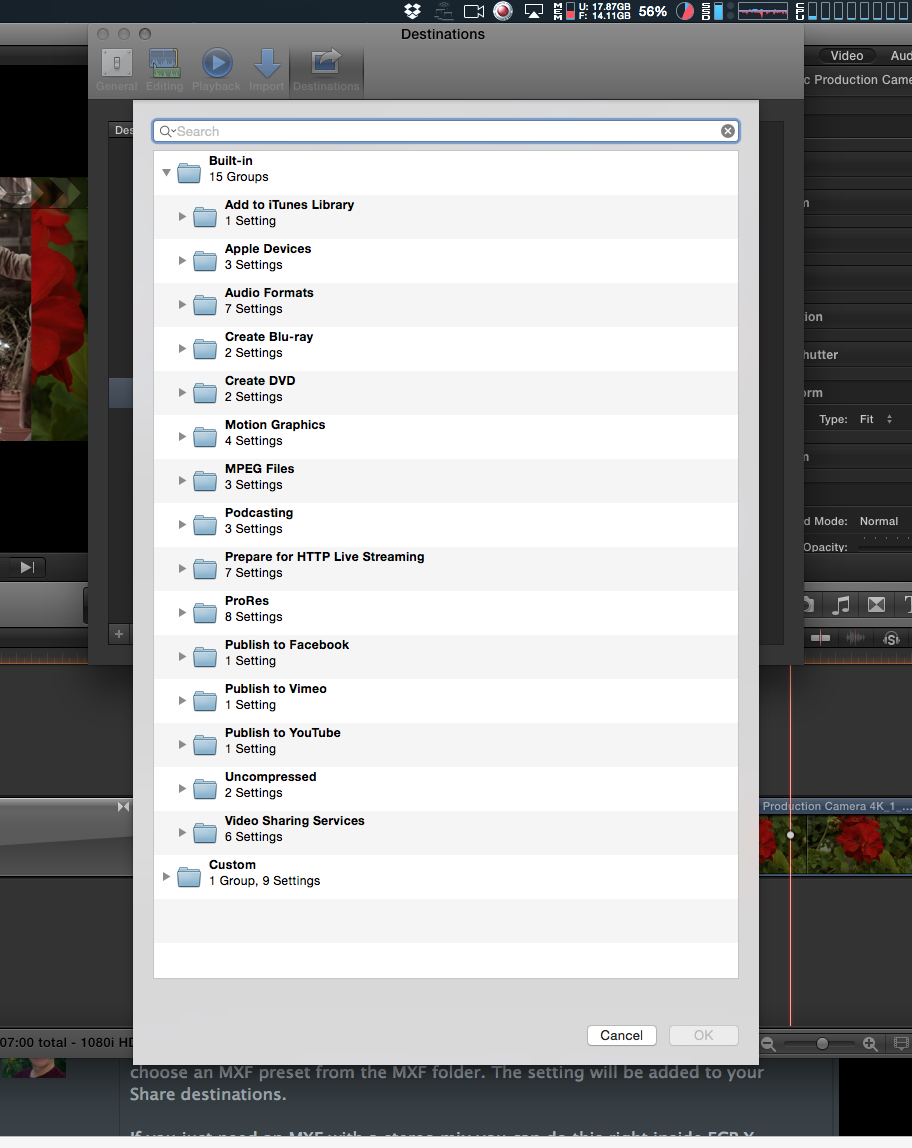
I can see them listed in the Compressor settings via Motion's export options.
But they don't show up when I try to make a Compressor custom Destination in FCPX 10.1.4.
Please Log in to join the conversation.
Please Log in to join the conversation.
- Nervebroke
-

- Offline
- Elite Member
-

- Posts: 177
- Thank you received: 12
When you do as Ronny suggested you have to twirl down the custom group. Then you will see all the MXF settings in 8 groups
Dave
Please Log in to join the conversation.
Please Log in to join the conversation.
- Roadswitcher
-
- Offline
- Senior Member
-

- Posts: 56
- Thank you received: 4
That means, something is really messed up now on my system ( OSX 10.9.5 FCPX 10.1.4 ).
QT7 is blind for raw mxf files, as is the import routine of FCPX, the Pro Video Formats update should have enabled all that.
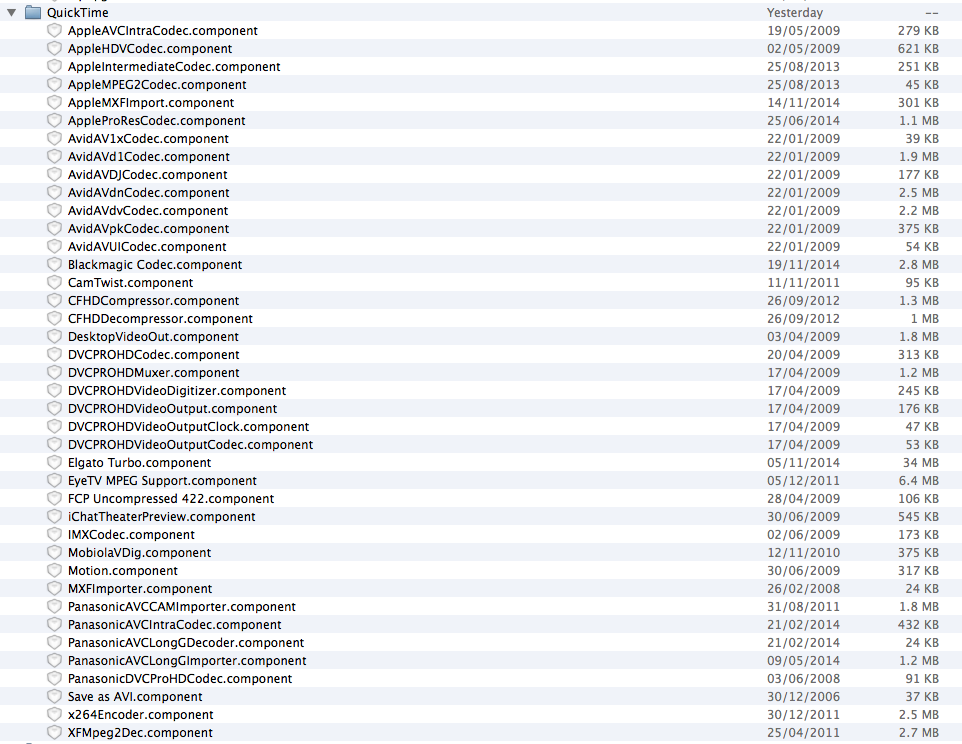
Looked in my /Library/Quicktime folder to see all the installed components, saw the AVCIntra Codec that came with a previous update ( present in Compressor 4.1.3 but strangely not showing up via the Compressor settings in the FCPX share menu ... another annoyance ), the AVClongGDecoder & Importer, but no other "new" items.
In the ProApps folder of the Root Library, all my Import Plugins are present ( the RADPlug ones ).
Can't remember right now where Compressor is holding its share of components.
Could someone show me their populated Quicktime folder with all the components for a quick comparison ?
This is my (bloated) folder :
BTW, is there supposed to be an entry for the OP1a export module in Compressor's list, as advertised on the Apple Update notification ?
Or is everything covered by the MXF folder ?
In your screenshot of Compressors MXF entry, there is also an AS-11 export setup, is that the one from Hamburg Media ?
FYI, I restarted the Mac after the updates and also tried to start FCPX with a fresh preference file.
Thx for letting me see what's on your component list.
alex
Please Log in to join the conversation.
- ronny courtens
-

- Offline
- Moderator
-

- Posts: 4455
- Thank you received: 962
A friend of mine had the same issue this morning. It got solved by re-installing the ProMedia 2.0 components from the App store. If the App Store doe not allow you to re-download because it thinks the components are already installed, here's a direct link to the update: support.apple.com/kb/DL1396?viewlocale=en_US&locale=ja_JP
It’s in Japanese, but don’t worry. Just click the blue box under the text “Pro Video Formats 2.0” and your download will start

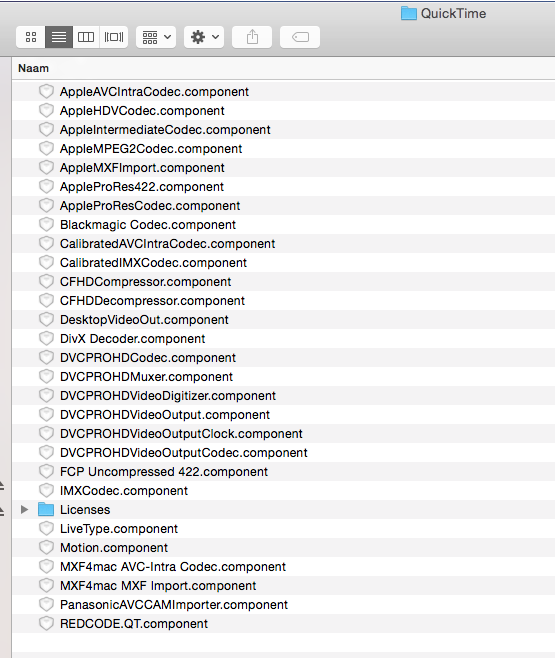
Here's a screenshot of my QT components folder, but I'm afraid it won't be of much use as I already had several MXF components from Calibrated and from the Hamburg Pro Media AS-11 suite:
MXF export from FCP X/Compressor is strictly OP1-a, so everything is covered in the MXF settings. I have created the AS-11 presets myself because the Apple MXF settings all have 8-channel audio while AS-11 is either 4 or 16 channel audio. But these presets are very easy to create in Compressor.
Hope this helps. I see you live in Paris, so it must be past midnight for you as well.
Best wishes from Belgium and have a good night.
- Ronny
Please Log in to join the conversation.

BenB wrote: Wow, Apple being considerate of legacy OS users, there's a shock! HA!
FCP7 Still works doesn't it? I assumed an OS update would have killed that long ago. Feel's like there's code in these OS release to keep it running!
Please Log in to join the conversation.
Please Log in to join the conversation.


The Pro Video Format thingy installed first before FCPX 10.1.4 downloaded. Does that matter?
Please Log in to join the conversation.
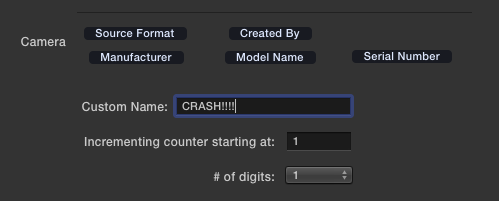
The crashing one when you enter a custom name in the edit custom name field is still there and the media browsers still don't look quite right.
Sean Lander - Editing since 1982 - AVID 1991 - FCP 1999 - FCPX 2011
Please Log in to join the conversation.
Importing Canon c300 footage (native mxf).
I freaked out because the interview clips were only the first 30 seconds (exactly) of each clip. Yikes! Turns out, these were additional clips somehow generated on import. The real, longer clips imported fine. For some reason, FCPX decided to create additional :30 clips of SOME of the file.
This happened twice. Two different cameras (although both c300 (mxf).
Please Log in to join the conversation.
- alsoknownas
-
- Offline
- New Member
-

- Posts: 2
- Thank you received: 0
we just had a bug , similar to one on fcp 10.1.3
after importing the rushes from P2 Hd card and working correctly with the software
we exported several times the master to test it and it crashed.
After reopening the library, some files were red missing , and there weren't present in the original media but they had been imported correctly.
we have a 16gb macbook
to add, we had bugs on FCP 10.1.3 concerning the importation and the disappearance of the rushes which i post later some more explanations .
thanks for your forum
Please Log in to join the conversation.
Please Log in to join the conversation.
- Roadswitcher
-
- Offline
- Senior Member
-
- Posts: 56
- Thank you received: 4
ronny courtens wrote: Alex,
A friend of mine had the same issue this morning. It got solved by re-installing the ProMedia 2.0 components from the App store.
Thanks Ronny for the 'japanese' link !
Did a reinstall ( twice ) but the result is rather disappointing. Still no direct handling of raw MXF files in QT or FCPX.
It would be interesting to know who else in this community managed to get this one working.
Looking at your component list, I can't see anything wrong with mine, only that you have the Calibrated as well as the mxf4mac elements on board.
Could it be possible that only this presence made it possible to read raw MXF files ?
My friends from the Parisian ORF Bureau had to buy the full MXF package from the Hamburg Pro Media guys in order to comply with the need for an MXF workflow from Aquisition to Mastering & subsequent ftp operations.
With this on a Mac, they can now directly read .mxf videos with QT7, although they also have the MXF-Player on board.
Too tired to stay on that Battlefront right now .....
Until I can fnd a solution, I'll stick to what we have been offered, if only for the export side. That's already a great step forward for me and the stuff I do for the ORF.
Thanks also for clarifying what the OP1-a compliance was all about.
Went back for a knowledge refresh to Hamburgs excellent workflow guide for their AS11 suite and AMWA's AS-11 White Paper's explanaton of the operational pattern OP1-a.
Was worth being read again.
Still, if you guys here could come forward to tell whether anyone had a positive update of the QT framework .......
alex
Please Log in to join the conversation.

Please Log in to join the conversation.
- simon.a.billington
-
- Offline
- Elite Member
-
- Posts: 179
- Thank you received: 10
Typically, though not always, features like that come as part of a bigger major release. So it really does demonstrate they are trying to make some of the pros out there happy.
But you can't make everyone happy.
That's okay, because I'm sure there is something new and exciting and more bug crushing waiting ahead of us in the near future.
It does show, that Apple aren't forgetting about users anymore as they continue to keep up their steady stream of fixes and enhancements
Please Log in to join the conversation.
- simon.a.billington
-
- Offline
- Elite Member
-
- Posts: 179
- Thank you received: 10
Could it be it might be conflicting with your other MXF installations??
Please Log in to join the conversation.
- Roadswitcher
-
- Offline
- Senior Member
-
- Posts: 56
- Thank you received: 4
Simon, your tip was already on my battered mind, but you were spot on with your remark.
After getting some rest from my doc shoot, I had a cleaner brainmass to play with.
So I moved out ALL my components from the Quicktime folder in the root library.
Tried again the Pro Formats update and rebooted.
This way I could see all the components being installed by the update, on their own, while I was free to supplement the list by bringing back most of the expelled components.
That's how I found out that an old "MXFImporter" from 2008 ( don't know what created this ... maybe my MXF4mac player ? ) was corrupting the import routine. Without it, everything became "normal".
Now the QT framework is effectively including .mxf files, QT7 is finally able to read orphaned raw MXF videos and FCPX's import routine is also capable of showing them when selected, while still accepting structured camera cards ( and their archives ).
Feeling much better now !
And here are even some better news for the whole FCPX community :
ORF in Paris received news from the HQ in Vienna about the future implementation of FCPX in replacement of 7.0.3.
The TD is warmly praising the latest 10.1.4 update, because of the generous MXF inclusion.
ORF has been using MXF for some time, the cameras are now mainly XDCAM HD 422 models from Sony, with SxS cards.
The Paris bureau bought, way before the switch to XDCAM, a Canon XF 305, recording like the Sonys with an MPEG2 codec @ 50 mbits/s and wrapped in an MXF container. The only difference is the CF card used here.
There are already some workflows published that include the audio treatment following EBU's R123 4b recommendation.
BTW, thank you guys for the link to 10dot1's AS-11 page.
A good addition to other tutorials, with a nice gift of useful presets.
Nice to see how a "small" update is suddenly pushing the boundaries for European Broadcaster.
Let's now see who's next to drift away from legacy FCP .....
alex
Please Log in to join the conversation.
- ronny courtens
-
- Offline
- Moderator
-
- Posts: 4455
- Thank you received: 962
Glad it worked and thank you for posting the solution, very interesting. I will also remove any older MXF utilities from our production machines. We don't have any issues, but better be safe.
That's excellent news coming from ORF, especially since TF1 already had started adopting FCP X since February this year.
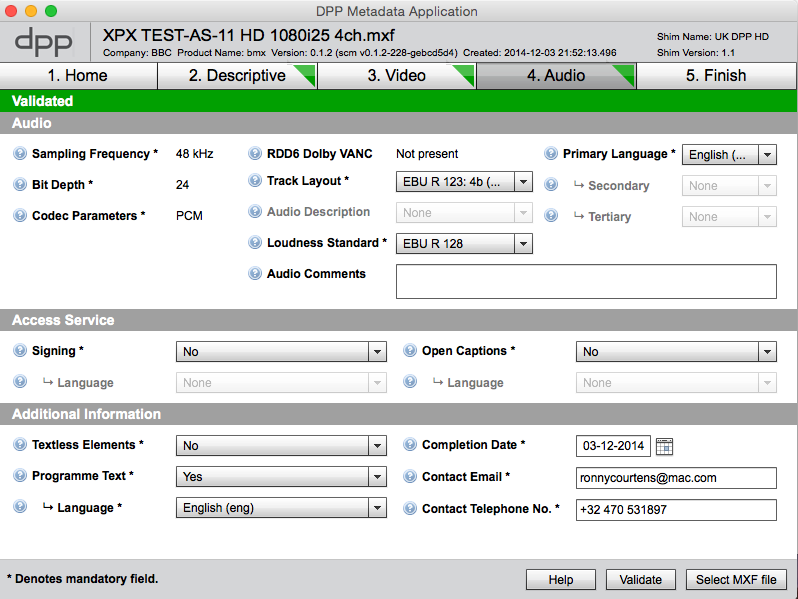
The MXF exported from FCP X/Compressor is fully compliant with all MXF broadcast delivery standards. We have done extensive testing and we had our files checked by an external test office. Everything perfect. Some technical supervisor from BBC posted on FB that the MXF files were not DPP compliant for BBC delivery because the MXF did not include the Shim Name and the Shim Version. I have proved he was absolutely wrong. The Shims are added to the MXF file when you validate the final DPP AS-11 MXF file in the DPP metadata validation app.
Here you see the DPP metadata validation app with one of the R123:4b files we created. Green lights all the way and OK for BBC broadcast delivery:
- Ronny
Please Log in to join the conversation.
- Roadswitcher
-
- Offline
- Senior Member
-
- Posts: 56
- Thank you received: 4
Before X will go active here in February, I'll test run everything, create a template like the one I already made for FCP7, and show the editors how to "route" the audio roles via the Master File export and Compressor's AS-11 "treatment". The DPP app is really helpful here, as you made it clear for the R123:4b config.
Just sorry that we still hav to create a legal MXF file in TWO steps.
Maybe (one day) we'll get a direct multitrack export routine for MXF .....
Thank you again Ronny for all the knowledge around MXF and the related audio handling you are sharing with us on this board.
alex
Please Log in to join the conversation.
