


- Posts: 4455
- Thank you received: 962
3 Post Moderation Rule for New Boarders (25 Jan 2021)
New boarders will have their posts moderated - Don't worry if you cannot see your post immediately.
Audio replacement workflow
- ronny courtens
-

- Offline
- Moderator
-

Less
More
04 Nov 2014 21:49 - 04 Nov 2014 22:05 #55520
by ronny courtens
Replied by ronny courtens on topic Audio replacement workflow
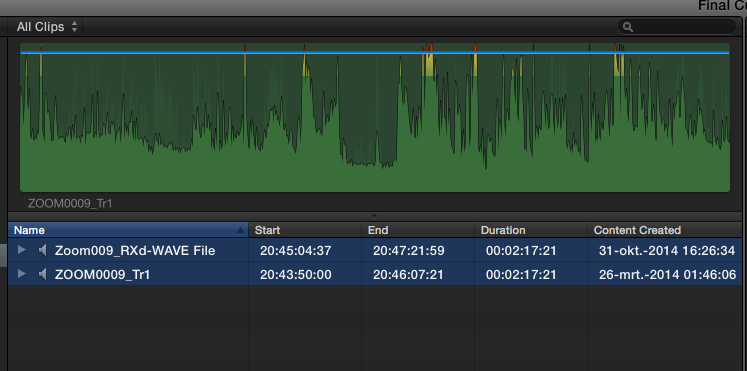
You are correct. When I import both files in FCP X the start TCs are different, while Wave Agent says they are the same:
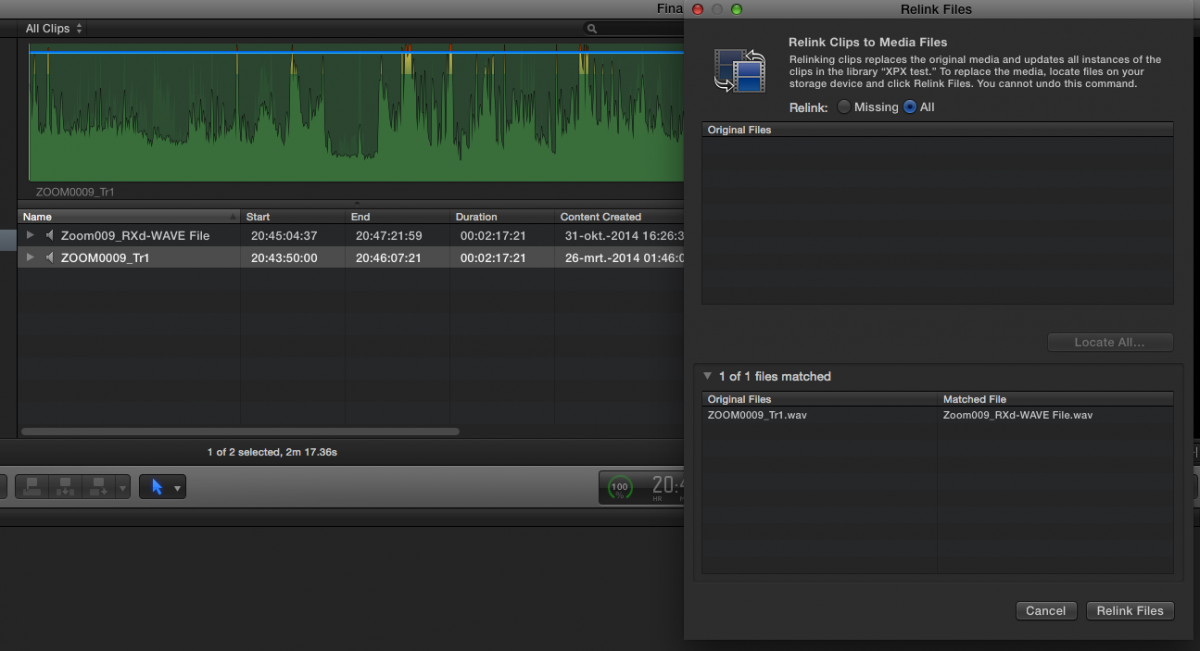
But when I try to relink the original clip to the improved clip on my desktop, the files match and I am able to relink:
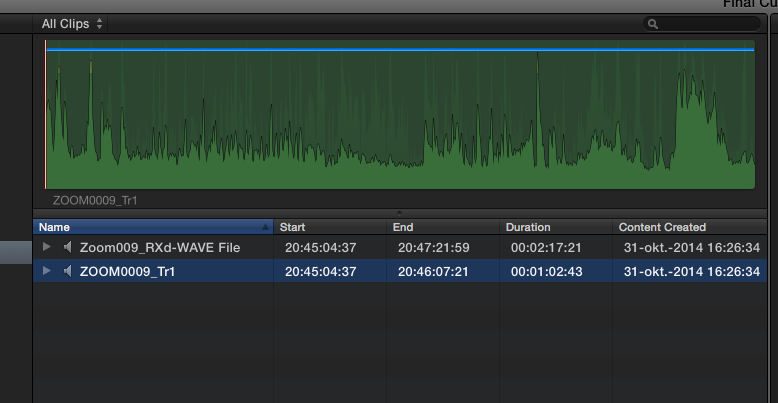
You can see that the clip has been relinked, the start TC is now the same as the start TC of the modified clip to which it has been linked:
So the real question is:
Why am I able to relink these files on my system while you cannot relink exactly the same files on your system?
A suggestion:
Try to relink an original clip (ZOOM0009-Tr1) in your FCP X clip browser to the same original clip (ZOOM0009-Tr1) in the folder I have sent you.
When this has been done, relink the clip to the improved clip (Zoom009_Rxd-WAVE FILE) in the folder and see if this works.
Off to sleep now, but I ill be back around 6 a.m. local time.
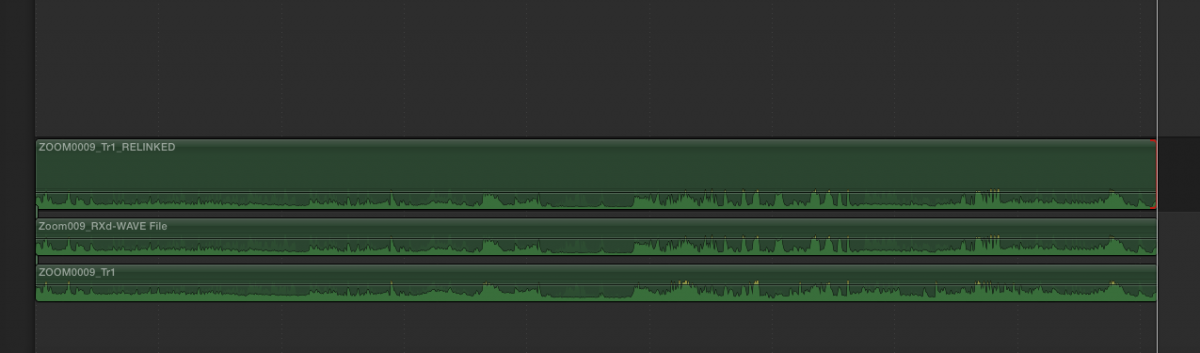
EDIT: having a closer look at the relinked clip I saw that the duration of the relinked clip is different than the duration of the clip it was relinked to. But that's just FCP X messing up. When I put the clips on the timeline I can extend the relinked clip. The original clip (which I re-imported after relinking), the relinked clip and the improved clip all have the same length and they match perfectly:
- Ronny
But when I try to relink the original clip to the improved clip on my desktop, the files match and I am able to relink:
You can see that the clip has been relinked, the start TC is now the same as the start TC of the modified clip to which it has been linked:
So the real question is:
Why am I able to relink these files on my system while you cannot relink exactly the same files on your system?
A suggestion:
Try to relink an original clip (ZOOM0009-Tr1) in your FCP X clip browser to the same original clip (ZOOM0009-Tr1) in the folder I have sent you.
When this has been done, relink the clip to the improved clip (Zoom009_Rxd-WAVE FILE) in the folder and see if this works.
Off to sleep now, but I ill be back around 6 a.m. local time.
EDIT: having a closer look at the relinked clip I saw that the duration of the relinked clip is different than the duration of the clip it was relinked to. But that's just FCP X messing up. When I put the clips on the timeline I can extend the relinked clip. The original clip (which I re-imported after relinking), the relinked clip and the improved clip all have the same length and they match perfectly:
- Ronny
Last edit: 04 Nov 2014 22:05 by ronny courtens.
Please Log in to join the conversation.
- ronny courtens
-
- Offline
- Moderator
-
Less
More
- Posts: 4455
- Thank you received: 962
05 Nov 2014 07:51 #55547
by ronny courtens
Replied by ronny courtens on topic Audio replacement workflow
Hi Manoucho,
I just did some further testing. I brought an original clip and the improved one, both from the folder I have sent you, back into Wave Agent.
I set a frame rate for the original clip, the same 23,98 one as I had set for the modified clip, and I saved. Then I imported both clips into FCP X and now they show exactly the same start TC in FCP X. It is clear that FCP X sees the start TC of an audio clip according to the frame rate of the audio clip set in Wave Agent.
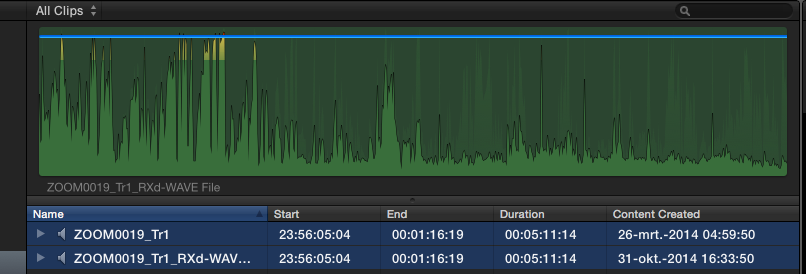
Still that does not explain why I can relink the clips and you cannot. What OS are you running? I am doing this on a system running Yosemite and I know a lot of things have changed with relation to video and audio in Yosemite. Maybe that's why FCP X could be less picky relinking on my system than on yours.
- Ronny
I just did some further testing. I brought an original clip and the improved one, both from the folder I have sent you, back into Wave Agent.
I set a frame rate for the original clip, the same 23,98 one as I had set for the modified clip, and I saved. Then I imported both clips into FCP X and now they show exactly the same start TC in FCP X. It is clear that FCP X sees the start TC of an audio clip according to the frame rate of the audio clip set in Wave Agent.
Still that does not explain why I can relink the clips and you cannot. What OS are you running? I am doing this on a system running Yosemite and I know a lot of things have changed with relation to video and audio in Yosemite. Maybe that's why FCP X could be less picky relinking on my system than on yours.
- Ronny
Please Log in to join the conversation.
- Andreas Kiel
-

- Offline
- Platinum Member
-

Less
More
- Posts: 1077
- Thank you received: 189
05 Nov 2014 12:00 - 05 Nov 2014 12:32 #55549
by Andreas Kiel
Replied by Andreas Kiel on topic Audio replacement workflow
Hmmm,
I haven't seen the files.
But I would be really amazed if FCP(X) ever cared about about metadata like FPS.
This is an issue since a decade.
So it doesn't matter what FPS entry you make in Wave Agent.
- Andreas
EDIT:
If you change the FPS base in Wave Agent the timestamp (TIMESTAMP_SAMPLES_SINCE_MIDNIGHT_LO) won't be changed. So nothing changes unless the target application can handle BWAV metadata.
One thing though with can happen is that the app which was used to "enhance" the audio used it's own timebase and changes the samplerate to fit into it's environment.
The saved file will be different for FCP X.
I haven't seen the files.
But I would be really amazed if FCP(X) ever cared about about metadata like FPS.
This is an issue since a decade.
So it doesn't matter what FPS entry you make in Wave Agent.
- Andreas
EDIT:
If you change the FPS base in Wave Agent the timestamp (TIMESTAMP_SAMPLES_SINCE_MIDNIGHT_LO) won't be changed. So nothing changes unless the target application can handle BWAV metadata.
One thing though with can happen is that the app which was used to "enhance" the audio used it's own timebase and changes the samplerate to fit into it's environment.
The saved file will be different for FCP X.
Last edit: 05 Nov 2014 12:32 by Andreas Kiel.
Please Log in to join the conversation.

05 Nov 2014 13:07 - 05 Nov 2014 13:26 #55551
by Emmanuel
Replied by Emmanuel on topic Audio replacement workflow
Ronny, Andreas
This project is starting to become a nightmare but I'm REALLY GLAD you guys are on board to help out.
Ronny: I've tried what you suggested:
- relink original file with original file you sent me -> OK
- then relink to modified file -> NOT OK
Arrrgh.........
-EDIT:
I am on Mavericks. I did not upgrade PRECISELY because they say not to do so in the middle of a project. Shall I ?
This project is starting to become a nightmare but I'm REALLY GLAD you guys are on board to help out.
Ronny: I've tried what you suggested:
- relink original file with original file you sent me -> OK
- then relink to modified file -> NOT OK
Arrrgh.........
-EDIT:
I am on Mavericks. I did not upgrade PRECISELY because they say not to do so in the middle of a project. Shall I ?
Last edit: 05 Nov 2014 13:26 by Emmanuel.
Please Log in to join the conversation.
- Andreas Kiel
-
- Offline
- Platinum Member
-
Less
More
- Posts: 1077
- Thank you received: 189
05 Nov 2014 13:34 #55552
by Andreas Kiel
Replied by Andreas Kiel on topic Audio replacement workflow
Manoucho,
You can send me the offending files as well, I'll have a look.
kiel{at}spherico(dot)com
- Andreas
You can send me the offending files as well, I'll have a look.
kiel{at}spherico(dot)com
- Andreas
Please Log in to join the conversation.
05 Nov 2014 13:38 #55553
by Emmanuel
Replied by Emmanuel on topic Audio replacement workflow
Just done so. Thanks a lot again.
Please Log in to join the conversation.
- Andreas Kiel
-
- Offline
- Platinum Member
-
Less
More
- Posts: 1077
- Thank you received: 189
05 Nov 2014 15:01 - 05 Nov 2014 15:01 #55554
by Andreas Kiel
Replied by Andreas Kiel on topic Audio replacement workflow
What software was used to modify the files?
Could you create a XML from the project?
- Andreas
Could you create a XML from the project?
- Andreas
Last edit: 05 Nov 2014 15:01 by Andreas Kiel.
Please Log in to join the conversation.
05 Nov 2014 15:48 #55557
by Emmanuel
Replied by Emmanuel on topic Audio replacement workflow
Guys I've made an interesting discovery:
- If I create a new event and replace the file, I can relink the file without problem.
- But if I place the file on a new project and edit it, then I can't relink it.
It seems to confirm that it is a timecode interpretation issue.
- If I create a new event and replace the file, I can relink the file without problem.
- But if I place the file on a new project and edit it, then I can't relink it.
It seems to confirm that it is a timecode interpretation issue.
Please Log in to join the conversation.
- Andreas Kiel
-
- Offline
- Platinum Member
-
Less
More
- Posts: 1077
- Thank you received: 189
05 Nov 2014 16:29 #55558
by Andreas Kiel
Replied by Andreas Kiel on topic Audio replacement workflow
Manoucho,
Protools should be able to save a .wav with timecode.
I had only had a short look at your files today, but will have a closer 1 tomorrow.
- Andreas
Protools should be able to save a .wav with timecode.
I had only had a short look at your files today, but will have a closer 1 tomorrow.
- Andreas
Please Log in to join the conversation.
- ronny courtens
-
- Offline
- Moderator
-
Less
More
- Posts: 4455
- Thank you received: 962
05 Nov 2014 16:29 - 05 Nov 2014 16:30 #55559
by ronny courtens
Replied by ronny courtens on topic Audio replacement workflow
Manoucho,
That's interesting. And this of course would explain why I was able to relink the files while it did not work for you. I am happy to see Andreas is looking at this problem as well. I will do some further testing in a few hours. I'm sure we will be able to solve this nightmare.
- Ronny
That's interesting. And this of course would explain why I was able to relink the files while it did not work for you. I am happy to see Andreas is looking at this problem as well. I will do some further testing in a few hours. I'm sure we will be able to solve this nightmare.
- Ronny
Last edit: 05 Nov 2014 16:30 by ronny courtens.
Please Log in to join the conversation.
- Andreas Kiel
-
- Offline
- Platinum Member
-
Less
More
- Posts: 1077
- Thank you received: 189
05 Nov 2014 17:06 #55560
by Andreas Kiel
Replied by Andreas Kiel on topic Audio replacement workflow
Here a bit really technical background.
I actually only looked at 2 files to analyze the data structure ( I won't explain what is what).
The data structure looks very different for the files.
Original:
|fmt |:"Idx: 3 StartPoint: 878 Length: 31882", RIFF:"Idx: 1 StartPoint: 0 Length: 12", |data|:"Idx: 4 StartPoint: 32760 Length: 46909448", bext:"Idx: 2 StartPoint: 12 Length: 866"
Modified:
RIFF:"Idx: 1 StartPoint: 0 Length: 12", |fmt |:"Idx: 2 StartPoint: 12 Length: 4076", |data|:"Idx: 3 StartPoint: 4088 Length: 46909448"
That's the reason FCP X won't relink.
I'll think about a solution tomorrow.
- Andreas
I actually only looked at 2 files to analyze the data structure ( I won't explain what is what).
The data structure looks very different for the files.
Original:
|fmt |:"Idx: 3 StartPoint: 878 Length: 31882", RIFF:"Idx: 1 StartPoint: 0 Length: 12", |data|:"Idx: 4 StartPoint: 32760 Length: 46909448", bext:"Idx: 2 StartPoint: 12 Length: 866"
Modified:
RIFF:"Idx: 1 StartPoint: 0 Length: 12", |fmt |:"Idx: 2 StartPoint: 12 Length: 4076", |data|:"Idx: 3 StartPoint: 4088 Length: 46909448"
That's the reason FCP X won't relink.
I'll think about a solution tomorrow.
- Andreas
Please Log in to join the conversation.
- ronny courtens
-
- Offline
- Moderator
-
Less
More
- Posts: 4455
- Thank you received: 962
05 Nov 2014 17:26 #55561
by ronny courtens
Replied by ronny courtens on topic Audio replacement workflow
Thank you for looking into this, Andreas.
@Manoucho:
I have just sent you one audio file: "ZOOM009_Rxd WAVE FILE"
Try to relink this file to the "ZOOM0009_Tr1" clip in your FCP X Clip Browser. It relinks on my system without any problems, even after having created a Project with parts of the original clip on the timeline.
Does this work for you as well now?
- Ronny
@Manoucho:
I have just sent you one audio file: "ZOOM009_Rxd WAVE FILE"
Try to relink this file to the "ZOOM0009_Tr1" clip in your FCP X Clip Browser. It relinks on my system without any problems, even after having created a Project with parts of the original clip on the timeline.
Does this work for you as well now?
- Ronny
Please Log in to join the conversation.
- ronny courtens
-
- Offline
- Moderator
-
Less
More
- Posts: 4455
- Thank you received: 962
05 Nov 2014 18:00 #55562
by ronny courtens
Replied by ronny courtens on topic Audio replacement workflow
Hi Andreas,
I think I have found the solution. The problem with resetting the time code in Wave Agent is that you absolutely need to enter a "frame rate" for the file before WA allows you to modify the time code. This "frame rate" metadata absolutely confuses FCP X, it makes it display completely wrong start and end time codes for the imported clip.
So I have opened the file that needs to be relinked in Logic Pro X and I have changed the Project time code so it matches the time code of the original clip in FCP X. I have exported the file as a new 24-bit WAV file and it immediately relinks to the original clip in FCP X.
- Ronny
I think I have found the solution. The problem with resetting the time code in Wave Agent is that you absolutely need to enter a "frame rate" for the file before WA allows you to modify the time code. This "frame rate" metadata absolutely confuses FCP X, it makes it display completely wrong start and end time codes for the imported clip.
So I have opened the file that needs to be relinked in Logic Pro X and I have changed the Project time code so it matches the time code of the original clip in FCP X. I have exported the file as a new 24-bit WAV file and it immediately relinks to the original clip in FCP X.
- Ronny
Please Log in to join the conversation.
- Andreas Kiel
-
- Offline
- Platinum Member
-
Less
More
- Posts: 1077
- Thank you received: 189
05 Nov 2014 18:13 #55563
by Andreas Kiel
Replied by Andreas Kiel on topic Audio replacement workflow
Ronny,
That's a brilliant idea.
- Andreas
That's a brilliant idea.
- Andreas
Please Log in to join the conversation.
07 Nov 2014 11:16 #55649
by Emmanuel
Replied by Emmanuel on topic Audio replacement workflow
Hi guys
Sorry for my silence I was working away from the office yesterday.
Ronny: the file you sent me works !!!!!!!!!!!!!!!!!!!!!!!!!!!!!! :woohoo: :woohoo: :woohoo: :woohoo: :woohoo:
I've also tried to put it on top of the original file and I was relieved to see that there is no echo/delay between the two.
The last big step is if X2Pro will handle it well, but it seems we're very close.
Wow I don't know how to thank you!
The only problem is that I don't have LPX, could I take advantage of your generosity and ask you to do the other files as well ? If you don't have time no problem I'll find somebody who has it.
Thank you thank you thank you thank you
Sorry for my silence I was working away from the office yesterday.
Ronny: the file you sent me works !!!!!!!!!!!!!!!!!!!!!!!!!!!!!! :woohoo: :woohoo: :woohoo: :woohoo: :woohoo:
I've also tried to put it on top of the original file and I was relieved to see that there is no echo/delay between the two.
The last big step is if X2Pro will handle it well, but it seems we're very close.
Wow I don't know how to thank you!
The only problem is that I don't have LPX, could I take advantage of your generosity and ask you to do the other files as well ? If you don't have time no problem I'll find somebody who has it.
Thank you thank you thank you thank you
Please Log in to join the conversation.
- ronny courtens
-
- Offline
- Moderator
-
Less
More
- Posts: 4455
- Thank you received: 962
07 Nov 2014 20:07 #55671
by ronny courtens
Replied by ronny courtens on topic Audio replacement workflow
Hey Manoucho,
Glad we have finally gotten you out of this nightmare. No problem, I will modify the other files in LPX on Saturday morning and I will send you the folder with the correct files as soon as all are done and tested.
We also use ProTools in-house and I can confirm X2Pro has no issues with relinked clips. Whenever we need to relink files I always make sure the relinked clip in the Browser also gets the correct name (which FCP X really should do).
- Ronny
Glad we have finally gotten you out of this nightmare. No problem, I will modify the other files in LPX on Saturday morning and I will send you the folder with the correct files as soon as all are done and tested.
We also use ProTools in-house and I can confirm X2Pro has no issues with relinked clips. Whenever we need to relink files I always make sure the relinked clip in the Browser also gets the correct name (which FCP X really should do).
- Ronny
Please Log in to join the conversation.
- ronny courtens
-
- Offline
- Moderator
-
Less
More
- Posts: 4455
- Thank you received: 962
09 Nov 2014 16:59 #55723
by ronny courtens
Replied by ronny courtens on topic Audio replacement workflow
The files have been sent to your email address.
- Ronny
- Ronny
Please Log in to join the conversation.
10 Nov 2014 12:33 #55751
by Emmanuel
Replied by Emmanuel on topic Audio replacement workflow
Ha Ronny
I don't know how to thank you. You've been unbelievably helpful, patient, competent. I'll make sure to add you in the thanks section of the credits it's the minimum I can do. And I'll be happy to invite you for a coffee next time I pass by Brussels, if you have time of course!
I don't know how to thank you. You've been unbelievably helpful, patient, competent. I'll make sure to add you in the thanks section of the credits it's the minimum I can do. And I'll be happy to invite you for a coffee next time I pass by Brussels, if you have time of course!
Please Log in to join the conversation.
- ronny courtens
-
- Offline
- Moderator
-
Less
More
- Posts: 4455
- Thank you received: 962
10 Nov 2014 12:47 #55752
by ronny courtens
Replied by ronny courtens on topic Audio replacement workflow
Hi Manoucho,
Happy to hear it has finally worked. I have learned something in this process as well. The fact that Wave Agent insists on entering a frame rate for the audio before you can modify the start TC of a clip seems to confuse FCP X. So for future reference it is better to have the audio guy send back the modified clips with the same time code as the original ones. And if they cannot do this, LPX can always come to the rescue
I will be happy to meet you some day soon, I have seen your website and I like the work you guys are doing. I regularly come to Amsterdam, it's one of my favorite towns in Holland. I will contact you a few days before my next visit, so we can have a chat.
- Ronny
Happy to hear it has finally worked. I have learned something in this process as well. The fact that Wave Agent insists on entering a frame rate for the audio before you can modify the start TC of a clip seems to confuse FCP X. So for future reference it is better to have the audio guy send back the modified clips with the same time code as the original ones. And if they cannot do this, LPX can always come to the rescue
I will be happy to meet you some day soon, I have seen your website and I like the work you guys are doing. I regularly come to Amsterdam, it's one of my favorite towns in Holland. I will contact you a few days before my next visit, so we can have a chat.
- Ronny
Please Log in to join the conversation.
