- Posts: 4455
- Thank you received: 962
3 Post Moderation Rule for New Boarders (25 Jan 2021)
New boarders will have their posts moderated - Don't worry if you cannot see your post immediately.
Audio replacement workflow
- ronny courtens
-

- Offline
- Moderator
-

Less
More
28 Oct 2014 17:50 #55014
by ronny courtens
Replied by ronny courtens on topic Audio replacement workflow
You are correct, an audio file does not have an original frame rate. But if you want to modify a start time code in Wave Agent you need to set a frame rate.
If the start TC is correct but the duration is shorter you have a problem. Either the sound guy has not exported the file as he should have, or the audio already had a frame rate set to it. What happens when you set the frame rate to 25 fps?
- Ronny
If the start TC is correct but the duration is shorter you have a problem. Either the sound guy has not exported the file as he should have, or the audio already had a frame rate set to it. What happens when you set the frame rate to 25 fps?
- Ronny
Please Log in to join the conversation.


28 Oct 2014 17:56 #55016
by Emmanuel
Replied by Emmanuel on topic Audio replacement workflow
Okaye this is the status:
If I choose 24FPS and I uncheck "preserve TC start", I get the right duration etc. in FCPX.
However, FCPX still doesn't want to relink, but is not saying specifically why.
Any idea ?
If I choose 24FPS and I uncheck "preserve TC start", I get the right duration etc. in FCPX.
However, FCPX still doesn't want to relink, but is not saying specifically why.
Any idea ?
Please Log in to join the conversation.
28 Oct 2014 18:00 #55017
by Emmanuel
Replied by Emmanuel on topic Audio replacement workflow
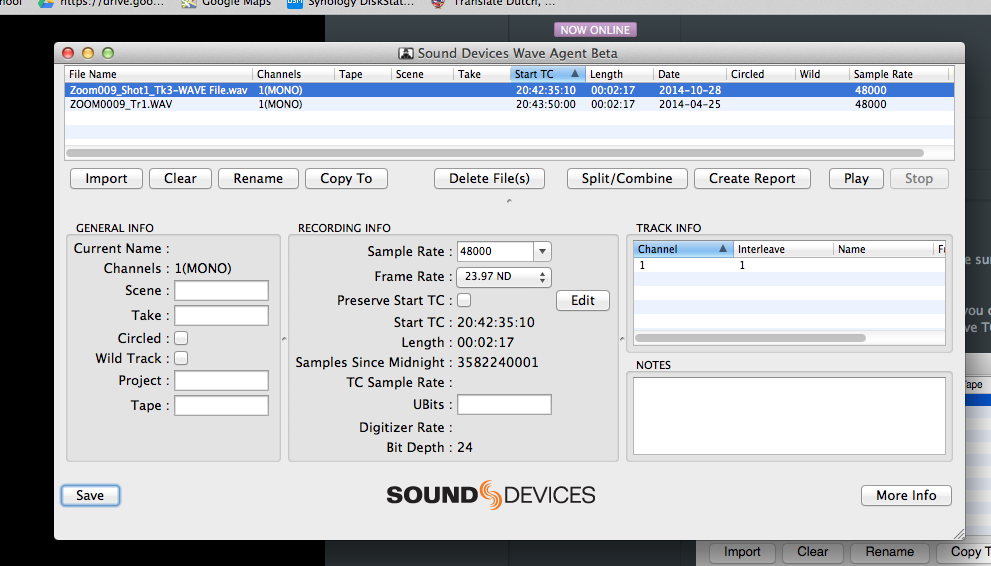
So the issue is that the original file has 3 channels (although 2 are probably empty) and the restored one has 1.
Please Log in to join the conversation.
28 Oct 2014 18:09 #55019
by Emmanuel
Replied by Emmanuel on topic Audio replacement workflow
Pff it's getting more and more complex.
So. The Zoom recorded 3 tracks at the same time (3 different mics), giving 3 different files ending with Tr1, Tr2 and Tr3.
It seems like FCPX stills sees a link between the files, and requires the other channels. But I'm really trying to replace Tr1 only, so why is this happening ?
I'm totally lost. Maybe I shall sleep on it.
So. The Zoom recorded 3 tracks at the same time (3 different mics), giving 3 different files ending with Tr1, Tr2 and Tr3.
It seems like FCPX stills sees a link between the files, and requires the other channels. But I'm really trying to replace Tr1 only, so why is this happening ?
I'm totally lost. Maybe I shall sleep on it.
Please Log in to join the conversation.
- ronny courtens
-
- Offline
- Moderator
-
Less
More
- Posts: 4455
- Thank you received: 962
28 Oct 2014 18:14 #55020
by ronny courtens
Replied by ronny courtens on topic Audio replacement workflow
Hey manoucho,
Yes, this is getting quite complicated. The audio guy should have respected the channel configuration and he should have returned the corrected audio with 3 tracks, even though you only use the first one. That is a must if you need to properly relink corrected audio. But okay, we will try to figure this out.
It's getting late here as well (I live in Belgium, BTW), so let's call it a day and we will try to find a solution tomorrow morning.
- Ronny
Yes, this is getting quite complicated. The audio guy should have respected the channel configuration and he should have returned the corrected audio with 3 tracks, even though you only use the first one. That is a must if you need to properly relink corrected audio. But okay, we will try to figure this out.
It's getting late here as well (I live in Belgium, BTW), so let's call it a day and we will try to find a solution tomorrow morning.
- Ronny
Please Log in to join the conversation.
29 Oct 2014 11:13 #55079
by Emmanuel
Replied by Emmanuel on topic Audio replacement workflow
Hi Ronny
Thanks again for your invaluable help. I'm also on the same time as you, I am French living in Amsterdam. We might even have 1, 2 or 3 languages in common
I don't mind coming back to the audio designer, but what I don't understand is that the original audio tracks don't seem at all to have 3 channels. I can only see 3 channels in Wave Agent.
That's why I'm so confused. Maybe it's an idea if I send you one file to look at ?
Thanks again for your invaluable help. I'm also on the same time as you, I am French living in Amsterdam. We might even have 1, 2 or 3 languages in common
I don't mind coming back to the audio designer, but what I don't understand is that the original audio tracks don't seem at all to have 3 channels. I can only see 3 channels in Wave Agent.
That's why I'm so confused. Maybe it's an idea if I send you one file to look at ?
Please Log in to join the conversation.
- ronny courtens
-
- Offline
- Moderator
-
Less
More
- Posts: 4455
- Thank you received: 962
29 Oct 2014 12:08 #55084
by ronny courtens
Replied by ronny courtens on topic Audio replacement workflow
Hey manoucho,
I have had a look at your website. I love the work you guys are doing, excellent! Yes, I speak 5 languages so we certainly will have Dutch, French and English in common
I agree it would be best if you could send me the audio so I can see what really is going on and how we can solve this. It should not be that difficult.
I will need two files:
- an original audio file that you have imported in FCP X (the same as you have sent to your audio engineer)
- the corresponding corrected audio file that the audio engineer has sent back to you and that you cannot relink
Don't do anything to the files, just send them to me as you have them on your system (no modified TC).
You can send the files to this email address: ronnycourtens(at)mac(dot)com
I will have a look at them as soon as I get them.
- Ronny
I have had a look at your website. I love the work you guys are doing, excellent! Yes, I speak 5 languages so we certainly will have Dutch, French and English in common
I agree it would be best if you could send me the audio so I can see what really is going on and how we can solve this. It should not be that difficult.
I will need two files:
- an original audio file that you have imported in FCP X (the same as you have sent to your audio engineer)
- the corresponding corrected audio file that the audio engineer has sent back to you and that you cannot relink
Don't do anything to the files, just send them to me as you have them on your system (no modified TC).
You can send the files to this email address: ronnycourtens(at)mac(dot)com
I will have a look at them as soon as I get them.
- Ronny
Please Log in to join the conversation.
29 Oct 2014 12:45 #55086
by Emmanuel
Replied by Emmanuel on topic Audio replacement workflow
Thank you so much Ronny! Sending you everything now.
Please Log in to join the conversation.
29 Oct 2014 12:46 #55087
by Emmanuel
Replied by Emmanuel on topic Audio replacement workflow
And thank you for the compliments of course, very kind of you. What is your job precisely? Are you an editor ?
Please Log in to join the conversation.
- ronny courtens
-
- Offline
- Moderator
-
Less
More
- Posts: 4455
- Thank you received: 962
29 Oct 2014 13:19 #55089
by ronny courtens
Replied by ronny courtens on topic Audio replacement workflow
I have been in the film and television business for over 37 years. I am an editor at heart and I have worked for some major European post houses and television stations. Over the years I have done quite some VFX work as well. Today I am taking it easier. I'm working as an independent post-production manager for feature films and as a workflow consultant for European television companies and production houses. But I still edit stuff myself whenever I have the time, and always on FCP X.
- Ronny
- Ronny
Please Log in to join the conversation.
29 Oct 2014 13:49 #55093
by Emmanuel
Replied by Emmanuel on topic Audio replacement workflow
Oh you worked at Studio l'Equipe ! They graded my previous short !
Please Log in to join the conversation.
- ronny courtens
-
- Offline
- Moderator
-
Less
More
- Posts: 4455
- Thank you received: 962
29 Oct 2014 14:05 #55095
by ronny courtens
Replied by ronny courtens on topic Audio replacement workflow
Yes, I was a senior partner there before I started my own company. I also started up CMC in Malakoff (Paris) for them, which is now part of the Monal Group. L'Equipe is indeed a big name in the feature film world. I started working there in the very early days of video (when the words internet and cell-phone did not even exist), and the owners Philippe and André are still good friends of mine.
I have downloaded your files. I am still struggling with a WAVE problem from another thread on the forum. I will have a look at your files in a few moments.
- Ronny
I have downloaded your files. I am still struggling with a WAVE problem from another thread on the forum. I will have a look at your files in a few moments.
- Ronny
Please Log in to join the conversation.
29 Oct 2014 14:15 #55097
by Emmanuel
Replied by Emmanuel on topic Audio replacement workflow
Such an honour to be helped by you then
Please Log in to join the conversation.
29 Oct 2014 17:22 #55119
by Emmanuel
Replied by Emmanuel on topic Audio replacement workflow
OK, going home now. Let's see tomorrow if we can find a solution. Thanks again!
Please Log in to join the conversation.
- ronny courtens
-
- Offline
- Moderator
-
Less
More
- Posts: 4455
- Thank you received: 962
29 Oct 2014 17:25 #55120
by ronny courtens
Replied by ronny courtens on topic Audio replacement workflow
I have just found it!
Here you see the relinked file in FCP X:
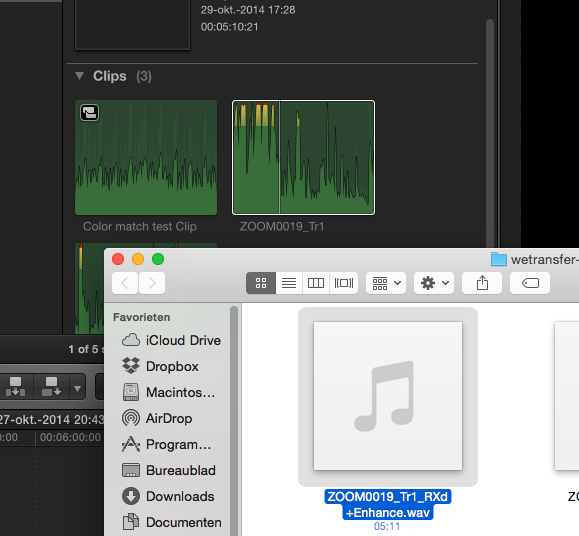
Post back tomorrow morning and I will show you how to do it.
- Ronny
Here you see the relinked file in FCP X:
Post back tomorrow morning and I will show you how to do it.
- Ronny
Please Log in to join the conversation.
30 Oct 2014 10:14 #55147
by Emmanuel
Replied by Emmanuel on topic Audio replacement workflow
I'm all ears, Ronny!
Please Log in to join the conversation.
- ronny courtens
-
- Offline
- Moderator
-
Less
More
- Posts: 4455
- Thank you received: 962
30 Oct 2014 11:25 #55150
by ronny courtens
Replied by ronny courtens on topic Audio replacement workflow
Hi Manoucho,
Actually it's quite easy, but you have to make sure to follow the correct steps in Wave Agent.
1. Open the original WAV file in WA.
2. Open the enhanced WAV file in WA. Now you can see both files under each other.
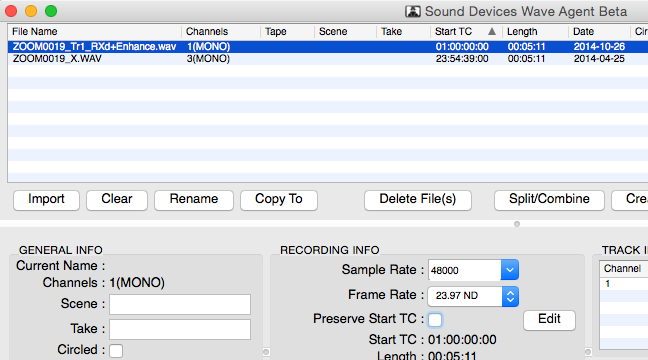
3. Select the enhanced file. De-select Preserve TC and set the Frame Rate to 23,97 ND:
4. Press the Edit button, select Edit manually in the edit window and enter the Sart TC you see in the original WAV into the edit window of the enhanced WAV:

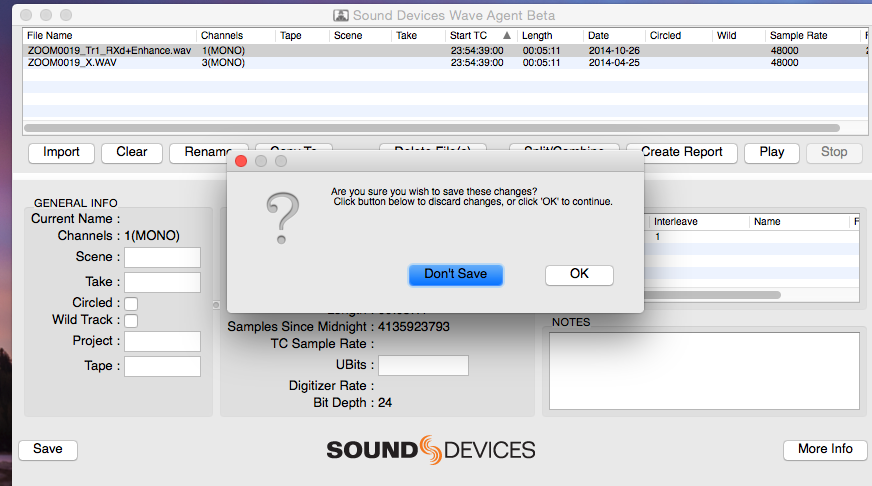
5. Press OK and then MOST IMPORTANT: press the Save button on the bottom-left of the WA window. You will get a message asking you to confirm, just press OK and your modifications will be saved to the file:
6. Now use the Relink function in FCP X to relink the original WAV to the modified WAV and everything will work:
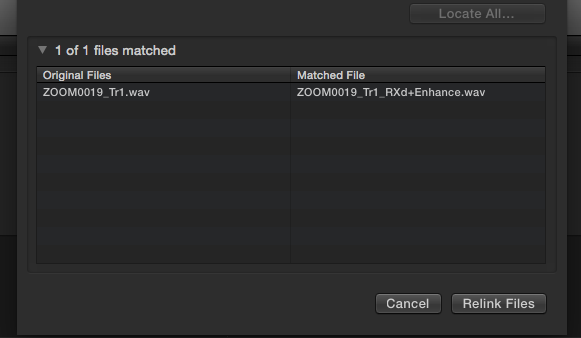
- Ronny
Actually it's quite easy, but you have to make sure to follow the correct steps in Wave Agent.
1. Open the original WAV file in WA.
2. Open the enhanced WAV file in WA. Now you can see both files under each other.
3. Select the enhanced file. De-select Preserve TC and set the Frame Rate to 23,97 ND:
4. Press the Edit button, select Edit manually in the edit window and enter the Sart TC you see in the original WAV into the edit window of the enhanced WAV:
5. Press OK and then MOST IMPORTANT: press the Save button on the bottom-left of the WA window. You will get a message asking you to confirm, just press OK and your modifications will be saved to the file:
6. Now use the Relink function in FCP X to relink the original WAV to the modified WAV and everything will work:
- Ronny
Please Log in to join the conversation.
30 Oct 2014 16:53 #55178
by Emmanuel
Replied by Emmanuel on topic Audio replacement workflow
Ronny
It looks very similar to what I had done but I probably didn't do everything in the right order. I didn't have time to try it today, I will do it tomorrow. Will keep you updated.
Merci encore et à demain.
It looks very similar to what I had done but I probably didn't do everything in the right order. I didn't have time to try it today, I will do it tomorrow. Will keep you updated.
Merci encore et à demain.
Please Log in to join the conversation.
- ronny courtens
-
- Offline
- Moderator
-
Less
More
- Posts: 4455
- Thank you received: 962
30 Oct 2014 16:55 #55180
by ronny courtens
Replied by ronny courtens on topic Audio replacement workflow
Oké, bonne chance et à demain!
- Ronny
- Ronny
Please Log in to join the conversation.