


3 Post Moderation Rule for New Boarders (25 Jan 2021)
New boarders will have their posts moderated - Don't worry if you cannot see your post immediately.
Audio replacement workflow


During the editing of a film, we've found out that some of the audio was very noisy. I've send the original audio tracks to an audio designer so he can fix the issues. My question is the following:
* Is there a way to lay those new audio tracks BELOW the current ones in the timeline, with the same edit as the original, WITHOUT erasing the original ones ?
If I wanted to do a full replacement, I'd simply relink the media to the new files. However I still need to keep both for some time. I hope you understand my question well

Thank you !!!!
Please Log in to join the conversation.
- ronny courtens
-

- Offline
- Moderator
-

- Posts: 4455
- Thank you received: 962
You can put the corrected audio clips under the old ones. Then you select the old clips and you press V to mute them, if that's what you mean.
- Ronny
Please Log in to join the conversation.
No, what I mean is that the film is already edited. So I'd need to whether alter the original tracks to "add" some tracks to it (I don't think it can be done) or find a creative workflow to get it done.
Not sure if I'm clear
Please Log in to join the conversation.
- ronny courtens
-
- Offline
- Moderator
-
- Posts: 4455
- Thank you received: 962
You have finished a film but the audio had some problems.
So you have sent the audio from the edited film to an audio engineer and he has sent you an improved audio track.
Now you want to add this improved audio to the FCP X timeline while also keeping the old audio for the time being.
Is that correct?
- Ronny
Please Log in to join the conversation.
You have finished a film but the audio had some problems.
- Correct.
So you have sent the audio from the edited film to an audio engineer and he has sent you an improved audio track.
- I have sent the ORIGINAL, unedited tracks to the audio engineer, not an AAF with the edit.
Now you want to add this improved audio to the FCP X timeline while also keeping the old audio for the time being.
- Correct. This is because the sound designer (who is not the same as the audio engineer) has asked me to do so, in case he rejects the improvements from the audio engineer.
Please Log in to join the conversation.
- ronny courtens
-
- Offline
- Moderator
-
- Posts: 4455
- Thank you received: 962
1. Duplicate your edited timeline as a Snapshot.
2. Create a new Library and drag the Project Snapshot into the new Library. This will copy all the clips used in the Project to your new Library, but if your media are external or if both Libraries are on the same drive this will not create duplicate media files.
3. In the new Library, relink the original audio clips to the new audio clips. This will replace the old audio with the new audio clips in the edited timeline. The audio in the original Project in the other Library will not be affected by this.
4. Now you have two edited timelines, one with the original edited audio in Library 1 and one with the improved edited audio in Library 2.
You can keep each projects separate in its own Library until the sound designer decides which edit he will keep.
But if you really want to see all the original and all the improved audio clips on the same timeline, you can do this as well. Here's the trick:
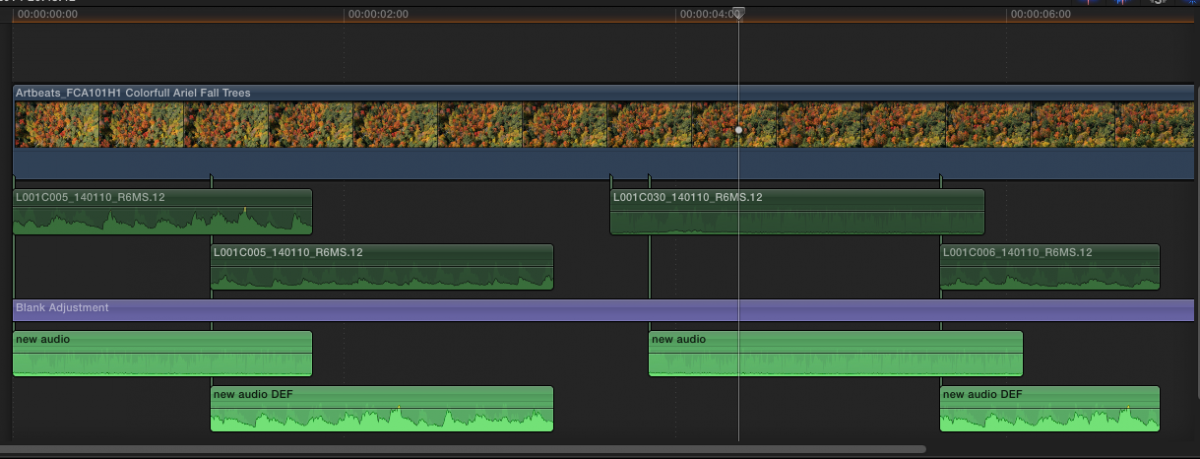
- In the original Project, add an Adjustment layer (or a totally empty title clip) under the audio and extend the layer from the beginning to the end of the timeline.
- Copy all the improved audio from the Snapshot Project in Library 2 and paste the improved audio clips under the adjustment layer in the original timeline in Library 1.
Now you will have one timeline with both the original and the improved edited audio clips:
- Ronny
Please Log in to join the conversation.


Please Log in to join the conversation.
Ronnie, I think you're describing exactly what I need to do.
Ben, I'm not sure to understand it, wouldn't it result in a simple audio export that I can't edit later ?
Please Log in to join the conversation.
Unfortunately the timecodes of the original file and the restored files do not match: the original did not start at 00:00, but the new ones do.
There is no other difference than that, but because of this FCPX refuses to re-link the files.
Is there anything I can do ?
Thank you !!!
Please Log in to join the conversation.
- ronny courtens
-
- Offline
- Moderator
-
- Posts: 4455
- Thank you received: 962
Do the original files and the ones you got back from the audio guy have the same format?
- Ronny
Please Log in to join the conversation.
- The original files are .wav
- I've received them in .wav and .aif
But I can confirm it's a timecode issue: for some reason one of the files I've received has the original timecode, and I can relink that one.
Please Log in to join the conversation.
Please Log in to join the conversation.
- ronny courtens
-
- Offline
- Moderator
-
- Posts: 4455
- Thank you received: 962
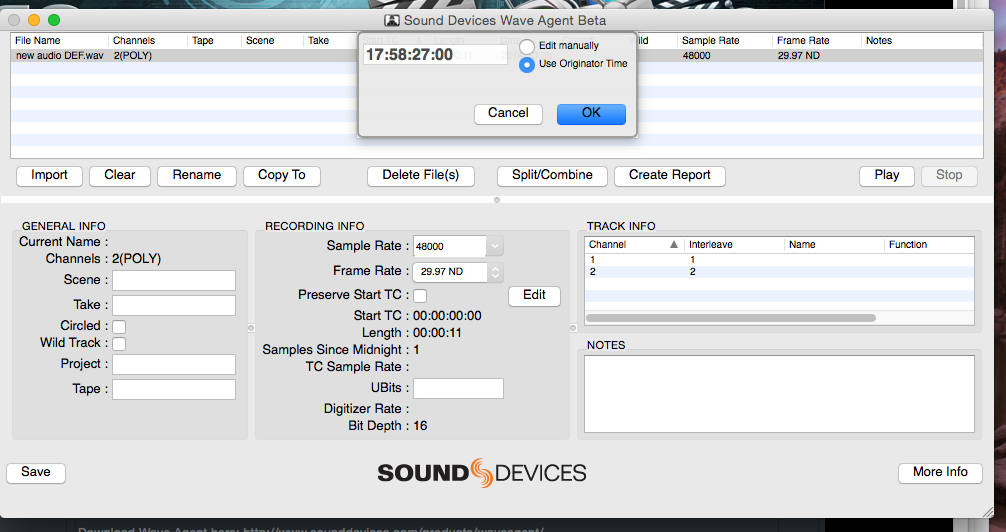
Download Wave Agent here: www.sounddevices.com/products/waveagent/
This is a free utility that will allow you to modify the start tc of any WAVE file.
Just modify the start TC for each file (make sure to enter the correct frame rate of your project first) and save the files. Then they should properly relink in FCP X.
- Ronny
Please Log in to join the conversation.
Please Log in to join the conversation.
Please Log in to join the conversation.
- ronny courtens
-
- Offline
- Moderator
-
- Posts: 4455
- Thank you received: 962
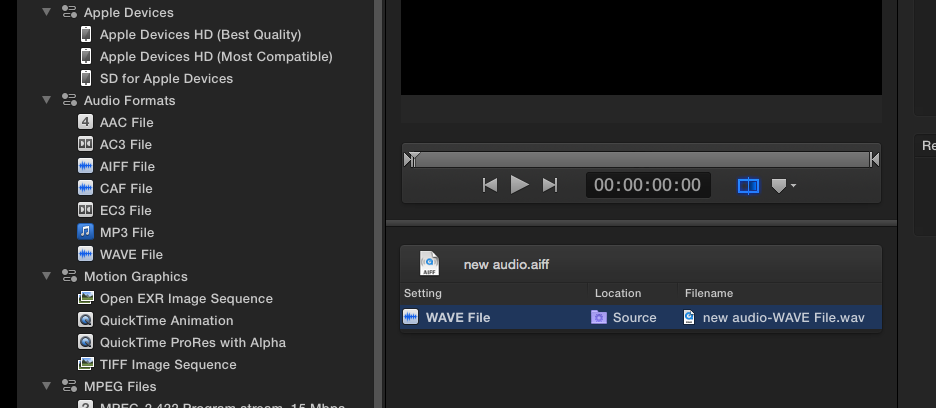
But yes, in Compressor you can do this as a batch:
- Ronny
Please Log in to join the conversation.
Please Log in to join the conversation.
The timecode I set in Wave Agent (23:54:39:00) is different from the timecode I see in FCPX (23:56:05:04).
Why this difference ?
Remark: in WAV agent I set the framerate as 23.97fps, the same rate as the timeline I am editing. But I don't know about the "original framerate" of the audio file, I thought an audio file doesn't have timerate, only frequency.
Please Log in to join the conversation.
Starting to get frustrating.
Please Log in to join the conversation.
