


3 Post Moderation Rule for New Boarders (25 Jan 2021)
New boarders will have their posts moderated - Don't worry if you cannot see your post immediately.
Audio sync problem. I suspect this is a sample rate problem? (i am still learning)
- TripleX808
-
 Topic Author
- Offline
- Senior Member
-

- Alright?
Please Log in to join the conversation.
- ronny courtens
-

- Offline
- Moderator
-

- Posts: 4455
- Thank you received: 962
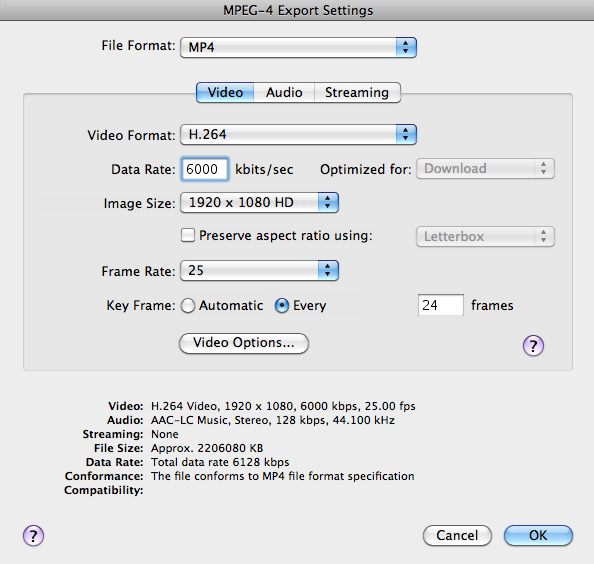
With these settings you will get an H.264/MP4 file of 2 GB. We can push this further, but I would not go too high because otherwise the file won't play fluidly from a USB stick. USB is very, very slow

My suggestion: change the Data Rate to 15000 kbits/sec. Then press OK. The settings window will close.
Now all you have to do is enter a name and a destination for the exported file and press the Save button. The export will begin. Depending on the speed of your computer this will certainly take some time but it should give you a pretty decent quality delivery file that will be around 5 to 6 GB and that will play both on Mac and PC.
-Ronny
Please Log in to join the conversation.
- TripleX808
-
Topic Author
- Offline
- Senior Member
-
- Alright?
Endless thanks for all your help! I couldn't have got this Assignment done without your help!
I will come back to my mac after I watch City hammer Arsenal (hopefully) lol


Please Log in to join the conversation.
- TripleX808
-
Topic Author
- Offline
- Senior Member
-
- Alright?

Please Log in to join the conversation.
- ronny courtens
-
- Offline
- Moderator
-
- Posts: 4455
- Thank you received: 962
-Ronny
Please Log in to join the conversation.
- TripleX808
-
Topic Author
- Offline
- Senior Member
-
- Alright?
46.48Gb now.
Can't think what to do to make more space?
The FCPX project and events folders are about 115Gb!!!
Please Log in to join the conversation.
- ronny courtens
-
- Offline
- Moderator
-
- Posts: 4455
- Thank you received: 962
Here's from the Apple support pages:
"Symptoms: When sharing to a QuickTime movie, Apple Devices, HTTP live streaming, or AAC audio, the following alert may appear "Failed: Quicktime could not access a file. Offset too big."
Resolution: This alert message indicates that the drive you are exporting to is getting full. To address this, clear up some space on your hard drive or share to a different drive with available space."
So you will need 40 + 25 = 65 GB to be really safe if you store the exported file to your system drive. If you have an external drive you can temporarily move some large files onto this drive, then start exporting again. Or you can export your H.264 file to that external drive.
Whenever you delete files to make space, don't forget to empty the Trash Can. If not the space is not made available.
-Ronny
Please Log in to join the conversation.
- TripleX808
-
Topic Author
- Offline
- Senior Member
-
- Alright?
Tried exporting to external (459Gb free of 1Tb). Tried copying master file to external THEN exporting QT7 H264 to my iMac main drive.
Made space on my iMac this morning so I had 140Gb of space and tried the same QT7 N263 export (data thing at 15000 again).
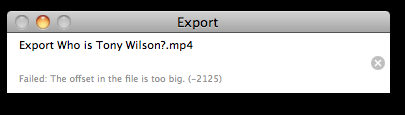
I don't understand why I am still getting this error message after making all this space???
Please Log in to join the conversation.

500GB drive must have at least 75GB of free space minimum to function properly. That would not include space needed for writing new files. All drives must maintain 15% of their total capacity ass free space, otherwise you can run in to odd system wide issues like this.
Please Log in to join the conversation.
- ronny courtens
-
- Offline
- Moderator
-
- Posts: 4455
- Thank you received: 962

If you have enough drive space the -2125 message also can indicate bad time code in your original clip. This is always at the very start or the very end of your file. To fix this:
Open your file in QT player. Look at the start of the video and at the end.
If you have a long black image (> 1 sec) before the video and audio actually start: press I to set an In trim-point just after the black.
If you have a long black image after the video and audio actually end: press O to set an Out trim-point.
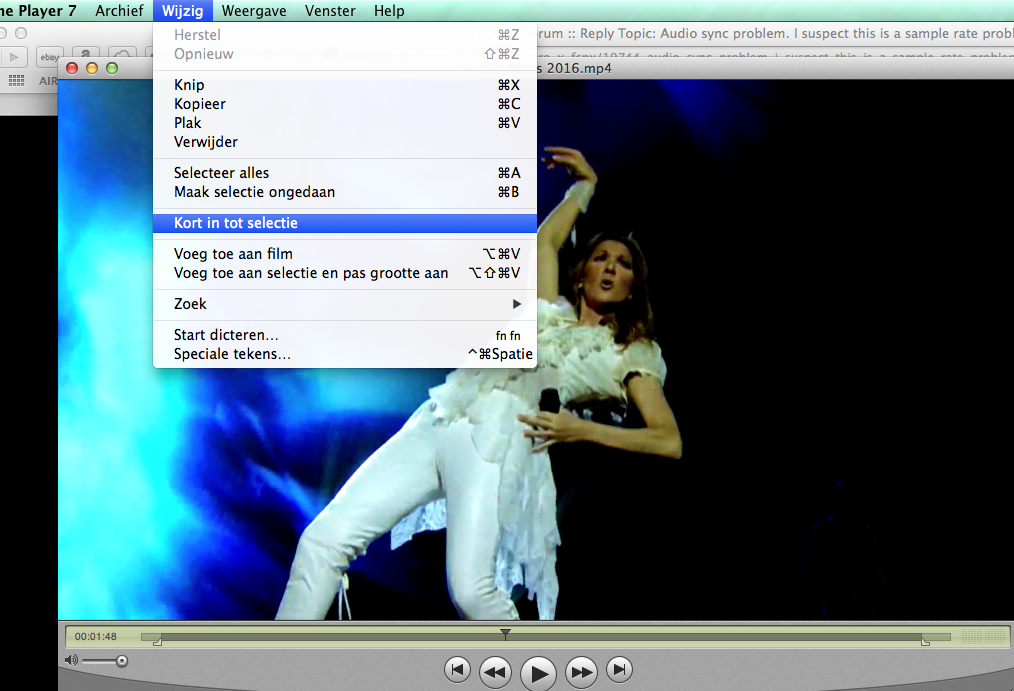
With your trim points set, choose Edit > Trim to Selection, the press CMD+S to save your trimmed movie and try exporting again.
Ronny
Please Log in to join the conversation.
- TripleX808
-
Topic Author
- Offline
- Senior Member
-
- Alright?
No point me posting a screenshot.
Please Log in to join the conversation.
- ronny courtens
-
- Offline
- Moderator
-
- Posts: 4455
- Thank you received: 962
Do you have MPEG Streamclip? This app can fix tc breaks and you can also export with it. I think the best thing we can do is to first create a new decent ProRes 422 stereo master and use that master for exporting.
If you don't have MPEG Streamclip: download it here and install it (it's free):
www.squared5.com/svideo/mpeg-streamclip-mac.html
When you have installed it, post back.
-Ronny
Please Log in to join the conversation.
- TripleX808
-
Topic Author
- Offline
- Senior Member
-
- Alright?
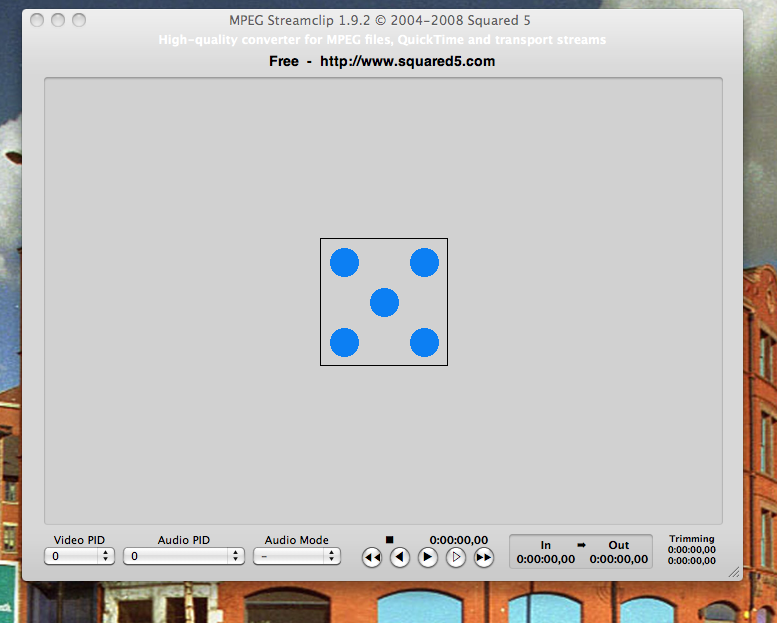
Done that.
Please Log in to join the conversation.
- ronny courtens
-
- Offline
- Moderator
-
- Posts: 4455
- Thank you received: 962
Ronny
Please Log in to join the conversation.
- TripleX808
-
Topic Author
- Offline
- Senior Member
-
- Alright?
Please Log in to join the conversation.
- ronny courtens
-
- Offline
- Moderator
-
- Posts: 4455
- Thank you received: 962
So here's my suggestion: we are going to make a brand new ProRes422 file with stereo audio first because I think the false 5.1 audio information inside the current master could be causing the export errors. Making a new master file will be much faster than converting to MP4, and if you can successfully make a new master without getting any errors you will also be able to make an MP4.
Here's what you do:
Choose File > Export to QuickTime
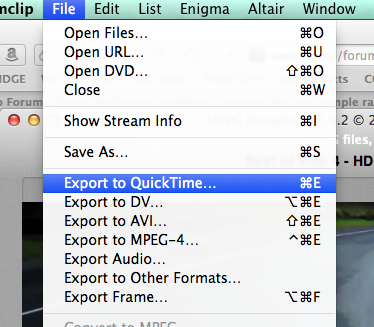
In the Export Settings window that opens set the settings exactly as you see here:
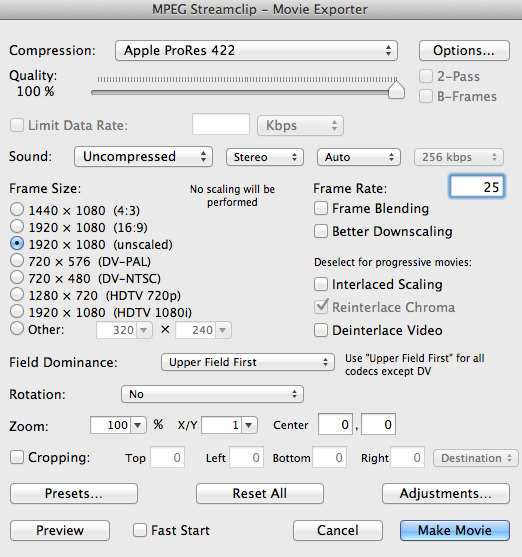
Then press the Make Movie button. Give the new file a name, set a destination for it and press Save to start the encoding. I don't think this will take very long, it all depends on the speed of your computer.
When it's done, post back.
-Ronny
Please Log in to join the conversation.
- TripleX808
-
Topic Author
- Offline
- Senior Member
-
- Alright?
Successfully created a 38.73Gb file.
Please Log in to join the conversation.
- ronny courtens
-
- Offline
- Moderator
-
- Posts: 4455
- Thank you received: 962
In MPEG Streamclip choose File > Open Files and select the new master file to open it in Streamclip. Check if the file plays correctly.
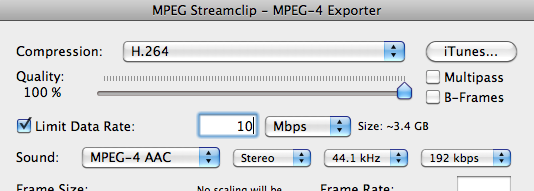
Then choose File > Export to MPEG-4, the Export settings window will open.
In the Settings window set everything exactly as you see here:
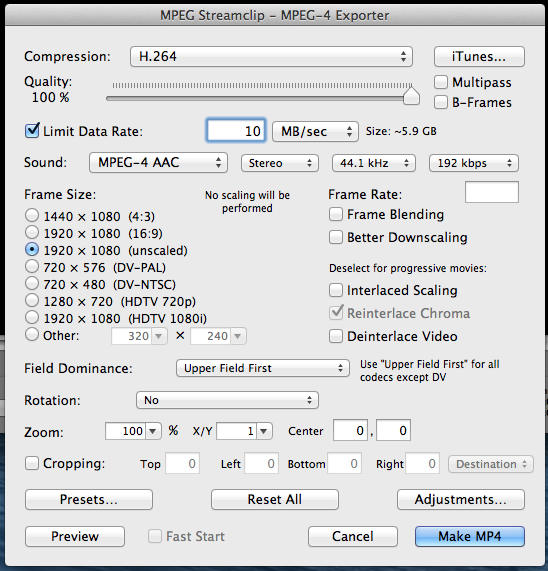
Press Make MP4, give the exported fine a name, set a destination and press OK. If everything goes well this will finally give you a 6 GB MP4 file for your USB.
Good luck

-Ronny
Please Log in to join the conversation.
- TripleX808
-
Topic Author
- Offline
- Senior Member
-
- Alright?
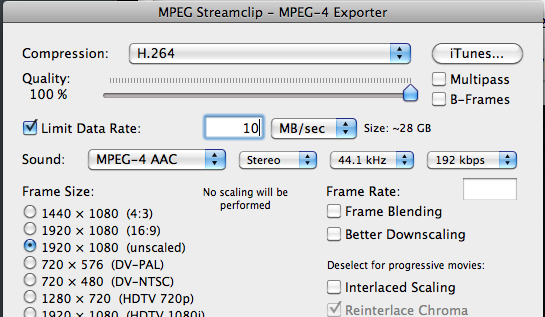
Limit Data Range when I set to MB/sec it shows ~28 GB
i changed it to Mbps and it says ~3.4 GB
??
Does this mean I will end up with a 28Gb Documentary? Or am I just getting confused?
Please Log in to join the conversation.
- TripleX808
-
Topic Author
- Offline
- Senior Member
-
- Alright?
set at 3MB/sec and it shows ~8.5 GB.
Please Log in to join the conversation.
