


3 Post Moderation Rule for New Boarders (25 Jan 2021)
New boarders will have their posts moderated - Don't worry if you cannot see your post immediately.
Audio sync problem. I suspect this is a sample rate problem? (i am still learning)
- TripleX808
-
 Topic Author
- Offline
- Senior Member
-

- Alright?
I CANNOT get the audio in sync after export. After tearing my hair out! I noticed the sample rate of ALL the audio is 44,100 and the Final Cut Project is 48,000. Am I going to have to export ALL those 75 audio clips out of Logic 9 at 48,000?
If I import the audio as 48,000 BUT use the same file names, will Final Cut Pro X reference those so the timeline remains intact (therefore cutting down potentially a MASSIVE workload?)
This Assignment has to be handed in in three weeks???
Please Log in to join the conversation.
- ronny courtens
-

- Offline
- Moderator
-

- Posts: 4455
- Thank you received: 962
-Ronny
Please Log in to join the conversation.

- Export only video
- Export only audio
Then try to see if it's synced when you "mux" it on a new project timeline or doing some re-syncing on the all duration of the movie.
I suspect "bad" conformation on FCPX ingestion as FCP use all kind of audio files on the timeline and do some "real time mix". There is no "ProRes audio" option.
Your tips about filename will not work, and if you do some re-sync or re-onlining after conformation of your original rush, you have great chance to got some little gap or sync problem after 44>48 conversion (even it's not hard to fix it, it can be long).
Or maybe you can try to put your FCPX timeline at 44.1 ?
Please Log in to join the conversation.
- TripleX808
-
Topic Author
- Offline
- Senior Member
-
- Alright?
HOPEFULLY when I export to H264 it will be perfectly in sync and i can sleep at night. lol Assuming that's the best way to export? All the other ways produce MASSIVE file sizes!!!
Please Log in to join the conversation.
- TripleX808
-
Topic Author
- Offline
- Senior Member
-
- Alright?
Update: I dragged ALL of the audio files from my FCPX original media folder, onto a Logic Pro 9 Project with audio settings at 48,000 to make sure I then had new audio files at the correct sample rate.
I copied these over the original ones in FCPX and exported as .H264.
AND STILL THE INTERVIEW AUDIO IS OUT OF SYNC!!!
Yes, all the audio clips are manually lined up with the video which is the main storyline. I watch it on FCPX and they are all bang on! I watch the exported one and they are out of sync?
I am VERY new to this program. I'm a Music Production Degree Student and it was my decision to make a Documentary. So it's a bit out of my comfort zone.
I notice I can select the small video clip AND the audio; then select 'new compound clip'. Will that 'glue the audio to the video'? So it's sync'ed up after export?
All the other export types seem to produce over 60Gb files or even 100Gb+ files???
6.45Gb for .H264. The Documentary is going onto 8Gb usb sticks.
Oh, it's a 48 minute Documentary.
All help greatly appreciated and thanks to those so far.
stevenalomas.wordpress.com/
Please Log in to join the conversation.
- ronny courtens
-
- Offline
- Moderator
-
- Posts: 4455
- Thank you received: 962
Sorry to hear you are having all these issues.
Try this: export your program to a ProRes 422 master file instead, then open the file in QT player. Make sure no other apps are running when you play the file. Is the audio still out of sync on the ProRes master file?
-Ronny
Please Log in to join the conversation.
- TripleX808
-
Topic Author
- Offline
- Senior Member
-
- Alright?
Before that I decided to select all clips up to 12 minutes in and selected new compound clip out of all the clips.
After I checked the exported file was still out of sync, I went back into FCPX and selected break apart clip items. The audio clips are all out of sync now!!! Arg!!!
So as I line these audio files up manually again (and my wife sits in the Lounge bending my ear) I will then export as you suggest Ronny.
Please Log in to join the conversation.
- haysoos123
-
- Offline
- Platinum Member
-

- Posts: 402
- Thank you received: 72
However, I'm not sure how you would do that accurately for each clip since you're probably just using a section of it for each shot. Without some hard sound and a clapper slate, you can't really be sure it's totally in sync unless you're VERY good at matching lip sync. An alternate way to do it would be BEFORE you break apart the audio, you can go into each clip that's out of sync by right-clicking it and "Open in Timeline" and you can resync it in there.
Yet another way to go if you want to manually do everything: If you recorded audio on your camera mic, you could select the clip and its corresponding audio and tell FCPX to make new sync clips (I'm guessing you probably did this to begin with to sync your audio). Then, you can manually overcut the out-of-sync shots with your new synced clips.
Please Log in to join the conversation.
- TripleX808
-
Topic Author
- Offline
- Senior Member
-
- Alright?
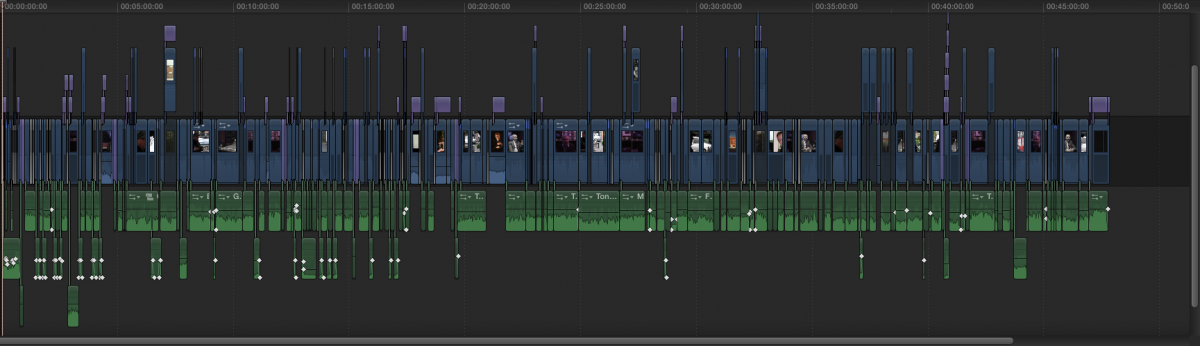
I'm beginning to think I've not set the Project up correctly being a noob.
I noticed when I opened FCPX earlier, the first clip in the project seemed to start earlier than the beginning (i.e. it was in a kind of greyed out area). This is puzzling me, though may be irrelevant to my problem of syncing.
I'm frustrated and clueless???

Please Log in to join the conversation.
- haysoos123
-
- Offline
- Platinum Member
-
- Posts: 402
- Thank you received: 72
One more thing to check is that your sample rate is indeed 48 kHz and not some weird decimal number. You can see that in the event window in list view, and right-click on the columns to add "Audio Sample Rate."
Please Log in to join the conversation.
- TripleX808
-
Topic Author
- Offline
- Senior Member
-
- Alright?
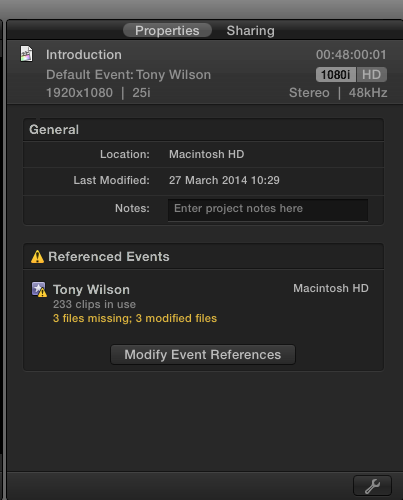
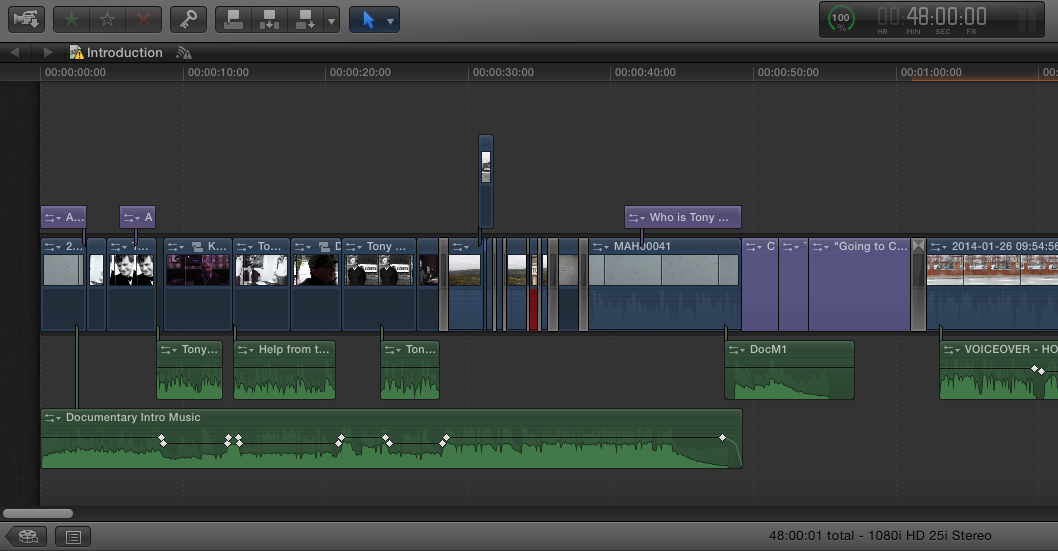
Two screenshots. Should I be worried about those missing files in that screenshot?
Please Log in to join the conversation.
- ronny courtens
-
- Offline
- Moderator
-
- Posts: 4455
- Thank you received: 962
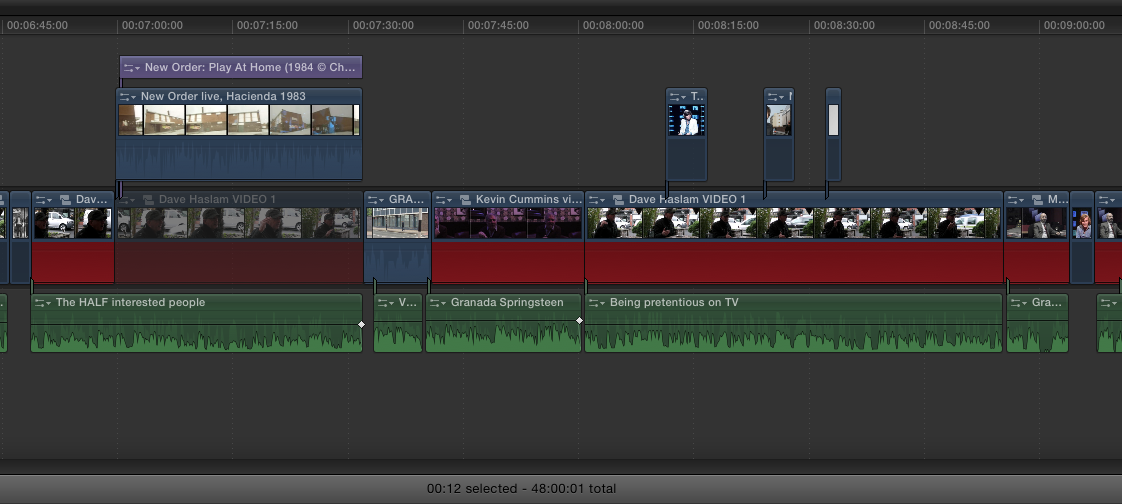
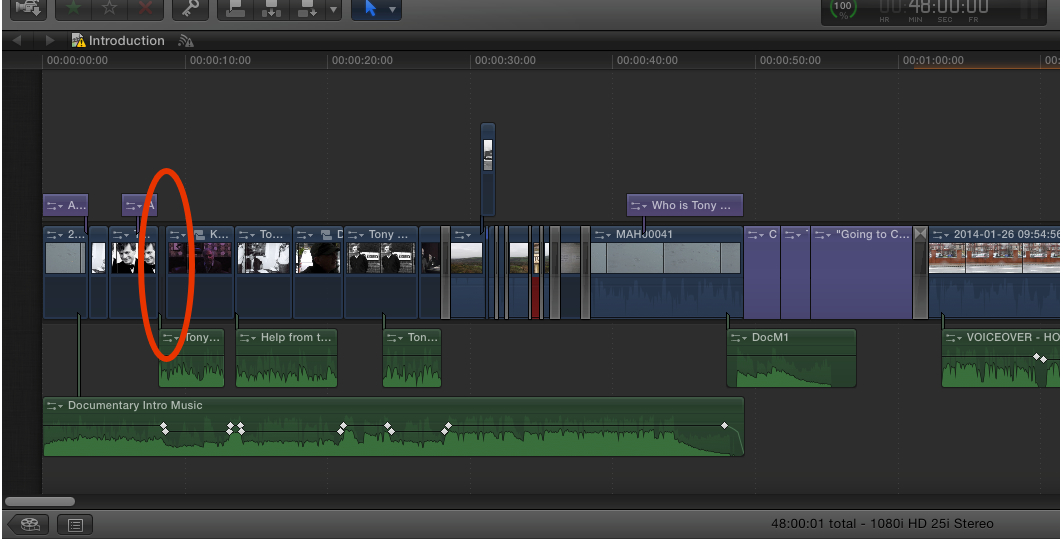
You should be very worried about your audio being connected to a gap in the primary storyline.
Look at the gap after the third video clip in your timeline. Why is it there? If you intentionally want black video on that spot you should use a black color generator and not a gap clip. Gap clips can screw up your exports because sometimes they get ignored, which will obviously drag every following clip out of sync.
This is a first important factor to consider, plus we will need some more information to help you through this:
- What is the format of your video?
- Are you working with optimized media?
Ronny
Please Log in to join the conversation.
- TripleX808
-
Topic Author
- Offline
- Senior Member
-
- Alright?
Those gap things keep appearing (I didn't put that there??). If I delete all them I'm gonna have to line up all audio again.
Bloody Hell, all I want is this film to look good and in sync when it's exported!! It looks great when I watch it in FCPX! It's making me ill with stress! lol.
The green audio is some instances of music I have composed, but primarily they are tie-clip mic audio clips for the interview clips. Should I make compound clips with the interview video and its associated audio?
I don't get these little green handles that the audio files connect to the story with. Confusing!
I think the problem is my complete lack of knowledge with how to work FCPX and the storyline and best practices for workflow.
I HOPE you guys can save me. I'm gonna get a TOP grade for this but ONLY is the exported file is in sync!
What's a black color generator Ronny?
Sorry Ronny, I don't understand what you mean by format of my video (I'm in jolly old England where we use 25 frames per second PAL, is that what you mean?)
And what is optimised media?
Another screen shot included. I feel stupid now!
Please Log in to join the conversation.
- ronny courtens
-
- Offline
- Moderator
-
- Posts: 4455
- Thank you received: 962

As you don't know the basics of the program I think we'd better try to get you out of this fast without adding more problems or having to start from scratch. So here's a suggestion:
Play your entire program on the timeline. Does everything still play correctly and in sync from start to end?
If so, confirm this and I will explain how to get rid of these gaps. Once these are gone I think you will be able to export the edit just like it plays on the timeline.
-Ronny
Please Log in to join the conversation.
- TripleX808
-
Topic Author
- Offline
- Senior Member
-
- Alright?
Sorry I'm late getting back to you (I have a research project Assignment that is due in tomorrow morning so I've been working on that).
With ALL these attempts at exporting I have ALWAYS made sure every interview clip has 'bang on' in sync audio BEFORE I attempt an export (I AM a perfectionist).
I have yet again just checked through every single clip within the documentary within FCPX. They are ALL in sync. I suppose this is why when I play an exported version of my Documentary I just want to jump off a bridge screaming! lol
I am no doubt so close to having a great Documentary to promote! Just need your help with the final export. I DEFINITELY know a LOT more about FCPX from when I started this Documentary last September/October!!!
I don't think there are any 'gaps' as such.
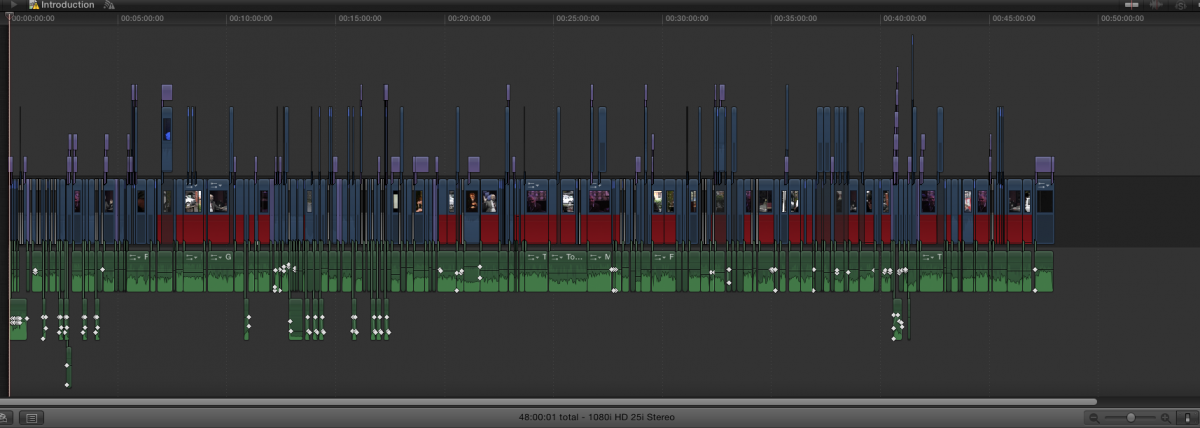
The timeline has on it either video I have captured myself or stills from the internet (or video clips I've used from youtube). I've saved ALL the audio from any youtube clips I've used and processed it within Logic Pro 9 to get it to 48,000 and then dropped it 'underneath' the respective video clips.
The green audio clips 'underneath' the timeline are either interview audio or my own composed music (ALL at 48,000).
It's now bang on 48 minutes duration (intentionally, as if it gets broadcast on an hour programme then there is space for 3 x 4 minute commercial breaks). Clever eh? lol
Research Project is finished now, so I have got all of today/this evening to get this Documentary exported (subject to my wife not complaining of me being stuck in my home studio like a hermit).
Please Log in to join the conversation.
- ronny courtens
-
- Offline
- Moderator
-
- Posts: 4455
- Thank you received: 962
-Ronny
Please Log in to join the conversation.
- TripleX808
-
Topic Author
- Offline
- Senior Member
-
- Alright?
I've not tried anything else as yet.
Except making me tea obviously lol.
Please Log in to join the conversation.
- ronny courtens
-
- Offline
- Moderator
-
- Posts: 4455
- Thank you received: 962
Let me repeat: are you absolutely sure that you have not one single gap clip in your entire primary storyline? Even if you have put a video clip above a gap clip on the primary the edit can get screwed up during export if there are any audio clips attached to gap clips on the primary.
The screenshot you have sent clearly showed one, so I have to be absolutely sure it isn't there anymore:
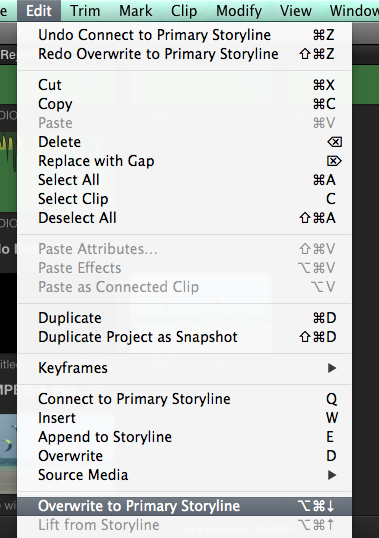
If you do have video clips above gap clips on the primary: select every video clip above a gap clip and press ALT+CMD+Down Arrow (or choose Edit > Overwrite to Primary Storyline) to overwrite the gap clip with the connected clip:
This will eliminate any potential export issues due to gap clips. Check this first, and if you have any problems or questions post back immediately. I'm staying at my computer.
-Ronny
Please Log in to join the conversation.
- TripleX808
-
Topic Author
- Offline
- Senior Member
-
- Alright?
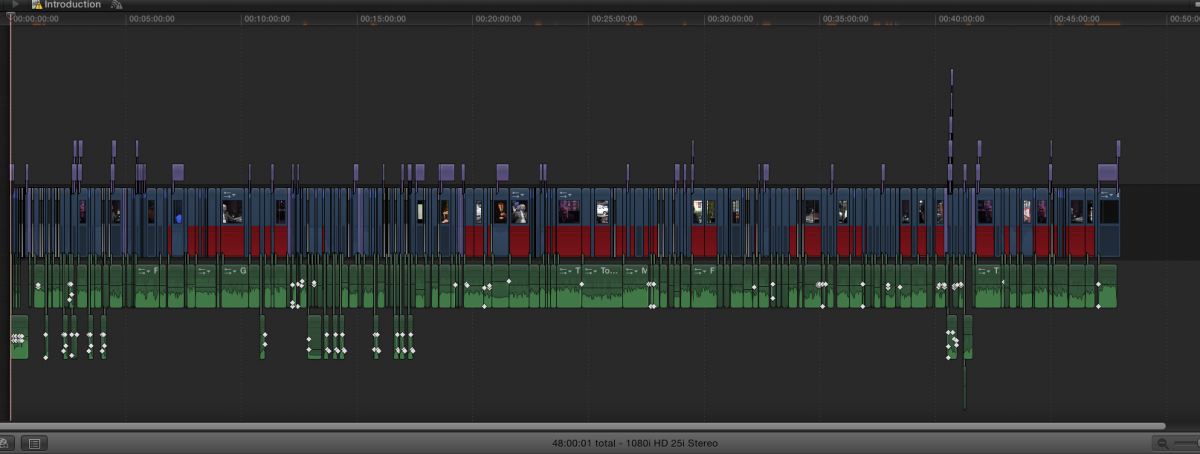
The state of the Project is now: Main Timeline - video or stills. Above that - purple text boxes. Below that - green audio files (ALL 48k).
see screenshots.
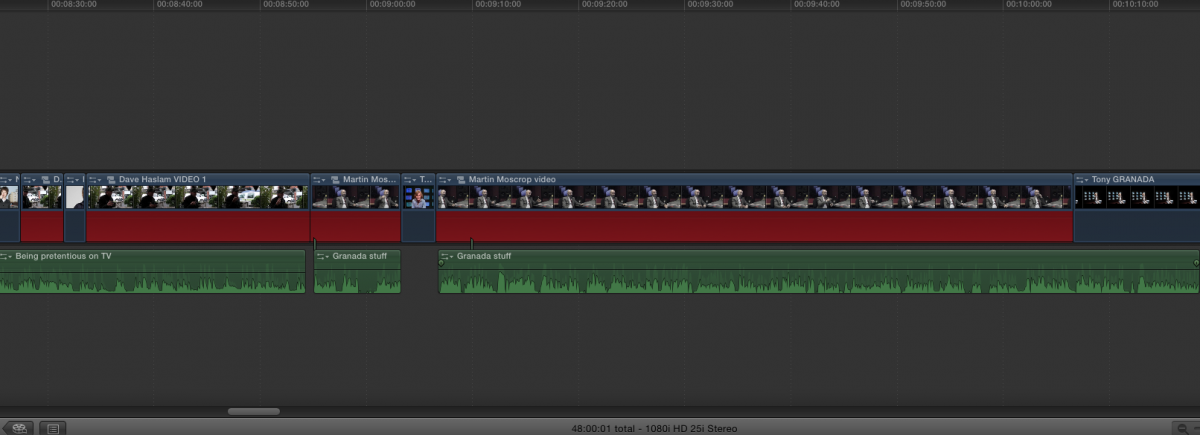
Please Log in to join the conversation.
- ronny courtens
-
- Offline
- Moderator
-
- Posts: 4455
- Thank you received: 962
Then do a final check of your edit on the timeline.
Finally export as a ProRes 422 master file and pray...

If this still does not give you a sync master file: at least now your timeline is clean and organized and we can try a next solution.
-Ronny
Please Log in to join the conversation.
