


3 Post Moderation Rule for New Boarders (25 Jan 2021)
New boarders will have their posts moderated - Don't worry if you cannot see your post immediately.
FCPX10.1 Free Update

As for those three displays on the FCP X app page, the two to the left are Thuderbolt displays, I've one on my desk at this moment. The one larger one on the right is the Sharp 32" PN-K321 - 4K Ultra HD LED Monitor, for sale in the Apple online store.
Please Log in to join the conversation.

I thought BM and Apple were really close friends. Hope there is a fix soon.
On a happier note, Matchframe aka. Reveal in Browser works fine now with Synchronized clips. Not quite sure if it is a new feature, but happy to find out that its there.
Overall I'm super happy with the new organizing features plus all the little things. Most of all the performance! Quick to get to work and snappy to "work" with or better yet: to create with!
I'm trying hard to get this baby to crash. No luck so far...

Please Log in to join the conversation.

I had a clip that was on the timeline, lots of editing later I deleted that clip but the used media indicator remains. Since I've only one project in this library and I've checked the media list for the project I'm quite sure it's no longer used.
I've tried to recreate this by adding / removing other clips but it seems to work every other time. Not sure what I did differently the first time….
Please Log in to join the conversation.
- JFilmmaker1
-

- Offline
- Senior Member
-

- Posts: 56
- Thank you received: 1
BenB wrote: The "File Information" section of the Inspector (Info tab) is different than what was there before. You had to turn on "File Status" in the menu below. Now it is a permanently viewable section (hide/show). Much easier to deal with. I like it way better than the old File Status.
As for those three displays on the FCP X app page, the two to the left are Thuderbolt displays, I've one on my desk at this moment. The one larger one on the right is the Sharp 32" PN-K321 - 4K Ultra HD LED Monitor, for sale in the Apple online store.
The display I'm talking about is on the App Store on the fcpx page, not on the website.
Please Log in to join the conversation.
store.apple.com/us/product/MC914LL/B/app...lay-27-inch?fnode=53
Please Log in to join the conversation.

I have at least 50-100 projects. If I wish to be organized I must make 50-100 library....
The event is just an event not sure that will be used in project... ... Or, an event can be used in more projects... What is this stupid idea that Event - an project is a common library matter.... ????
Even so, there is no chance to hide a library as it was in the old system: with a simple rename of a "Final Cut Events" / "Final Cut Projects" folder...
It was very useful in the old fcpx that I could browse in the project library with th quick scannig on the project by the mouse , so I could simply recognize what actually is in the project. So the search was much much easier.
Now If I want to know which project include a clip I must open 1 by 1 the project and put to the timeline for checking whether the project include something or not...
IT IS HORRIBLE!
Especially after a very intelligent and flexible system.
Please Log in to join the conversation.
- ronny courtens
-

- Offline
- Moderator
-

- Posts: 4455
- Thank you received: 962
In the old system you needed to know exactly which Events to load in order to see the media for any Projects you wanted to work on. With the Library system you actually do the same thing by first creating a Library for any Event(s) and associated Projects. But once this is done, whenever you open a Library you know all the media and the associated Projects will be there. This is actually easier.
Projects do not need to be associated to single specific Libraries or Events. You can create a Project inside a separate new Library and use media of any Event in any given Library inside this Project.
You can hide/show Libraries within FCPX by using the Open Library/Close Library command, which again is easier than using a third-party application or dragging folders around to hide/show Events and Projects separately.
I agree project skimming could be useful at times. I guess they have taken it away to gain performance on slower systems because loading the thumbnails for all projects in the Project Library did take up a lot of RAM. If you want this back, fill in the feedback form. The more people request this the more chance they will consider it.
Updating your existing projects to the new Library system is actually quite straightforward, read these guidelines if you have any doubts or questions (2 parts):
www.macprovideo.com/hub/final-cut/fcp-x-...-to-libraries-part-1
- Ronny
Please Log in to join the conversation.
The new library structure does indeed change how media, events, projects are represented. In my original post I mentioned that IMHO this would trip some people up. If you have a set way of doing things (workflow) then analyzing how 10.1.1 works and how to adapt to it will be time well spent.
In addition to what Ronnie has said and his link, there are lots of excellent resources out there to get a handle on the new UI, including the MacBreak Studio series that is currently on this site.
Not sure how and why you have 50-100 current projects and whether or not having a matching 50-100 separate libraries would be best for you. If the projects are related to the same events or to the same media, then you would have less separate libraries. As Ronny said you can also be selective which libraries load within FCP now and so the excellent EventManagerX is not really needed anymore. Far faster to just add a checkmark to a box to load.
Also Libraries can be anywhere and sim links from projects can access them. No real need to copy files unless making fully self contained files for sharing editing.
I still have skimming for any events, projects within Libraries, so not sure what is missing for you?
The other file management feature is using keywords, tags. Using metadata like this allows you to collect all related materials under a search. This is something that I am just now getting a hang of. Adding a keyword for each project name and adding while importing or creating projects makes finding clips easier for me.
I am starting to really like the new FCPX10.1.1 Takes some getting used to.
Hope this helps, Greg
Please Log in to join the conversation.
May be it just it is very strange the new management to me... But still there is a 3 problem to me:
1., I try to collect as much as possible the connected events and projects into library by library... But may happens (as it happened already) that I forget to place a project to the library. (I use Event Manager X software) what I don't know how to add such a forgotten project to an updated library. That is very important to me! I tried to open in finder by "Show package content" the library and I added manually the missing project to the "updated projects" folder, but it is no appears in fcpX.... Please help me how to fix this....
2., In fcpX on the libraries there are the project icon, but can not skim on this icon...
 so, the quick search is not possible as it was in the previous system...
 3., It was very comfortable to hide an unused event/project in the previous management by a renamed folder. Now, I think I must open the library in the finder with right click.... and rename the contents folder by folder ??? or how?
It would be useful, because after a time there will be many many libraries and searching and browsing among of very long list will be not very easy... OK I can give name to each library, but even so, the list may very long... + there may be such a library which is not public to others...
So if you have good tricks for these problems, please help me.
Please Log in to join the conversation.
Please Log in to join the conversation.
- ronny courtens
-
- Offline
- Moderator
-
- Posts: 4455
- Thank you received: 962
1. This is very easy and you can do it in FCPX, not in the Finder. If you have a Project that you want to move into a different Library: open both Libraries in FCPX and just drag the Project from one Library into the other.
Here I have two Libraries (LIB 1 and LIB 2). LIB 1 contains two Projects (PROJECT 1 and PROJECT 2)
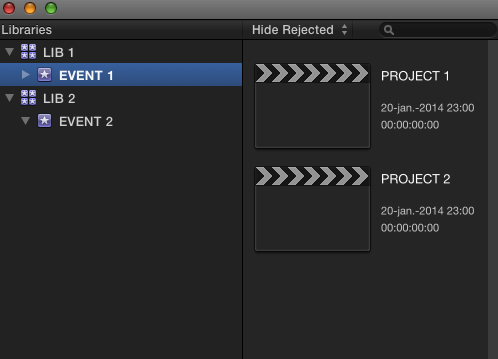
If I want to move PROJECT 2 to LIB 2 I just drag it onto the LIB 2 Event and it will be copied over
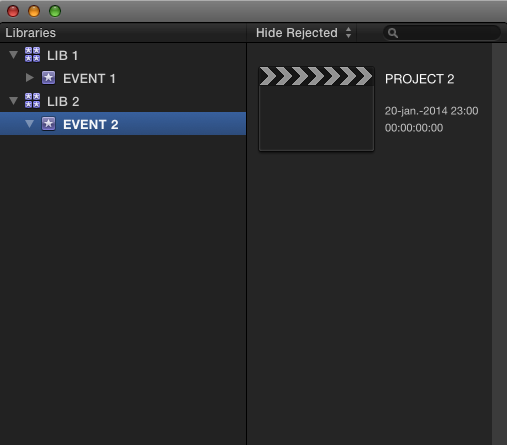
When the Project has been copied to the new Library you can delete it from the original Library if you wish.
2. I agree, being able to skim over a Project in the Project Library sometimes was useful and you cannot do this anymore as there is no Project Library anymore since 10.1. As I have mentioned you can send feedback to Apple, maybe they will restore this functionality.
3. This is much easier than before. In fact I would advise not ever doing anything related to FCPX in the Finder anymore as you can do everything right within FCPX.
If you want to open (reveal) a Library: in FCPX choose File > Open Library. You will see a list of all available Libraries. Select which Library you want to open from the list.
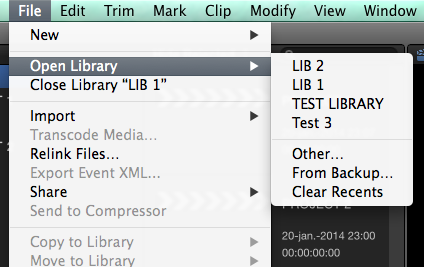
If you want to close (hide) a Library: select the Library in the Library pane and choose File > Close Library.
- Ronny
Please Log in to join the conversation.
I feel myself completely stupid now... So I downloaded a Larry Jordan training video about fcpx10.1 file management system ...
Even after the first 10 minutes I see, how stupid questions I put... Anyway, thank you very much your super tutorials!
I think I will like this system as getting more clear how it works.
If I stop, I will ask again... But I hope after a few days my panic will go away

Please Log in to join the conversation.
- ronny courtens
-
- Offline
- Moderator
-
- Posts: 4455
- Thank you received: 962
There are no stupid questions. I agree the Library system can look intimidating at first, but it really is an improvement once you get used to it.
Good luck with the transition, and if you have any more questions feel free to ask.
- Ronny
Please Log in to join the conversation.
... a little Hungarian speciality...
I do hope than a day fcpx will able to do this
Please Log in to join the conversation.
- ronny courtens
-
- Offline
- Moderator
-
- Posts: 4455
- Thank you received: 962
You will be amazed how close you can get to realtime image processing with 10.1.1 on a new MP. But this, of course, wil never be possible simply because the operator will never be fast enough

This was made in Hungaria? My respect.
- Ronny
Please Log in to join the conversation.
Unfortunately not by me
I think I must massively learn motion too
Do you have any idea about the software?
Please Log in to join the conversation.
- ronny courtens
-
- Offline
- Moderator
-
- Posts: 4455
- Thank you received: 962
The videoclip is just a mock-up of non-existing "Mari"-like software. You can see the GUI elements are not real: the jagged edges around the elements show that they are keyed over the video. The cursor movements are not realistic either and you can clearly see that every change made to her face has been composited over previous layers. It must have taken quite some time to put all this together, especially when I read that 5 VFX artists have been working on this clip. So no, not a real software and very far from real-time.
- Ronny
Please Log in to join the conversation.
nice work, anyway...
Please Log in to join the conversation.
- ronny courtens
-
- Offline
- Moderator
-
- Posts: 4455
- Thank you received: 962
- Ronny
Please Log in to join the conversation.
