


- Posts: 197
- Thank you received: 27
3 Post Moderation Rule for New Boarders (25 Jan 2021)
New boarders will have their posts moderated - Don't worry if you cannot see your post immediately.
FCPX10.1 Free Update
19 Dec 2013 14:20 #36485
by smg669
Justine,
You need to go into your "Security & Privacy" settings and change your "Allow applications downloaded from" settings. Not sure with EMX, but you may need to change it to "Anywhere"... try "Mac App Store and identified developers" first.
Replied by smg669 on topic FCPX10.1 Free Update
MsJustine wrote:
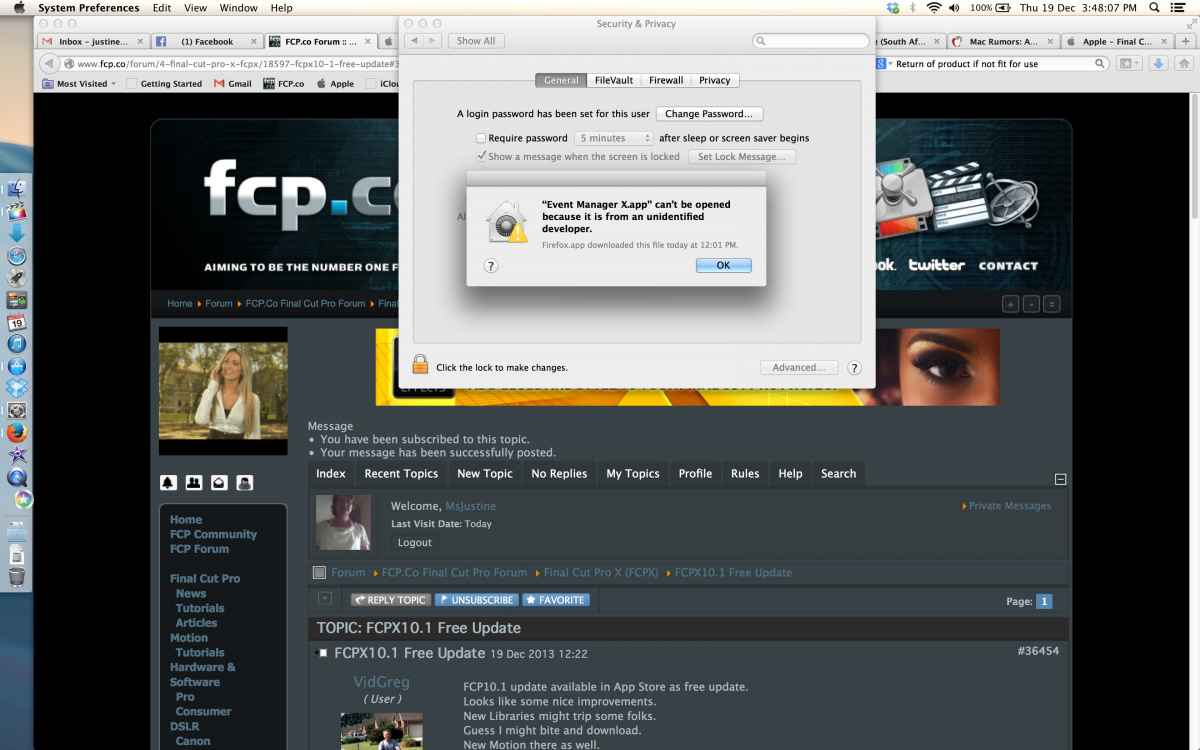
I did and I got this error,
see screen grab
Justine
Justine,
You need to go into your "Security & Privacy" settings and change your "Allow applications downloaded from" settings. Not sure with EMX, but you may need to change it to "Anywhere"... try "Mac App Store and identified developers" first.
Please Log in to join the conversation.

19 Dec 2013 14:24 #36486
by Robmm
Replied by Robmm on topic FCPX10.1 Free Update
I notice in the minimum requirements it says OpenCL-capable graphics card. I have an 2008 IMac whose card is listed as non capable. I don't know what OpenCL relates to. Does this mean I won't be able to use 10.1 at all ? By the way, my Imac runs Mavericks just fine.
Please Log in to join the conversation.

19 Dec 2013 16:46 #36494
by BenB
Replied by BenB on topic FCPX10.1 Free Update
If your Mac ran 10.0.9 with Mavericks, it should run 10.1 just fine.
Forget using Events and Projects like you did before. Libraries are the new Events. The hierarchy is Hard Drive > Library > Events > Projects & Media. It is that simple.
I will be publishing a PDF for my students, on how to update the APTS book media to work with 10.1. Bear in mind that book is now very, very outdated. If anyone is interested, private message me, I'll send the link when it is uploaded.
Forget using Events and Projects like you did before. Libraries are the new Events. The hierarchy is Hard Drive > Library > Events > Projects & Media. It is that simple.
I will be publishing a PDF for my students, on how to update the APTS book media to work with 10.1. Bear in mind that book is now very, very outdated. If anyone is interested, private message me, I'll send the link when it is uploaded.
Please Log in to join the conversation.
- Darren Roark
-

- Offline
- Platinum Member
-

19 Dec 2013 17:07 #36495
by Darren Roark
Replied by Darren Roark on topic FCPX10.1 Free Update
The original Mac Pro can run mavericks with some Google fu and an upgraded graphics card.
Please Log in to join the conversation.
- jjsanderson
-
- Offline
- Elite Member
-

19 Dec 2013 18:02 #36504
by jjsanderson
I think a 2008 iMac is too old to run FCPX, yes. 'OpenCL' is a capability of the graphics card - the ability to use it for compute tasks - on which FCPX relies heavily. The 2600XT card in the 2008 iMac is too old to support that technology, as was the 2600Pro that shipped in Mac Pros of the same year. With the Pro we can update our graphics card, but with the iMac you've no such upgrade path, sorry.
None of this has changed with FCPX 10.1. All versions of FCPX have relied on OpenCL-capable graphics cards.
What has changed with FCPX 10.1 is that it now seems to require Mavericks. But it still requires an OpenCL graphics card, too.
Replied by jjsanderson on topic FCPX10.1 Free Update
Robmm wrote: I notice in the minimum requirements it says OpenCL-capable graphics card. I have an 2008 IMac whose card is listed as non capable. I don't know what OpenCL relates to. Does this mean I won't be able to use 10.1 at all ? By the way, my Imac runs Mavericks just fine.
I think a 2008 iMac is too old to run FCPX, yes. 'OpenCL' is a capability of the graphics card - the ability to use it for compute tasks - on which FCPX relies heavily. The 2600XT card in the 2008 iMac is too old to support that technology, as was the 2600Pro that shipped in Mac Pros of the same year. With the Pro we can update our graphics card, but with the iMac you've no such upgrade path, sorry.
None of this has changed with FCPX 10.1. All versions of FCPX have relied on OpenCL-capable graphics cards.
What has changed with FCPX 10.1 is that it now seems to require Mavericks. But it still requires an OpenCL graphics card, too.
Please Log in to join the conversation.

19 Dec 2013 19:37 #36535
by NEMCtv6
Replied by NEMCtv6 on topic FCPX10.1 Free Update
Is there a scrolling timeline? That would be nice. :woohoo:
Please Log in to join the conversation.


19 Dec 2013 20:00 #36541
by Redifer
Give me the GoogleFu please. I've already upgraded the graphics card a couple of years ago to a 5770 and it runs great. But my Colonel refuses to be 64-bit and that's why I can't get past Lion. Is there a way to upgrade my colonel? Because that's the only way it's gonna run Mavs.
Replied by Redifer on topic FCPX10.1 Free Update
Darren Roark wrote: The original Mac Pro can run mavericks with some Google fu and an upgraded graphics card.
Give me the GoogleFu please. I've already upgraded the graphics card a couple of years ago to a 5770 and it runs great. But my Colonel refuses to be 64-bit and that's why I can't get past Lion. Is there a way to upgrade my colonel? Because that's the only way it's gonna run Mavs.
Please Log in to join the conversation.
19 Dec 2013 20:38 - 19 Dec 2013 20:38 #36553
by BenB
Not Bins, those are physical elements. "Collections" as they only refer to metadata. You can also keyword Projects, too.
Create an Event, call it Projects.
Create keyword collections to organize the various Projects.
Put those keyword collections into folders to further organize.
And as stated, create Smart Collections that use not just Type, but also Keywords, and/or text parameters.
In UNIX, the Kernel is the OS.
Replied by BenB on topic FCPX10.1 Free Update
Dawar wrote: By the way, you can now create a smart collection with "Type-is-project" filter.
Aka a sequences bin...
Not Bins, those are physical elements. "Collections" as they only refer to metadata. You can also keyword Projects, too.
Create an Event, call it Projects.
Create keyword collections to organize the various Projects.
Put those keyword collections into folders to further organize.
And as stated, create Smart Collections that use not just Type, but also Keywords, and/or text parameters.
In UNIX, the Kernel is the OS.
Last edit: 19 Dec 2013 20:38 by BenB.
Please Log in to join the conversation.
19 Dec 2013 20:56 #36566
by marchyman
Replied by marchyman on topic FCPX10.1 Free Update
My old 2007 iMac ran 10.0.9. Very slowly, but it ran.
Please Log in to join the conversation.
19 Dec 2013 21:14 #36574
by Seanus
Sean Lander - Editing since 1982 - AVID 1991 - FCP 1999 - FCPX 2011
Replied by Seanus on topic FCPX10.1 Free Update
Looking at how you run Mavericks on a pre-2008 machine looks pretty dodgy to me.
Not going to take the risk. I'll rent an iMac until February I think.
SO do we know if we can now keyframe colour corrections?
Also looks like you now have a preset layout that puts the Events on the monitor that has the menubar and your viewers on the blank screen.
Not going to take the risk. I'll rent an iMac until February I think.
SO do we know if we can now keyframe colour corrections?
Also looks like you now have a preset layout that puts the Events on the monitor that has the menubar and your viewers on the blank screen.
Sean Lander - Editing since 1982 - AVID 1991 - FCP 1999 - FCPX 2011
Please Log in to join the conversation.
19 Dec 2013 21:32 #36576
by Dave_EP
Looks to me like no changes to the colour board operation, though I'd be happy to be contradicted.
No key framing, no renaming, no changes at all, so I guess I'll request them again
We also don't have send to motion that I really wanted - so I'll be requesting it again.
The ability to detach audio from multi cam is welcome, but we still can't add stabilisation to a section taken from multi cam either so it seems I'll still have to set in/out then export that section, re-import it, overlay it and stabilise the new clip!
While we can hit shift-F to get back to the original clip, hitting Q to overlay it on the timeline as a new clip makes no difference either. I wish there were a way of taking the current angle and having it select those frames as a range in the multi cam source so I'd know where to blade and stabilise there instead
What we do finally have is "used media" on a per project basis! Yay!
And join through edits! Yay!
And rolling expanded audio! Yay!
Replied by Dave_EP on topic FCPX10.1 Free Update
Seanus wrote: SO do we know if we can now keyframe colour corrections?
Looks to me like no changes to the colour board operation, though I'd be happy to be contradicted.
No key framing, no renaming, no changes at all, so I guess I'll request them again
We also don't have send to motion that I really wanted - so I'll be requesting it again.
The ability to detach audio from multi cam is welcome, but we still can't add stabilisation to a section taken from multi cam either so it seems I'll still have to set in/out then export that section, re-import it, overlay it and stabilise the new clip!
While we can hit shift-F to get back to the original clip, hitting Q to overlay it on the timeline as a new clip makes no difference either. I wish there were a way of taking the current angle and having it select those frames as a range in the multi cam source so I'd know where to blade and stabilise there instead
What we do finally have is "used media" on a per project basis! Yay!
And join through edits! Yay!
And rolling expanded audio! Yay!
Please Log in to join the conversation.
19 Dec 2013 21:49 #36580
by Seanus
Sean Lander - Editing since 1982 - AVID 1991 - FCP 1999 - FCPX 2011
Replied by Seanus on topic FCPX10.1 Free Update
But you can just open the multi cam clip and stabilise in there. Why export?
Sean Lander - Editing since 1982 - AVID 1991 - FCP 1999 - FCPX 2011
Please Log in to join the conversation.
19 Dec 2013 21:52 #36581
by Dave_EP
Well, suppose you have a 1 hour shoot that you're editing, and almost every camera moves at some point during that time, so it's not even a static shot with just the odd bump.
Do you rally want to stabilise (say) 6 or 7 cameras for an entire hour just for a 5 second shot here and an 8 second shot there?
If the multi cam hasn't been topped and tailed you can just about work out the timecode positioning, but if it has been topped and tailed then things don't match up at all, so it's pretty hard to find this 5 seconds within the 1 hour shoot and is much quicker to export/import/overlay.
if you have a better / faster way I'm all ears
Replied by Dave_EP on topic FCPX10.1 Free Update
Seanus wrote: But you can just open the multi cam clip and stabilise in there. Why export?
Well, suppose you have a 1 hour shoot that you're editing, and almost every camera moves at some point during that time, so it's not even a static shot with just the odd bump.
Do you rally want to stabilise (say) 6 or 7 cameras for an entire hour just for a 5 second shot here and an 8 second shot there?
If the multi cam hasn't been topped and tailed you can just about work out the timecode positioning, but if it has been topped and tailed then things don't match up at all, so it's pretty hard to find this 5 seconds within the 1 hour shoot and is much quicker to export/import/overlay.
if you have a better / faster way I'm all ears
Please Log in to join the conversation.
19 Dec 2013 21:54 #36582
by Dave_EP
Replied by Dave_EP on topic FCPX10.1 Free Update
To add to that as an example, I just finished one with 5 cameras and I needed to stabilise 9 shots in total, each of between 5 and 11 seconds taken from 4 of the 5 cameras (the 5th was locked off). Stabilising the entire camera file is impractical and finding the few seconds is not trivial, unless you know different ?
Please Log in to join the conversation.
- Darren Roark
-
- Offline
- Platinum Member
-
19 Dec 2013 22:21 #36585
by Darren Roark
Replied by Darren Roark on topic FCPX10.1 Free Update
I'm not condoning hackintoshes but Installing 10.9 on a MP 1.1 is essentially the same thing. Google 'jabbawok mac pro' for some good reading. There are installers out there as well. It's a combination of updating the firmware to the 2.1 model and using chameleon as the bootloader. Mavericks actually makes them run much faster in spite of using an emulated kernel.
There is no risk in trying as long as you use a separate drive for mavericks.
There is no risk in trying as long as you use a separate drive for mavericks.
Please Log in to join the conversation.
19 Dec 2013 23:29 #36598
by Mickey G
Replied by Mickey G on topic FCPX10.1 Free Update
I’m digging the idea of the new Library structure and the fact you can hide Libraries when not in use, however unless I’m missing something I still see a use for Event Manager X. Say I want to hide events within the Library but not the Library itself.
One example, I create a “client” library, within this library are events for each spot I create throughout the year for them i.e. Event1 - “Promo early 2014”, Event2 - “Promo - mid 2014”, etc., etc,
Well lets say I’ve accumulated many Events for this one client within this 1 library, well I’d want to start hiding “completed” Events but not necessarily the entire Library.
Is there a way to do this in 10.1 or am I stuck with the all or nothing approach with having to hide entire libraries and all of the content within them?
Obviously this is not exactly my workflow/naming conventions but hopefully you get the idea of a similar scenario.
I’d hope to see Event Manager X updated to be able to hide Events the same as it does now but just within the Library structure. Maybe Event Manager X does now, I haven’t done much testing...
Thoughts or ideas?
One example, I create a “client” library, within this library are events for each spot I create throughout the year for them i.e. Event1 - “Promo early 2014”, Event2 - “Promo - mid 2014”, etc., etc,
Well lets say I’ve accumulated many Events for this one client within this 1 library, well I’d want to start hiding “completed” Events but not necessarily the entire Library.
Is there a way to do this in 10.1 or am I stuck with the all or nothing approach with having to hide entire libraries and all of the content within them?
Obviously this is not exactly my workflow/naming conventions but hopefully you get the idea of a similar scenario.
I’d hope to see Event Manager X updated to be able to hide Events the same as it does now but just within the Library structure. Maybe Event Manager X does now, I haven’t done much testing...
Thoughts or ideas?
Please Log in to join the conversation.
19 Dec 2013 23:40 #36599
by davechap
Replied by davechap on topic FCPX10.1 Free Update
Hey Mickey,
I think you're holding onto the old "workaround" from previous versions that Event Manager X catered to. A Library can be per client OR per project. An event inside a library can be anything from an event to sort projects or and event for a type of footage, etc. The organization is different now and some of those rules don't apply. Example: a project can reference multiple clips across many events as long as it's all in the same library.
The Library file (new enclosing folder) can exist anywhere on your system instead of your movie folders. Make a client folder and each project you do a new library. This is really going to be how you work from now on.
This really makes a lot of sense for all those that did the "sparse bundle" method of organizing edits/projects. Hope some of this explanation helps.
I think you're holding onto the old "workaround" from previous versions that Event Manager X catered to. A Library can be per client OR per project. An event inside a library can be anything from an event to sort projects or and event for a type of footage, etc. The organization is different now and some of those rules don't apply. Example: a project can reference multiple clips across many events as long as it's all in the same library.
The Library file (new enclosing folder) can exist anywhere on your system instead of your movie folders. Make a client folder and each project you do a new library. This is really going to be how you work from now on.
This really makes a lot of sense for all those that did the "sparse bundle" method of organizing edits/projects. Hope some of this explanation helps.
Please Log in to join the conversation.
20 Dec 2013 00:25 #36606
by VidGreg
Replied by VidGreg on topic FCPX10.1 Free Update
Well it is a rain day here in San Diego,
What better time to update.
Made sure to backup to 2 version of CCC/external bootable HDD's of the hard drive on my rMBP and to TimeMachine.
Repaired permissions and scripts via Onyx.
Upgraded my laptop to Mavericks 10.9.1
Upgraded all software
Now to play with FCPX10.1 and some other software tonight.
Got a couple of short vids to edit.
See how it goes.
Best to all, Greg
What better time to update.
Made sure to backup to 2 version of CCC/external bootable HDD's of the hard drive on my rMBP and to TimeMachine.
Repaired permissions and scripts via Onyx.
Upgraded my laptop to Mavericks 10.9.1
Upgraded all software
Now to play with FCPX10.1 and some other software tonight.
Got a couple of short vids to edit.
See how it goes.
Best to all, Greg
Please Log in to join the conversation.
20 Dec 2013 00:58 #36612
by BenB
Replied by BenB on topic FCPX10.1 Free Update
I know Mickey, he's a super valued member of our local FCP users group, and one of the top filmmakers in the area here (3rd largest film market in the country). We were talking about this with a couple of other user group members today, and they brought up real world scenarios where hiding Events will still be necessary for management. Folks are going to end up with DOZENS AND DOZENS of Events in one Library. So I vote that we need Event Manager X to update so it can work inside of Libraries some how.
Please Log in to join the conversation.
