


- Posts: 4455
- Thank you received: 962
3 Post Moderation Rule for New Boarders (25 Jan 2021)
New boarders will have their posts moderated - Don't worry if you cannot see your post immediately.
10.0.6 Quirks etc...
- ronny courtens
-

- Offline
- Moderator
-

Less
More
28 Oct 2012 16:56 #16020
by ronny courtens
Replied by ronny courtens on topic 10.0.6 Quirks etc...
title animation doesn't work AGAIN !
put a title in timeline, make a couple keyframes (size, tracking etc) and nothing happens....
will Apple fix it in any release ?
Title animation DOES work. In fact it has worked since version 01. The only thing you should be aware of is that many standard title generators that come with the app do not have all their parameters, such as Tracking, published as animatable. Let me give you an example and how you can solve this issue:
Drop the Boogie Lights title on your timeline.
Try to animate the Tracking under the Text tab. It won't work, even though you CAN add keyframes for the parameter. I know this is confusing, I have mentioned this and I have been told it will be fixed. But in the meantime you can fix it yourself:
Select the Boogie Lights title (just as an example) in your Title Browser, R-click it and select "Open as A Copy". The title will open (as a copy) in Motion 5.
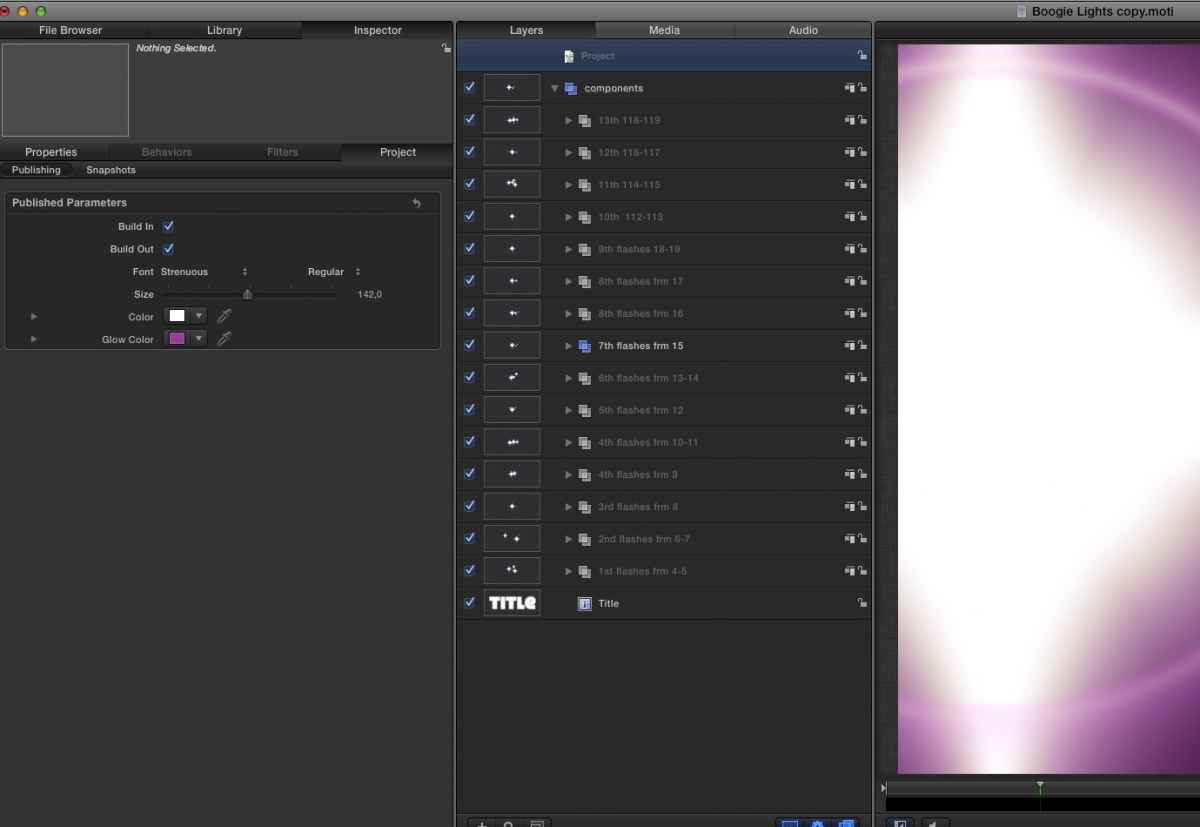
Click the Project layer in the Layers Pane, then go to the Inspector > Properties > Published and you will see that there is no published parameter for Tracking (see screenshot 1). That's why you cannot animate Tracking for this title in FCP10.
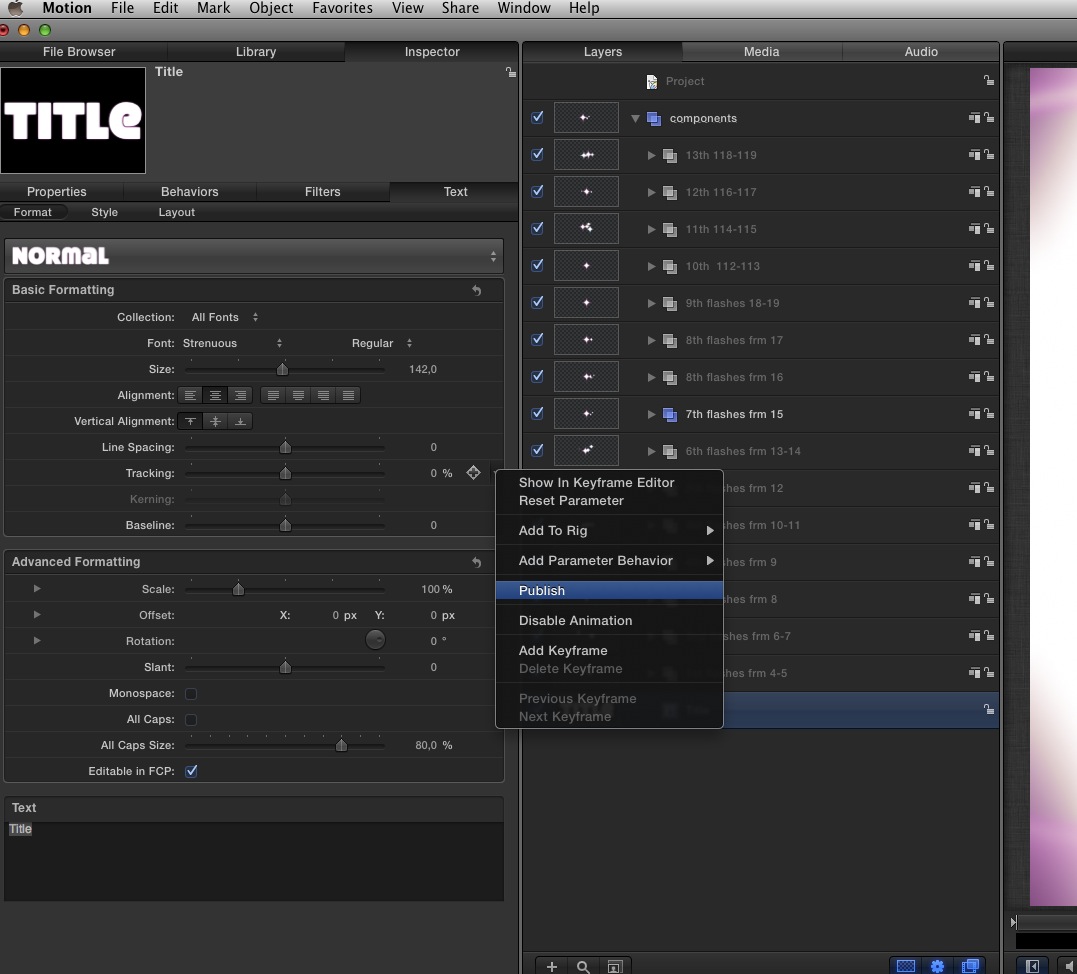
Now click the Title layer in the Layers Pane and go to the Inspector > Properties > Format tab. There you can see all the formatting parameters for the title. Click the Tracking parameter to select it, then press the small triangle next to the Keyframe symbol and choose "Publish" from the list (see screenshot 2).
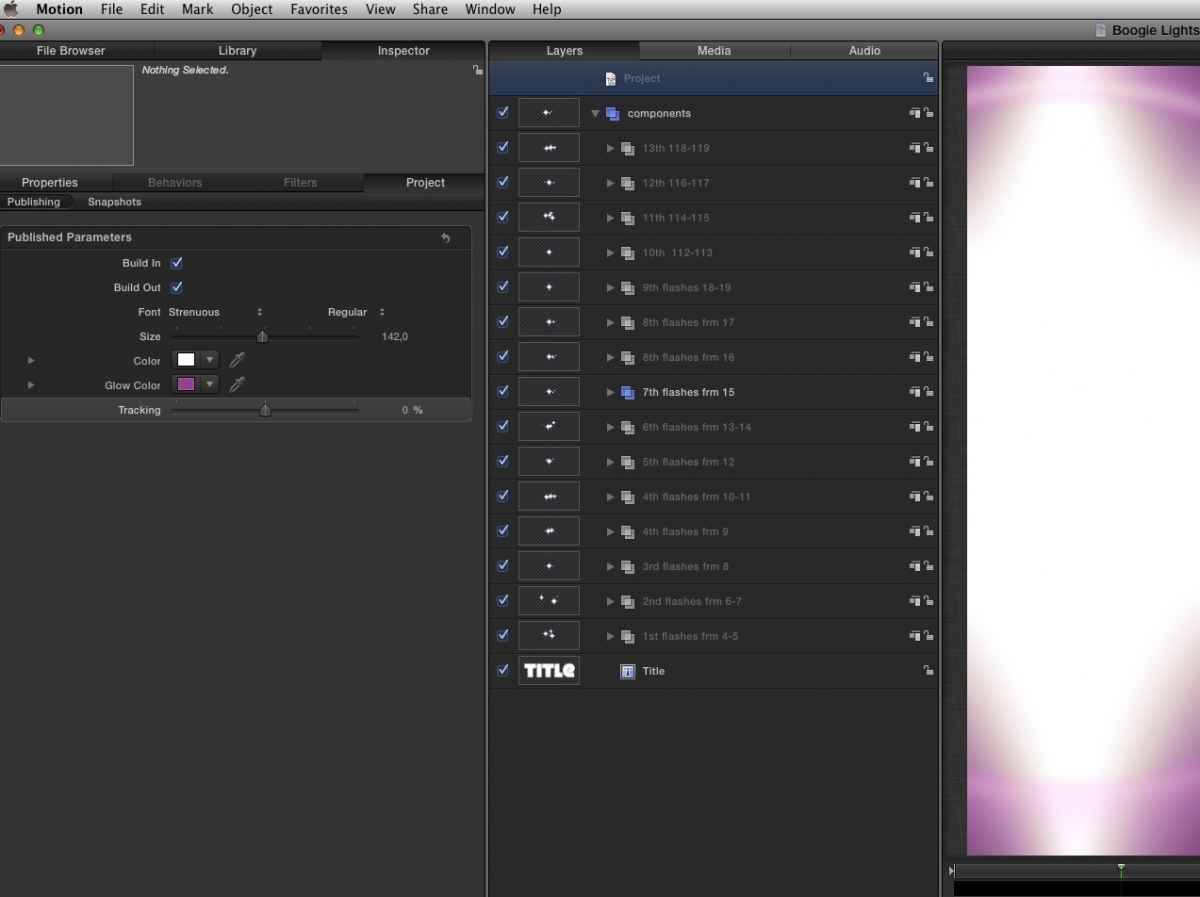
The Tracking parameter will be published in your title Project (see screenshot 3).
Save the Motion file (you can give it another name if you wish), then close Motion and open FCP10. The title will appear in your Title Browser and you will be able to animate the Tracking parameter.
Long to explain, but in reality this only takes 30 second or less to do. In fact you can publish any parameter you wish for any title and then you will be able to animate all these parameters in FCP10.
put a title in timeline, make a couple keyframes (size, tracking etc) and nothing happens....
will Apple fix it in any release ?
Title animation DOES work. In fact it has worked since version 01. The only thing you should be aware of is that many standard title generators that come with the app do not have all their parameters, such as Tracking, published as animatable. Let me give you an example and how you can solve this issue:
Drop the Boogie Lights title on your timeline.
Try to animate the Tracking under the Text tab. It won't work, even though you CAN add keyframes for the parameter. I know this is confusing, I have mentioned this and I have been told it will be fixed. But in the meantime you can fix it yourself:
Select the Boogie Lights title (just as an example) in your Title Browser, R-click it and select "Open as A Copy". The title will open (as a copy) in Motion 5.
Click the Project layer in the Layers Pane, then go to the Inspector > Properties > Published and you will see that there is no published parameter for Tracking (see screenshot 1). That's why you cannot animate Tracking for this title in FCP10.
Now click the Title layer in the Layers Pane and go to the Inspector > Properties > Format tab. There you can see all the formatting parameters for the title. Click the Tracking parameter to select it, then press the small triangle next to the Keyframe symbol and choose "Publish" from the list (see screenshot 2).
The Tracking parameter will be published in your title Project (see screenshot 3).
Save the Motion file (you can give it another name if you wish), then close Motion and open FCP10. The title will appear in your Title Browser and you will be able to animate the Tracking parameter.
Long to explain, but in reality this only takes 30 second or less to do. In fact you can publish any parameter you wish for any title and then you will be able to animate all these parameters in FCP10.
Please Log in to join the conversation.
- Tom Wolsky
-

- Offline
- Moderator
-
28 Oct 2012 17:07 #16022
by Tom Wolsky
Replied by Tom Wolsky on topic 10.0.6 Quirks etc...
Thanks for this Ronnie, but this animation function should work inside FCP without having to resort to Motion. It's really embarrassing that the keyframes in FCP animate the tracking slider but don't actually animate the parameters. The FCP team need to fix this, and I'm really surprised we've got as far as as the seventh version without it being fixed.
Please Log in to join the conversation.


28 Oct 2012 20:27 #16048
by toxotis70
Replied by toxotis70 on topic 10.0.6 Quirks etc...
thanks... at least there is a way to animate those parameters.
Please Log in to join the conversation.
- ronny courtens
-
- Offline
- Moderator
-
Less
More
- Posts: 4455
- Thank you received: 962
29 Oct 2012 04:18 #16076
by ronny courtens
Replied by ronny courtens on topic 10.0.6 Quirks etc...
Tom,
I entirely agree. I have reported this quirk since version 2 but it probably got down the priority list somewhere. As you say, it's quite embarrassing to see a slider with keyframe options that actually do nothing.
I entirely agree. I have reported this quirk since version 2 but it probably got down the priority list somewhere. As you say, it's quite embarrassing to see a slider with keyframe options that actually do nothing.
Please Log in to join the conversation.
29 Oct 2012 11:54 - 29 Oct 2012 11:58 #16091
by toxotis70
Replied by toxotis70 on topic 10.0.6 Quirks etc...
i found (?) another strange thing....
when i stabilize a shot, the image gets smaller and i cant find a way to correct it (via the parameters of stibilization).
I cant remember if it was the same before.... can anyone try it please ?
when i stabilize a shot, the image gets smaller and i cant find a way to correct it (via the parameters of stibilization).
I cant remember if it was the same before.... can anyone try it please ?
Last edit: 29 Oct 2012 11:58 by toxotis70.
Please Log in to join the conversation.
- ronny courtens
-
- Offline
- Moderator
-
Less
More
- Posts: 4455
- Thank you received: 962
29 Oct 2012 11:58 #16093
by ronny courtens
Replied by ronny courtens on topic 10.0.6 Quirks etc...
I cannot reproduce your issue. Can you give some more information about the clip you are working on (codec, frame size)?
Please Log in to join the conversation.
29 Oct 2012 12:01 #16094
by toxotis70
Replied by toxotis70 on topic 10.0.6 Quirks etc...
its a shot from iPhone ...
Please Log in to join the conversation.
29 Oct 2012 12:02 - 29 Oct 2012 12:09 #16095
by toxotis70
Replied by toxotis70 on topic 10.0.6 Quirks etc...
i think it happens because its VERY shaky... i will try it again with another clip from my sony camera.
edit...
I tried with another clip (not so shaky) and its OK.
I suppose that FCPX can't correct a very shaky clip without a lot of scaling.
also, is there Loop playback icon ?
It was (i think) in the main window, together with fullscreen icon....
edit...
I tried with another clip (not so shaky) and its OK.
I suppose that FCPX can't correct a very shaky clip without a lot of scaling.
also, is there Loop playback icon ?
It was (i think) in the main window, together with fullscreen icon....
Last edit: 29 Oct 2012 12:09 by toxotis70.
Please Log in to join the conversation.
- ronny courtens
-
- Offline
- Moderator
-
Less
More
- Posts: 4455
- Thank you received: 962
29 Oct 2012 12:52 #16100
by ronny courtens
Replied by ronny courtens on topic 10.0.6 Quirks etc...
Wen a clip gets really, really shaky no stabilization software in the world will be able to correct it without major quality loss or picture errors. Software can only correct operator errors in a limited way.
You are correct, the Loop playback button is gone. I had to check this first because I hardly ever use buttons unless there is no other choice. Shortcut for Loop Playback is CMD+L.
You are correct, the Loop playback button is gone. I had to check this first because I hardly ever use buttons unless there is no other choice. Shortcut for Loop Playback is CMD+L.
Please Log in to join the conversation.
29 Oct 2012 13:24 #16102
by toxotis70
Replied by toxotis70 on topic 10.0.6 Quirks etc...
the problem with this, is that you dont know if you have loop playback ON - OFF....
Please Log in to join the conversation.
- ronny courtens
-
- Offline
- Moderator
-
Less
More
- Posts: 4455
- Thank you received: 962
29 Oct 2012 13:51 #16103
by ronny courtens
Replied by ronny courtens on topic 10.0.6 Quirks etc...
You are right, but in all honesty I cannot think of a real-life situation where this would bother me.
Please Log in to join the conversation.
29 Oct 2012 14:08 - 29 Oct 2012 14:09 #16106
by toxotis70
Replied by toxotis70 on topic 10.0.6 Quirks etc...
i use it all the time to preview my edits in timeline...
loop and shift+/ to review my edits and trim them with , . keys
In avid , i used trim mode and space to do the same thing , dynamic trimming.
Is the only thing i cant do in FCPX as i like to do....
loop and shift+/ to review my edits and trim them with , . keys
In avid , i used trim mode and space to do the same thing , dynamic trimming.
Is the only thing i cant do in FCPX as i like to do....
Last edit: 29 Oct 2012 14:09 by toxotis70.
Please Log in to join the conversation.
