


3 Post Moderation Rule for New Boarders (25 Jan 2021)
New boarders will have their posts moderated - Don't worry if you cannot see your post immediately.
10.0.6 Quirks etc...

Stereo pairs show up as one channel. Mono channels show up individually. With the clip in a Timeline, select it, go to the Audio tab in the Inspector, reconfigure the channels. You should see it update in the Timeline in real time.
Please Log in to join the conversation.
Can't sleep? Try this: fcpxpert.net ;-)
Please Log in to join the conversation.
Or take 30 min and reinstall. Which is way easier than the 4+ hours those 7 or 8 DVDs used to take, if you didn't lose one, and didn't lose that tiny sticker with the serial number on it. Anyone miss those days?
Please Log in to join the conversation.

Can't sleep? Try this: fcpxpert.net ;-)
Please Log in to join the conversation.
- DSvoboda356
-

- Offline
- Premium Member
-

- Posts: 109
- Thank you received: 5
Please Log in to join the conversation.
Please Log in to join the conversation.
- iamtonyjacobsen
-

- Offline
- New Member
-

- Posts: 3
- Thank you received: 0
A couple things...
1) I can't seem to 'undo' anything! I see that the last action is there in the pull down menu, but it's grey'd out.
2) With BG rendering on, after a clip has rendered, in this case a simple text title, if I make a change to it in the inspector (animating it), the changes/adjustments will not show up. I have to move the title around and get it to re-render for the change to show.
That's all I'm seeing as of now.
Anyone else experiencing these issues?
Please Log in to join the conversation.
The one from COlor grading central works though
I also find Tonalizer Lite does cause way more of flickering/flashing problems with exported files. It happened in 10.0.5 and prior but can be solved by deleting all render files before doing the export. But now under 10.0.6 even deleting render files no longer works.
When I turn off Tonalizer the export files look perfect without those flickers/flashes.
Please Log in to join the conversation.
BenB wrote:
Don't understand the skimming in the browser comment. Not sure what you mean.
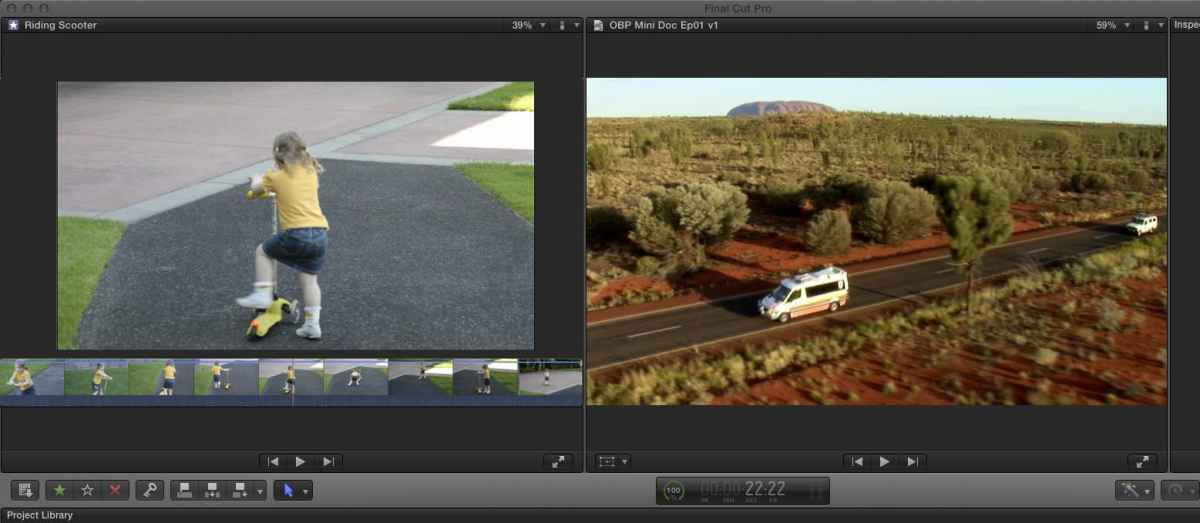
So when a clip is displaying in the viewer (and I'm talking a two screen configuration here) it would be nice to have a reference as to where you are on the viewer itself. A bit like how it was in FCP 7. This way when you have a clip that is over 20 minutes long in the browser you could have a little more control over where your playhead is skimming.
Does that make sense? I thought Apple were saying that if they did a viewer it would have to be special. While I love it, I was hoping it might have some secrets.
Imagine if you could skim over the viewer itself and while you did that you got a little filmstrip down the bottom showing you where you were. Much like how it works in list view in the browser.
Sean Lander - Editing since 1982 - AVID 1991 - FCP 1999 - FCPX 2011
Please Log in to join the conversation.

Please Log in to join the conversation.
Seanus wrote: Imagine if you could skim over the viewer itself and while you did that you got a little filmstrip down the bottom showing you where you were. Much like how it works in list view in the browser.
that's a mockup, right?
Please Log in to join the conversation.

Other than that (and I've just started playing with it really), I feel like the program got much snappier as a whole, especially the range tool...
Please Log in to join the conversation.
- geoffdills
-
- Offline
- New Member
-
- Posts: 4
- Thank you received: 0
Please Log in to join the conversation.

Can't sleep? Try this: fcpxpert.net ;-)
Please Log in to join the conversation.
Seanus wrote:
BenB wrote: Imagine if you could skim over the viewer itself and while you did that you got a little filmstrip down the bottom showing you where you were. Much like how it works in list view in the browser.
That would be incredible!!
I’m digging the viewer, great for referencing color-grades against the original clips using match-frame and matching actions when making cuts but it is a bit limited.
Better then nothing I guess although I got quite used to working without it.
Please Log in to join the conversation.
- pietrociao
-
- Offline
- New Member
-
- Posts: 12
- Thank you received: 0
I'm editing the Behind the Scenes documentary for a feature film. I have almost 3TB of footage. Since FCPX couldn't handle one event with so many clips, I divided it into about 20 events. After doing that everything was working fine, I could edit with no problem in 10.0.5 - After updating to 10.0.6 I can't even work, everything it's EXTREMELY slow and it ends up crashing all the time.
My config is MacBook Pro i5 2.3 8GB RAM with the latest version of Mountain Lion.
Please let me know if you have any suggestion. The only thing I added to the standard FCPX are some template titles that I downloaded from this website.
Please Log in to join the conversation.
- davidasharpe
-
- Offline
- New Member
-
- Posts: 4
- Thank you received: 0
It was in the share menu but now it's no longer there.
Please Log in to join the conversation.
- davidasharpe
-
- Offline
- New Member
-
- Posts: 4
- Thank you received: 0
Please Log in to join the conversation.
- Disproportionate Pictures
-

- Offline
- Platinum Member
-

- Posts: 1433
- Thank you received: 64
Thoughts?
Please Log in to join the conversation.
While playing with the added/improved features that have been ushered in through the 10.0.6 update, I've come across a glaring mistake: You still can't compare two clips from the Event Library in the new dual viewer option, which would be perfect for color correcting clips in an edited sequence. As far as I can tell, you can only compare a clip from the Project Library and a clip from the Event Library in the new dual viewer option.
I have no idea how Apple could have made such an obvious mistake surrounding one of the things that could truly make this a professional tool. Whether I've missed something extremely obvious or a trick that isn't entirely intuitive, does anyone have any advice? Even if it's just the best way to contact Apple to request - what I imagine would be - a fairly easy fix.
Please Log in to join the conversation.
