


3 Post Moderation Rule for New Boarders (25 Jan 2021)
New boarders will have their posts moderated - Don't worry if you cannot see your post immediately.
Full Spec Imac versus "NEW" Mac Pro ($3000+tax Entry Level System)


Specifically with connecting USB speakers such as the MAudio USB bookshelf kind and some people were hearing pops and clicks. This could be an issue of the speaker's internal amp shielding.
Not with the use of FCPX.
Most people editing on an iMac will use the SPIF Optical out or just a good set of headphones into the same output.
Please Log in to join the conversation.
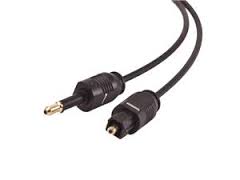
All modern Macs have optical audio output, and it is compatible with the optical input of any 7.1 system so long as you get an appropriate fiber optic cable. I'm doing exactly that with a Mini and a 7.1 Onkyo system. You can also use a Thunderbolt to HDMI converter to send both video and digital audio through an HDMI cable
Please Log in to join the conversation.

Headphone port
Headphone/optical digital audio output (minijack)
Curious if that would give you clean audio into an audio interface like a MOTU or something like it.
Please Log in to join the conversation.
Something like AJA would make.
Curious you say digital SPIF might not be clean as digital infers DIGITAL "clean audio"
Use what ya got, hook up your old Non-HDMI 5.1/7.1 amp thats good enough to reference audio from
with decent speakers.
Please Log in to join the conversation.

ronny courtens wrote: After having compared real-world performance of an entry-level new MP against one of our maxed out late 2013 iMacs myself there is no doubt in my mind: if you work with Apple pro apps the new MP is the best thing you can buy at this moment. And the more you upgrade the MP, the more drastic the differences get.
Between these two machines, was there any noticeable difference in the responsiveness of the interface?
Does anyone have any thoughts regarding the longevity of either machine? Will the dual GPUs (even the D300) give the nMP a longer usable life?
Please Log in to join the conversation.
If you plan on doing mostly 1080p then you might be best served by a Core i7 iMac with lots of ram.
My wife uses a 8 year old Macbook Pro. I had a 2008 iMac that I just sold with a new SSD put in it.
It will run for a long time.
Both are whisper quiet.
Cost and 4K thats what you really looking at when you pose this question.
Please understand the iMac is still a beast I render feature length 1080p (multi-cam) video in a very short time.
Please Log in to join the conversation.
Please Log in to join the conversation.
Is the base model Mac Pro a viable 4K machine? We don't do any 4k at the moment, but it is a possibility in the future.
Please Log in to join the conversation.
- Scrubelicious
-

- Offline
- Platinum Member
-

- Posts: 1228
- Thank you received: 114

I would like to see a comparison between the new Mac Pro's... two basic baseline vs custom.
Please Log in to join the conversation.
Please Log in to join the conversation.
- Disproportionate Pictures
-

- Offline
- Platinum Member
-
- Posts: 1433
- Thank you received: 64
Scrubelicious wrote: 4K... I'em looking at 6K.
I would like to see a comparison between the new Mac Pro's... two basic baseline vs custom.
Unfortunately, it seems like Barefeats hasn't gotten their hands on all configurations yet.
Please Log in to join the conversation.
- Scrubelicious
-
- Offline
- Platinum Member
-
- Posts: 1228
- Thank you received: 114
Naaa I will be skipping that one and wait when Vector Video hits.Topher5 wrote: Why not super High Resolution 8K?
Please Log in to join the conversation.
- Disproportionate Pictures
-
- Offline
- Platinum Member
-
- Posts: 1433
- Thank you received: 64
Topher5 wrote: Why not super High Resolution 8K?
Well, if you're working with RED Dragon footage, that is 6K. I know they exist, but I don't think any of the popular high-end Cameras shoot 8K yet.
Please Log in to join the conversation.
- Scrubelicious
-
- Offline
- Platinum Member
-
- Posts: 1228
- Thank you received: 114
Please Log in to join the conversation.
- Disproportionate Pictures
-
- Offline
- Platinum Member
-
- Posts: 1433
- Thank you received: 64
And considering many movies are only just starting to be finished at 4K, I don't think the pressure is on.
Please Log in to join the conversation.
Please Log in to join the conversation.
- Disproportionate Pictures
-
- Offline
- Platinum Member
-
- Posts: 1433
- Thank you received: 64
dinerdog wrote: Perhaps by this time next year, some of the power of the new MacPros will trickle down to a top level BTO iMac. I think people would kill for an all in one solution with that kind of power. I would.
I'm not sure how much they can do within the confines of the current iMac case. Even if there were room for the larger components, I don't think the room is there for adequate cooling. Perhaps Apple could find room for an optional second GPU, but I'd wager it would be another MOBILE GPU (like what's in there now).
Besides, I'd be wary of coupling a high performance machine to a display. One or the other is very likely to go out of date first, and keeping them separate gives you some flexibility.
Please Log in to join the conversation.
- Karsten Schlüter
-

- Offline
- Moderator
-

- Posts: 3790
- Thank you received: 718
Disproportionate Pictures wrote: ... Even if there were room for the larger components, I don't think the room is there for adequate cooling. Perhaps Apple could find room for an optional second GPU, ... .
... just some silly idea from a zero-engineer:
a Thunderbolt-connected break-out-box with a second GPU as co-processor???? :woohoo:
For my ol' macMini, I had a Elgato Turbo264HD-stick, which did marvel for my underpowered system. I have absolute no idea if MacOS would allow such manipulation and detours, but transferring 'render jobs' to some external box, containing an off-the-selves (=not too expensive)card ... maybe some 3rd-party vendor could do that? Would have a 9/10 on my want-scale. ....
Please Log in to join the conversation.

- Posts: 971
- Thank you received: 46
It makes so much sense to have a device that is upgradeable, with internal storage, not very big, that can be used as the "heavy-lifter" attached to the rMBP...
Please Log in to join the conversation.
- Disproportionate Pictures
-
- Offline
- Platinum Member
-
- Posts: 1433
- Thank you received: 64
A GPU is typically a 16-lane PCIe card. Right now, Thunderbolt 2 cannot handle that kind of bandwidth; I think it's equivalent to 6-lane PCIe. Perhaps when Thunderbolt 3 is launched in a few years, the next jump in bandwidth will make ALL PCIe cards installable via external chassis. But I haven't even seen the vaguest of roadmaps for when to expect Thunderbolt 3.
Please Log in to join the conversation.
