


3 Post Moderation Rule for New Boarders (25 Jan 2021)
New boarders will have their posts moderated - Don't worry if you cannot see your post immediately.
Full Spec Imac versus "NEW" Mac Pro ($3000+tax Entry Level System)


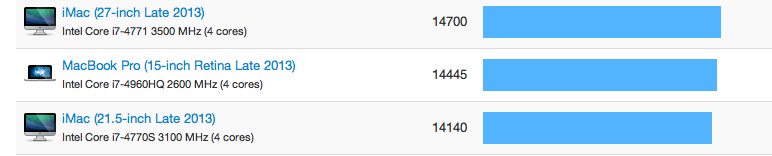
You will notice the entry level Mac Pro is no match for the Core I7 2013 Imac.
Also the ram for the Imac will be considerably cheaper.
I love my monitor with my Imac.

Please Log in to join the conversation.
- Disproportionate Pictures
-

- Offline
- Platinum Member
-

- Posts: 1433
- Thank you received: 64
Second, these raw scores are good for general comparison, but may mean nothing in relation to application specific tests.
Third, how big a part your CPU plays in your applications performance can vary greatly from app to app. GPU performance is much more important now in many cases, including FCPX and Motion. Hence, Apple's big focus on dual-GPU exclusive configurations in the new MacPro.
If all you need is an iMac, that's fine. But don't underestimate the horsepower these new machines bring to the table.
Please Log in to join the conversation.

The iMac is a nice machine but not for me. Plus I really hate the glossy screen.
Sean Lander - Editing since 1982 - AVID 1991 - FCP 1999 - FCPX 2011
Please Log in to join the conversation.
The Core I7 27" full spec comes with a Nvidia 780M 4GB VRam Card.
Its a close call two AMD FirePro D300 graphics processors with 2GB of GDDR5 VRAM
Versus... the Nvidia GTX 780 with 4GB DDR5 VRam, with CUDA Core Support
If I choose to use After effects, Premiere or for that matter Photoshop.
GPU Acceleration, Nvidia CUDA Support with Adobe software.
Is with Nvidia cards which will allow full use of Mercury Playback Engine in Adobe Premiere.
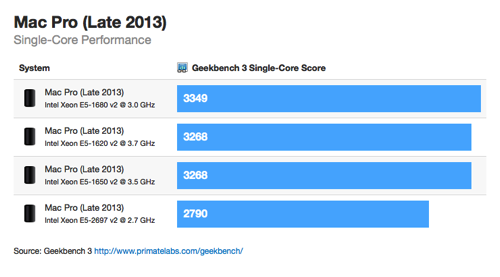
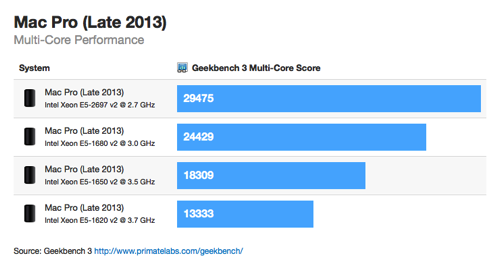
Geekbench 3 is Primate Labs' next-generation processor benchmark, with a new scoring system that separates single-core and multi-core performance, and new workloads that simulate REAL-WORLD SCENARIOS.
Ever since the first updated Mac Pro result appeared on the Geekbench Browser back in June, everyone has been curious about how the upcoming Mac Pros will perform. Arguably the most important component when it comes to performance is the processor in "tandem" with the GPU.
N.B. Both systems sport PCIe for their internal SSDs or Fusion Drives. Actually Fusion drives will not fit in a New Mac Pro.
I still have conflicting reports that the Mac Pro will not even come with the (Cool Black) Keyboard and the mouse.
While I agree the Full Spec Mac Pro will Destroy all Imacs its not so with the entry level Mac Pro.
All the 2013 Imacs with core i7 and i5 destroy the entry Mac Pro.
What will Apple charge for DDR-1866 ram and for that matter a 4K Mac Display.
Trust me I love Apple, just buy smart.
Please Log in to join the conversation.
Full lamination has a second major benefit: It eliminates the reflection of light off the LCD panel and off the back of the display’s cover glass. But we also figured out how to reduce reflection off the front of the glass without compromising color quality. Instead of applying an antireflective coating to the glass in a conventional way, we adapted a process used on smaller surfaces like camera lenses and fighter pilots’ helmets. It’s called plasma deposition, and it involves coating the glass with layers of silicon dioxide and niobium pentoxide so precise and so thin they’re measured in atoms. The result: an astounding 75 percent reduction in reflectivity — and vibrant, accurate colors.
Please Log in to join the conversation.
Please Log in to join the conversation.
Of course I could.
Is it NEED or WANT or PRIDE.
All do respect to the members of this forum.
I just put it forth that some might me better served by a full spec 2013 Core i7 Imac.
Please Log in to join the conversation.
I think your reasoning is solid, and a great point.
I upgraded my 2006 MacPro to an 2012 iMac and I must say I am delighted with the iMac. I have to order 2 new machines in December and I'm very much on the fence about a Mac Pro or a 2013 iMac. The Mac Pro for what I need is $2000 more than a similarly equipped iMac, and it is difficult to know if the added performance (which is really unknown at this point) is worth the money. Granted the 6 thunderbolt ports will be very welcome on the MacPro.
I don't EVER render now with 1080p material. Yes my exports will be faster with a MacPro, and I'll have even more effects, but I suspect that FCP 10.1 is going to have a boost in both of those respects based on what we see in iMovie 10.
My 2 cents.
Please Log in to join the conversation.
Please Log in to join the conversation.
- Disproportionate Pictures
-
- Offline
- Platinum Member
-
- Posts: 1433
- Thank you received: 64
Topher5 wrote: ...so really 2 ports versus 6 is moot.
Not at all. I'm working on an iMac right now with 2 ports. At the end of one chain is a BlackMagic I/O box. At the end of the other is a Wacom Cintiq. Neither of these have thru ports. Lots of peripherals are "end of chain" devices like Audio recorders, eSata and Gigabit Ethernet adaptors, lots of the cheaper portable TB drives, and any display that's not natively Thunderbolt. Have more than 2 of any of these things and you're out of ports on an iMac.
Again, it comes down to what you need. iMacs have gotten significantly more powerful over the past 4 or 5 years, so many more people can be adequately served by them.
I don't think that people who don't need a MacPro should buy one, but downplaying the MacPro lineup based on the base config is a bit disingenuous. You could say the exact same thing about a Beefy MacBookPro vs a bottom end iMac.
Please Log in to join the conversation.
I still say its moot, if you simply purchase a Thunderbolt hub or sometimes call a Thunderbolt dock such as this. In the unlikely situation your peripherals do not have the second pass through port.
www.belkin.com/us/p/P-F4U055/
or this...
www.amazon.com/Thunderbolt-Express-Trans...0VMT2889PKJ0SAG47ZJ8
Connect as many devices as you want on your IMAC.
MOOT.
Please Log in to join the conversation.
- Disproportionate Pictures
-
- Offline
- Platinum Member
-
- Posts: 1433
- Thank you received: 64
It's not a splitter. It just sits in the middle of the chain like other thru-put devices.
In my situation how would that help at all? If someone gives me a Thunderbolt drive with footage, I still have to unhook either my Cintiq or my BM Intensity Extreme to plug it in.
Please Log in to join the conversation.
You are in error.
The Belkin splits your one to give you TWO EXTRA Thunderbolt ports and a plethora of other ports.
In a powered hub to add lots more daisy chained devices.
In the very very unlikely situation you would need more.
Please Log in to join the conversation.
A Thunderbolt connector is capable of providing two full-duplex channels.
Each channel provides bi-directional 10 Gbps of band- width.
I'm talking Thunderbolt 1 not 2.
Please Log in to join the conversation.
- Disproportionate Pictures
-
- Offline
- Platinum Member
-
- Posts: 1433
- Thank you received: 64
My setup- thunderbolt cables between each device.
Chain 1: iMac TB Port 1--->LACIE RAID--->LACIE RAID--->BLACKMAGIC I/O [no thruput]
Chain 2: iMac TB Port 2--->YOUR BELIKIN HUB--->WACOM CINTIQ [no thruput]
With the Belkin inserted in the second chain, I still have to unplug an End of Chain device to plug in a TB client drive.
Please Log in to join the conversation.
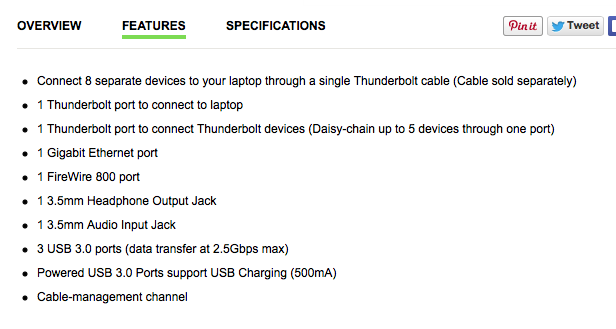
The Belkin device looks a little confusing because it appears to have a thunderbolt port on the front. However, the specs say that it has 2 thunderbolt ports total:
Also, Thunderbolt ports are like many other things. You can never have to many.
 On my iMac I have one additional 30 in. display (no pass through) and then the other has a Lacie ESata Hub, which daisy chains to a Matrox MX02 (with again no pass through). Therefore if I wanted to add any more devices it would have to be a thunderbolt device with pass through.
I'm finding myself relying more on USB 3, which works very well for external shuttle drives, etc.
Please Log in to join the conversation.
It's been relegated to my Macbook Pro.
I prefer the Wacom Intuos Large tablet which uses just the USB.
I hate all the cables of my Cintiq.
Please Log in to join the conversation.
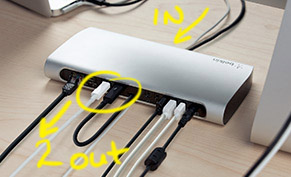
Two out.

Please Log in to join the conversation.
- Disproportionate Pictures
-
- Offline
- Platinum Member
-
- Posts: 1433
- Thank you received: 64
You can't split a TB signal. That can only be done directly off the controller on the computer itself.
Please Log in to join the conversation.
It only has one.
In your situation you need a Mac Pro with 6 port.
You would think such an animal from Belkin would exist.
A five port Thunderbolt Dock.
Sorry
Please Log in to join the conversation.
