


- Posts: 84
- Thank you received: 3
3 Post Moderation Rule for New Boarders (25 Jan 2021)
New boarders will have their posts moderated - Don't worry if you cannot see your post immediately.
Broadcast Monitoring in 10.0.3 - Matrox, Blackmagic, AJA?
- mliebergot
-

- Offline
- Premium Member
-

Less
More
22 Feb 2012 21:10 #4722
by mliebergot
Replied by mliebergot on topic Re: Broadcast Monitoring in 10.0.3 - Matrox, Blackmagic, AJA?
For me yes.
Please Log in to join the conversation.
22 Feb 2012 21:25 #4723
by tpayton
Replied by tpayton on topic Re: Broadcast Monitoring in 10.0.3 - Matrox, Blackmagic, AJA?
Thanks for the encouraging report. I have the same MacPro setup, but with a Matrox MX02 and it is very buggy at the moment. But I have increasingly great respect for the engineers at BlackMagic. Those Aussies seem to be a hard working bunch!
Please Log in to join the conversation.

22 Feb 2012 21:57 #4724
by tap5a
Replied by tap5a on topic Re: Broadcast Monitoring in 10.0.3 - Matrox, Blackmagic, AJA?
Broadcast video output thing actually seems to be really hard thing to do for these 'modern' editing systems (Premiere CS5, FCPX...). Mercury playback engine in Premiere CS5.5 is almost two years old and program is still very clunky and buggy when using any broadcast I/O (AJA, Matrox, Blackmagic). Actually just some time ago accelerated effects in CS5.5 didn't even work when broadcast I/O was enabled.
I've heard there's some difficulty passing frames quickly from GPU to video I/O. So I really hope Apple has had broadcast I/O deeply in their mind when building AV Foundation.
It seems Avid MC6 is only program today what really works greatly with video I/Os. Actually when testing I think our AJA Kona cards worked better with Avid MC6 than ever with FCP7. Very fast and responsive.
I've heard there's some difficulty passing frames quickly from GPU to video I/O. So I really hope Apple has had broadcast I/O deeply in their mind when building AV Foundation.
It seems Avid MC6 is only program today what really works greatly with video I/Os. Actually when testing I think our AJA Kona cards worked better with Avid MC6 than ever with FCP7. Very fast and responsive.
Please Log in to join the conversation.
22 Feb 2012 22:54 #4727
by tpayton
Exactly. I'm actually blow away that it is working so well on my now 6 year old MacPro. Add this to the fact that it plays any Codec. On legacy systems they were just passing the rendered codec through to the output device (I know that is overly simplistic, but that is basically what was happening). Do you remember in FCP 7 there was a codec handling preference .
BTW Do you know if the Avid is able to play any Codec?
Replied by tpayton on topic Re: Broadcast Monitoring in 10.0.3 - Matrox, Blackmagic, AJA?
tap5a wrote: I've heard there's some difficulty passing frames quickly from GPU to video I/O.
Exactly. I'm actually blow away that it is working so well on my now 6 year old MacPro. Add this to the fact that it plays any Codec. On legacy systems they were just passing the rendered codec through to the output device (I know that is overly simplistic, but that is basically what was happening). Do you remember in FCP 7 there was a codec handling preference .
BTW Do you know if the Avid is able to play any Codec?
Please Log in to join the conversation.
22 Feb 2012 23:28 - 23 Feb 2012 03:30 #4728
by NocoDave
Replied by NocoDave on topic Re: Broadcast Monitoring in 10.0.3 - Matrox, Blackmagic, AJA?
I haven't seen much of what's around on the web in relation to Apple video editing. What I've seen is that between this place and small number of others FCPX has a base for big future.
Ripple Training and MacBreak Studio being a couple of others that come to mind.
CAN THIS POST PLEASE BE MOVED BACK TO THE THREAD TITLED "The Best Forum" WHERE IT WAS POSTED AND WAS EARLIER ON. I HAVE NO IDEA HOW IT MADE ITS WAY HERE.
Ripple Training and MacBreak Studio being a couple of others that come to mind.
CAN THIS POST PLEASE BE MOVED BACK TO THE THREAD TITLED "The Best Forum" WHERE IT WAS POSTED AND WAS EARLIER ON. I HAVE NO IDEA HOW IT MADE ITS WAY HERE.
Last edit: 23 Feb 2012 03:30 by NocoDave. Reason: Post moved from thread, How?
Please Log in to join the conversation.
23 Feb 2012 05:24 - 23 Feb 2012 16:46 #4745
by tap5a
Avid used to be very closed and only it's own codecs worked in it but nowadays they have AMA (Avid Media Access) and through that you can for example edit H.264 and plenty of other codecs natively in Avid timeline. In MC6 they also added native support for ProRes. I haven't edited professionally with Avid since 2004 so I'm sure someone knows much more about Avid's current state.
But it seems that Avid is built from ground up to work through broadcast I/Os and I guess that's the reason why AJA cards (and what I heard Blackmagic's also) seem to work almost perfectly with Avid MC6 although it's first version allowing any 3rd party hardware to be used with Avid.
Replied by tap5a on topic Re: Broadcast Monitoring in 10.0.3 - Matrox, Blackmagic, AJA?
tpayton wrote: BTW Do you know if the Avid is able to play any Codec?
Avid used to be very closed and only it's own codecs worked in it but nowadays they have AMA (Avid Media Access) and through that you can for example edit H.264 and plenty of other codecs natively in Avid timeline. In MC6 they also added native support for ProRes. I haven't edited professionally with Avid since 2004 so I'm sure someone knows much more about Avid's current state.
But it seems that Avid is built from ground up to work through broadcast I/Os and I guess that's the reason why AJA cards (and what I heard Blackmagic's also) seem to work almost perfectly with Avid MC6 although it's first version allowing any 3rd party hardware to be used with Avid.
Last edit: 23 Feb 2012 16:46 by tap5a.
Please Log in to join the conversation.
23 Feb 2012 14:35 #4759
by Seanus
Sean Lander - Editing since 1982 - AVID 1991 - FCP 1999 - FCPX 2011
Replied by Seanus on topic Re: Broadcast Monitoring in 10.0.3 - Matrox, Blackmagic, AJA?
??? What does this have to do with FCP X?
Sean Lander - Editing since 1982 - AVID 1991 - FCP 1999 - FCPX 2011
Please Log in to join the conversation.
23 Feb 2012 14:52 #4760
by NocoDave
Replied by NocoDave on topic Re: Broadcast Monitoring in 10.0.3 - Matrox, Blackmagic, AJA?
I think there's some strange bug or something on the forum Seanus. My post jumped here from another thread and it looks like Tapio's has jumped from the "Avid Media Composer 6" thread in the "Off Topic" section.
Please Log in to join the conversation.

08 Mar 2012 00:58 #5486
by RonPriest
YES! I am such a happy camper too! I've been putting off installing FCPX on my Old 2006 MacPro to see if the new Intensity Drivers would work with my installed Intensity Pro card because I thought I remember reading somewhere that it would have conflicts with the Matrox Compress HD card.
But, a couple days ago, after completing an edit on my iMac in FCPX, and exporting it to a ProRes master then transcoding it to a iPad/Apple TV video and watching it on my large HDTV, I seen that some of the shots had way too much saturation. It was then that it really hit me, I simply can't get by without monitoring my projects on my HDTV during color correction. (Yes I know its not true color correction since it's an HDTV and not an "official" broadcast monitor, but it's the closest Im going go get for wedding video production!)
Anyway, I installed FCPX on my old MacPro today and removed and installed the beta 3 version of Desktop video (after uninstalling the previous version mind you). And after I finally figured out that I had to go to the Window drop down menu and turn A/V Output on, then I could see everything just perfect, although the playback isn't as smooth as it could be, but I'm not complaining, I'm sure that will be fixed soon. One other problem though is I'm not getting any audio output. Am I missing something somewhere?
Oh BTW, the only problem Im having with my Compress HD card and compressor (I didn't install the new compressor on the Mac Pro Yet) is with the droplets. When I drop a master video on a droplet it doesn't know where to find Compressor, I guess since compressor was moved to a FCP subfolder when installing the new FCPX?
Replied by RonPriest on topic Re: Broadcast Monitoring in 10.0.3 - Matrox, Blackmagic, AJA?
mliebergot wrote: Well after downloading the Black Magic Beta 9.2 update yesterday, I had no luck running it with FCPX as even though I set the BM Control Panel to 720P 59.94, FCPX still recognized the Intensity Pro card as SD 29.97 output.
Aha, that is until I fired up my system this evening.
I checked the control panel and it was still set to 720P 59.94.
However when I went into FCPX, the display showed up as it should as 720P 59.94.
Seems to run smooth as far as I can tell. No stutter like last night when output was showing up as SD 29.97 in FCPX.
It seems that after I installed the drivers and Beta 9.2 update, and rebooted as suggested, that the 9.2 control panel was set to default. After I changed it, it to 720P, it seems that the change didn't take effect, until after I rebooted again.
So for now all seems good, as I have Intensity Pro previews in FCPX.
Happy camper for now.
YES! I am such a happy camper too! I've been putting off installing FCPX on my Old 2006 MacPro to see if the new Intensity Drivers would work with my installed Intensity Pro card because I thought I remember reading somewhere that it would have conflicts with the Matrox Compress HD card.
But, a couple days ago, after completing an edit on my iMac in FCPX, and exporting it to a ProRes master then transcoding it to a iPad/Apple TV video and watching it on my large HDTV, I seen that some of the shots had way too much saturation. It was then that it really hit me, I simply can't get by without monitoring my projects on my HDTV during color correction. (Yes I know its not true color correction since it's an HDTV and not an "official" broadcast monitor, but it's the closest Im going go get for wedding video production!)
Anyway, I installed FCPX on my old MacPro today and removed and installed the beta 3 version of Desktop video (after uninstalling the previous version mind you). And after I finally figured out that I had to go to the Window drop down menu and turn A/V Output on, then I could see everything just perfect, although the playback isn't as smooth as it could be, but I'm not complaining, I'm sure that will be fixed soon. One other problem though is I'm not getting any audio output. Am I missing something somewhere?
Oh BTW, the only problem Im having with my Compress HD card and compressor (I didn't install the new compressor on the Mac Pro Yet) is with the droplets. When I drop a master video on a droplet it doesn't know where to find Compressor, I guess since compressor was moved to a FCP subfolder when installing the new FCPX?
Please Log in to join the conversation.

11 Apr 2012 13:58 #6801
by mjg
Replied by mjg on topic Re: Broadcast Monitoring in 10.0.3 - Matrox, Blackmagic, AJA?
Nope, the FCPX 10.0.4 update - and the brand new Blackmagic Decklink driver update for this FCPX update - does not fix a descent video out. Sadly.
Please Log in to join the conversation.
11 Apr 2012 23:33 #6829
by tpayton
Replied by tpayton on topic Re: Broadcast Monitoring in 10.0.3 - Matrox, Blackmagic, AJA?
Sorry that Blackmagic driver isn't working. Perhaps it is not yet compatible with 10.0.4.
My Matrox MX02 is actually working quite well with the new version and drivers. Still a few tweaks needed but i've got a good image going to my HDMI monitor as well as a CRT.
My Matrox MX02 is actually working quite well with the new version and drivers. Still a few tweaks needed but i've got a good image going to my HDMI monitor as well as a CRT.
Please Log in to join the conversation.

12 Apr 2012 03:45 #6838
by BenB
Replied by BenB on topic Re: Broadcast Monitoring in 10.0.3 - Matrox, Blackmagic, AJA?
AJA's Kona card support page as of this posting:
"Please Note: The 10.3 driver versions are temporarily unavailable. Please check back later."
"Please Note: The 10.3 driver versions are temporarily unavailable. Please check back later."
Please Log in to join the conversation.
-

- New Member
-

Less
More
- Thank you received: 0
12 Apr 2012 11:24 #6869
by

It did fix my monitor out. I put my output to 720p and it does not jitter anymore. It is a fluid !
Mac OS 10.7.3
FCPX 10.0.4
Blackmagic intensity : 9.2.1
Replied by on topic Re: Broadcast Monitoring in 10.0.3 - Matrox, Blackmagic, AJA?
It did fix my monitor out. I put my output to 720p and it does not jitter anymore. It is a fluid !
Mac OS 10.7.3
FCPX 10.0.4
Blackmagic intensity : 9.2.1
Please Log in to join the conversation.
-
- New Member
-
Less
More
- Thank you received: 0
12 Apr 2012 21:11 #6904
by
Replied by on topic Re: Broadcast Monitoring in 10.0.3 - Matrox, Blackmagic, AJA?
It did to me, sorry to hear it didn't fix yours. Are you on lion ?
Please Log in to join the conversation.

12 Apr 2012 21:34 #6906
by dgwvideo
Ron, Compressor 4 should install as its own application and not in any FCPX subfolder. Is this where yours is located?
Creating history....one edit at a time !
Replied by dgwvideo on topic Re: Broadcast Monitoring in 10.0.3 - Matrox, Blackmagic, AJA?
RonPriest wrote: When I drop a master video on a droplet it doesn't know where to find Compressor, I guess since compressor was moved to a FCP subfolder when installing the new FCPX?
Ron, Compressor 4 should install as its own application and not in any FCPX subfolder. Is this where yours is located?
Creating history....one edit at a time !
Please Log in to join the conversation.
12 Apr 2012 22:17 - 12 Apr 2012 22:19 #6914
by mjg
Replied by mjg on topic Re: Broadcast Monitoring in 10.0.3 - Matrox, Blackmagic, AJA?
The driver is specially released for FCPX 10.0.4. I get picture but it's sluggish and not really responsing right and loses speed after a while (720p50) - it does not chew 50 fps - thats the thing. Anyway - I suppose it's not the final solution to have to set video format/ratio/fps everytime for different projects...this must be a temporary solution? FCPX is sensationally indipendent of formats and I cant see that its acceptable that a video card screws that up. Must be some kind of provisorium?
tpayton wrote: Sorry that Blackmagic driver isn't working. Perhaps it is not yet compatible with 10.0.4.
Last edit: 12 Apr 2012 22:19 by mjg.
Please Log in to join the conversation.
12 Apr 2012 22:35 - 12 Apr 2012 22:37 #6916
by tpayton
Replied by tpayton on topic Re: Broadcast Monitoring in 10.0.3 - Matrox, Blackmagic, AJA?
It looks as thought mixed settings on my MXO2 also results in bad performance not to mention scaling issues. See a photo here, this is a 4x3 SD timeline, but my settings on my MX02 is 1080i29.97. It doesn't play back smoothly, and notice on my HDMI and CRT display the 4x3 picture is filled to fit the 16x9 area (my CRT is set to 16x9):
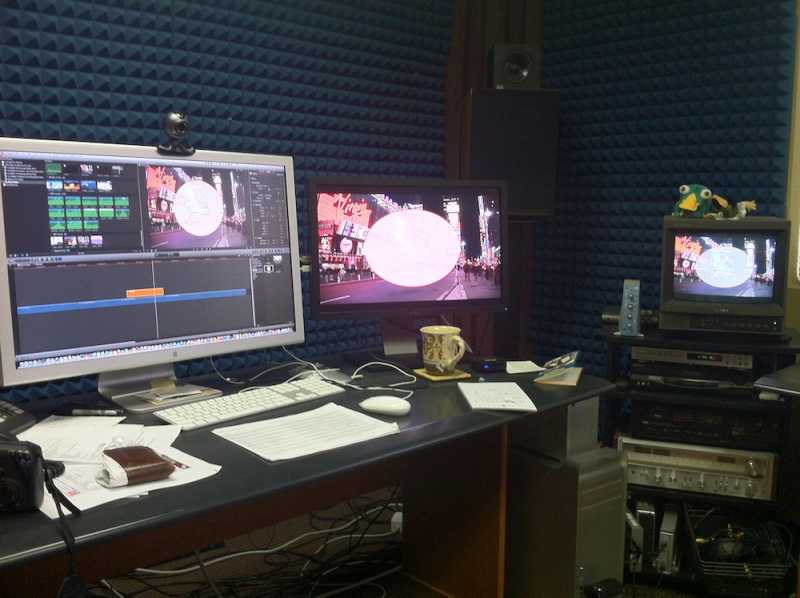
On the other hand actually using a 1080 timeline works very fantastic with this setup regardless of codec. We are doing some tests for a project tomorrow to be shot on green screen and h264 keyed footage is playing back without problem and without rendering through the MXO2.
I'm sure Apple and Matrox & Blackmagic are aware of this, but we should both shoot a note to them so there might be more fluid solution once Broadcast monitoring gets out of beta.
On the other hand actually using a 1080 timeline works very fantastic with this setup regardless of codec. We are doing some tests for a project tomorrow to be shot on green screen and h264 keyed footage is playing back without problem and without rendering through the MXO2.
I'm sure Apple and Matrox & Blackmagic are aware of this, but we should both shoot a note to them so there might be more fluid solution once Broadcast monitoring gets out of beta.
Last edit: 12 Apr 2012 22:37 by tpayton.
Please Log in to join the conversation.
12 Apr 2012 22:39 #6917
by tpayton
Replied by tpayton on topic Re: Broadcast Monitoring in 10.0.3 - Matrox, Blackmagic, AJA?
Wow my edit room is a mess! I'm blind to my own grossness 
Please Log in to join the conversation.
12 Apr 2012 22:48 #6918
by tpayton
Replied by tpayton on topic Re: Broadcast Monitoring in 10.0.3 - Matrox, Blackmagic, AJA?
Just saw this too:
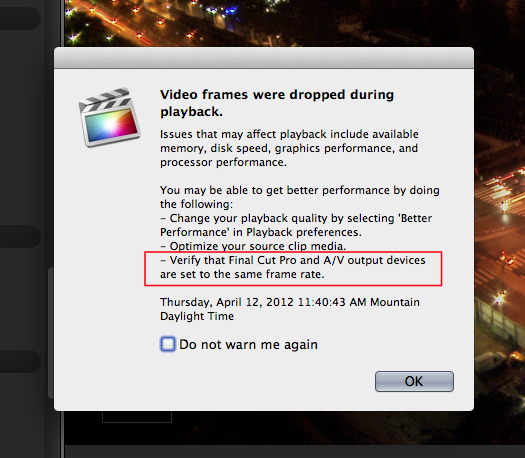
And I realized that my MX02 really wants to just be on 1080i 29.97 regardless of the sequence setting.
This stuff is still in the oven, not quite done cooking.
And I realized that my MX02 really wants to just be on 1080i 29.97 regardless of the sequence setting.
This stuff is still in the oven, not quite done cooking.
Please Log in to join the conversation.
- Scrubelicious
-

- Offline
- Platinum Member
-

Less
More
- Posts: 1228
- Thank you received: 114
12 Apr 2012 23:30 #6925
by Scrubelicious
Replied by Scrubelicious on topic Re: Broadcast Monitoring in 10.0.3 - Matrox, Blackmagic, AJA?
I would like to see AJA update driver with io HD support! We have 6 of them chillen right now.
Please Log in to join the conversation.
