


- Thank you received: 0
3 Post Moderation Rule for New Boarders (25 Jan 2021)
New boarders will have their posts moderated - Don't worry if you cannot see your post immediately.
Broadcast Monitoring in 10.0.3 - Matrox, Blackmagic, AJA?
-

- New Member
-

Less
More
02 Feb 2012 07:23 #3733
by
Replied by on topic Re: Broadcast Monitoring in 10.0.3 - Matrox, Blackmagic, AJA?
hey guys,
As soon as I switch the a/v to on in FCPX both the external monitor and the video on the editing display become very jumpy/skipping frames as if there was a strobe effect on the screen the whole time. It was never like that in FCP7 while playing back from the timeline. I used to show clients footage straight out of the system via HDMI in FCP7 and was hoping to do the same thing I used to do with this update. I do have the "older" Decklink HD Extreme card and not the extreme 3D card. Could that be the problem? I have no problem dropping 1k on the new card if it works but I don't want to buy the newer card if this isn't going to help. I just need someone to confirm that they have smooth playback at 1080i that they would be able to show clients or if this frame skip is happening to everyone.
Thanks,
Mike
As soon as I switch the a/v to on in FCPX both the external monitor and the video on the editing display become very jumpy/skipping frames as if there was a strobe effect on the screen the whole time. It was never like that in FCP7 while playing back from the timeline. I used to show clients footage straight out of the system via HDMI in FCP7 and was hoping to do the same thing I used to do with this update. I do have the "older" Decklink HD Extreme card and not the extreme 3D card. Could that be the problem? I have no problem dropping 1k on the new card if it works but I don't want to buy the newer card if this isn't going to help. I just need someone to confirm that they have smooth playback at 1080i that they would be able to show clients or if this frame skip is happening to everyone.
Thanks,
Mike
Please Log in to join the conversation.
-
- New Member
-
Less
More
- Thank you received: 0
02 Feb 2012 07:26 #3734
by
Replied by on topic Re: Broadcast Monitoring in 10.0.3 - Matrox, Blackmagic, AJA?
by the way, I have a 8 core mac pro with 20 gigs of ram and the Blackmagic Decklink HD Extreme.
Please Log in to join the conversation.

02 Feb 2012 07:37 #3735
by BenB
Replied by BenB on topic Re: Broadcast Monitoring in 10.0.3 - Matrox, Blackmagic, AJA?
Check with Blackmagic, only certain resolutions are supported I believe. It has to be configured both in FCP X and in the BM control panel properly.
Please Log in to join the conversation.
-
- New Member
-
Less
More
- Thank you received: 0
02 Feb 2012 08:10 #3738
by
Replied by on topic Re: Broadcast Monitoring in 10.0.3 - Matrox, Blackmagic, AJA?
Looks like Scooby was having the same frame skipping issues I'm having. Does anyone using a blackmagic setup have smooth playback when the a/v is turned on? Or is there anyone else with another setup other than black magic having smooth playback?
Thanks,
Mike
Thanks,
Mike
Please Log in to join the conversation.
02 Feb 2012 09:32 - 02 Feb 2012 09:32 #3739
by BenB
Replied by BenB on topic Re: Broadcast Monitoring in 10.0.3 - Matrox, Blackmagic, AJA?
What Mac setup are you using?
My AJA Kona LHi and Flanders LM-2451W give me pretty smooth playback. An occasional hint of latency in the Viewer, but then I'm not watching the Viewer, I'm watching my broadcast monitor.
And remember this is all a beta release of the feature, and of the drivers.
My AJA Kona LHi and Flanders LM-2451W give me pretty smooth playback. An occasional hint of latency in the Viewer, but then I'm not watching the Viewer, I'm watching my broadcast monitor.
And remember this is all a beta release of the feature, and of the drivers.
Last edit: 02 Feb 2012 09:32 by BenB.
Please Log in to join the conversation.
- jeffkirkland
-

- Offline
- New Member
-
Less
More
- Posts: 7
- Thank you received: 1
02 Feb 2012 10:43 - 02 Feb 2012 10:44 #3742
by jeffkirkland
Replied by jeffkirkland on topic Re: Broadcast Monitoring in 10.0.3 - Matrox, Blackmagic, AJA?
As BenB says, this is all Beta so don't expect it to be anywhere near perfect right now.
On the plus side, sending out to a broadcast monitor is mostly for colour grading and as long as I can see the current frame I don't really care how well it plays back.
BTW, Magic Bullet Looks for FCPX can also send a still frame out via my Intensity card which makes it my go-to tool for colour grading right now.
On the plus side, sending out to a broadcast monitor is mostly for colour grading and as long as I can see the current frame I don't really care how well it plays back.
BTW, Magic Bullet Looks for FCPX can also send a still frame out via my Intensity card which makes it my go-to tool for colour grading right now.
Last edit: 02 Feb 2012 10:44 by jeffkirkland.
Please Log in to join the conversation.
-
- New Member
-
Less
More
- Thank you received: 0
02 Feb 2012 18:57 #3754
by
Replied by on topic Re: Broadcast Monitoring in 10.0.3 - Matrox, Blackmagic, AJA?
Thanks guys. I'm glad to hear that you aja is playing back smooth. That gives me some hope! I have a 8 core mac pro with 20 gigs of ram and using the hdmi and component outs from the black magic deckling extreme card going to a 37 inch client monitor and 21 inch program monitor. I'm thinking that maybe since scooby was using the intensity card having some issues and i'm using an older black magic card that maybe the issue is simply that the older cards aren't up to par. I tried looking all over the black magic website for some kind of contact info, but couldn't find anything other than to make a press release. If someone has an email or phone for blackmagic, can you let me know.
Thanks again for all the help.
Mike
Thanks again for all the help.
Mike
Please Log in to join the conversation.

02 Feb 2012 19:45 #3756
by mjg
Replied by mjg on topic Re: Broadcast Monitoring in 10.0.3 - Matrox, Blackmagic, AJA?
Same rig here. It looks awful in my TVlogic24. I use SDI. And it goes black when playing and push stop - no last frame. Yes - it's BEEETA. 
To put viewer to the TVlogic through DVI - second display - works fine. Have to use that until the beta stage is over I suppose.
To put viewer to the TVlogic through DVI - second display - works fine. Have to use that until the beta stage is over I suppose.
Mike wrote: by the way, I have a 8 core mac pro with 20 gigs of ram and the Blackmagic Decklink HD Extreme.
Please Log in to join the conversation.
02 Feb 2012 20:50 #3762
by BenB
Replied by BenB on topic Re: Broadcast Monitoring in 10.0.3 - Matrox, Blackmagic, AJA?
I'm getting kernel panics since installing FCP X 10.0.3 and the new AJA beta drivers. I'm uninstalling the AJA drivers thinking that's the culprit, since no one else is getting kernel panics with FCP X updates.
Please Log in to join the conversation.
-
- New Member
-
Less
More
- Thank you received: 0
02 Feb 2012 23:19 #3775
by
Replied by on topic Re: Broadcast Monitoring in 10.0.3 - Matrox, Blackmagic, AJA?
Hey Ben, that's gotta be it. 10.0.3 is running really smooth on both my Mac Pro and iMac. The only problem is the external monitor. Good luck with the panics!
Please Log in to join the conversation.
03 Feb 2012 00:00 #3778
by BenB
Replied by BenB on topic Re: Broadcast Monitoring in 10.0.3 - Matrox, Blackmagic, AJA?
I happens any time I allow the monitor to go to sleep, or manually power it off and back on. I saved a PDF of the crash report for AJA, sending it to them now. Clearly states a problem with the new beta driver. Hopefully they'll clear that up soon.
Kernel Extensions in backtrace:
com.aja.iokit.konalhi(10.2)[5E036FCE-1703-00EB-762B-31091D9529D2]@0xffffff7f81da1000->0xffffff7f81e17fff
Kernel Extensions in backtrace:
com.aja.iokit.konalhi(10.2)[5E036FCE-1703-00EB-762B-31091D9529D2]@0xffffff7f81da1000->0xffffff7f81e17fff
Please Log in to join the conversation.

08 Feb 2012 07:35 #4087
by tpayton
Replied by tpayton on topic Re: Broadcast Monitoring in 10.0.3 - Matrox, Blackmagic, AJA?
To those who have broadcast monitoring working a few questions:
Do you notice real time effects, etc. to be slower when AV Output is on?
If so, does it work considerably better with rendering?
Have you tried custom resolution timelines?
Also you any one be up to turning on a camera and letting the rest of see exactly how it is working?
Do you notice real time effects, etc. to be slower when AV Output is on?
If so, does it work considerably better with rendering?
Have you tried custom resolution timelines?
Also you any one be up to turning on a camera and letting the rest of see exactly how it is working?
Please Log in to join the conversation.
08 Feb 2012 08:27 #4092
by Seanus
Sean Lander - Editing since 1982 - AVID 1991 - FCP 1999 - FCPX 2011
Replied by Seanus on topic Re: Broadcast Monitoring in 10.0.3 - Matrox, Blackmagic, AJA?
Hmmm not having any issues with my MacPro 8 Core and the Decklink Exteme HD.
Make sure you've set the right resolution in the prefs and remember it can't handle 1080P@25fps as this is not a broadcast format.
I'm going out component to a monitor and he only thing I notice (and this too was an issue in FCP 7) is the introduced lag to the controls. It's only half a second or so but enough to be annoying.
Make sure you've set the right resolution in the prefs and remember it can't handle 1080P@25fps as this is not a broadcast format.
I'm going out component to a monitor and he only thing I notice (and this too was an issue in FCP 7) is the introduced lag to the controls. It's only half a second or so but enough to be annoying.
Sean Lander - Editing since 1982 - AVID 1991 - FCP 1999 - FCPX 2011
Please Log in to join the conversation.
08 Feb 2012 16:19 - 08 Feb 2012 16:32 #4094
by mjg
Replied by mjg on topic Re: Broadcast Monitoring in 10.0.3 - Matrox, Blackmagic, AJA?
BlackMagic Desctop Video Beta 2 out. Better - it does not go to black when paus/stop anymore and the pic is "sharp" even in play - not only frezepic. But it cant play in real time - it sluggish down to "slomo" after a sec. Settings: 720p50.
Last edit: 08 Feb 2012 16:32 by mjg.
Please Log in to join the conversation.
08 Feb 2012 18:24 - 08 Feb 2012 18:25 #4098
by Seanus
Sean Lander - Editing since 1982 - AVID 1991 - FCP 1999 - FCPX 2011
Replied by Seanus on topic Re: Broadcast Monitoring in 10.0.3 - Matrox, Blackmagic, AJA?
Thought I'd give it a try and now I'm seeing a frame of black after I hit play where I wasn't before. My footage is all 1080P stuff shot at 25 so I have to use 1080i 50 which introduces a bit of flicker but it is certainly usable.
If you try and run it down to 720P 50 then I see the same slow down. It obviously can't crunch it down on the fly.
Here's my setting.
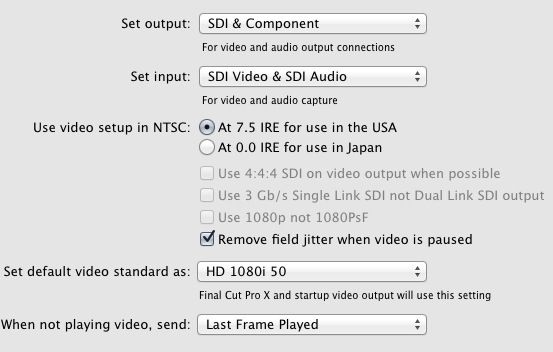
If you try and run it down to 720P 50 then I see the same slow down. It obviously can't crunch it down on the fly.
Here's my setting.
Sean Lander - Editing since 1982 - AVID 1991 - FCP 1999 - FCPX 2011
Last edit: 08 Feb 2012 18:25 by Seanus.
Please Log in to join the conversation.
- mliebergot
-
- Offline
- Premium Member
-

Less
More
- Posts: 84
- Thank you received: 3
08 Feb 2012 20:12 #4100
by mliebergot
Curious to see if they fixed the Intensity Control Panel, and gave us control over which output size we need.
The first Beta only gave options for 16:9 SD video and no HD output display options.
Replied by mliebergot on topic Re: Broadcast Monitoring in 10.0.3 - Matrox, Blackmagic, AJA?
mjg wrote: BlackMagic Desctop Video Beta 2 out. Better - it does not go to black when paus/stop anymore and the pic is "sharp" even in play - not only frezepic. But it cant play in real time - it sluggish down to "slomo" after a sec. Settings: 720p50.
Curious to see if they fixed the Intensity Control Panel, and gave us control over which output size we need.
The first Beta only gave options for 16:9 SD video and no HD output display options.
Please Log in to join the conversation.
- mliebergot
-
- Offline
- Premium Member
-
Less
More
- Posts: 84
- Thank you received: 3
08 Feb 2012 20:40 #4101
by mliebergot
Replied by mliebergot on topic Re: Broadcast Monitoring in 10.0.3 - Matrox, Blackmagic, AJA?
BTW, speaking of the new bM Beta update.
When you install the update, is it recommended that you uninstall the previous update first, then install.
Or, is it fine to simply install the update and let the program overwrite what needs to be overwritten?
When you install the update, is it recommended that you uninstall the previous update first, then install.
Or, is it fine to simply install the update and let the program overwrite what needs to be overwritten?
Please Log in to join the conversation.
08 Feb 2012 21:28 #4103
by mjg
Replied by mjg on topic Re: Broadcast Monitoring in 10.0.3 - Matrox, Blackmagic, AJA?
I have had issues when installing over old many times (beta1 for example - had to reinstall it after uninstall) - so I now always uninstall before installing new.
Please Log in to join the conversation.
- mliebergot
-
- Offline
- Premium Member
-
Less
More
- Posts: 84
- Thank you received: 3
09 Feb 2012 07:38 - 09 Feb 2012 07:49 #4141
by mliebergot
Replied by mliebergot on topic Re: Broadcast Monitoring in 10.0.3 - Matrox, Blackmagic, AJA?
Thanks for the info.
I uninstalled the Beta1 drivers and installed the Beta2 drivrers.
Looks like BM fixed the Intensiyy Pro control panel, as I cannow select different display resolutions.
However FCPX still only recognizes SD video output. Also play is very choppy.
So unless someone has any info, it's back to using the 2nd display option from the 5770HD.
BM Intensity Pro, was set to display 720P 59.94, same as the project and video, which is PRORES LT. Playback, was set to better, not best.
I uninstalled the Beta1 drivers and installed the Beta2 drivrers.
Looks like BM fixed the Intensiyy Pro control panel, as I cannow select different display resolutions.
However FCPX still only recognizes SD video output. Also play is very choppy.
So unless someone has any info, it's back to using the 2nd display option from the 5770HD.
BM Intensity Pro, was set to display 720P 59.94, same as the project and video, which is PRORES LT. Playback, was set to better, not best.
Last edit: 09 Feb 2012 07:49 by mliebergot.
Please Log in to join the conversation.
