


- Posts: 929
- Thank you received: 131
3 Post Moderation Rule for New Boarders (25 Jan 2021)
New boarders will have their posts moderated - Don't worry if you cannot see your post immediately.
Broadcast Monitoring in 10.0.3 - Matrox, Blackmagic, AJA?
31 Jan 2012 22:16 #3648
by tpayton
Broadcast Monitoring in 10.0.3 - Matrox, Blackmagic, AJA? was created by tpayton
So Apple reports that broadcast monitoring is in beta for 10.0.3. So did anybody get it working?
Specifically I have a Matrox MX02 Mini and and hoping to get something about that wee little box.
Specifically I have a Matrox MX02 Mini and and hoping to get something about that wee little box.
Please Log in to join the conversation.
- Mikeybouchereau
-

- Offline
- Elite Member
-

Less
More
- Posts: 201
- Thank you received: 81
31 Jan 2012 22:17 #3649
by Mikeybouchereau
Replied by Mikeybouchereau on topic Re: Broadcast Monitoring in 10.0.3 - Matrox, Blackmagic, AJA?
I asked them a week ago, I am reposting in their forum today.
Please Log in to join the conversation.
31 Jan 2012 23:42 #3653
by tpayton
Replied by tpayton on topic Re: Broadcast Monitoring in 10.0.3 - Matrox, Blackmagic, AJA?
Just saw this from Phillip Hodgetts:
www.philiphodgetts.com/2012/01/10-0-3-update-notes/
"Video Output requires new drivers for your hardware. As of today only AJA have a beta of their FCP X output drivers available. Blackmagic Design and Matrox are expected to have betas of their drivers shortly. It’s important to note that these drivers are the first ever to be written to the new CoreMediaIO services on OS X. Previous drivers have all been QuickTime based, so this is all new work, not a simple update to drivers as previous versions were. That’s also why the video output is Lion only: only Lion has the foundations in place for the Core services functions needed, and work couldn’t start on the drivers until Lion was out, and a beta version of FCP X was available for hardware companies to work with."
Thusly, Matrox & Blackmagic folks shall wait. AJA here is some info:
www.aja.com/news/index_article.php?id=166
www.philiphodgetts.com/2012/01/10-0-3-update-notes/
"Video Output requires new drivers for your hardware. As of today only AJA have a beta of their FCP X output drivers available. Blackmagic Design and Matrox are expected to have betas of their drivers shortly. It’s important to note that these drivers are the first ever to be written to the new CoreMediaIO services on OS X. Previous drivers have all been QuickTime based, so this is all new work, not a simple update to drivers as previous versions were. That’s also why the video output is Lion only: only Lion has the foundations in place for the Core services functions needed, and work couldn’t start on the drivers until Lion was out, and a beta version of FCP X was available for hardware companies to work with."
Thusly, Matrox & Blackmagic folks shall wait. AJA here is some info:
www.aja.com/news/index_article.php?id=166
Please Log in to join the conversation.
- Scrubelicious
-

- Offline
- Platinum Member
-

Less
More
- Posts: 1228
- Thank you received: 114
01 Feb 2012 00:53 #3656
by Scrubelicious
Replied by Scrubelicious on topic Re: Broadcast Monitoring in 10.0.3 - Matrox, Blackmagic, AJA?
Sucks that there is no FireWire support!  Considering all of our MacPros are running with AJAs ioHD!
Considering all of our MacPros are running with AJAs ioHD! Please Log in to join the conversation.
- mliebergot
-
- Offline
- Premium Member
-

Less
More
- Posts: 84
- Thank you received: 3
01 Feb 2012 00:55 #3657
by mliebergot
Replied by mliebergot on topic Re: Broadcast Monitoring in 10.0.3 - Matrox, Blackmagic, AJA?
The only drawback for me right now on this that I am still running Snow Leopard. This is because I haven't wanted to do the Lion update yet. This is due to Rosetta not being part of lion and some of my older apps can;t be ported to Lion.
Please Log in to join the conversation.
- Scrubelicious
-
- Offline
- Platinum Member
-
Less
More
- Posts: 1228
- Thank you received: 114
01 Feb 2012 02:45 #3661
by Scrubelicious
Replied by Scrubelicious on topic Re: Broadcast Monitoring in 10.0.3 - Matrox, Blackmagic, AJA?
And that you need Thunderbolt. The only two Macs we have are minis that have Thunderbolt. :pinch:
Please Log in to join the conversation.
- mliebergot
-
- Offline
- Premium Member
-
Less
More
- Posts: 84
- Thank you received: 3
01 Feb 2012 02:50 #3662
by mliebergot
Replied by mliebergot on topic Re: Broadcast Monitoring in 10.0.3 - Matrox, Blackmagic, AJA?
I believe if you have one of the above mentioned PCIe cards in your system, that you should be able to get external monitoring via that PCIe card.
However it was mentioned that you would need OSX Lion in order for the new drivers to function with the card.
I don;t see how Thunderbolt relates at all to PCIe (ie. Matrox, AJA, BlackMagic etc.) cards already being used by your system.
However it was mentioned that you would need OSX Lion in order for the new drivers to function with the card.
I don;t see how Thunderbolt relates at all to PCIe (ie. Matrox, AJA, BlackMagic etc.) cards already being used by your system.
Please Log in to join the conversation.

01 Feb 2012 05:03 #3665
by BenB
Replied by BenB on topic Re: Broadcast Monitoring in 10.0.3 - Matrox, Blackmagic, AJA?
You can't get "broadcast" output with firewire.
T'bolt runs the PCIe language, all T'bolt devices are PCIe devices on a super fast cable.
Broadcast output with FCP X is "either" T'bolt device that does SDI to your broadcast monitor, or via PCIe with SDI to your broadcast monitor. If you're not running SDI to a real broadcast monitor, it's not true broadcast output.
T'bolt runs the PCIe language, all T'bolt devices are PCIe devices on a super fast cable.
Broadcast output with FCP X is "either" T'bolt device that does SDI to your broadcast monitor, or via PCIe with SDI to your broadcast monitor. If you're not running SDI to a real broadcast monitor, it's not true broadcast output.
Please Log in to join the conversation.
- Scrubelicious
-
- Offline
- Platinum Member
-
Less
More
- Posts: 1228
- Thank you received: 114
01 Feb 2012 14:26 #3675
by Scrubelicious
Replied by Scrubelicious on topic Re: Broadcast Monitoring in 10.0.3 - Matrox, Blackmagic, AJA?
I hear that allot, can't say if it's true or not but I have heard AJA at the IBC saying you can get Broadcast with Firewire. :S
Please Log in to join the conversation.
-

- New Member
-

Less
More
- Thank you received: 0
01 Feb 2012 15:55 #3678
by

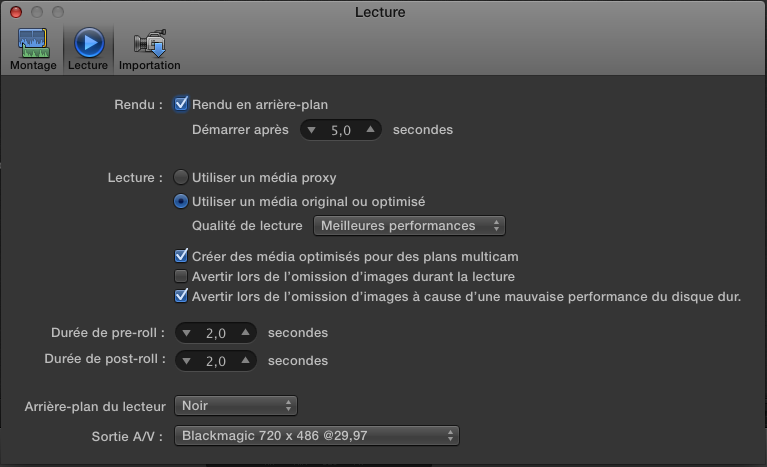
for those who have an Intensity Pro. Black Magic just released a 9.2 Beta that works with FCPX 10.0.3 output is only NTSC SD but if you activate A/V mode in the "Window" Menu it works with a little frame skipping. Still beta though
blackmagic-design.com/support/detail/?os...7&pid=3989&leg=false
Replied by on topic Re: Broadcast Monitoring in 10.0.3 - Matrox, Blackmagic, AJA?
for those who have an Intensity Pro. Black Magic just released a 9.2 Beta that works with FCPX 10.0.3 output is only NTSC SD but if you activate A/V mode in the "Window" Menu it works with a little frame skipping. Still beta though
blackmagic-design.com/support/detail/?os...7&pid=3989&leg=false
Please Log in to join the conversation.
-
- New Member
-
Less
More
- Thank you received: 0
01 Feb 2012 15:58 #3679
by
Replied by on topic Re: Broadcast Monitoring in 10.0.3 - Matrox, Blackmagic, AJA?
Please Log in to join the conversation.
- mliebergot
-
- Offline
- Premium Member
-
Less
More
- Posts: 84
- Thank you received: 3
01 Feb 2012 19:26 #3689
by mliebergot
Replied by mliebergot on topic Re: Broadcast Monitoring in 10.0.3 - Matrox, Blackmagic, AJA?
This is great news.
Now if they can get it to HD resolution, it would rock.
BTW, I never installed the desktop for video, on my system as I have only installed the last Intensity Pro drivers. Haven't done it in a while as you can see.
Any issues by installing the "desktop for video" on my system? Do I have to uninstall the old drivers first?
Now if they can get it to HD resolution, it would rock.
BTW, I never installed the desktop for video, on my system as I have only installed the last Intensity Pro drivers. Haven't done it in a while as you can see.
Any issues by installing the "desktop for video" on my system? Do I have to uninstall the old drivers first?
Please Log in to join the conversation.
-
- New Member
-
Less
More
- Thank you received: 0
01 Feb 2012 20:13 #3694
by
Replied by on topic Re: Broadcast Monitoring in 10.0.3 - Matrox, Blackmagic, AJA?
Hi,
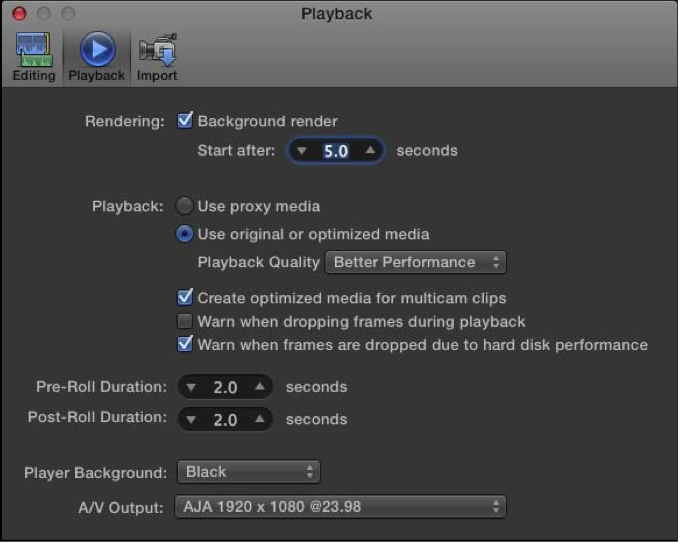
fortunately you have an uninstaller bundled with the 9.2 download. So I suggest you use it before installing anything. Then you do the install, reboot and there you go. Just open FCP X, go to the preference panel see if the card is setup ( it would be automatically ), then activate A/V in the Windows top menu .
cheers
fortunately you have an uninstaller bundled with the 9.2 download. So I suggest you use it before installing anything. Then you do the install, reboot and there you go. Just open FCP X, go to the preference panel see if the card is setup ( it would be automatically ), then activate A/V in the Windows top menu .
cheers
Please Log in to join the conversation.
- mliebergot
-
- Offline
- Premium Member
-
Less
More
- Posts: 84
- Thank you received: 3
01 Feb 2012 21:14 #3696
by mliebergot
Replied by mliebergot on topic Re: Broadcast Monitoring in 10.0.3 - Matrox, Blackmagic, AJA?
Thanks, I thought that it would be that simple.
Just didn't know if I had to uninstall the old driver, which I thought that I did.
Just didn't know if I had to uninstall the old driver, which I thought that I did.
Please Log in to join the conversation.

01 Feb 2012 22:14 #3700
by Pazu
Replied by Pazu on topic Re: Broadcast Monitoring in 10.0.3 - Matrox, Blackmagic, AJA?
Hi everyone, new here (and french sorry for my awful english).
The Broadcast monitoring with Decklinck Blackmagic works just fine. In fcpx, it shows only one configuration like the one you have Scooby.
To change it, go to the decklink options in Mac Os X sys pref. You have to change "set default video standard as: " to HD 1080p 25 or whatever you use. Then reload Final Cut Pro X and you'll have a beautiful broadcast monitoring
The Broadcast monitoring with Decklinck Blackmagic works just fine. In fcpx, it shows only one configuration like the one you have Scooby.
To change it, go to the decklink options in Mac Os X sys pref. You have to change "set default video standard as: " to HD 1080p 25 or whatever you use. Then reload Final Cut Pro X and you'll have a beautiful broadcast monitoring
Please Log in to join the conversation.
01 Feb 2012 22:30 #3701
by BenB
Replied by BenB on topic Re: Broadcast Monitoring in 10.0.3 - Matrox, Blackmagic, AJA?
AJA Kona LHi with FSI LM-2451W monitor is working just fine.
Please Log in to join the conversation.
- mliebergot
-
- Offline
- Premium Member
-
Less
More
- Posts: 84
- Thank you received: 3
01 Feb 2012 23:13 #3702
by mliebergot
Replied by mliebergot on topic Re: Broadcast Monitoring in 10.0.3 - Matrox, Blackmagic, AJA?
This news makes me one HAPPY camper.
Can't wait to get home tonight and try.
Thanks for the info.
Can't wait to get home tonight and try.
Thanks for the info.
Please Log in to join the conversation.
- ronny courtens
-

- Offline
- Moderator
-

Less
More
- Posts: 4455
- Thank you received: 962
01 Feb 2012 23:58 #3704
by ronny courtens
Replied by ronny courtens on topic Re: Broadcast Monitoring in 10.0.3 - Matrox, Blackmagic, AJA?
Works perfectly with AJAioXT over Thunderbolt and a Barco RHDM 2301-P
Please Log in to join the conversation.
-
- New Member
-
Less
More
- Thank you received: 0
02 Feb 2012 04:11 #3710
by
Replied by on topic Re: Broadcast Monitoring in 10.0.3 - Matrox, Blackmagic, AJA?
Unfortunately the options for the intensity Pro may not be as wide as the one for the Decklink. Maybe I should buy one 
Please Log in to join the conversation.
