


- Posts: 68
- Thank you received: 3
3 Post Moderation Rule for New Boarders (25 Jan 2021)
New boarders will have their posts moderated - Don't worry if you cannot see your post immediately.
FCPX 10.3 Audio Sidebar for Sound Effects
- willypimentel
-

- Offline
- Senior Member
-

Less
More
02 Nov 2016 16:34 #81991
by willypimentel
 I feel I am on the same boat here!! I am able to navigate to
/Library/Audio/Apple Loops/Apple and place a custom folder in there and it works and it shows in FCPX with Sierra inside the Folder "Final Cut Pro Sound Effects” but it does not work about its hierarchy.
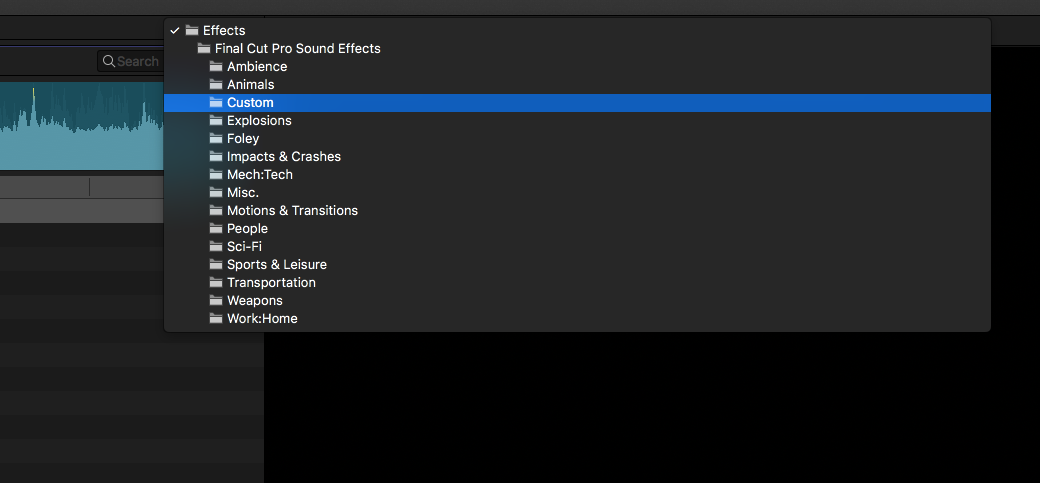
I place 2 folders Folders inside /Library/Audio/Apple Loops/Apple but only whats inside of ""Final Cut Pro Sound Effects” folder shows up?
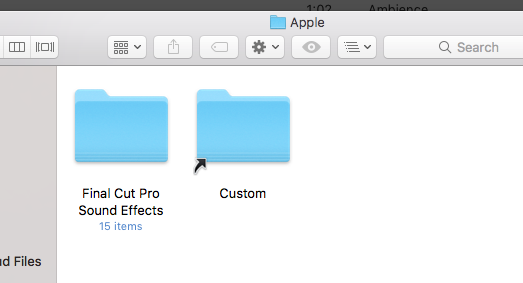
anyone can help…?
Replied by willypimentel on topic FCPX 10.3 Audio Sidebar for Sound Effects
I feel I am on the same boat here!! I am able to navigate to/Library/Audio/Apple Loops/Apple and place a custom folder in there and it works and it shows in FCPX with Sierra inside the Folder "Final Cut Pro Sound Effects” but it does not work about its hierarchy.
I place 2 folders Folders inside /Library/Audio/Apple Loops/Apple but only whats inside of ""Final Cut Pro Sound Effects” folder shows up?
anyone can help…?
Please Log in to join the conversation.
- thefluentone
-
- Offline
- Senior Member
-
Less
More
- Posts: 68
- Thank you received: 5
02 Nov 2016 17:03 #81998
by thefluentone
Aliases are softlinks, it may be that the method of pulling up the browser is limited by softlinks. It's possible a hardlink might work instead. If you're comfortable in a terminal you can try something along the lines of "ln AudioSourcePath /Library/Audio/Apple Loops/Apple/CustomLibraryDirName" I'm not an my editing computer right now so I'm just making a guess.
Replied by thefluentone on topic FCPX 10.3 Audio Sidebar for Sound Effects
PaulG wrote: Very strange. I can put the alias of the my non Apple EFX in the Sounds folder but it can't seem to read stuff lower down in sub folders. If I put an alias on the root level, it reads the folder, but not nested folders...
Aliases are softlinks, it may be that the method of pulling up the browser is limited by softlinks. It's possible a hardlink might work instead. If you're comfortable in a terminal you can try something along the lines of "ln AudioSourcePath /Library/Audio/Apple Loops/Apple/CustomLibraryDirName" I'm not an my editing computer right now so I'm just making a guess.
Please Log in to join the conversation.


02 Nov 2016 17:39 #82001
by illicit1
Replied by illicit1 on topic FCPX 10.3 Audio Sidebar for Sound Effects
The computer I am working on at the moment does not have my version of Final Cut Pro 10.3 on it, I am using the Trial at a remote site. Maybe this has something to do with it. On Sierra.
In my situation, I have only the following in /Library/Audio/
MIDI Configurations/ MIDI Devices/ MIDI Drivers/ MIDI Patch Names/ Plug-Ins/ Sounds/
and this in ~/Library/Audio:
MIDI Drivers Plug-Ins Sounds
In my situation, I have only the following in /Library/Audio/
MIDI Configurations/ MIDI Devices/ MIDI Drivers/ MIDI Patch Names/ Plug-Ins/ Sounds/
and this in ~/Library/Audio:
MIDI Drivers Plug-Ins Sounds
Please Log in to join the conversation.
- willypimentel
-
- Offline
- Senior Member
-
Less
More
- Posts: 68
- Thank you received: 3
03 Nov 2016 21:09 #82129
by willypimentel
Replied by willypimentel on topic FCPX 10.3 Audio Sidebar for Sound Effects
This problem is still unresolved!!
Please Log in to join the conversation.

06 Nov 2016 17:05 - 07 Nov 2016 08:59 #82295
by mjg
Replied by mjg on topic FCPX 10.3 Audio Sidebar for Sound Effects
10.3 do see alias folders and symbolic link folders put in to:
Library/Audio/Apple Loops/Apple/Final Cut Pro Sound Effects/
...but it DOES NOT read/index the content - for FCPX it’s empty folders.
This is broken with 10.3 - and Garegeband is dead too in "Photos & Audio Sidebar" (attention text says: ”3 missing files iLife prevoews unavailable").
I regard it as a bug and I expect an update of FCPX soon....if many think it’s important enough will say. For me it’s important...I can’t have terrabytes of sound FX & loops on a Mac’s internal disk. Of course not. Linking to external disks - with soft or hard links - is essential to my work flow in many cases and applications, especially working with FCPX.
Same on 3 Macs, Sierra & FCPX 10.3 = 10.3 just doesn’t handle links in the Photo & Audio sidebar, it just understands files on the internal disk.
UPDATE: FCPX sees files in "root folder" - but not files in folders inside folders...i.e. just first level...
Library/Audio/Apple Loops/Apple/Final Cut Pro Sound Effects/
...but it DOES NOT read/index the content - for FCPX it’s empty folders.
This is broken with 10.3 - and Garegeband is dead too in "Photos & Audio Sidebar" (attention text says: ”3 missing files iLife prevoews unavailable").
I regard it as a bug and I expect an update of FCPX soon....if many think it’s important enough will say. For me it’s important...I can’t have terrabytes of sound FX & loops on a Mac’s internal disk. Of course not. Linking to external disks - with soft or hard links - is essential to my work flow in many cases and applications, especially working with FCPX.
Same on 3 Macs, Sierra & FCPX 10.3 = 10.3 just doesn’t handle links in the Photo & Audio sidebar, it just understands files on the internal disk.
UPDATE: FCPX sees files in "root folder" - but not files in folders inside folders...i.e. just first level...
Last edit: 07 Nov 2016 08:59 by mjg.
Please Log in to join the conversation.
- Tom Wolsky
-

- Offline
- Moderator
-

06 Nov 2016 17:08 #82296
by Tom Wolsky
Replied by Tom Wolsky on topic FCPX 10.3 Audio Sidebar for Sound Effects
Did you use feedback?
Please Log in to join the conversation.
06 Nov 2016 17:10 - 06 Nov 2016 18:13 #82297
by mjg
Replied by mjg on topic FCPX 10.3 Audio Sidebar for Sound Effects
Yes, it's reported to Apple.
"Reveal in Finder" doesn't work either in the Photos&Audio browser. Even if the file is on local disk. Something is just wrong with FCPX 10.3 and Finder connection...the "browser" is broken.
"Reveal in Finder" doesn't work either in the Photos&Audio browser. Even if the file is on local disk. Something is just wrong with FCPX 10.3 and Finder connection...the "browser" is broken.
Last edit: 06 Nov 2016 18:13 by mjg.
Please Log in to join the conversation.
16 Nov 2016 14:27 - 16 Nov 2016 14:45 #82842
by naq59
Replied by naq59 on topic FCPX 10.3 Audio Sidebar for Sound Effects
In my case (El Capitain) many of my third party sounds are fine, even as alias, but others just appear as empty folders despite being directly placed next to "working" folders. The kind of samples doesn´t matter(44.1 /48 - 16/24 bit), neither whether the samples include copyright tags. I also tried changes the folder names - no numbers, spaces or punctuation marks. I can´t find any constant which decides if sounds appear or not. In iTunes they all work.
Hopefully someone will crack this.
I forgot to mention also that a large number of my "working" sound folders are not located directly in the Final Cut Pro Sound Effects folder but just in the Apple Loops folder - very odd.
Hopefully someone will crack this.
I forgot to mention also that a large number of my "working" sound folders are not located directly in the Final Cut Pro Sound Effects folder but just in the Apple Loops folder - very odd.
Last edit: 16 Nov 2016 14:45 by naq59. Reason: forgotten info
Please Log in to join the conversation.

25 Nov 2016 21:02 #83280
by CMessineo
Replied by CMessineo on topic FCPX 10.3 Audio Sidebar for Sound Effects
I just submitted feedback to Apple too.
I have thousands of sound effects stored in labeled folders (and subfolders).
There has to be an easy way to link them (without using iTunes).
I have thousands of sound effects stored in labeled folders (and subfolders).
There has to be an easy way to link them (without using iTunes).
Please Log in to join the conversation.
01 Dec 2016 16:13 #83515
by javiquil
Replied by javiquil on topic FCPX 10.3 Audio Sidebar for Sound Effects
Same thing here... If I add a custom folder inside "Final cut pro effects" folder ALL of the, suddenly dissapear 
as you can see here: "No items"
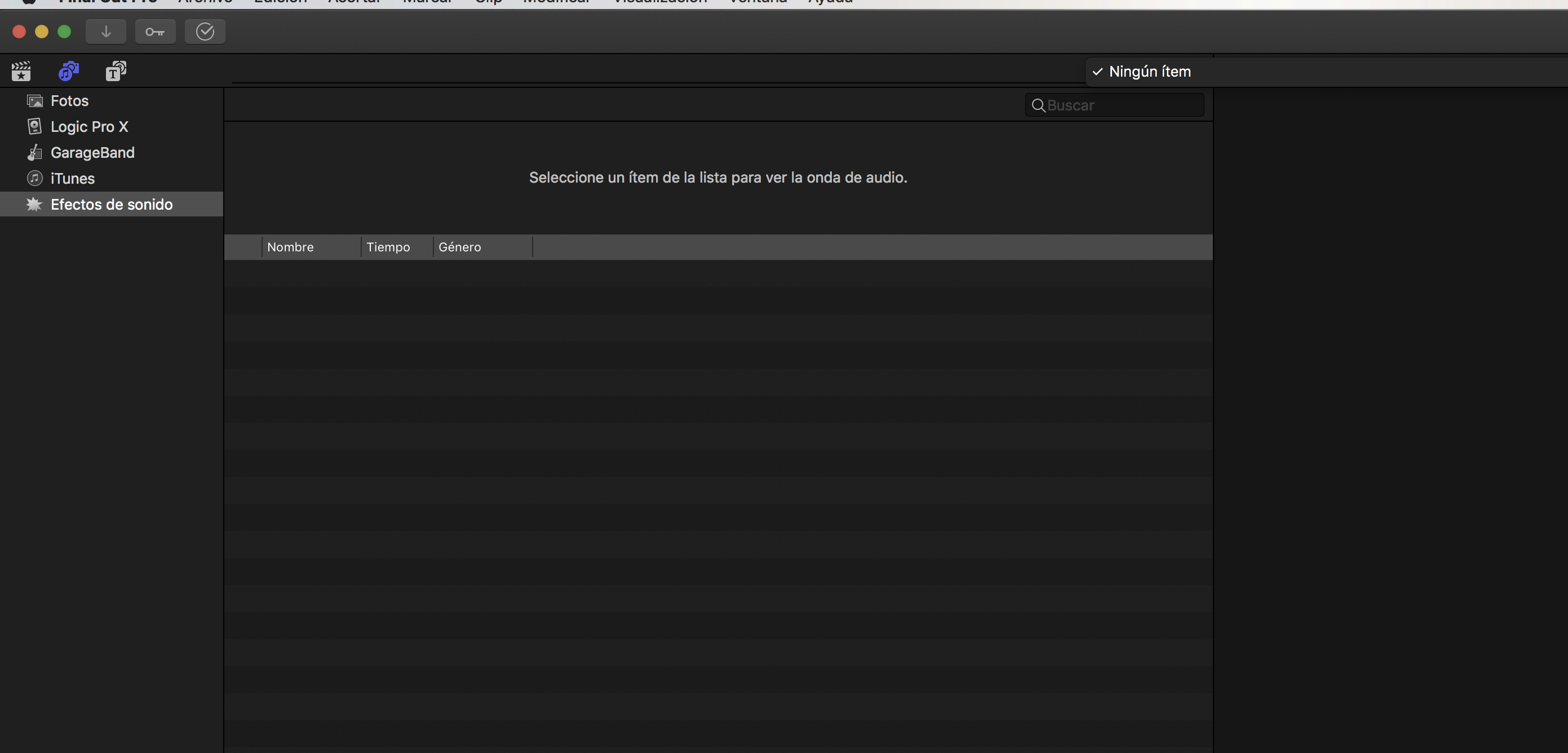
as you can see here: "No items"
Please Log in to join the conversation.


01 Dec 2016 16:48 #83518
by dgwvideo
Creating history....one edit at a time !
Replied by dgwvideo on topic FCPX 10.3 Audio Sidebar for Sound Effects
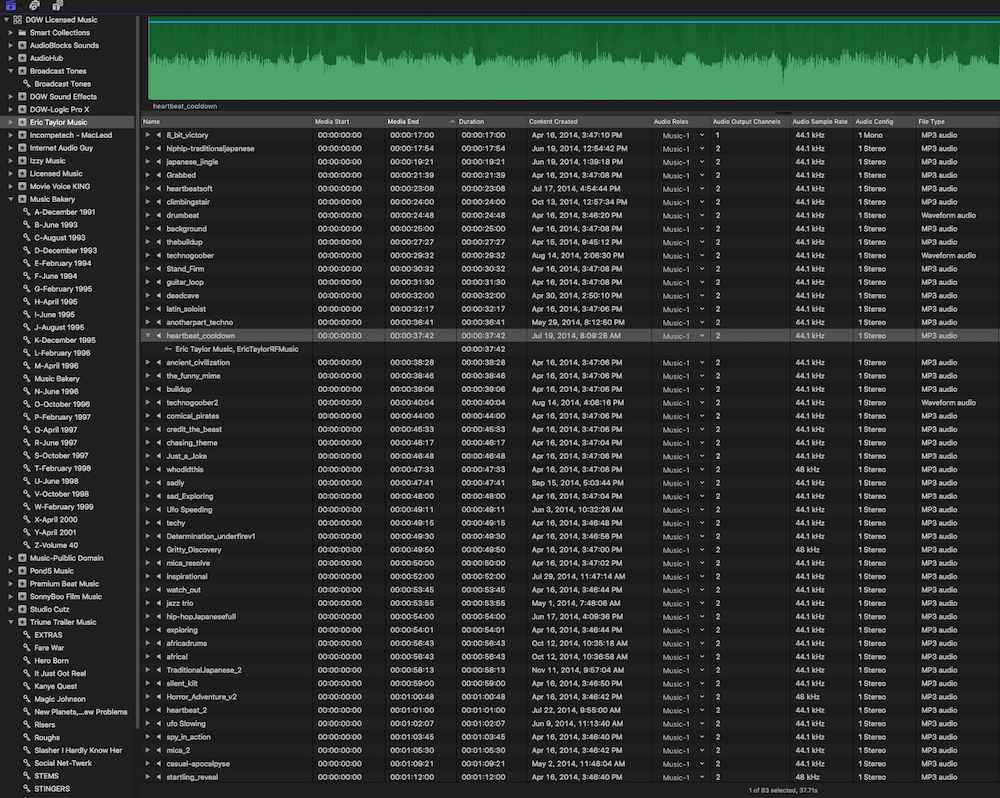
There are multiple threads on this forum for this topic. I have reported feedback to Apple days after the initial release of 10.3. I have decided that for me a separate library of my custom sounds is the best solution until Apple adds a feature that makes this more accessible. I have all the sorting capability I need with the library. Here is a screen shot (partially expanded) of a 160GB custom music and sound library.
Creating history....one edit at a time !
Please Log in to join the conversation.
01 Dec 2016 17:28 #83521
by naq59
Replied by naq59 on topic FCPX 10.3 Audio Sidebar for Sound Effects
For me I found that by creating aliases of the direct folders (those containing the samples and not within another folder) allowed me to access 99% of my sounds again.
Please Log in to join the conversation.

01 Dec 2016 20:20 #83527
by PaulG
Replied by PaulG on topic FCPX 10.3 Audio Sidebar for Sound Effects
Much as I want this functionality restored, I decided to bite the bullet and create a custom SFX library, which contains all of my SFX and stock music. The upside to this approach is that you can predetermine the right roles for everything and drag just the sound I need into the timeline and it automatically copies it to the project library. You have much more control over tagging/keywording sounds.
This library can also be a repository of stock video items like countdowns, slates and other stuff.
The only downsides I can think of are that you need to manually add sounds to the SFX Library (instead of it just detecting new entries) and you might have additional loading/memory issues depending on the size of the library.
I'd be curious to know what Apple intended with this. Ideally, you'd be able to map a custom folder location to the list of pre-determined folders like GarageBand, Logic, Apple SFX etc.
This library can also be a repository of stock video items like countdowns, slates and other stuff.
The only downsides I can think of are that you need to manually add sounds to the SFX Library (instead of it just detecting new entries) and you might have additional loading/memory issues depending on the size of the library.
I'd be curious to know what Apple intended with this. Ideally, you'd be able to map a custom folder location to the list of pre-determined folders like GarageBand, Logic, Apple SFX etc.
Please Log in to join the conversation.
04 Dec 2016 15:01 #83624
by Qmedia.nu
Replied by Qmedia.nu on topic FCPX 10.3 Audio Sidebar for Sound Effects
As i found out for my self, the easiest way was to mak an additional playlist in iTunes, put in my stock of royalty free music and this playlist perfectly appeared in the sidebar under the iTunes button.
Please Log in to join the conversation.
09 Dec 2016 23:31 #83866
by dmetz
Replied by dmetz on topic FCPX 10.3 Audio Sidebar for Sound Effects
I've done a bit of digging today, and in my case, there are 4 main folders under the main Effects folder - Sound Effects, iLife Sound Effects, Theme Music, and Final Cut Pro Sound Effects.
FCPX is reading the Final Cut Pro Sound Effects folder from /Library/Audio/Apple Loops/Apple/
The other 3 are sourced from within the iMovie application...
Further, within the /Apple/ folder mentioned above, I have 19 other folders with loops / sfx, but Final Cut doesn't see them. GarageBand, however, sees everything in there.
C'mon, Apple... this ain't right.
FCPX is reading the Final Cut Pro Sound Effects folder from /Library/Audio/Apple Loops/Apple/
The other 3 are sourced from within the iMovie application...
Further, within the /Apple/ folder mentioned above, I have 19 other folders with loops / sfx, but Final Cut doesn't see them. GarageBand, however, sees everything in there.
C'mon, Apple... this ain't right.
Please Log in to join the conversation.
06 Jan 2017 20:11 #84590
by CMessineo
Replied by CMessineo on topic FCPX 10.3 Audio Sidebar for Sound Effects
Anyone heard any news on this issue?
Has anyone figured out a way to create a folder that is at same level as the "final Cut Pro Sound Effects Folder"?
I run a film school and teach editing. We have many machines and a large sound effects and music library that I need to get on each machine. These sounds and music files need to be accessible through the sound browser (iTunes is not an option nor is a dedicated FCP Library).
As an aside, I love the new version (10.3), but it's so frustrating when Apple breaks what was already working (adding sound libraries).
Has anyone figured out a way to create a folder that is at same level as the "final Cut Pro Sound Effects Folder"?
I run a film school and teach editing. We have many machines and a large sound effects and music library that I need to get on each machine. These sounds and music files need to be accessible through the sound browser (iTunes is not an option nor is a dedicated FCP Library).
As an aside, I love the new version (10.3), but it's so frustrating when Apple breaks what was already working (adding sound libraries).
Please Log in to join the conversation.
- Tom Wolsky
-
- Offline
- Moderator
-
06 Jan 2017 20:25 #84591
by Tom Wolsky
Replied by Tom Wolsky on topic FCPX 10.3 Audio Sidebar for Sound Effects
Why does it have to be at the same level as FCP Sound Effects and not inside it? In previous versions any additional content was in a single folder.
Please Log in to join the conversation.
06 Jan 2017 21:21 #84596
by CMessineo
In previous versions, you could have separate folders (my custom folders were below and separate from my other folders)..
This is important for searching. If I put it all in one folder, then the sound effects found must be searched at the same time as all my other custom folders (which contain 10's of thousands of effects).
Replied by CMessineo on topic FCPX 10.3 Audio Sidebar for Sound Effects
Tom Wolsky wrote: Why does it have to be at the same level as FCP Sound Effects and not inside it? In previous versions any additional content was in a single folder.
In previous versions, you could have separate folders (my custom folders were below and separate from my other folders)..
This is important for searching. If I put it all in one folder, then the sound effects found must be searched at the same time as all my other custom folders (which contain 10's of thousands of effects).
Please Log in to join the conversation.
- Tom Wolsky
-
- Offline
- Moderator
-
06 Jan 2017 21:54 #84597
by Tom Wolsky
Replied by Tom Wolsky on topic FCPX 10.3 Audio Sidebar for Sound Effects
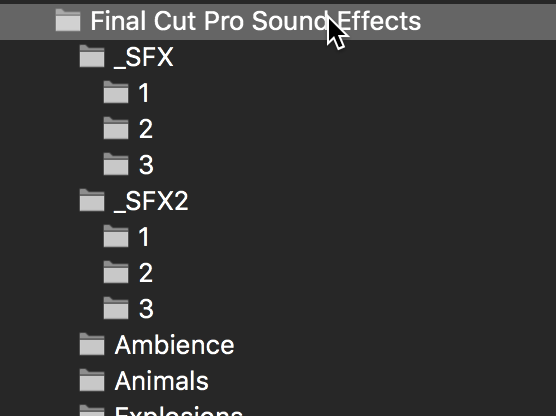
Shouldn't your folders appear in the popup menu and be selectable? Wouldn't that confine your search to the selected folder or subfolder?
Please Log in to join the conversation.
08 Jan 2017 19:28 #84670
by CMessineo
Replied by CMessineo on topic FCPX 10.3 Audio Sidebar for Sound Effects
You are correct. I could click on my individual folders to search those.
I just can't search the overall "Final Cut Pro Sound Effects Folder" without also including my folders.
I can make it work, I guess I just wish we had a little bit more flexibility, like not having to nest our folders inside those folders in the library (especially since we can't use links/aliases). This makes it much harder to manage in a classroom environment.
Thanks for your help though.
Chris
I just can't search the overall "Final Cut Pro Sound Effects Folder" without also including my folders.
I can make it work, I guess I just wish we had a little bit more flexibility, like not having to nest our folders inside those folders in the library (especially since we can't use links/aliases). This makes it much harder to manage in a classroom environment.
Thanks for your help though.
Chris
Please Log in to join the conversation.
