


- Posts: 161
- Thank you received: 13
3 Post Moderation Rule for New Boarders (25 Jan 2021)
New boarders will have their posts moderated - Don't worry if you cannot see your post immediately.
What are you hoping for in 10.3?
- nils.dettmann
-

- Offline
- Elite Member
-

Less
More
23 Feb 2016 22:25 #73698
by nils.dettmann
Replied by nils.dettmann on topic What are you hoping for in 10.3?
Actually there is an opacity handle when you expand video animation and then Compositing.
But it´s only linear and it´s still some clicks and taps away...
But it´s only linear and it´s still some clicks and taps away...
Please Log in to join the conversation.
- Tom Wolsky
-

- Offline
- Moderator
-

23 Feb 2016 22:34 #73699
by Tom Wolsky
Replied by Tom Wolsky on topic What are you hoping for in 10.3?
• Faster way to do fade in/outs in video. And with various curves. Maybe an opacity handle like it is for audio fades)
Don't you use a transition for this?
Don't you use a transition for this?
Please Log in to join the conversation.

24 Feb 2016 01:41 #73706
by Shane M
Replied by Shane M on topic What are you hoping for in 10.3?
Off the top of my head, that I don't think has been mentioned yet...
1. Remove attributes - I find it kind of funny that this wasn't just automatically part of the addition of the "Paste Attributes" feature that was eventually added.
2. Drag Effect From Inspector to a clip in timeline. Essentially another, quicker way of copy and pasting attributes.
3. Markers on the actual timeline, not just on clips. Would be cool if you could click (wth a modifier?) and drag them to be moved somewhere else instead of having to delete and recreate new markers.
1. Remove attributes - I find it kind of funny that this wasn't just automatically part of the addition of the "Paste Attributes" feature that was eventually added.
2. Drag Effect From Inspector to a clip in timeline. Essentially another, quicker way of copy and pasting attributes.
3. Markers on the actual timeline, not just on clips. Would be cool if you could click (wth a modifier?) and drag them to be moved somewhere else instead of having to delete and recreate new markers.
Please Log in to join the conversation.

24 Feb 2016 12:39 #73712
by grailz
Replied by grailz on topic What are you hoping for in 10.3?
- A non keyboard way to select a secondary storyline. It is annoying to have to click on the boundaries of a secondary storyline every time I want to edit something into it. I can select a clip within a secondary storyline simply by mousing over and hitting the "c" key. I would like to have a similar ability to interact with secondary storylines
- A way to assign a keyboard shortcut to toggle between proxy/optimized media
- SVG support for FCPX/Motion
- A way to assign a keyboard shortcut to toggle between proxy/optimized media
- SVG support for FCPX/Motion
Please Log in to join the conversation.
24 Feb 2016 17:56 #73732
by Soundwise
Actually it has the same ease ins and outs as the audio fades.
Replied by Soundwise on topic What are you hoping for in 10.3?
nils.dettmann wrote: Actually there is an opacity handle when you expand video animation and then Compositing.
But it´s only linear and it´s still some clicks and taps away...
Actually it has the same ease ins and outs as the audio fades.
Please Log in to join the conversation.
- Scott Markowitz
-
- Offline
- Elite Member
-
Less
More
- Posts: 161
- Thank you received: 31
24 Feb 2016 19:41 #73738
by Scott Markowitz
Replied by Scott Markowitz on topic What are you hoping for in 10.3?
I really want to have killer color grading and an elegant way to round trip from FCP X and Motion.
Yes, this has been mentioned already, but I have some a big ideas about what it should look like.
Motion should be a fully-functional node-based 3-D compositing environment complete with modeling tools, full texturing capabilities, real-world physics, and particle systems.
(I want Fusion 8 and Resolve capabilities in my FCP X timeline.)
Yes, this has been mentioned already, but I have some a big ideas about what it should look like.
Motion should be a fully-functional node-based 3-D compositing environment complete with modeling tools, full texturing capabilities, real-world physics, and particle systems.
(I want Fusion 8 and Resolve capabilities in my FCP X timeline.)
Please Log in to join the conversation.
- robadamsfilms
-
- Offline
- New Member
-

Less
More
- Posts: 4
- Thank you received: 0
24 Feb 2016 20:29 #73740
by robadamsfilms
Replied by robadamsfilms on topic What are you hoping for in 10.3?
1. A Two-Up Color-Grading display (like PP)
2. Scrolling Timeline
3. Roles-Based Audio Mixer
4. Remove Attributes
Basic stuff IMO.
2. Scrolling Timeline
3. Roles-Based Audio Mixer
4. Remove Attributes
Basic stuff IMO.
Please Log in to join the conversation.
24 Feb 2016 21:33 #73741
by robertdee
Replied by robertdee on topic What are you hoping for in 10.3?
Color Finale (with the new favourite effect shortcut assigned) has changed my work on FCPX in a big way. So much better to work with.
Please Log in to join the conversation.
- nils.dettmann
-
- Offline
- Elite Member
-
Less
More
- Posts: 161
- Thank you received: 13
25 Feb 2016 10:00 #73747
by nils.dettmann
I don´t think so.
Maybe I´m totally mistaken but there is no ease in or ease out with the opacity handles. You can achieve the behavior with keyframes but that´s not what was asked and what I was talking about.
Replied by nils.dettmann on topic What are you hoping for in 10.3?
Soundwise wrote:
nils.dettmann wrote: Actually there is an opacity handle when you expand video animation and then Compositing.
But it´s only linear and it´s still some clicks and taps away...
Actually it has the same ease ins and outs as the audio fades.
I don´t think so.
Maybe I´m totally mistaken but there is no ease in or ease out with the opacity handles. You can achieve the behavior with keyframes but that´s not what was asked and what I was talking about.
Please Log in to join the conversation.
25 Feb 2016 10:06 - 25 Feb 2016 10:16 #73748
by Soundwise
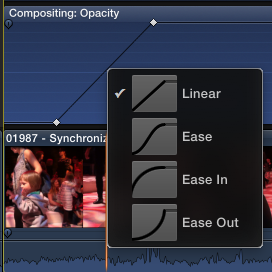
Right click the line between keyframes. You're right, it does not work on the actual opacity handle though.
Replied by Soundwise on topic What are you hoping for in 10.3?
nils.dettmann wrote:
Soundwise wrote:
nils.dettmann wrote: Actually there is an opacity handle when you expand video animation and then Compositing.
But it´s only linear and it´s still some clicks and taps away...
Actually it has the same ease ins and outs as the audio fades.
I don´t think so.
Maybe I´m totally mistaken but there is no ease in or ease out with the opacity handles. You can achieve the behavior with keyframes but that´s not what was asked and what I was talking about.
Right click the line between keyframes. You're right, it does not work on the actual opacity handle though.
Last edit: 25 Feb 2016 10:16 by Soundwise.
Please Log in to join the conversation.
- mondovideo
-
- Offline
- New Member
-
- penguin in bondage
Less
More
- Posts: 1
- Thank you received: 0
25 Feb 2016 15:56 #73753
by mondovideo
Replied by mondovideo on topic What are you hoping for in 10.3?
All good!! Can Motion be brought up in this thread? I am still earnestly hoping that Apple can find the way to bring back external monitor capabilities for Motion, this is so needed!!
Warning pipe dream ahead: On the topic of Motion, does anyone have an opinion of folding it into X? Something along the lines of a compound clip with a selection on type of clip it will become (eg., Motion or compound), and stepping into it clips would be displayed within the Motion environment. Comps and environments etc. completed, step back out and the clip behaves in same manner as a typical compound in Project. Render and done. Would elevate X to a new level.
Thanks!
Warning pipe dream ahead: On the topic of Motion, does anyone have an opinion of folding it into X? Something along the lines of a compound clip with a selection on type of clip it will become (eg., Motion or compound), and stepping into it clips would be displayed within the Motion environment. Comps and environments etc. completed, step back out and the clip behaves in same manner as a typical compound in Project. Render and done. Would elevate X to a new level.
Thanks!
Please Log in to join the conversation.
- DmitriZigany
-
- Offline
- Platinum Member
-

Less
More
- Posts: 730
- Thank you received: 26
26 Feb 2016 13:03 - 26 Feb 2016 13:09 #73779
by DmitriZigany
That's interesting. Unfortunately it only works between keyframes, it seems? So I have to open the clip with ctrl-v, then click the opacity triangle, then create two keyframes (but have to move the opacity handle in the beginning first to place a keyframe at the beginning) then I can make a different curve.
I wish there was opacity handles always available on all video clips just like there's always fade handles on audio clips.
Replied by DmitriZigany on topic What are you hoping for in 10.3?
nils.dettmann wrote: Actually there is an opacity handle when you expand video animation and then Compositig.
Right click the line between keyframes. You're right, it does not work on the actual opacity handle though.
That's interesting. Unfortunately it only works between keyframes, it seems? So I have to open the clip with ctrl-v, then click the opacity triangle, then create two keyframes (but have to move the opacity handle in the beginning first to place a keyframe at the beginning) then I can make a different curve.
I wish there was opacity handles always available on all video clips just like there's always fade handles on audio clips.
Last edit: 26 Feb 2016 13:09 by DmitriZigany.
Please Log in to join the conversation.
- DmitriZigany
-
- Offline
- Platinum Member
-
Less
More
- Posts: 730
- Thank you received: 26
26 Feb 2016 13:06 #73780
by DmitriZigany
Replied by DmitriZigany on topic What are you hoping for in 10.3?
For titles and attached clips I prefer to use opacity. Especially titles as they are turned into a secondary storyline and take up much more vertical space when a transition is added...Tom Wolsky wrote: • Faster way to do fade in/outs in video. And with various curves. Maybe an opacity handle like it is for audio fades)
Don't you use a transition for this?
Please Log in to join the conversation.
