


- Posts: 868
- Thank you received: 85
3 Post Moderation Rule for New Boarders (25 Jan 2021)
New boarders will have their posts moderated - Don't worry if you cannot see your post immediately.
What are you hoping for in 10.3?
22 Feb 2016 19:06 #73642
by cseeman
Replied by cseeman on topic What are you hoping for in 10.3?
And speaking of cumbersome text editing.
I'd really prefer kerning in the Viewer than in the Inspector. Simple put the cursor between two characters and use a keyboard command to nudge the characters left or right.
I'd really prefer kerning in the Viewer than in the Inspector. Simple put the cursor between two characters and use a keyboard command to nudge the characters left or right.
Please Log in to join the conversation.
- Squamish ed
-

- Offline
- Elite Member
-

Less
More
- Posts: 238
- Thank you received: 20
22 Feb 2016 21:17 #73644
by Squamish ed
Ed
Replied by Squamish ed on topic What are you hoping for in 10.3?
Key framing colour board changes.
Ed
Please Log in to join the conversation.
22 Feb 2016 21:45 #73646
by PaulG
Replied by PaulG on topic What are you hoping for in 10.3?
OK, here's my wish list of ten things (in no particular order):
1) Image Sequences: FCPX needs to follow Motion's (or After Effects') lead and recognize image sequences as VIDEO not thousands of stills that need to be put into a compound clip and set for 1 frame each. Dumbest workaround I've ever seen. You can render out image sequences but why can't you import them?
2) RAW support: both for stills and image sequences. FCPX treats DNG, CR2, NEF and other flavors of RAW as JPEGs with the same restrictions on color temp, ISO etc. Aperture had RAW, so does the new "Photos" app (why does Apple insist on calling programs by their generic functional names?, but I digress). If you work with photos (small p), you need RAW interpretation controls.
3) Type Tweaks: A couple of small things:
- Ability to scale text x/y independently within the text section, not the video section. This way you can stretch a word without affecting the whole line...
- Allow text to repositioned anywhere on screen in the text entry mode regardless of video coordinates without text being cut off by frame limits. Be able to see text "off screen" while working with large blocks that extend off screen.
4) Color Board: Make Exposure the first tab you see (it's the thing I deal with most; color is always the last)
5) Snapshot custom naming template without having to rename snapshots every time
6) Export & RT to Motion
7) Motion update: SUPPORT EXTERNAL MONITORS!
 Audio Mixing (others have already laid this out...)
9) Loop Controls: Allow a segment to be looped/ping-ponged ad infinitum. This could be a "filter" that you apply so that it loops the edited clip for as long as you want to drag the clip out. This would help with constructing complex animation ideas.
10) Keyframing: the controls are still very clunky and often work counter-intuitively. Control - V to show all keyframes often takes several twirls to reveal keyframes and which properties are affect.
That's my current gripe list. I'd settle for anything on being tweaked...
1) Image Sequences: FCPX needs to follow Motion's (or After Effects') lead and recognize image sequences as VIDEO not thousands of stills that need to be put into a compound clip and set for 1 frame each. Dumbest workaround I've ever seen. You can render out image sequences but why can't you import them?
2) RAW support: both for stills and image sequences. FCPX treats DNG, CR2, NEF and other flavors of RAW as JPEGs with the same restrictions on color temp, ISO etc. Aperture had RAW, so does the new "Photos" app (why does Apple insist on calling programs by their generic functional names?, but I digress). If you work with photos (small p), you need RAW interpretation controls.
3) Type Tweaks: A couple of small things:
- Ability to scale text x/y independently within the text section, not the video section. This way you can stretch a word without affecting the whole line...
- Allow text to repositioned anywhere on screen in the text entry mode regardless of video coordinates without text being cut off by frame limits. Be able to see text "off screen" while working with large blocks that extend off screen.
4) Color Board: Make Exposure the first tab you see (it's the thing I deal with most; color is always the last)
5) Snapshot custom naming template without having to rename snapshots every time
6) Export & RT to Motion
7) Motion update: SUPPORT EXTERNAL MONITORS!
Audio Mixing (others have already laid this out...)9) Loop Controls: Allow a segment to be looped/ping-ponged ad infinitum. This could be a "filter" that you apply so that it loops the edited clip for as long as you want to drag the clip out. This would help with constructing complex animation ideas.
10) Keyframing: the controls are still very clunky and often work counter-intuitively. Control - V to show all keyframes often takes several twirls to reveal keyframes and which properties are affect.
That's my current gripe list. I'd settle for anything on being tweaked...
Please Log in to join the conversation.
- Tom Wolsky
-

- Offline
- Moderator
-

22 Feb 2016 21:55 - 22 Feb 2016 21:56 #73647
by Tom Wolsky
Replied by Tom Wolsky on topic What are you hoping for in 10.3?
"- Allow text to repositioned anywhere on screen in the text entry mode regardless of video coordinates without text being cut off by frame limits."
You can do this. Drag with the target button. That's the way text should be moved.

You can do this. Drag with the target button. That's the way text should be moved.
Last edit: 22 Feb 2016 21:56 by Tom Wolsky.
Please Log in to join the conversation.
22 Feb 2016 22:01 #73648
by PaulG
Replied by PaulG on topic What are you hoping for in 10.3?
Yeah, Tom, I do know that, but I think it's pointless and makes you get out of the text layout mode. Text should never be cut off because of frame boundaries. I don't see the purpose of when you'd want that to occur....
Please Log in to join the conversation.
- Tom Wolsky
-
- Offline
- Moderator
-
22 Feb 2016 22:17 #73649
by Tom Wolsky
Replied by Tom Wolsky on topic What are you hoping for in 10.3?
"makes you get out of the text layout mode"
I don't know what that means. Most video app cuts text off at the boundaries if you don't move it with a text position control.
I don't know what that means. Most video app cuts text off at the boundaries if you don't move it with a text position control.
Please Log in to join the conversation.
22 Feb 2016 22:28 #73650
by PaulG
Replied by PaulG on topic What are you hoping for in 10.3?
Tom, you're right, my thinking was reversed. It's when you're in the Transform area of the Video tab, using the X/Y trying to keyframe text from off-screen to on-screen comes with cut-off. Is there another way to keyframe text in and out without this happening? Is the text position tool keyframe-able? Are any of the text parameters key-framable?
Please Log in to join the conversation.
- Tom Wolsky
-
- Offline
- Moderator
-
22 Feb 2016 22:55 #73652
by Tom Wolsky
Replied by Tom Wolsky on topic What are you hoping for in 10.3?
Keyframing is odd in text. If a parameter appears in the Title inspector, for instance tracking, which does in a few titles, then the parameter can be keyframed. I don't know of hand any that has position keyframable. Being able to keyframe text parameters in the text inspector is high on my list.
Please Log in to join the conversation.
- Karsten Schlüter
-

- Offline
- Moderator
-
Less
More
- Posts: 3790
- Thank you received: 718
23 Feb 2016 07:24 #73658
by Karsten Schlüter
Replied by Karsten Schlüter on topic What are you hoping for in 10.3?
call me grumpy … but the suggestions so far are .... minuscle (pun intended) ... :S aren't they?
ok, aside 'fix bugs/more solid' and the ever lasting 'audio mixer'.
… next update will have it hard to create a "WOW" .......
ok, aside 'fix bugs/more solid' and the ever lasting 'audio mixer'.
… next update will have it hard to create a "WOW" .......
Please Log in to join the conversation.

Less
More
- Posts: 971
- Thank you received: 46
23 Feb 2016 07:34 #73659
by MsJustine
Replied by MsJustine on topic What are you hoping for in 10.3?
I guess it is very hard to think about the huge features? I mean what is huge and what is minuscule?
FCPX is basically a finished product, in that it works and does the job it was built for, and does it very well. Should Apple do all the plug in's or leave that for outside developers?
What could Apple do better than an outside developer? From what I have heard from FCPX radio and read on forums, Colorfinale is way better than the bog standard color board included in FCPX.
ColorFinale is a plug in, not something Apple published, so where should Apple stop and developers take over? Maybe Apple has a certain developer in mind to do the heavy coding for a roles based audio mixer, or some sort of audio mixer, and this is very much a wanted feature, sorely missed since 10.0.0!!
I still cannot understand the reluctance of Apple FCPX pro dev not to publish a beta version, so that people can test, comment, provide insights into what could be improved, watchOS, tvOS, iosOS, El CapOS is all in very public beta, so no real surprises there, but for a tiny app like FCPX and Logic, why the hush hush, or your fired secrecy?? Paranoid is not the word, confused more like, I just don't get it, open debate for 1 part and secrecy for a bunch of tiny apps?? :huh:
FCPX is basically a finished product, in that it works and does the job it was built for, and does it very well. Should Apple do all the plug in's or leave that for outside developers?
What could Apple do better than an outside developer? From what I have heard from FCPX radio and read on forums, Colorfinale is way better than the bog standard color board included in FCPX.
ColorFinale is a plug in, not something Apple published, so where should Apple stop and developers take over? Maybe Apple has a certain developer in mind to do the heavy coding for a roles based audio mixer, or some sort of audio mixer, and this is very much a wanted feature, sorely missed since 10.0.0!!
I still cannot understand the reluctance of Apple FCPX pro dev not to publish a beta version, so that people can test, comment, provide insights into what could be improved, watchOS, tvOS, iosOS, El CapOS is all in very public beta, so no real surprises there, but for a tiny app like FCPX and Logic, why the hush hush, or your fired secrecy?? Paranoid is not the word, confused more like, I just don't get it, open debate for 1 part and secrecy for a bunch of tiny apps?? :huh:
Please Log in to join the conversation.

23 Feb 2016 08:22 #73660
by Seamusvfx
Does it need a wow. It does what it does - which is edit. Audio mixer keeps cropping up because it's a core editing function that is currently missing.
Replied by Seamusvfx on topic What are you hoping for in 10.3?
Karsten Schlüter wrote: call me grumpy … but the suggestions so far are .... minuscle (pun intended) ... :S aren't they?
ok, aside 'fix bugs/more solid' and the ever lasting 'audio mixer'.
… next update will have it hard to create a "WOW" .......
Does it need a wow. It does what it does - which is edit. Audio mixer keeps cropping up because it's a core editing function that is currently missing.
Please Log in to join the conversation.
Less
More
- Posts: 971
- Thank you received: 46
23 Feb 2016 08:26 #73661
by MsJustine
Replied by MsJustine on topic What are you hoping for in 10.3?
Yes but who should do it? Apple or an external app plug in developer? I am sure everyone agrees an audio mixer with LUFS is needed ASAP, if not sooner, the question is, who builds this??
Please Log in to join the conversation.
23 Feb 2016 09:21 #73663
by Seamusvfx
Replied by Seamusvfx on topic What are you hoping for in 10.3?
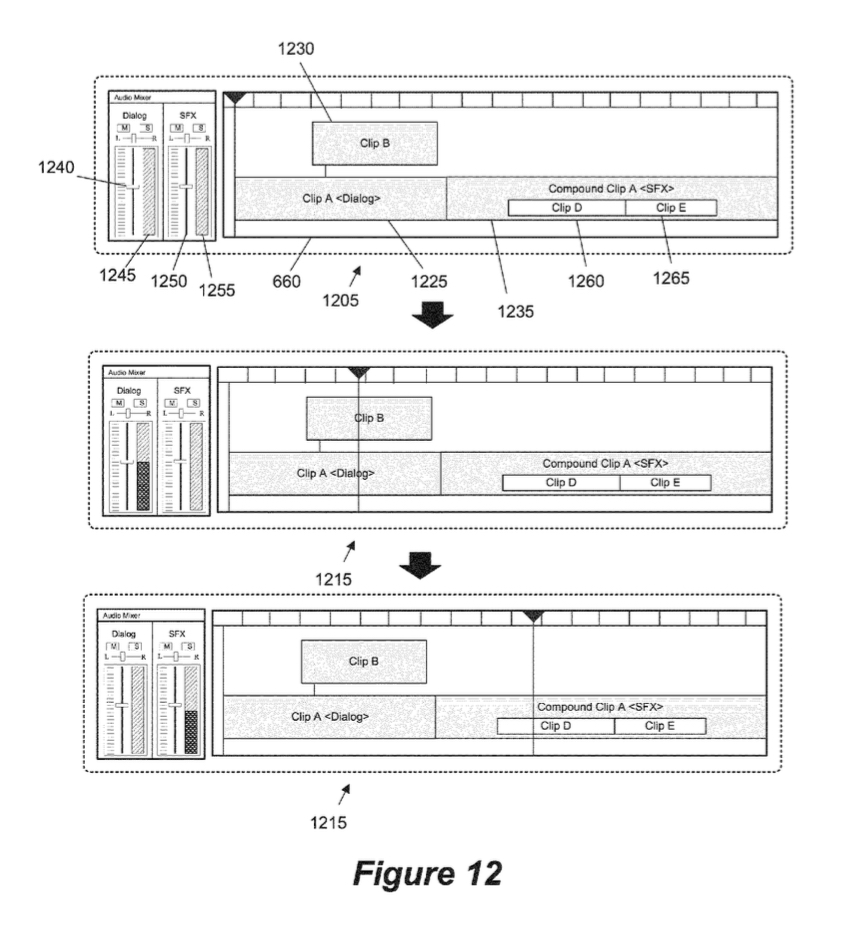
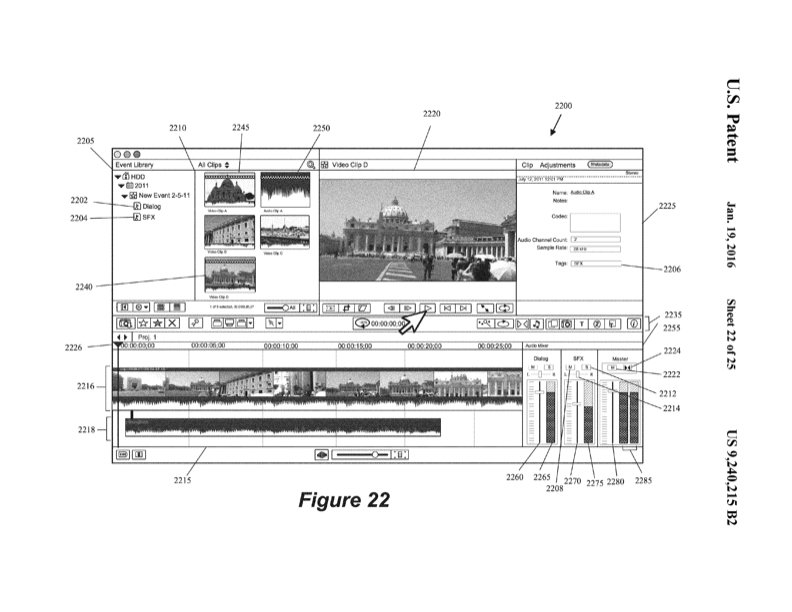
Apple. Theres not really any question about that. I think I'm right saying that sort of integration can't be done through whats exposed to developers - at least not elegantly. Besides Apple already have a patent on it
www.cinema5d.com/final-cut-pro-x-roles-a...possibly-on-its-way/
Please Log in to join the conversation.
Less
More
- Posts: 971
- Thank you received: 46
23 Feb 2016 10:29 #73665
by MsJustine
Replied by MsJustine on topic What are you hoping for in 10.3?
I saw that when it was first made public, and it is WOW, something so obvious, it is exactly that sort of thing that really would do well in beta, to test the heck out of it, the more people using and finding ways to use it, the better the development will be.
The problem I have with that patent screengrab, with the layout is screen clutter on a 13in macbook pro, if Apple plan to implement this extra volume meters on portable devices then larger screens are almost a given, 15in maybe a squeeze, 17in will be more suitable.
Apple I hope are thinking about who uses FCPX, and not everyone has an imac and 5k 100in monitors..
The problem I have with that patent screengrab, with the layout is screen clutter on a 13in macbook pro, if Apple plan to implement this extra volume meters on portable devices then larger screens are almost a given, 15in maybe a squeeze, 17in will be more suitable.
Apple I hope are thinking about who uses FCPX, and not everyone has an imac and 5k 100in monitors..
Please Log in to join the conversation.
- Abercrombie
-
- Offline
- New Member
-

Less
More
- Posts: 6
- Thank you received: 0
23 Feb 2016 10:54 #73667
by Abercrombie
Replied by Abercrombie on topic What are you hoping for in 10.3?
For me, a Siri-based transcription tool inside of FCPX would be a great 10.3 feature- Adobe tried this, but it never worked that well. Since interviews are a big part of most editors life, automatically created transcriptions would be awesome!
I really like this list as well:
fcpx.tv/top.html
Maybe they and fcp.co could get together and implement some kind of feature wishlist in a wiki. So everybody could add wishes themselves. Or maybe a feature wishlist coordinator/moderator. I know, Peter has a lot of things to do, so maybe someone else.
I really like this list as well:
fcpx.tv/top.html
Maybe they and fcp.co could get together and implement some kind of feature wishlist in a wiki. So everybody could add wishes themselves. Or maybe a feature wishlist coordinator/moderator. I know, Peter has a lot of things to do, so maybe someone else.
Please Log in to join the conversation.
23 Feb 2016 14:23 #73672
by BenB
Replied by BenB on topic What are you hoping for in 10.3?
Please Log in to join the conversation.
Less
More
- Posts: 971
- Thank you received: 46
23 Feb 2016 14:28 #73675
by MsJustine
Replied by MsJustine on topic What are you hoping for in 10.3?
I see a big issue with this layout, if you have mixed audio in a compound clip, how are you going to mix the audio?
Also only 1 timecode window, which is daft, needs 2 timecode windows...
Ben did you notice what version this was for??????? If this is what Apple is thinking then we are all in for a big shock!!! It is not a 10.1 or 10.2 or 10.3...it is lets says less than 10.1...
Also only 1 timecode window, which is daft, needs 2 timecode windows...
Ben did you notice what version this was for??????? If this is what Apple is thinking then we are all in for a big shock!!! It is not a 10.1 or 10.2 or 10.3...it is lets says less than 10.1...
Please Log in to join the conversation.
23 Feb 2016 14:36 #73677
by BenB
Replied by BenB on topic What are you hoping for in 10.3?
Compound clip routes to whatever its Role assignment is. Very simple.
Aside from audio mixer and audio buses, or a realistic LPX round trip scheme, I don't care what they do next. I'm too busy...
Aside from audio mixer and audio buses, or a realistic LPX round trip scheme, I don't care what they do next. I'm too busy...
Please Log in to join the conversation.
- nils.dettmann
-
- Offline
- Elite Member
-
Less
More
- Posts: 161
- Thank you received: 13
23 Feb 2016 21:16 #73694
by nils.dettmann
Replied by nils.dettmann on topic What are you hoping for in 10.3?
I vote for audio mixer, Motion roundtrip and fully featured secondary storylines (e.g. titles connected to secondary storylines.)
And one thing which did´t come up so far: a more logical way of ungrouping clips.
I think it´s quite dangerous to eventually loose audio channels and all the L-Cuts when ungrouping compound or synchronized clips.
(Disconnecting the audio first helps but I don´t think the user experience is logical in this context)
And one thing which did´t come up so far: a more logical way of ungrouping clips.
I think it´s quite dangerous to eventually loose audio channels and all the L-Cuts when ungrouping compound or synchronized clips.
(Disconnecting the audio first helps but I don´t think the user experience is logical in this context)
Please Log in to join the conversation.
- DmitriZigany
-
- Offline
- Platinum Member
-

Less
More
- Posts: 730
- Thank you received: 26
23 Feb 2016 21:47 - 23 Feb 2016 22:04 #73695
by DmitriZigany
Replied by DmitriZigany on topic What are you hoping for in 10.3?
The things I can think of right now are:
• Faster waveform re-draws! (must be possible to analyse the waveforms and then store them somehow?)
• Stop the frequent crashes when working with titles/fonts. (might be me, I've tried to clear out fonts etc and this has been an issue for me since 1.0.x)
• Faster way to do fade in/outs in video. And with various curves. Maybe an opacity handle like it is for audio fades)
• Better use of screen real estate when viewing multicam angles
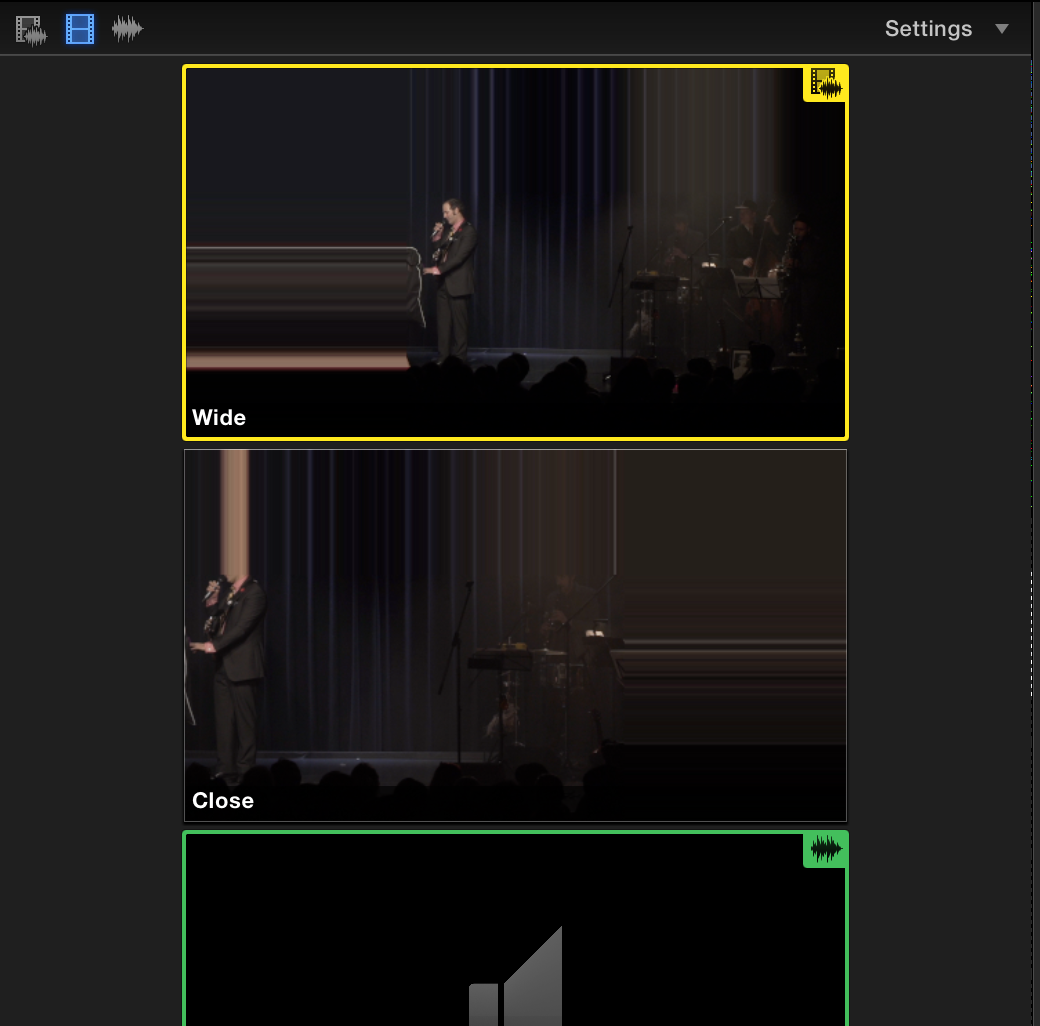
• Fix the graphic bug that happens once an angle is resized, then thumbnails look like this:
• Faster waveform re-draws! (must be possible to analyse the waveforms and then store them somehow?)
• Stop the frequent crashes when working with titles/fonts. (might be me, I've tried to clear out fonts etc and this has been an issue for me since 1.0.x)
• Faster way to do fade in/outs in video. And with various curves. Maybe an opacity handle like it is for audio fades)
• Better use of screen real estate when viewing multicam angles
• Fix the graphic bug that happens once an angle is resized, then thumbnails look like this:
Last edit: 23 Feb 2016 22:04 by DmitriZigany.
Please Log in to join the conversation.
