


- Posts: 2609
- Thank you received: 696
3 Post Moderation Rule for New Boarders (25 Jan 2021)
New boarders will have their posts moderated - Don't worry if you cannot see your post immediately.
FCPX update to 10.2.3
09 Feb 2016 14:12 #73147
by joema
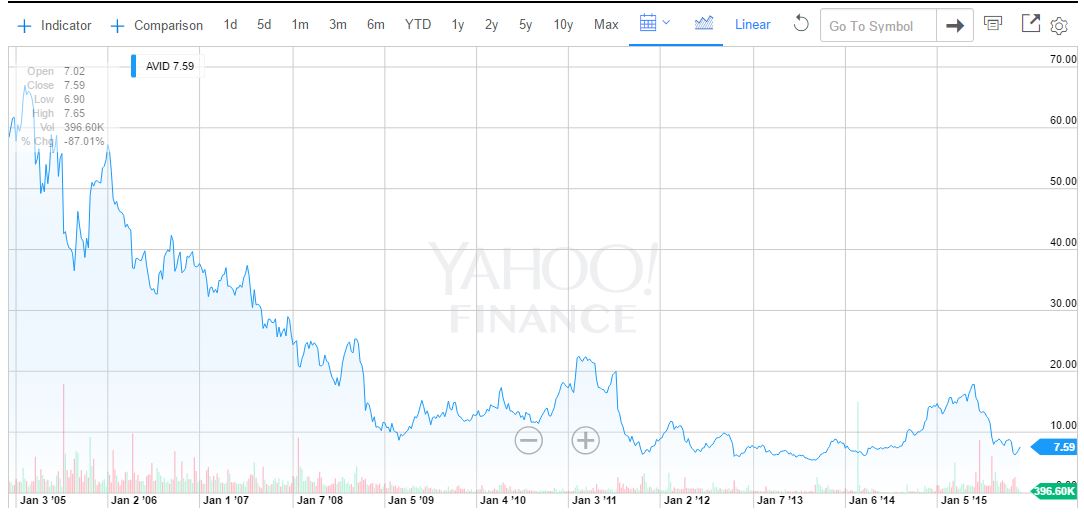
Here's something else to give you goosebumps:
Avid stock price graph (attached)
Avid delisted from NASDAQ nearly one year due to financial irregularities: nofilmschool.com/2014/02/avid-delisted-nasdaq-stock-market
Boston Globe 2014: Can Avid Make A Comeback? www.bostonglobe.com/business/2014/04/05/...aqQI72AtK/story.html
Replied by joema on topic FCPX update to 10.2.3
Arsecati wrote: ...I'll probably have completed my transition to MC by that time: my word, editing on that gives me goosebumps the more I work on it!

Here's something else to give you goosebumps:
Avid stock price graph (attached)
Avid delisted from NASDAQ nearly one year due to financial irregularities: nofilmschool.com/2014/02/avid-delisted-nasdaq-stock-market
Boston Globe 2014: Can Avid Make A Comeback? www.bostonglobe.com/business/2014/04/05/...aqQI72AtK/story.html
Please Log in to join the conversation.

Less
More
- Posts: 971
- Thank you received: 46
09 Feb 2016 14:15 #73148
by MsJustine
Replied by MsJustine on topic FCPX update to 10.2.3
I saw that, I know I would not spend $1.00 buying anything from Avid...They might not be around next week...Really I hope Apple Inc buys Avid,they have some great kit which would make FCPX super rock-solid, the hardware and software, but I guess the pain of Beats, maybe not!
Please Log in to join the conversation.
- knurrrrrrt
-

- Offline
- Premium Member
-

Less
More
- Posts: 85
- Thank you received: 10
09 Feb 2016 14:25 #73150
by knurrrrrrt
Replied by knurrrrrrt on topic FCPX update to 10.2.3
Having worked intensively with both NLEs, I am very curios : what exactly are you missing in FCPX that you find in Media Composer?
Surely, FCPX has a lot of room for improvement as any other NLE. Especially in the Audio section and timeline organization. And MC is good software, but you would have to physically force me to go back to it. It´s just painfully slow to work with.
Surely, FCPX has a lot of room for improvement as any other NLE. Especially in the Audio section and timeline organization. And MC is good software, but you would have to physically force me to go back to it. It´s just painfully slow to work with.
Please Log in to join the conversation.
09 Feb 2016 14:30 #73151
by ButchM
Out of curiosity ... could you cite the specific items FCP X lacks that prevent you from achieving a "professional" workflow?
I'm curious, as I make money every day from FCP X ... while it may not compare directly with other options in some aspects ... it's one of the best bargains I have ever added to my toolset in over 40 years of self-employed freelance work. The ROI for FCP X is through the roof.
I'd really like to know what I'm missing ... if you can prove that I can be more efficient and more profitable (increasing my profitability by the same multiple) by employing a $1,300 over $300 expenditure ... I'll join you ... goosebumps notwithstanding.
Replied by ButchM on topic FCPX update to 10.2.3
Arsecati wrote: IF there is a major update in April that finally does address the actual professional needs and issues that we have -
Out of curiosity ... could you cite the specific items FCP X lacks that prevent you from achieving a "professional" workflow?
I'm curious, as I make money every day from FCP X ... while it may not compare directly with other options in some aspects ... it's one of the best bargains I have ever added to my toolset in over 40 years of self-employed freelance work. The ROI for FCP X is through the roof.
I'd really like to know what I'm missing ... if you can prove that I can be more efficient and more profitable (increasing my profitability by the same multiple) by employing a $1,300 over $300 expenditure ... I'll join you ... goosebumps notwithstanding.
Please Log in to join the conversation.

09 Feb 2016 14:31 #73152
by szzs
Replied by szzs on topic FCPX update to 10.2.3
FCPX:
The project properties became locked . So now I can not change a project from 1080p 23.98p rate to 25p rate... Is there any chance to change frame rate of the project?
The project properties became locked . So now I can not change a project from 1080p 23.98p rate to 25p rate... Is there any chance to change frame rate of the project?
Please Log in to join the conversation.

09 Feb 2016 14:36 #73153
by davechap
You can't change project settings once a clip has been added. Quick solution though: Select all of the clips and cut them (so the project is empty) and then change the settings of the project. You'd want to select the "custom" option so the timeline doesn't adjust to the settings of the first clip added. Then, paste your edit back in.
Replied by davechap on topic FCPX update to 10.2.3
szzs wrote: FCPX:
The project properties became locked . So now I can not change a project from 1080p 23.98p rate to 25p rate... Is there any chance to change frame rate of the project?
You can't change project settings once a clip has been added. Quick solution though: Select all of the clips and cut them (so the project is empty) and then change the settings of the project. You'd want to select the "custom" option so the timeline doesn't adjust to the settings of the first clip added. Then, paste your edit back in.
Please Log in to join the conversation.
10 Feb 2016 09:01 #73175
by kzi2006
Replied by kzi2006 on topic FCPX update to 10.2.3
I have serious bug right after this update 
Stabilization don't work good... so go back to 10.2.2
Stabilization don't work good... so go back to 10.2.2
Please Log in to join the conversation.
Less
More
- Posts: 971
- Thank you received: 46
- ken.anderson
-
- Offline
- New Member
-

Less
More
- Posts: 1
- Thank you received: 0
10 Feb 2016 13:26 #73184
by ken.anderson
Replied by ken.anderson on topic FCPX update to 10.2.3
In the past I have been able to trick the update on my older Imac by selecting update in 1 hour in the app store. This update simply will not respond to this method. Is this an issue with El Capitan or because of what is contained in this update?
Please Log in to join the conversation.
10 Feb 2016 19:34 #73196
by BenB
Replied by BenB on topic FCPX update to 10.2.3
And now I think we can wrap up this discussion with the following thread.
www.fcp.co/forum/4-final-cut-pro-x-fcpx/...g-fcs-legacy-vs-fcpx
www.fcp.co/forum/4-final-cut-pro-x-fcpx/...g-fcs-legacy-vs-fcpx
Please Log in to join the conversation.

11 Feb 2016 05:14 #73208
by dgwvideo
Actually you can change many of the project properties once a clip is in the timeline, such as frame size, render quality, etc. but just not frame rate. The suggestion to copy and paste to a new project with the frame rate desired is an effective way to achieve that, as you mentioned.
Creating history....one edit at a time !
Replied by dgwvideo on topic FCPX update to 10.2.3
davechap wrote: You can't change project settings once a clip has been added.
Actually you can change many of the project properties once a clip is in the timeline, such as frame size, render quality, etc. but just not frame rate. The suggestion to copy and paste to a new project with the frame rate desired is an effective way to achieve that, as you mentioned.
Creating history....one edit at a time !
Please Log in to join the conversation.
11 Feb 2016 05:17 #73209
by davechap
You can't change project settings [for frame rate] once a clip has been added.

Replied by davechap on topic FCPX update to 10.2.3
dgwvideo wrote:
davechap wrote: You can't change project settings once a clip has been added.
Actually you can change many of the project properties once a clip is in the timeline, such as frame size, render quality, etc. but just not frame rate. The suggestion to copy and paste to a new project with the frame rate desired is an effective way to achieve that, as you mentioned.
You can't change project settings [for frame rate] once a clip has been added.
Please Log in to join the conversation.
