


3 Post Moderation Rule for New Boarders (25 Jan 2021)
New boarders will have their posts moderated - Don't worry if you cannot see your post immediately.
FCPX export BUG!
- Tom Wolsky
-

- Offline
- Moderator
-

Second, I'm doing an export test not making video for broadcast. That H.263 isn't for broadcast has absolutely nothing to do with the export frame count and you know that and you even said so yourself that the codec doesn't matter.
Third, give me a name and contact information.
Fourth, I think I've been very clear. I've run the tests and I've shown you the test results in applications outside of FCP.
Fifth, tell me who you have contacted at Apple and I will tell them. It does not make sense that you tell me there is a bug in the export frame count when everything I've tested, with one exception, shows there is not.
What can be more logical than what I can see with my own eyes on the video file after it is exported outside of FCP and as it is appears in other applications. You have not shown to me that you have created files that have the wrong frame count when used outside of FCP, which is the point of an exported file.
Please Log in to join the conversation.
- ronny courtens
-

- Offline
- Moderator
-
- Posts: 4455
- Thank you received: 962
I entirely agree with Tom. With all due respect: you can say what you want but as long as real-world tests and experience prove the opposite you cannot expect anyone to believe you.
There have indeed been reports about a random 1 frame error when exporting native XDCAM interlaced footage to an XDCAM interlaced master file. Feedback has been sent to Apple about this and if you work with native XDCAM interlaced footage and you export to the same format the adjustment layer workaround solves the issue for the time being. That part of your post is correct.
But this does NOT happen when you optimize the XDCAM footage first or when you export to ProRes. I just got confirmation from Ryan Vellin at Metronome Productions about this. They work with XDCAM interlaced footage and they export to XDCAM interlaced for their national broadcaster, but they convert to ProRes prior to editing. Ryan says he never has seen this error before. So this is a very specific issue related to native XDCAM interlaced video, and you must be careful not to post a very specific issue as a general bug.
It is also incorrect to say that this happens with other formats. We export for broadcast on a daily basis and I don't see any of the issues you are mentioning. So either you make this up or you have a problem with your system setup.
I am not aware of the fact that Apple has officially confirmed this as a bug, so I would be very interested to know where you got that information as well.
Kind regards,
- Ronny
Please Log in to join the conversation.

I don't think you can upload a video to prove there's no that BUG @prores422 25i 5mins timeline exporting prores422 masterfile using fcpx 10.1.1.
I feel someone here always feel fcpx smoothly, perfect,
in fact, it's not!
if you have many connected clips, you will feel totally hard to edit
but fcp7 will do that smoothly,
it's not suitable for subtitle....and last time, we have a timeline with
1300+ audio connected clips (every 1 video has 8 channels audio files) and
600+ video connected clips, the timeline responsive is too slow!
Any one can try that.
But FCP7 is not.
Now there's another fatal bug --exporting 1 frame long
We have huge mount of fcp7s and fcpxs avids smokes flames that you cannot imagine.
we have 200+fcp7s avids 200+. flames@linux 20+
I do test for our new construction of postproduction,
Why should I lie here?
is there any benefit for me?
In our postproduction, fcpx has that bug and unsmooth editing,
I came here to report the BUG to people, so maybe they can avoid the BUGS, and improve fcpx's experience!
We have apple's 12hours/Day professional video service Every macpro!
I can let them know the bugs anytime,
and I don't have to prove to you and tom anything.
ronny courtens wrote: @artofoe
I entirely agree with Tom. With all due respect: you can say what you want but as long as real-world tests and experience prove the opposite you cannot expect anyone to believe you.
There have indeed been reports about a random 1 frame error when exporting native XDCAM interlaced footage to an XDCAM interlaced master file. Feedback has been sent to Apple about this and if you work with native XDCAM interlaced footage and you export to the same format the adjustment layer workaround solves the issue for the time being. That part of your post is correct.
But this does NOT happen when you optimize the XDCAM footage first or when you export to ProRes. I just got confirmation from Ryan Vellin at Metronome Productions about this. They work with XDCAM interlaced footage and they export to XDCAM interlaced for their national broadcaster, but they convert to ProRes prior to editing. Ryan says he never has seen this error before. So this is a very specific issue related to native XDCAM interlaced video, and you must be careful not to post a very specific issue as a general bug.
It is also incorrect to say that this happens with other formats. We export for broadcast on a daily basis and I don't see any of the issues you are mentioning. So either you make this up or you have a problem with your system setup.
I am not aware of the fact that Apple has officially confirmed this as a bug, so I would be very interested to know where you got that information as well.
Kind regards,
- Ronny
Please Log in to join the conversation.
- ronny courtens
-
- Offline
- Moderator
-
- Posts: 4455
- Thank you received: 962
Happy editing.
- Ronny
Please Log in to join the conversation.
- Tom Wolsky
-
- Offline
- Moderator
-
Please Log in to join the conversation.
- Tom Wolsky
-
- Offline
- Moderator
-
Please Log in to join the conversation.
- Nervebroke
-

- Offline
- Elite Member
-

- Posts: 177
- Thank you received: 12
Dave
Please Log in to join the conversation.
- ronny courtens
-
- Offline
- Moderator
-
- Posts: 4455
- Thank you received: 962

- Ronny
Please Log in to join the conversation.

Please Log in to join the conversation.
- ronny courtens
-
- Offline
- Moderator
-
- Posts: 4455
- Thank you received: 962

- Ronny
Please Log in to join the conversation.

Is this another forum you shouldn't read during a coffee break?
Please Log in to join the conversation.
The video is without any cutting!
I don't know at that time, what will they say?
I always report bug and poor performance here, because I want get some information to prevent the BUGs and to improve fcpx's performance.
Everything I said here is what we meet in real broadcast postproduction.
I always don't think I have more experience than someone else here, but when I say something about fcpx's disadvantage, there's always someone telling me there's not,
they use fcpx very good.
We've only 10 fcpxs, maybe I can only see the trees, but I meet the disadvantage of fcpx.
Why there's someone don't want me say that?
Please Log in to join the conversation.
You can try import the masterfile back into timeline,
you can find the added frame.
Tom Wolsky wrote: Can you please give us a name and contact information. I have run 17 tests now with different formats and cannot see the problem outside of the FCP browser.
Please Log in to join the conversation.
but that's not mine, or I'd rather sell them and be in holiday everyday.
ronny courtens wrote: Correct. I don't argue with someone who has 400 edit bays and 20 Flame stations
- Ronny
Please Log in to join the conversation.
- Tom Wolsky
-
- Offline
- Moderator
-
Please Log in to join the conversation.
- Tom Wolsky
-
- Offline
- Moderator
-
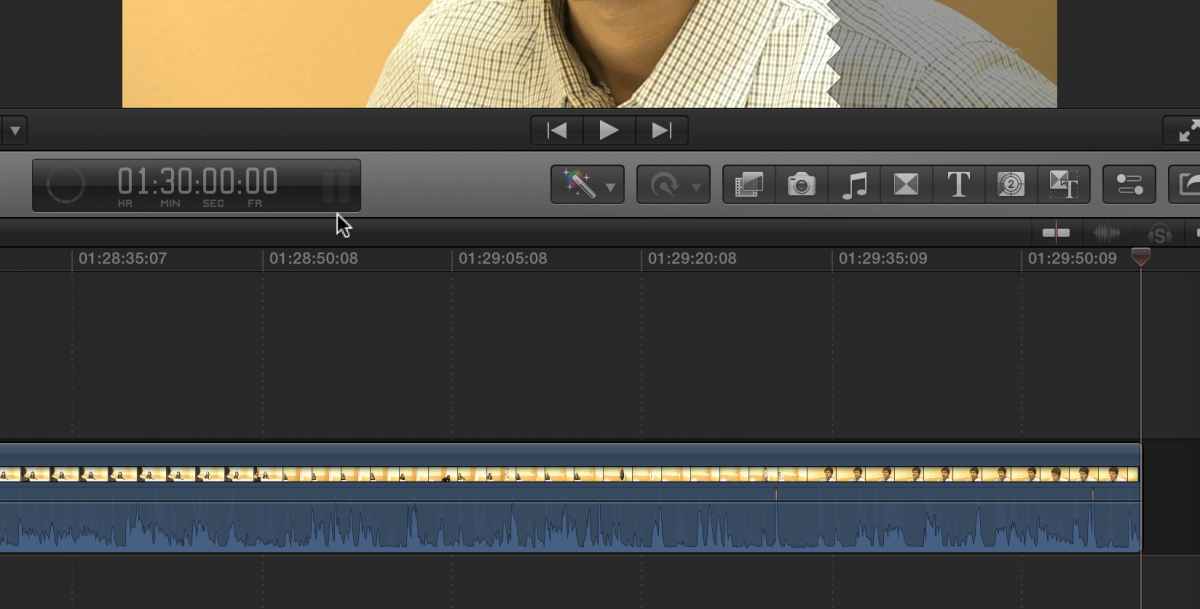
This is the frame after the end of the video. The so called magic frame. Here the playhead is at the end of the video, where you should see black and in the viewer you're seeing the frame before the playhead. The timecode shows the frame after the video.
Please Log in to join the conversation.
Now, I am trying to upload to www.youku.com
Can you see that website normally?
I use low bit rate resolution, and don't know if the quality is enough cause my poor upload speed.
But the original video is more than 1GB, so I will upload the high resolution video if necessary.
The test in the video is 4mins long timeline@fcpx10.1.1 mac os 10.9.3 mac pro 2013. prores422 25i exported master file which is 4min+1frame.
then I imported back into timeline
And I found the added 1 frame in the timeline.
I only do that 1 time to save time cause I don't want it to be cut.
I think that's enough prove the BUG.
And every fcpx in our company has the bug also, do you want me to upload every video?
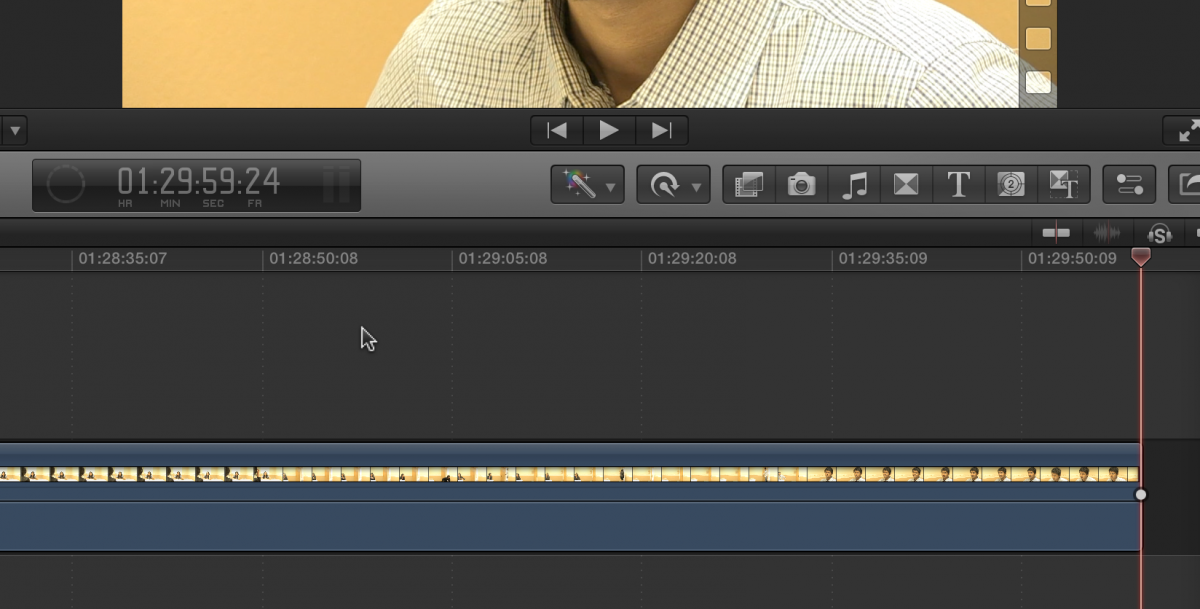
Tom Wolsky wrote: A one hour 30 minute 25fps export test I did for you. I reimported the file into a new project in FCP. This is the timecode for the last frame of video
Please Log in to join the conversation.
but, that's not important.
What I pointed out is it adds 1 frame.
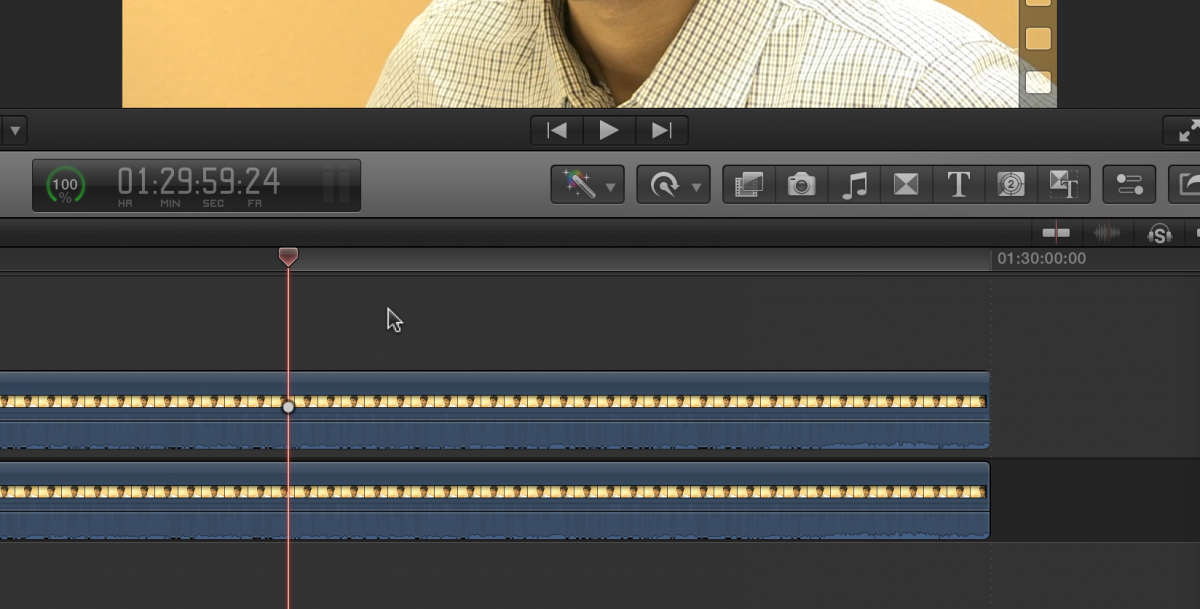
you can put the exported file on the 2nd layer (as connected clip)
and put the original timeline on the 1st layer.
then you will see this:
Tom Wolsky wrote: Or are you looking at this:
This is the frame after the end of the video. The so called magic frame. Here the playhead is at the end of the video, where you should see black and in the viewer you're seeing the frame before the playhead. The timecode shows the frame after the video.
Please Log in to join the conversation.
- Tom Wolsky
-
- Offline
- Moderator
-
Maybe it would be better if you could upload the file to a service like WeTransfer.com.
Please Log in to join the conversation.
- Tom Wolsky
-
- Offline
- Moderator
-
Please Log in to join the conversation.
