


- Posts: 110
- Thank you received: 6
3 Post Moderation Rule for New Boarders (25 Jan 2021)
New boarders will have their posts moderated - Don't worry if you cannot see your post immediately.
FCPX export BUG!
24 May 2014 14:26 - 27 May 2014 17:06 #46613
by artofoe
FCPX export BUG! was created by artofoe
I've finished a test about fcpx's export bug.
When export master file @Prores422, you will got 1 frame longer than your sequence!
The position of the frame is random!
the efficiency solution I think for now is:
install 10.0.9 to the same mac pro, find the added frame in the 10.1.1, and delete it in 10.0.9
then export!
10.0.9 has not that BUG.
the mac pro's export time is good if you've rendered all the timeline, 0.25 times timeline duration on mac pro2013 (6cores D500)
When export master file @Prores422, you will got 1 frame longer than your sequence!
The position of the frame is random!
the efficiency solution I think for now is:
install 10.0.9 to the same mac pro, find the added frame in the 10.1.1, and delete it in 10.0.9
then export!
10.0.9 has not that BUG.
the mac pro's export time is good if you've rendered all the timeline, 0.25 times timeline duration on mac pro2013 (6cores D500)
Last edit: 27 May 2014 17:06 by artofoe.
Please Log in to join the conversation.
24 May 2014 15:11 #46617
by artofoe
Replied by artofoe on topic FCPX export BUG!
I've download a adjustment layer broadcast safe to make every frame of your timeline to be rendered.
Please Log in to join the conversation.
- Tom Wolsky
-

- Offline
- Moderator
-

24 May 2014 15:35 - 24 May 2014 15:35 #46621
by Tom Wolsky
Replied by Tom Wolsky on topic FCPX export BUG!
You're going to have to give some more information like the frame rates of your media and the frame rate of your project. Also what version you're using.
I exported a 45:09:05 project at 23.976 and that's exactly what I got. Nothing needed to be rendered, except for the conversion to ProRes to make the master file.
I exported a 45:09:05 project at 23.976 and that's exactly what I got. Nothing needed to be rendered, except for the conversion to ProRes to make the master file.
Last edit: 24 May 2014 15:35 by Tom Wolsky.
Please Log in to join the conversation.
24 May 2014 15:39 #46622
by artofoe
Replied by artofoe on topic FCPX export BUG!
I've tested 24p 25i 120mbps 185mpbs
10.9.2 10.9.3
fcpx10.1.1
no less than 4mins 30s will cause that bug
10.9.2 10.9.3
fcpx10.1.1
no less than 4mins 30s will cause that bug
Please Log in to join the conversation.
24 May 2014 15:45 #46623
by artofoe
Replied by artofoe on topic FCPX export BUG!
Conversion to prores is transcode, that will not cause the bug.
Please Log in to join the conversation.
- ronny courtens
-

- Offline
- Moderator
-
Less
More
- Posts: 4455
- Thank you received: 962
24 May 2014 16:19 #46624
by ronny courtens
Replied by ronny courtens on topic FCPX export BUG!
From the reports I have received about it, this mainly happens when exporting to a PAL interlaced format. That's why many people do not have this problem. The codec does not seem to matter, although XDCAM gets mentioned a lot of times. The current workaround is to drop any adjustment layer above the timeline before exporting. This does not affect the quality nor the export time. We export long PAL timelines on a daily basis, but never to interlaced formats, and I have not seen this issue before. But it's good to keep sending feedback to Apple about this.
- Ronny
- Ronny
Please Log in to join the conversation.
- Tom Wolsky
-
- Offline
- Moderator
-
24 May 2014 16:28 #46625
by Tom Wolsky
Replied by Tom Wolsky on topic FCPX export BUG!
What do the data rate numbers means? Please give exact specifications. Are you exporting to H.264? Do you mean 24fps or 23.976?
Do you're saying exporting a master file to ProRes won't produce this result? No idea what you mean by conversion to ProRes is transcode. Unless you shot and recorded and edited ProRes, pretty much everything exported as a master file to ProRes will require a conversion.
I also did XDCAM to XDCAM with no frame error.
Do you're saying exporting a master file to ProRes won't produce this result? No idea what you mean by conversion to ProRes is transcode. Unless you shot and recorded and edited ProRes, pretty much everything exported as a master file to ProRes will require a conversion.
I also did XDCAM to XDCAM with no frame error.
Please Log in to join the conversation.
- Tom Wolsky
-
- Offline
- Moderator
-
24 May 2014 16:35 #46626
by Tom Wolsky
Replied by Tom Wolsky on topic FCPX export BUG!
Just to clarify Ronny, when you say PAL interlaced, you mean standard definition, or just the frame rate?
Please Log in to join the conversation.
- ronny courtens
-
- Offline
- Moderator
-
Less
More
- Posts: 4455
- Thank you received: 962
24 May 2014 16:45 #46627
by ronny courtens
Replied by ronny courtens on topic FCPX export BUG!
Hey Tom,
Most of the reports I have read mention an occasional 1 frame error when exporting to a PAL interlaced HD format. In Europe some broadcasters still ask for 50i XDCAM HD.MXF or 50i IMX.MXF deliveries. We don’t do that anymore, we always export progressive ProRes and we don’t see any TC problems when exporting.
- Ronny
Most of the reports I have read mention an occasional 1 frame error when exporting to a PAL interlaced HD format. In Europe some broadcasters still ask for 50i XDCAM HD.MXF or 50i IMX.MXF deliveries. We don’t do that anymore, we always export progressive ProRes and we don’t see any TC problems when exporting.
- Ronny
Please Log in to join the conversation.
24 May 2014 16:59 #46628
by artofoe
Replied by artofoe on topic FCPX export BUG!
Not only for 25i, but also 24P format, timeline settings both prores422 and HQ.
You can easily reproduce that anytime.
You can easily reproduce that anytime.
ronny courtens wrote: From the reports I have received about it, this mainly happens when exporting to a PAL interlaced format. That's why many people do not have this problem. The codec does not seem to matter, although XDCAM gets mentioned a lot of times. The current workaround is to drop any adjustment layer above the timeline before exporting. This does not affect the quality nor the export time. We export long PAL timelines on a daily basis, but never to interlaced formats, and I have not seen this issue before. But it's good to keep sending feedback to Apple about this.
- Ronny
Please Log in to join the conversation.
24 May 2014 17:00 #46629
by artofoe
Replied by artofoe on topic FCPX export BUG!
You can try 24p prores or hq, you will have the problem
Please Log in to join the conversation.
- Tom Wolsky
-
- Offline
- Moderator
-
24 May 2014 17:35 - 24 May 2014 17:39 #46630
by Tom Wolsky
Replied by Tom Wolsky on topic FCPX export BUG!
Do you mean 24fps or 23.98? My tests on 23.98 showed no problem.
I am now working on testing 25fps interlaced material as Ronny suggested. The problem has not reproduced for me in 29.97 interlaced ProRes, 23.98 obviously progressive in either ProRes or XDCAMHD.
I am now working on testing 25fps interlaced material as Ronny suggested. The problem has not reproduced for me in 29.97 interlaced ProRes, 23.98 obviously progressive in either ProRes or XDCAMHD.
Last edit: 24 May 2014 17:39 by Tom Wolsky.
Please Log in to join the conversation.
- Tom Wolsky
-
- Offline
- Moderator
-
24 May 2014 18:13 #46631
by Tom Wolsky
Replied by Tom Wolsky on topic FCPX export BUG!
Finally reproduced it with XDCAM 1080i50 outputting to a ProRes master. The output was one frame long.
Please Log in to join the conversation.
- ronny courtens
-
- Offline
- Moderator
-
Less
More
- Posts: 4455
- Thank you received: 962
24 May 2014 18:18 #46632
by ronny courtens
Replied by ronny courtens on topic FCPX export BUG!
Thank you, Tom. That confirms our findings. No problems with 24p here, most of these issues are with XDCAM 50i.
- Ronny
- Ronny
Please Log in to join the conversation.
- Tom Wolsky
-
- Offline
- Moderator
-
24 May 2014 18:58 #46633
by Tom Wolsky
Replied by Tom Wolsky on topic FCPX export BUG!
One more test, exported XDCAM 1080i50 from a 1080p23.98 project to ProRes and had no frame error. The lengths were identical. So far only XDCAM 108i50 to 1080i50 is producing the error.
Please Log in to join the conversation.
25 May 2014 05:07 #46641
by artofoe
Replied by artofoe on topic FCPX export BUG!
It's no matter with XDCAM.
By the way, exporting XDCAM50i to 23.98p doesn't make sense. It will cause jitter, and we will use hardware to do it.
Both Prores422 24p and 25i, and HQ 24p 25i have the BUG.
Anyone can reproude that anytime.
By the way, exporting XDCAM50i to 23.98p doesn't make sense. It will cause jitter, and we will use hardware to do it.
Both Prores422 24p and 25i, and HQ 24p 25i have the BUG.
Anyone can reproude that anytime.
Tom Wolsky wrote: One more test, exported XDCAM 1080i50 from a 1080p23.98 project to ProRes and had no frame error. The lengths were identical. So far only XDCAM 108i50 to 1080i50 is producing the error.
Please Log in to join the conversation.
- ronny courtens
-
- Offline
- Moderator
-
Less
More
- Posts: 4455
- Thank you received: 962
25 May 2014 05:47 #46644
by ronny courtens
Replied by ronny courtens on topic FCPX export BUG!
Both Prores422 24p and 25i, and HQ 24p 25i have the BUG. Anyone can reproude that anytime.
That is not correct. Just like Tom I can only reproduce this with XDCAM interlaced. For any other formats I cannot reproduce this.
- Ronny
That is not correct. Just like Tom I can only reproduce this with XDCAM interlaced. For any other formats I cannot reproduce this.
- Ronny
Please Log in to join the conversation.
25 May 2014 05:49 #46645
by artofoe
Replied by artofoe on topic FCPX export BUG!
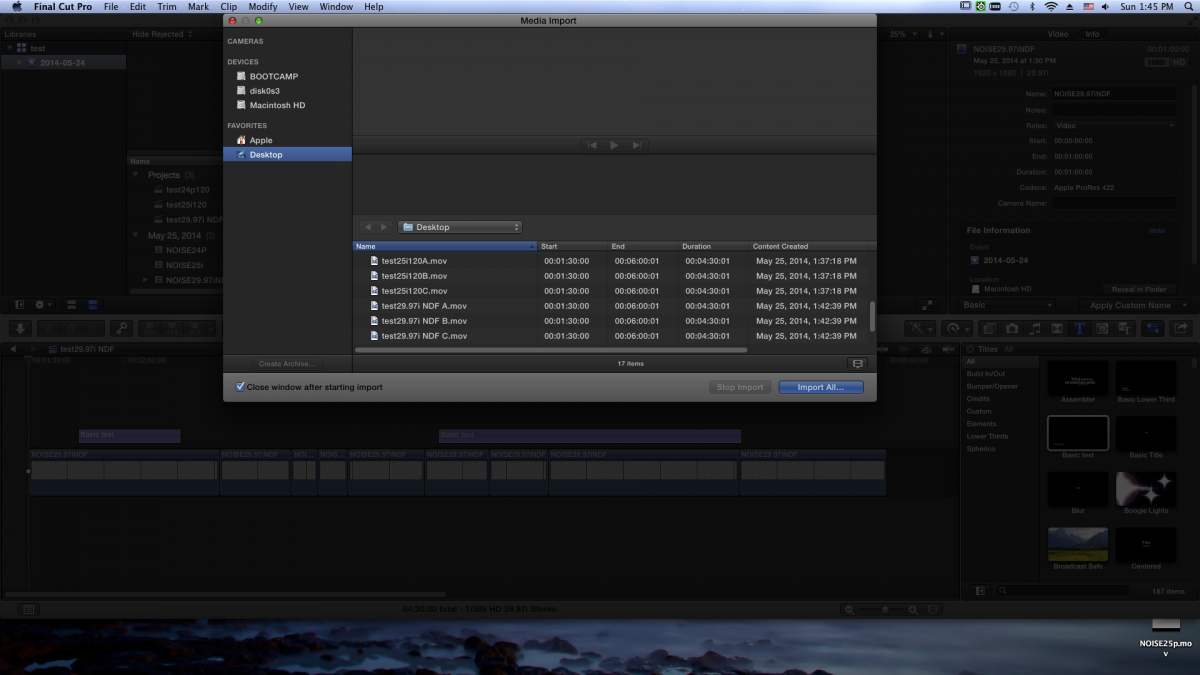
Let me show you the test I just did. I export 3 times master files.
All the codec and timeline settings are Prores422.
FCPX10.1.1, mac os 10.9.3, mac pro 2013
Please look at the picture I just upload,
you can see any one can reproduce the bug anytime, and no matter with XDCAM50i.
All the codec and timeline settings are Prores422.
FCPX10.1.1, mac os 10.9.3, mac pro 2013
Please look at the picture I just upload,
you can see any one can reproduce the bug anytime, and no matter with XDCAM50i.
ronny courtens wrote: Thank you, Tom. That confirms our findings. No problems with 24p here, most of these issues are with XDCAM 50i.
- Ronny
Please Log in to join the conversation.
25 May 2014 05:55 #46646
by artofoe
Replied by artofoe on topic FCPX export BUG!
By the way, there is another BUG here:
Please look at the right part of the picture I just uploaded, the clip begins at 00:00:00:00
and ends at 00:01:00:00
Why FCPX say the duration is 1 min?
As a matter of fact, the duration is 1min, but the clip should end at 00:00:59:29, so the duration is 1min!
Please look at the right part of the picture I just uploaded, the clip begins at 00:00:00:00
and ends at 00:01:00:00
Why FCPX say the duration is 1 min?
As a matter of fact, the duration is 1min, but the clip should end at 00:00:59:29, so the duration is 1min!
Please Log in to join the conversation.
- Tom Wolsky
-
- Offline
- Moderator
-
25 May 2014 06:32 #46648
by Tom Wolsky
Replied by Tom Wolsky on topic FCPX export BUG!
In the image you uploaded the clips begin at 1:30:00 and end at 6:00:01. You have been talking about 25i and 24p. The image shows clips whose names indicate 25fps and 29.97fps. The image doesn't show a duration of one minute. Perhaps you meant to upload a different image.
Please Log in to join the conversation.
