


- Posts: 110
- Thank you received: 6
3 Post Moderation Rule for New Boarders (25 Jan 2021)
New boarders will have their posts moderated - Don't worry if you cannot see your post immediately.
FCPX export BUG!
25 May 2014 06:36 - 25 May 2014 06:41 #46649
by artofoe
Replied by artofoe on topic FCPX export BUG!
If you can look at my picture carefully, you can find the timeline duration is 4:30 (at the down-side of the picture)
but the export file 1 frame longer.
these clips is 25i and 29.97i.
If you can see my picture carefully , you can find the up-right part of the picture shows you
the duration of one minute.
so, please see carefully before post
but the export file 1 frame longer.
these clips is 25i and 29.97i.
If you can see my picture carefully , you can find the up-right part of the picture shows you
the duration of one minute.
so, please see carefully before post
Tom Wolsky wrote: In the image you uploaded the clips begin at 1:30:00 and end at 6:00:01. You have been talking about 25i and 24p. The image shows clips whose names indicate 25fps and 29.97fps. The image doesn't show a duration of one minute. Perhaps you meant to upload a different image.
Last edit: 25 May 2014 06:41 by artofoe.
Please Log in to join the conversation.
- ronny courtens
-

- Offline
- Moderator
-

Less
More
- Posts: 4455
- Thank you received: 962
25 May 2014 07:19 #46651
by ronny courtens
Replied by ronny courtens on topic FCPX export BUG!
The best (and the only) way of dealing with this is to send your feedback to Apple. We had these issues before with interlaced video and we have reported this. Since we don't deal with interlaced video anymore we don't have any issues at all. So send feedback and in the meantime if your exports are 1 frame too long put an adjustment layer with broadcast filter on top of your edit to prevent this from happening.
- Ronny
- Ronny
Please Log in to join the conversation.
- Tom Wolsky
-

- Offline
- Moderator
-
25 May 2014 07:20 - 25 May 2014 07:28 #46652
by Tom Wolsky
Replied by Tom Wolsky on topic FCPX export BUG!
If it ends at 59:29 then it's neither 24fps nor 25fps. That's NTSC frame rate 29.97.
Look at the clip in the browser. Look at the timecode at the last frame in the viewer. What does it say?
Look at the clip in the browser. Look at the timecode at the last frame in the viewer. What does it say?
Last edit: 25 May 2014 07:28 by Tom Wolsky.
Please Log in to join the conversation.
25 May 2014 07:28 - 25 May 2014 07:29 #46653
by artofoe
Replied by artofoe on topic FCPX export BUG!
My picture also shows your 25i, forgive my lazy to show the 25i timeline. but it's the same.
doesn't make sense to show you again. and 25p, and 24p.
It is enough to say fcpx has problem with exporting master file!
and apple have to solve this, just think:
the producer has censored your finished timeline and if there is only 2 hours to broadcast,
are you sure you can export the timeline correctly?
It's fatal BUG for FCPX, cause Avid can do broadcast, FCP7 can, but why FCPX cannot?
doesn't make sense to show you again. and 25p, and 24p.
It is enough to say fcpx has problem with exporting master file!
and apple have to solve this, just think:
the producer has censored your finished timeline and if there is only 2 hours to broadcast,
are you sure you can export the timeline correctly?
It's fatal BUG for FCPX, cause Avid can do broadcast, FCP7 can, but why FCPX cannot?
Tom Wolsky wrote: If should end at 59:29 then it's neither 24fps nor 25fps. That's NTSC frame rate 29.97.
Look at the clip in the browser. Look at the timecode at the last frame in the viewer. What does it say?
Last edit: 25 May 2014 07:29 by artofoe.
Please Log in to join the conversation.
- Tom Wolsky
-
- Offline
- Moderator
-
25 May 2014 07:31 - 25 May 2014 07:33 #46654
by Tom Wolsky
Replied by Tom Wolsky on topic FCPX export BUG!
Did you look at the timecode on the last frame of video? Please look what it says.
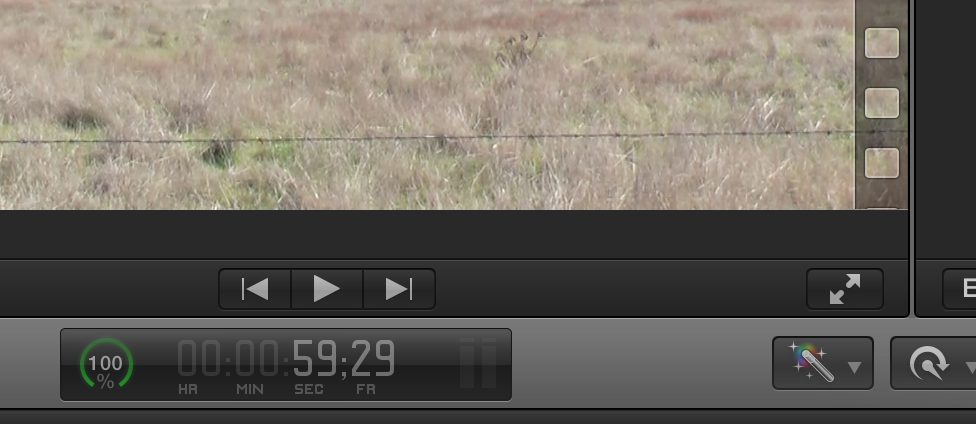
That's the last frame of the video. That's the timecode for a one minute file.
Fuck what it says in the browser. Look at the fucking file man.
That's the last frame of the video. That's the timecode for a one minute file.
Fuck what it says in the browser. Look at the fucking file man.
Last edit: 25 May 2014 07:33 by Tom Wolsky.
Please Log in to join the conversation.
25 May 2014 07:36 #46655
by artofoe
Replied by artofoe on topic FCPX export BUG!
I've done this, but I'm not sure apple can solve it.
Many years ago, apple came to us to solve the downscaling problem with aja kona card (it will duplicate the first frame of the timeline), and till now , the BUG still exists. But ,that's not fatal, cause the duration is the same!
I don't know how many people using fcpx for broadcasting, but you know,
we have to make the accurate timeline duration , cause advertisement should insert on air when broadcasting.
Since the longer frame is randomly insert into the timeline, it cannot ensure the advertisement insert point correct!
It's fatal!
And we have bought the apple video service, every mac pro has that service.
I don't know if I should phone them.
Many years ago, apple came to us to solve the downscaling problem with aja kona card (it will duplicate the first frame of the timeline), and till now , the BUG still exists. But ,that's not fatal, cause the duration is the same!
I don't know how many people using fcpx for broadcasting, but you know,
we have to make the accurate timeline duration , cause advertisement should insert on air when broadcasting.
Since the longer frame is randomly insert into the timeline, it cannot ensure the advertisement insert point correct!
It's fatal!
And we have bought the apple video service, every mac pro has that service.
I don't know if I should phone them.
ronny courtens wrote: The best (and the only) way of dealing with this is to send your feedback to Apple. We had these issues before with interlaced video and we have reported this. Since we don't deal with interlaced video anymore we don't have any issues at all. So send feedback and in the meantime if your exports are 1 frame too long put an adjustment layer with broadcast filter on top of your edit to prevent this from happening.
- Ronny
Please Log in to join the conversation.
- Tom Wolsky
-
- Offline
- Moderator
-
25 May 2014 07:40 #46656
by Tom Wolsky
Replied by Tom Wolsky on topic FCPX export BUG!
And BTW if you're working in 29.97 NDF the end frame timecode will be 59:29, but real time will be one frame over one minute. That's why broadcast always uses DF count for recording and production.
Please Log in to join the conversation.
25 May 2014 07:42 #46657
by artofoe
Replied by artofoe on topic FCPX export BUG!
I don't know what you mean.
I just mean: start point: 00:00:00:00 ,end point 00:01:00:00
the duration should not be 1 min, it should be 1min+1frame.
if the duration is 1min , end point should be 00:00:59:29 for 29.97 or 00:00:59:24 for 25
that's another bug of FCPX, the right-up part of my picture show this.
I just mean: start point: 00:00:00:00 ,end point 00:01:00:00
the duration should not be 1 min, it should be 1min+1frame.
if the duration is 1min , end point should be 00:00:59:29 for 29.97 or 00:00:59:24 for 25
that's another bug of FCPX, the right-up part of my picture show this.
Tom Wolsky wrote: Did you look at the timecode on the last frame of video? Please look what it says.
That's the last frame of the video. That's the timecode for a one minute file.
Fuck what it says in the browser. Look at the fucking file man.
Please Log in to join the conversation.
- Tom Wolsky
-
- Offline
- Moderator
-
25 May 2014 07:43 - 25 May 2014 07:43 #46658
by Tom Wolsky
Replied by Tom Wolsky on topic FCPX export BUG!
And this is what the end frame of a PAL frame rate one minute file looks like
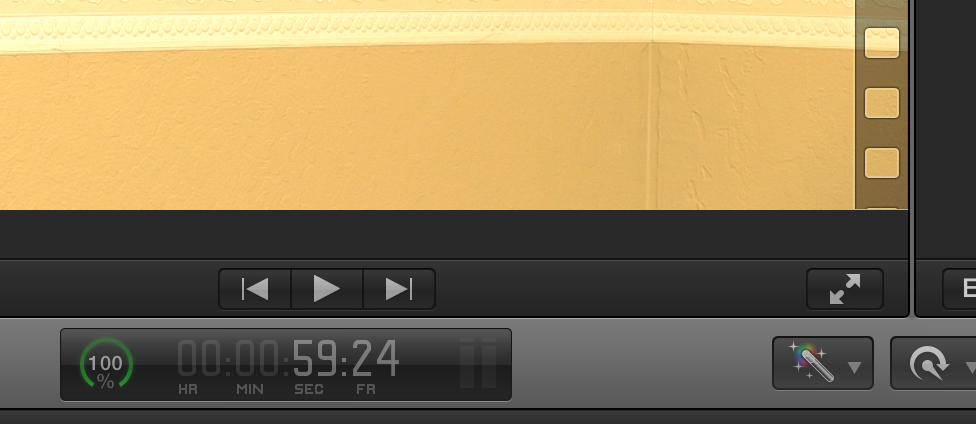
Because I was running tests with XDCAM 25i.
Because I was running tests with XDCAM 25i.
Last edit: 25 May 2014 07:43 by Tom Wolsky.
Please Log in to join the conversation.
- Tom Wolsky
-
- Offline
- Moderator
-
25 May 2014 07:45 #46659
by Tom Wolsky
Replied by Tom Wolsky on topic FCPX export BUG!
"Since the longer frame is randomly insert into the timeline"
This is just rubbish. There is no extra frame in the video. I looked at a one hour 15 minute project in 29.97 DF and the end timecode is exact.
This is just rubbish. There is no extra frame in the video. I looked at a one hour 15 minute project in 29.97 DF and the end timecode is exact.
Please Log in to join the conversation.
25 May 2014 07:45 #46660
by artofoe
Replied by artofoe on topic FCPX export BUG!
I just did test to show that BUG. I don't know about NTSC frame rate. I use 25i.
But any frame rate should be correct, you can test DF if you like.
But any frame rate should be correct, you can test DF if you like.
Tom Wolsky wrote: And BTW if you're working in 29.97 NDF the end frame timecode will be 59:29, but real time will be one frame over one minute. That's why broadcast always uses DF count for recording and production.
Please Log in to join the conversation.
- Tom Wolsky
-
- Offline
- Moderator
-
25 May 2014 08:02 #46661
by Tom Wolsky
Replied by Tom Wolsky on topic FCPX export BUG!
I tested PAL frame rate and the frame count is correct.
Take the file to FCP7 or Avid and see what the frame count is if you think it's long. I don't have Avid, but the frame count is correct in 7 and in Premiere.
Take the file to FCP7 or Avid and see what the frame count is if you think it's long. I don't have Avid, but the frame count is correct in 7 and in Premiere.
Please Log in to join the conversation.
- Tom Wolsky
-
- Offline
- Moderator
-
25 May 2014 08:06 #46662
by Tom Wolsky
Replied by Tom Wolsky on topic FCPX export BUG!
How many times do I have to say this. Please look at the file. Look at the timecode on the file. Do you have Pro Player? Open the file and see what it says. Take the file into any other application and look at the timecode.
Please Log in to join the conversation.
- Tom Wolsky
-
- Offline
- Moderator
-
25 May 2014 08:36 - 25 May 2014 08:39 #46663
by Tom Wolsky
Replied by Tom Wolsky on topic FCPX export BUG!
Just for you I built and exported a project that's one hour and 30 minutes long in 25fps. And I actually opened the file and looked at the file. This is the end timecode. The duration is on the left.
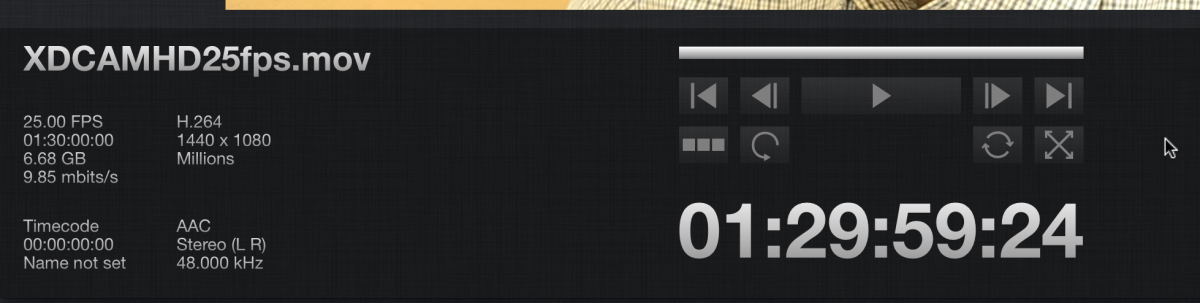
Last edit: 25 May 2014 08:39 by Tom Wolsky.
Please Log in to join the conversation.

25 May 2014 12:08 #46672
by BenB
I just got some XDCAM clips from a friend, and my results are the same a Ronny. I think we're having a debate on how to read timecode.
Replied by BenB on topic FCPX export BUG!
ronny courtens wrote: Both Prores422 24p and 25i, and HQ 24p 25i have the BUG. Anyone can reproude that anytime.
That is not correct. Just like Tom I can only reproduce this with XDCAM interlaced. For any other formats I cannot reproduce this.
- Ronny
I just got some XDCAM clips from a friend, and my results are the same a Ronny. I think we're having a debate on how to read timecode.
Please Log in to join the conversation.
26 May 2014 03:33 #46716
by artofoe
Replied by artofoe on topic FCPX export BUG!
your codec is h.264, not prores422.
Tom Wolsky wrote: Just for you I built and exported a project that's one hour and 30 minutes long in 25fps. And I actually opened the file and looked at the file. This is the end timecode. The duration is on the left.
Please Log in to join the conversation.
26 May 2014 03:35 #46717
by artofoe
Replied by artofoe on topic FCPX export BUG!
no, the duration shows 1 frame longer.
and, apple's support emailed me it's the BUG
no need any debate.
fcpx should fix this!
and, apple's support emailed me it's the BUG
no need any debate.
fcpx should fix this!
Please Log in to join the conversation.
- Tom Wolsky
-
- Offline
- Moderator
-
26 May 2014 05:10 #46718
by Tom Wolsky
Replied by Tom Wolsky on topic FCPX export BUG!
Just fir you I'll redo it in ProRes. So now you're saying the codec makes a difference? Before you said the codec doesn't matter.
Please Log in to join the conversation.
- Tom Wolsky
-
- Offline
- Moderator
-
26 May 2014 05:10 #46719
by Tom Wolsky
Replied by Tom Wolsky on topic FCPX export BUG!
That's the BS. Sorry.
Please Log in to join the conversation.
26 May 2014 05:54 - 26 May 2014 05:57 #46721
by artofoe
Replied by artofoe on topic FCPX export BUG!
First, I do the test using Prores.
2nd, H.264 is low effecincy editing codec, for broadcasting, we won't use that.
3rd, I report BUG, apple confirm that BUG.
4th, I don't know what you mean. I just want apple fix that BUG.
5th, if you feel there's no BUG, you can tell apple there is not, maybe then apple can tell me. But, it does not make sense that you tell me there's no BUG.
is that logical clearly?
2nd, H.264 is low effecincy editing codec, for broadcasting, we won't use that.
3rd, I report BUG, apple confirm that BUG.
4th, I don't know what you mean. I just want apple fix that BUG.
5th, if you feel there's no BUG, you can tell apple there is not, maybe then apple can tell me. But, it does not make sense that you tell me there's no BUG.
is that logical clearly?
Tom Wolsky wrote: Just fir you I'll redo it in ProRes. So now you're saying the codec makes a difference? Before you said the codec doesn't matter.
Last edit: 26 May 2014 05:57 by artofoe.
Please Log in to join the conversation.
