


3 Post Moderation Rule for New Boarders (25 Jan 2021)
New boarders will have their posts moderated - Don't worry if you cannot see your post immediately.
Export interlaced project as interlaced

discussions.apple.com/thread/5876503?tstart=0
Please Log in to join the conversation.
- Andreas Kiel
-

- Offline
- Platinum Member
-

- Posts: 1077
- Thank you received: 189
Then it will work fine. I always do/did that and never used Compressor to handle Image Sequences directly – so I hadn't been aware of this bug.
-Andreas
Please Log in to join the conversation.
- Russ Haskell
-
- Offline
- Elite Member
-

- Posts: 176
- Thank you received: 24
FWIW: Chose Export QT Component, then MPEG4 for Encoder Type, Then Settings>Configure, chose MP4 for File Format and H.264 for Video Format.
Everything looked good: Field Order info in the Inspector remained Same as Source. Hit Start Batch.
Brought the MP4 into Media Info and Scan Type said…Progressive.
Russ
Please Log in to join the conversation.
- Andreas Kiel
-
- Offline
- Platinum Member
-
- Posts: 1077
- Thank you received: 189
I don't have Media Info, but bringing back the converted file into FCPx still tells me that its interlaced.
Try the below one and let me know what Media Info says.
www.dropbox.com/s/5np8cg1p1s6cme1/Test_50i_2.mov
-Andreas
Please Log in to join the conversation.
- ronny courtens
-

- Offline
- Moderator
-

- Posts: 4455
- Thank you received: 962
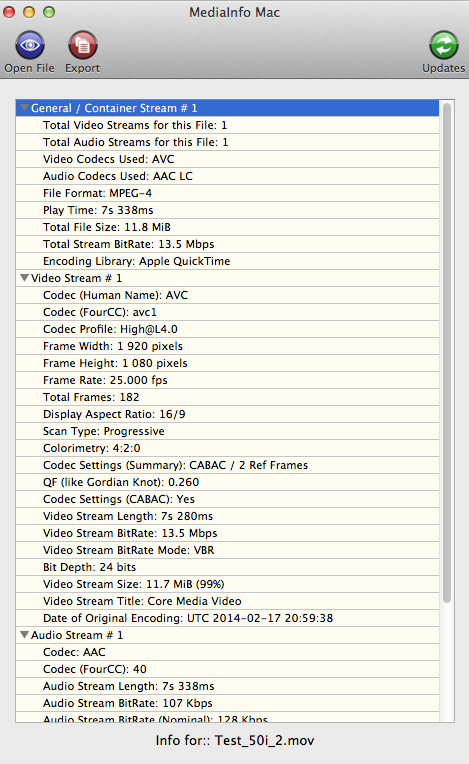
I have downloaded your file. MediaInfo says it's progressive:
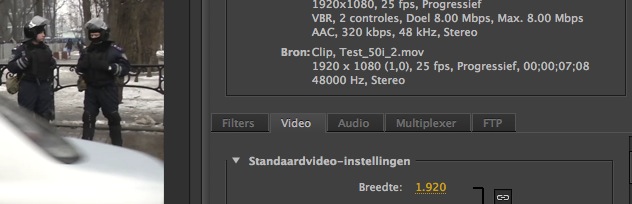
Adobe Media Encoder also lists it as progressive:
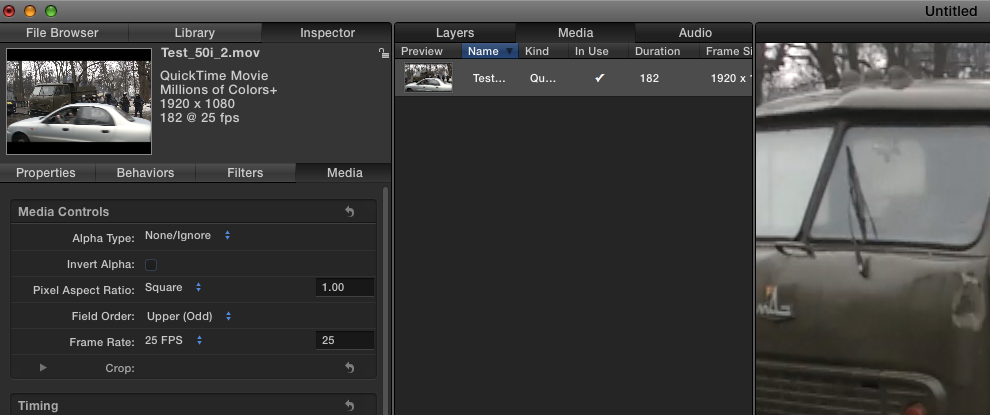
Only FCPX, Compressor and Motion list the file as Upper Field First:
- Ronny
Please Log in to join the conversation.
Please Log in to join the conversation.
- ronny courtens
-
- Offline
- Moderator
-
- Posts: 4455
- Thank you received: 962
-Ronny
Please Log in to join the conversation.
- Roadswitcher
-
- Offline
- Senior Member
-

- Posts: 56
- Thank you received: 4
Compressor 4.1.3, in Compressor itself or as a share preset
..... NOT possible, deinterlaced by default ( still considered as a bug since 4.1 ??? )
Elgato Turbo.264
..... NOT possible, although that option and forcing top or bottom field first are present
Handbrake
..... NOT possible, no control over the interlace attribute available
MPEG Streamclip 1.9.3b8
..... Possible, but doesn't flag downconverted legacy SD formats as being 16x9
Quicktime 7 Pro
..... Possible, through it's Export Routine either with a .mp4 or .mov container
..... Does flag SD 16x9 videos for correct AR playback on computer screens
There may be other "exporters" I haven't thought of ( besides Sorensons Squeeze Suite, way too expensive ).
Would be nice to discover other means to create interlace-retaining h.264 files.
Alex
Please Log in to join the conversation.
- Tom Wolsky
-

- Offline
- Moderator
-
Please Log in to join the conversation.
- Roadswitcher
-
- Offline
- Senior Member
-
- Posts: 56
- Thank you received: 4
The networks I work for need to get an edit from wherever I am in the world, via ftp or any other means of "cloud management", in a compact enough format, but still insertable as an element of a newscast playlist.
Sometimes it will be a mxf file with 2 stereo pairs ( stereo mix + separate elements without VO ), on other occasions, when there is no highspeed internet connection guaranteed, the fallback format will be a h.264 file at various bitrates, depending on the subject and priorities ( 4 to 6 Mbps in downconverted SD for one of my client networks, 8 to 10 Mbps for others in HD ).
What never changes is the demand from those stations to ALLWAYS keep te original interlaced "look" of the source images, as long as the camera used was setup in interlaced mode.
Personally, I shoot my documentary stuff mostly in 25p, have done so since the first cameras gave us that option, pushing back the need to de-interlace footage in post, which didn't come with the in-camera benefits of progressive video processing.
But it's not allways my choice.
News Networks still look for that typical "video presence" you get in interlaced.
Not my own taste, but I "send to order".
Alex
Please Log in to join the conversation.
- Andreas Kiel
-
- Offline
- Platinum Member
-
- Posts: 1077
- Thank you received: 189
For original sized media you can make a Compressor setup to keep the interlace even with h.264.
- Andreas
Please Log in to join the conversation.
- Roadswitcher
-
- Offline
- Senior Member
-
- Posts: 56
- Thank you received: 4
... with the old fashioned route I take, via QT7 Pro or MPEG Streamclip, I keep my interlaced field order, even with an SD downconversion.
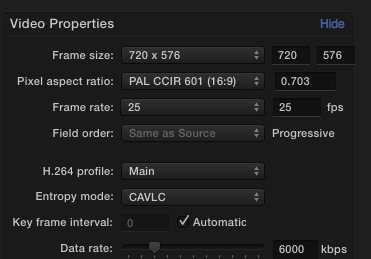
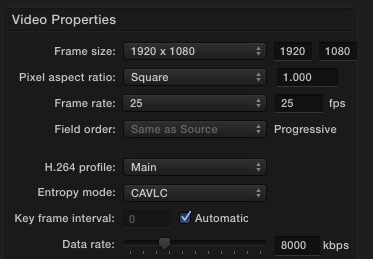
Compressor's h.264 MPEG-4 presets, even when modified, do not allow you to set the field order, that entry is greyed out and stuck to progressive.
Seems that nowadays, h.264 exports are considered only good for computer screens. At least when using Compressor's engine.
No more copy of Compressor 3 on my Macs, would have been interesting to see if that old version reacted differently.
Alex
Please Log in to join the conversation.
- Andreas Kiel
-
- Offline
- Platinum Member
-
- Posts: 1077
- Thank you received: 189
My answer regarding Compressor was wrong, sorry. Here why:
I did have some settings in V3 (where the options had been a bit different) and just took them over to V4 and never cared.
Opening these custom presets in V4 look very similar to yours except the forced "Progressive" isn't there.
I didn't have any interlaced material "since years" but I found some converted with Compressor - I don't know which version.
I will create a simple interlaced movie and test it with my Compressor settings.
BTW You can use AppleScript to save QT export settings for reuse and than create a droplet to convert movies.
- Andreas
Please Log in to join the conversation.
- Roadswitcher
-
- Offline
- Senior Member
-
- Posts: 56
- Thank you received: 4
Thank you for taking some time to help me out on this ....
I have tried on Compressor 4.1 the x.264 path instead of the "standard" h.264.
Although this one lets me decide of the field order of an interlaced video ( left to "same as source" ), it's far from satisfactory.
Audio is limited to a 44,1 sampling, no 48kHz option, basta.
The conversion takes forever, it's waaaay longer than with the h.264 codec. Around 8 minutes for a 90 seconds video at full 4-core load against only 95 seconds with QT 7 own conversion/export engine.
And although I've set the 16/9 flag, my oldie QT 7 Pro chooses to only show the result in the anamorphic 720x576 window. All my other players like Movieola, MPlayerX, Movist or MXF-Player do the same and ignore the WS flag.
Only Quicklook & QT X see the 16/9 setting in Compressor 4.x while using the x.264 variant.
Must be a Family Affair, now that AV-Foundation is taking over the helm from vintage QT Kit.
Because exporting out of that old QT with this same x.264 codec, it "only" takes 2'20" to complete the conversion ( but again with a full CPU load ), 48kHz sampling enabled and with a real WS flag that is understood by all Players.
Shows how good QT 7 Pro can still be, without the restrictions of a not so flexible Compressor.
These are the joys of having to still output SD versions of our HD shot News coverage, together with the obligation to stay in the interlaced domain.
I don't have any say in those choices, but if I had .....
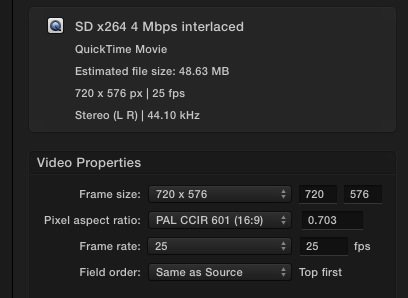
So, I'm stuck to work with that Good Old QT7, but I don't mind using it for those few times I need to convert an interlaced file. Not having a preset like with MPEG Streamclip is also not a big deal, I juste leave it on the last setup used, just eventually changing the bitrate cap.( Must shamefully admit having no experience with creating scripts )
But if you were able create out of v.3 a non-restricted setting, something that I could use in FCPX without the stop-over of a Master File Export, that would be great news !
Thanks again for any follow-up suggestion.
Alex
Please Log in to join the conversation.
- Andreas Kiel
-
- Offline
- Platinum Member
-
- Posts: 1077
- Thank you received: 189
I don't have any interlaced material so I created a fake in AE. It is flagged progressive - though it's interlaced.
The unzipped file must be moved to "~/Library/Application Support/Compressor/Settings/"
dl.dropboxusercontent.com/u/63959366/SD%20PAL.cmprstng.zip
Let me know about the result.
Regarding the QT script I've to search in my grab box - it's too long ago I did it last time.
- Andreas
Please Log in to join the conversation.
- Roadswitcher
-
- Offline
- Senior Member
-
- Posts: 56
- Thank you received: 4

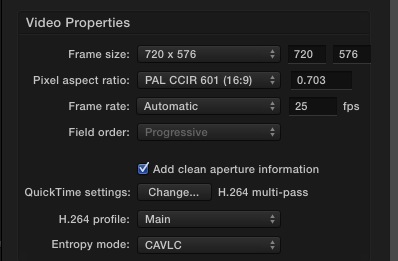
Didn't work .... get the greyed out "progressive", no way to choose the field order for interlaced view. It's not even marked as "same as source".
I guess that, as someone here already said, this must be a bug in Compressor.
I will put a link of my test sequence that I have used so far, it's an exerpt of last big Horse Racing event here in Paris, the "Prix de l'Arc de Triomphe".
It's a 90 second piece, real interlaced, sourced from a clean feed provided by the host broadcaster Equidia ( who I work for ).
If you have a preference for a deposit provider, Dropbox, WeTransfer or anything else, let me know.
I am at the Airport, about to leave for the West Coast to cover like every year the Breeders Cup, biggest Horse Racing Event besides the Kentucky Derby and it's Triple Crown extension.
Will send that footage from there.
Thanks again Andreas for your efforts.
Be back on the Web soon.
Alex
Please Log in to join the conversation.
- jeff_kirkland
-
- Offline
- Senior Member
-
Please Log in to join the conversation.
- Andreas Kiel
-
- Offline
- Platinum Member
-
- Posts: 1077
- Thank you received: 189
The difference between your Compressor setups and the one I created is that mine doesn't force the conversion to progressive.
Even is the file is flagged as progressive the interlace lines are kept.
I will try with your example once I get it.
I the meantime I've found that old QT app, modified it a bit and made a simple app out of that.
First thing is you must have QT Player 7 installed somewhere. (It doesn't need to be a pro version.) Otherwise the app won't work.
It also will work only for QuickTime movies.
Open a movie in QT Player 7, go to Export -> Movie to Quicktime Movie -> Options. Make your settings and start the export. You can stop immediately. Don't close the open movie. The setting you made is now the "most recent" one.
Within the app click "Save most recent settings for Quicktime movie". You will be asked for a name. Enter something descriptive.
Once this setting or more are saved they are ready for reuse.
Now select one of the preset you made and press cmd-O (or the button on the bottom of the app window.
Select a movie and the export will start with the selected setting.
The location of the converted file is the same as the one from the source file. The file name is "original name"& "_conv"& ".mov". Make sure that no file with that name exist at this location.
- Andreas
dl.dropboxusercontent.com/u/63959366/QT_Exporter.app.zip
Please Log in to join the conversation.
- Roadswitcher
-
- Offline
- Senior Member
-
- Posts: 56
- Thank you received: 4
Sorry for the long gap since my last message, was on assignement in the US ( Breeders Cup ) and that's where my 13" MBP chose to call it quits ! HD drive unreadable because of a faulty ribbon connector. Had to restore from my TM to a new drive and now still waiting for a ribbon kit to be sent from the iFixit catalog .... 'til then, I'm booting and working fron an external FW enclosure.
Not really comfortable.
Since the Restoring, I still had to "refresh" many preferences and presets that got lost ( think afer all these years relying on a TM backup, I should rather do more often clones with my CCC app, just to avoid all the hassle of checking and reconstructing prefs & Co.)
Lost my manually listed presets in the Share section of FCPX, but they were still present in Compressor, so I had to copy them again to my list.
Strangely enough, my AVCIntra Codec, alive and kicking in Compressor ( tested ) doesn't want to show up in the FCPX interface under my Compressor's custom settings. The Codec is well installed and present in the Root QT Codecs folder and in the User App-Support Compressor Folder , but doesn't show up in the custom folder created in Compressor, or even in the pull down menu of my QT7 pro Export Settings. ( Yes, I have the Pro version of this good old QT7, had the Pro key since being with Mac OSX )
So that's another problem I need to solve, if I dont want to stop by Compressor each time I'm asked for an AVCIntra export file.
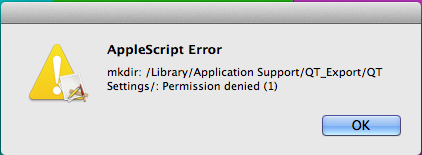
Many thanks for your script to save different QT export settings, tried it out, but got an Applescript error box. Although I could still live with my "most recent setting", since I would invoke the QT7 Pro Export Path only for those h264 files that require an interlaced input/output, your script would be a great improvement for the only (old) tool that doesn't allow to "memorize" different setups.
Until I manage to iron out all my troubles with my restored Mac, I have uploaded that interlaced HD test file I have been using extensively to benchmark all my exporting apps.
It's a plain ProRes422 13 seconds outtake of this years "Prix de l'Arc" Horse Race, my long time client being the Horse Racing Channel Equidia. And of course, it's interlaced !
www.dropbox.com/s/dzz9g5nwc4hboqi/Arc_20...R422_i_test.mov?dl=0
Thanks again for the great input and the time you have spent on this. As said before, lets see if with another version of Compressor, the native handling of interlaced videos will be finally allowed again by the dark people in the dev team.
For now, there are more critical items to discuss than mine. But this here is a great place to discuss and try to resolve problems. Kudos to y'all !
Alex
Please Log in to join the conversation.
