


- Posts: 4455
- Thank you received: 962
3 Post Moderation Rule for New Boarders (25 Jan 2021)
New boarders will have their posts moderated - Don't worry if you cannot see your post immediately.
Export interlaced project as interlaced
- ronny courtens
-

- Offline
- Moderator
-

Less
More
17 Feb 2014 23:52 - 18 Feb 2014 00:02 #41336
by ronny courtens
Replied by ronny courtens on topic Export interlaced project as interlaced
It doesn't look interlaced, but I have opened it in Episode Pro and it indeed shows interlaced in the format info, just like it does in Mediainfo. The problem is not with your original video. I have done some tests with other interlaced video as well, leading to an interesting result:
1. I have imported your video in FCPX and I have created an interlaced project.
Then I have exported once as ProRes 422 and once as H.264. I opened the exported files with MediaInfo, and guess what?
The ProRes 422 file shows as interlaced in MediaInfo, the H.264 files shows as progressive. Yet when I open the exported files in FCPX and in Compressor they both show as interlaced.
2. So I have done another test, this time with DV25i video and with DVCPRO 1080i@29.97fps. And I got exactly the same results: the ProRes master files show as interlaced in MediaInfo, the H.264 files show as progressive. The conclusion:
On an interlaced Project with interlaced video the Share > Master File > H.264 setting in FCPX always creates a progressive file (according to MediaInfo), while the ProRes 422 setting produces a correct interlaced file.
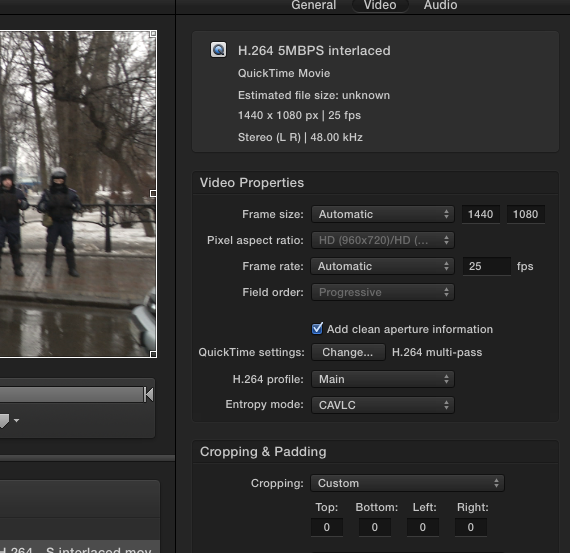
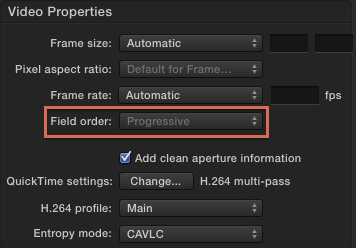
3. And what's more: there seems to be no way, neither in FCPX nor in Compressor, nor in QT7 Pro, to export H.264 as interlaced. The field order defaults to progressive and the option is even greyed out in Compressor:
4. I have also tried converting the Prores 422 interlaced master file to H.264 in MPEG Streamclip. Here I did have the options to export H.264 as interlaced. But again the resulting file showed up as progressive in MediaInfo:
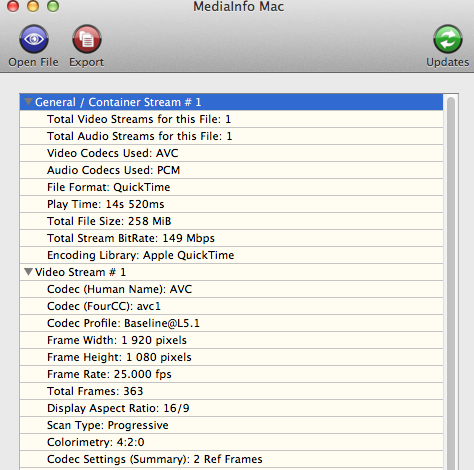
So QuickTime H.264 seems to always create an improperly interlaced H.264 file.
5. Now we know the problem, but what's the solution?
- If your client accepts ProRes422 there is no problem: export as a Master File and choose Current Settings (ProRes 422) in the Settings window. It will be a big file if your edit is long, but it will be the best quality interlaced master you can deliver.
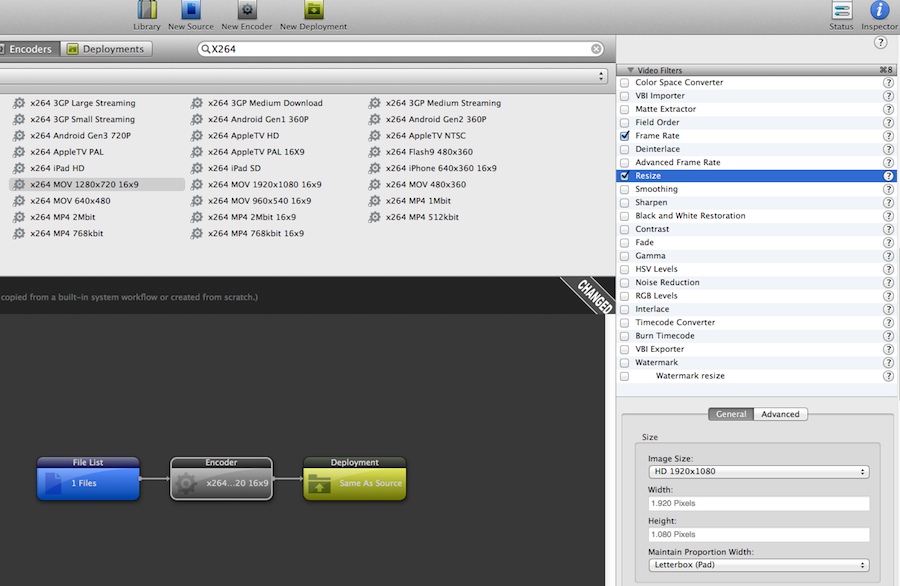
- If your client only accepts H.264 interlaced you will need to convert your ProRes 422 master file to H.264 using a specialized conversion app such as Episode. I have converted the ProRes 422 interlaced master file exported from your footage in FCPX to H.264 using the X264 encoder in Episode Engine Pro:
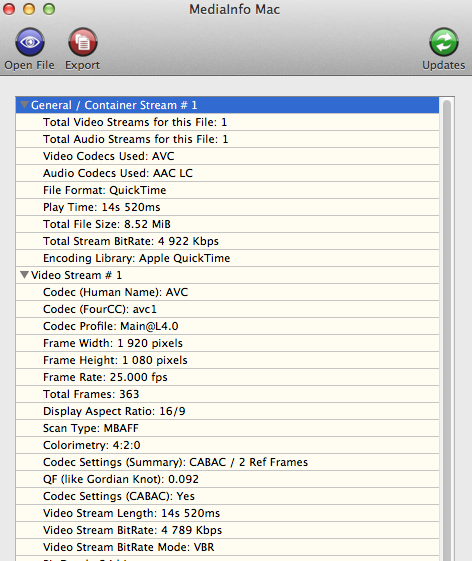
And the resulting H.264 file shows up as interlaced in MediaInfo:
- Ronny
1. I have imported your video in FCPX and I have created an interlaced project.
Then I have exported once as ProRes 422 and once as H.264. I opened the exported files with MediaInfo, and guess what?
The ProRes 422 file shows as interlaced in MediaInfo, the H.264 files shows as progressive. Yet when I open the exported files in FCPX and in Compressor they both show as interlaced.
2. So I have done another test, this time with DV25i video and with DVCPRO 1080i@29.97fps. And I got exactly the same results: the ProRes master files show as interlaced in MediaInfo, the H.264 files show as progressive. The conclusion:
On an interlaced Project with interlaced video the Share > Master File > H.264 setting in FCPX always creates a progressive file (according to MediaInfo), while the ProRes 422 setting produces a correct interlaced file.
3. And what's more: there seems to be no way, neither in FCPX nor in Compressor, nor in QT7 Pro, to export H.264 as interlaced. The field order defaults to progressive and the option is even greyed out in Compressor:
4. I have also tried converting the Prores 422 interlaced master file to H.264 in MPEG Streamclip. Here I did have the options to export H.264 as interlaced. But again the resulting file showed up as progressive in MediaInfo:
So QuickTime H.264 seems to always create an improperly interlaced H.264 file.
5. Now we know the problem, but what's the solution?
- If your client accepts ProRes422 there is no problem: export as a Master File and choose Current Settings (ProRes 422) in the Settings window. It will be a big file if your edit is long, but it will be the best quality interlaced master you can deliver.
- If your client only accepts H.264 interlaced you will need to convert your ProRes 422 master file to H.264 using a specialized conversion app such as Episode. I have converted the ProRes 422 interlaced master file exported from your footage in FCPX to H.264 using the X264 encoder in Episode Engine Pro:
And the resulting H.264 file shows up as interlaced in MediaInfo:
- Ronny
Last edit: 18 Feb 2014 00:02 by ronny courtens.
Please Log in to join the conversation.
- Andreas Kiel
-

- Offline
- Platinum Member
-

Less
More
- Posts: 1077
- Thank you received: 189
17 Feb 2014 23:57 #41337
by Andreas Kiel
Replied by Andreas Kiel on topic Export interlaced project as interlaced
the horizontal res in this case doesn't have any influence since vertical res isn't changed. its just about square versus non-square pixels.
the p2 files are not converted or modified during import — they are only collected into a quicktime container (a + v).
also i25 or 50i doesn't mean anything. you can have material which is interpreted as interlaced while the source does not have any timing difference in the fields — some call it progressive interlaced.
in older days this thing often enough the other way round.
-andreas
the p2 files are not converted or modified during import — they are only collected into a quicktime container (a + v).
also i25 or 50i doesn't mean anything. you can have material which is interpreted as interlaced while the source does not have any timing difference in the fields — some call it progressive interlaced.
in older days this thing often enough the other way round.
-andreas
Please Log in to join the conversation.
- Andreas Kiel
-
- Offline
- Platinum Member
-
Less
More
- Posts: 1077
- Thank you received: 189
18 Feb 2014 00:06 #41338
by Andreas Kiel
Replied by Andreas Kiel on topic Export interlaced project as interlaced
On an interlaced Project with interlaced video the Share > Master File > H.264 setting in FCPX always creates a progressive file (according to MediaInfo), while the ProRes 422 setting produces a correct interlaced file.
thats correct as by default many compressed formats don't support interlaced in the media definition.
but as said before this doesn't mean anything — except you do a resize.
-andreas
thats correct as by default many compressed formats don't support interlaced in the media definition.
but as said before this doesn't mean anything — except you do a resize.
-andreas
Please Log in to join the conversation.
- ronny courtens
-
- Offline
- Moderator
-
Less
More
- Posts: 4455
- Thank you received: 962
18 Feb 2014 00:11 #41339
by ronny courtens
Replied by ronny courtens on topic Export interlaced project as interlaced
Hi Andreas,
I agree, and that's probably why the original file does not look interlaced while in fact it is. I have also done the tests with original interlaced video to see if this would make any difference, but it doesn't. FCPX (in fact QuickTime) does not export properly interlaced H.264 while Episode does export a proper interlaced H.264 file.
And it does mean something to the OP, because that's why the exported H.264 file was rejected by the client.
- Ronny
I agree, and that's probably why the original file does not look interlaced while in fact it is. I have also done the tests with original interlaced video to see if this would make any difference, but it doesn't. FCPX (in fact QuickTime) does not export properly interlaced H.264 while Episode does export a proper interlaced H.264 file.
And it does mean something to the OP, because that's why the exported H.264 file was rejected by the client.
- Ronny
Please Log in to join the conversation.
- Andreas Kiel
-
- Offline
- Platinum Member
-
Less
More
- Posts: 1077
- Thank you received: 189
18 Feb 2014 00:41 #41340
by Andreas Kiel
Replied by Andreas Kiel on topic Export interlaced project as interlaced
hi ronny,
you're right. but as said its always a kind of definition.
an example.:
when i was young (+30 years ago) i wrote an app which forced the render apps to render half res vertical at double fps.
the result was merged into a file where image i plus image i+1 (for pal) where merged into one full height frame. the result was an interlaced but progressive file.
i will upload a test file from the ancient days to test interlace settings.
but i also heard from several people that sharing files with compressor or fcpx always generate interpolated progressive files. thats bad.
-andreas
you're right. but as said its always a kind of definition.
an example.:
when i was young (+30 years ago) i wrote an app which forced the render apps to render half res vertical at double fps.
the result was merged into a file where image i plus image i+1 (for pal) where merged into one full height frame. the result was an interlaced but progressive file.
i will upload a test file from the ancient days to test interlace settings.
but i also heard from several people that sharing files with compressor or fcpx always generate interpolated progressive files. thats bad.
-andreas
Please Log in to join the conversation.
- Tom Wolsky
-

- Offline
- Moderator
-
18 Feb 2014 01:37 #41343
by Tom Wolsky
Replied by Tom Wolsky on topic Export interlaced project as interlaced
The original media may have an interlaced flag set on it, but there is absolutely no way that video is interlaced in any proper definition of the meaning of interlacing. Calling it interlaced doesn't make it so.
Please Log in to join the conversation.
- ronny courtens
-
- Offline
- Moderator
-
Less
More
- Posts: 4455
- Thank you received: 962
18 Feb 2014 07:26 #41352
by ronny courtens
Replied by ronny courtens on topic Export interlaced project as interlaced
I agree, Tom. That's progressive video captured as interlaced. Actually it's DVCPRO HD 1080p25, which is always recorded as 1080i50 PsF (Progressive segmented Frames) in the camera. PsF recorded video has always been a PITA, and I'm glad this outdated recording format is on its way out. But that's not the real issue here.
The problem here is that when exporting any interlaced or progressive project to H.264.mov the encoder always uses progressive frames, no way to change this. And as the client specifically requests interlaced delivery the file gets rejected at QC. Not so when exporting as ProRes 422.
- Ronny
The problem here is that when exporting any interlaced or progressive project to H.264.mov the encoder always uses progressive frames, no way to change this. And as the client specifically requests interlaced delivery the file gets rejected at QC. Not so when exporting as ProRes 422.
- Ronny
Please Log in to join the conversation.
- Andreas Kiel
-
- Offline
- Platinum Member
-
Less
More
- Posts: 1077
- Thank you received: 189
18 Feb 2014 08:12 - 18 Feb 2014 08:13 #41353
by Andreas Kiel
Replied by Andreas Kiel on topic Export interlaced project as interlaced
Compressor v 4.1 changes the movie to progressive.
But if you still have a version of 4.0x you can make a setup there and use that one.
-Andreas
dl.dropboxusercontent.com/u/63959366/box-H264%20interlaced.mov
But if you still have a version of 4.0x you can make a setup there and use that one.
-Andreas
dl.dropboxusercontent.com/u/63959366/box-H264%20interlaced.mov
Last edit: 18 Feb 2014 08:13 by Andreas Kiel.
Please Log in to join the conversation.

18 Feb 2014 08:48 - 18 Feb 2014 09:00 #41354
by BenB
Replied by BenB on topic Export interlaced project as interlaced
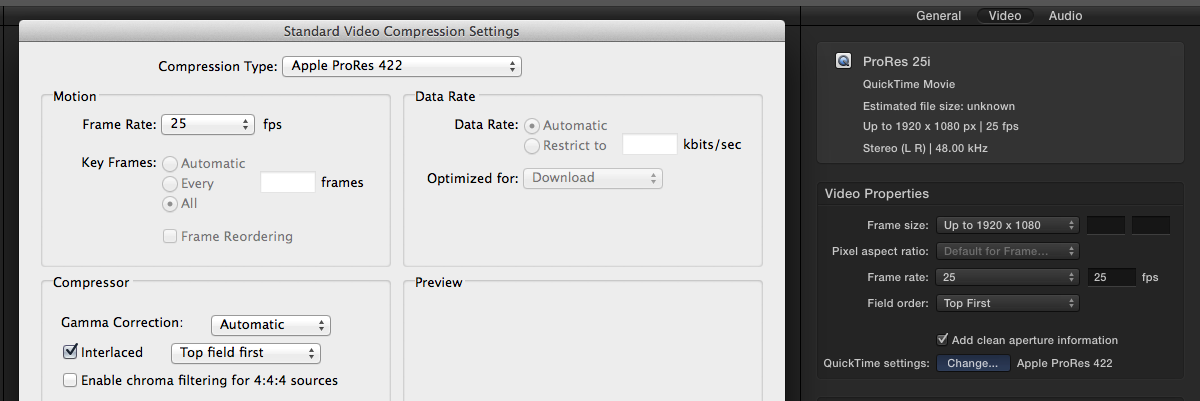
Andreas, why can't you make that same custom preset in Compressor 4.1? I just did this, and got a 25i ProRes out of it.
Last edit: 18 Feb 2014 09:00 by BenB.
Please Log in to join the conversation.
- Andreas Kiel
-
- Offline
- Platinum Member
-
Less
More
- Posts: 1077
- Thank you received: 189
18 Feb 2014 08:56 #41355
by Andreas Kiel
Replied by Andreas Kiel on topic Export interlaced project as interlaced
Cause there is no option for field handling anymore – at least I can't find it.
-Andreas
-Andreas
Please Log in to join the conversation.
18 Feb 2014 09:01 - 18 Feb 2014 09:01 #41356
by BenB
Replied by BenB on topic Export interlaced project as interlaced
I just updated my post, and yes, it is still there. Not sure why you can't find it. Just click the "Quicktime Settings" button like you used to. Yes, looks different, but it is all still there.
Last edit: 18 Feb 2014 09:01 by BenB.
Please Log in to join the conversation.
- Andreas Kiel
-
- Offline
- Platinum Member
-
Less
More
- Posts: 1077
- Thank you received: 189
18 Feb 2014 09:14 - 18 Feb 2014 09:23 #41358
by Andreas Kiel
Replied by Andreas Kiel on topic Export interlaced project as interlaced
Sure it looks different.
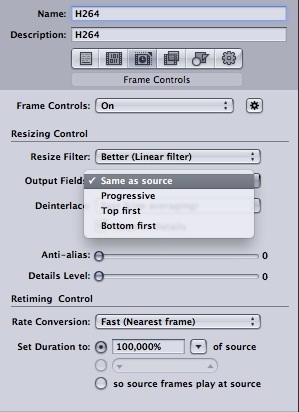
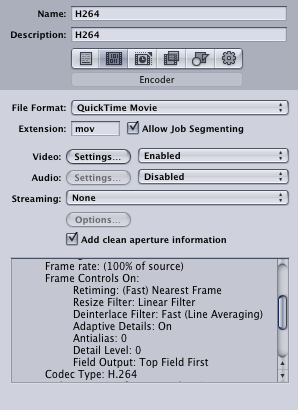
But for H.264 you can't select fields.
-Andreas
But for H.264 you can't select fields.
-Andreas
Last edit: 18 Feb 2014 09:23 by Andreas Kiel.
Please Log in to join the conversation.
- Tom Wolsky
-
- Offline
- Moderator
-
18 Feb 2014 12:42 - 18 Feb 2014 12:46 #41363
by Tom Wolsky
Replied by Tom Wolsky on topic Export interlaced project as interlaced
Oddly if I export a master file from FCP and set the codec to H.264, if the original is interlaced, the exported file is also interlaced.
Just to add, using the Compressor H264 setting on the same file, the interlacing is lost.
Just to add, using the Compressor H264 setting on the same file, the interlacing is lost.
Last edit: 18 Feb 2014 12:46 by Tom Wolsky.
Please Log in to join the conversation.
18 Feb 2014 13:23 - 18 Feb 2014 13:24 #41365
by BenB
Replied by BenB on topic Export interlaced project as interlaced
That is odd. Guess I never needed interlaced H.264 before. This is surprising. I hope this changes in a future update. Along with not allowing us to get alpha channels into ProRes 4444 via Compressor, too. Time to fill out the feedback page.
Last edit: 18 Feb 2014 13:24 by BenB.
Please Log in to join the conversation.
- Andreas Kiel
-
- Offline
- Platinum Member
-
Less
More
- Posts: 1077
- Thank you received: 189
18 Feb 2014 14:05 #41371
by Andreas Kiel
Replied by Andreas Kiel on topic Export interlaced project as interlaced
"Along with not allowing us to get alpha channels into ProRes 4444 via Compressor, too. "
You can still use 4.0.x
"Time to fill out the feedback page."
Thats true. I did it already a while ago.
-Andreas
You can still use 4.0.x
"Time to fill out the feedback page."
Thats true. I did it already a while ago.
-Andreas
Please Log in to join the conversation.
18 Feb 2014 15:10 #41376
by BenB
Replied by BenB on topic Export interlaced project as interlaced
The alpha channel issue is not new, it has been a Compressor issue for many versions now.
Please Log in to join the conversation.
- Andreas Kiel
-
- Offline
- Platinum Member
-
Less
More
- Posts: 1077
- Thank you received: 189
18 Feb 2014 17:37 #41382
by Andreas Kiel
As Ronny already mentioned it works fine for ProRes.
-Andreas
Replied by Andreas Kiel on topic Export interlaced project as interlaced
BenB wrote: Andreas, why can't you make that same custom preset in Compressor 4.1? I just did this, and got a 25i ProRes out of it.
As Ronny already mentioned it works fine for ProRes.
-Andreas
Please Log in to join the conversation.
- Andreas Kiel
-
- Offline
- Platinum Member
-
Less
More
- Posts: 1077
- Thank you received: 189
18 Feb 2014 17:39 #41383
by Andreas Kiel
Works for me ???
-Andreas
Example:
www.spherico.com/filmtools/X-Files/X-Proxy.dmg
Replied by Andreas Kiel on topic Export interlaced project as interlaced
BenB wrote: The alpha channel issue is not new, it has been a Compressor issue for many versions now.
Works for me ???
-Andreas
Example:
www.spherico.com/filmtools/X-Files/X-Proxy.dmg
Please Log in to join the conversation.
18 Feb 2014 21:41 #41396
by BenB
Replied by BenB on topic Export interlaced project as interlaced
Andreas, take an image sequence with alpha channel, make is a ProRes 4444, the alpha channel is lost. There is an very long running thread on Apple's Compressor forum about this.
Please Log in to join the conversation.
- Andreas Kiel
-
- Offline
- Platinum Member
-
Less
More
- Posts: 1077
- Thank you received: 189
19 Feb 2014 09:33 - 19 Feb 2014 09:34 #41414
by Andreas Kiel
Replied by Andreas Kiel on topic Export interlaced project as interlaced
Works for me.
Subtitles are exported as 4444 and reimported.
-Andreas

Subtitles are exported as 4444 and reimported.
-Andreas
Last edit: 19 Feb 2014 09:34 by Andreas Kiel.
Please Log in to join the conversation.
