


- Posts: 11
- Thank you received: 0
3 Post Moderation Rule for New Boarders (25 Jan 2021)
New boarders will have their posts moderated - Don't worry if you cannot see your post immediately.
Export interlaced project as interlaced
16 Feb 2014 20:05 #41247
by JOKER_th
Export interlaced project as interlaced was created by JOKER_th
Hello all,
I hope that you can help me with an FCPX problem.
A TV station requires 1920x1080, Frame rate 50i upperfield with H264 Codec in mov or mpeg4.
I've material which is shot in exactly these specifications. I edited the material in FCPX (it says 25i but people told me that it is the same) but whenever I use the "share" function to export the project, it ends up as a progressive file. I searched all the forums but had no success with finding an answer.
How can I export an interlaced project in interlaced and not progressive with FCPX? So, if you know a solution to this problem, please let me know.
Best regards,
Marvin
I hope that you can help me with an FCPX problem.
A TV station requires 1920x1080, Frame rate 50i upperfield with H264 Codec in mov or mpeg4.
I've material which is shot in exactly these specifications. I edited the material in FCPX (it says 25i but people told me that it is the same) but whenever I use the "share" function to export the project, it ends up as a progressive file. I searched all the forums but had no success with finding an answer.
How can I export an interlaced project in interlaced and not progressive with FCPX? So, if you know a solution to this problem, please let me know.
Best regards,
Marvin
Please Log in to join the conversation.
- Tom Wolsky
-

- Offline
- Moderator
-

16 Feb 2014 20:12 #41249
by Tom Wolsky
Replied by Tom Wolsky on topic Export interlaced project as interlaced
Are you exporting a master file? Where are looking at the exported file?
Please Log in to join the conversation.
16 Feb 2014 20:27 #41250
by JOKER_th
Replied by JOKER_th on topic Export interlaced project as interlaced
Yes, I am exporting a master file in FCPX. Well, I use Share --> Original file.
Then I used MediaInfo Mac to know what has been exported. And it always says "Scan Type" "Progressive" and the TV station confirmed that it is a progressive file.
Any ideas?
Then I used MediaInfo Mac to know what has been exported. And it always says "Scan Type" "Progressive" and the TV station confirmed that it is a progressive file.
Any ideas?
Please Log in to join the conversation.
17 Feb 2014 19:49 #41306
by JOKER_th
Replied by JOKER_th on topic Export interlaced project as interlaced
I would be really thankful if anyone had an idea how to solve this problem with FCPX.
Please Log in to join the conversation.
- Tom Wolsky
-
- Offline
- Moderator
-
17 Feb 2014 19:54 #41309
by Tom Wolsky
Replied by Tom Wolsky on topic Export interlaced project as interlaced
Have not been able to reproduce the problem. I see an interlaced file on export. Are you sure the original media is interlaced, not shot 1080p50 or something.
Please Log in to join the conversation.
17 Feb 2014 20:01 #41310
by JOKER_th
Replied by JOKER_th on topic Export interlaced project as interlaced
I checked the original file with MediaInfo Mac as well. It is interlaced whereas the exported file from FCPX project is progressive.
Please Log in to join the conversation.
- ronny courtens
-

- Offline
- Moderator
-
Less
More
- Posts: 4455
- Thank you received: 962
17 Feb 2014 20:33 #41311
by ronny courtens
Replied by ronny courtens on topic Export interlaced project as interlaced
Check your Project settings: select the Project icon in the Library Browser and in the Inspector > Info tab press the Modify Settings button. The Project Settings window will open.
What are your Video Properties (Format, resolution and Rate) ? They should be 1080i, 1920x1080, 25i.
If they are any different, change them, then press OK and export again.
- Ronny
What are your Video Properties (Format, resolution and Rate) ? They should be 1080i, 1920x1080, 25i.
If they are any different, change them, then press OK and export again.
- Ronny
Please Log in to join the conversation.
17 Feb 2014 20:39 #41313
by JOKER_th
Replied by JOKER_th on topic Export interlaced project as interlaced
The project is in 1080i HD, 1920x1080, 25i.
It seems that some sort of de-interlacing happens when I export the file. But I don't know why nor how to change it.
It seems that some sort of de-interlacing happens when I export the file. But I don't know why nor how to change it.
Please Log in to join the conversation.
17 Feb 2014 20:44 #41314
by JOKER_th
Replied by JOKER_th on topic Export interlaced project as interlaced
When I click on export and look at the settings there (just one click before FCPX is creating the file), it suddenly says 1920 x 1080 | 25 fps. Why?
Please Log in to join the conversation.
- ronny courtens
-
- Offline
- Moderator
-
Less
More
- Posts: 4455
- Thank you received: 962
17 Feb 2014 20:52 #41316
by ronny courtens
Replied by ronny courtens on topic Export interlaced project as interlaced
It always says 25fps in the Share window, that's correct for 50i. I just did a test with a 1080 25i project which I exported as a ProRes422 Master File. The exported file is 25i, as expected. So I really don't know what is going wrong with your export.
Just an idea: re-import your "progressive" exported master file back into FCPX. Select the file in your Browser and go to the Inspector. What are the clip properties? Does it say 25p?
- Ronny
Just an idea: re-import your "progressive" exported master file back into FCPX. Select the file in your Browser and go to the Inspector. What are the clip properties? Does it say 25p?
- Ronny
Please Log in to join the conversation.
17 Feb 2014 21:08 #41318
by JOKER_th
Replied by JOKER_th on topic Export interlaced project as interlaced
Hi Ronny,
your idea produced interesting results. When I reimport the exported file, FCPX correctly says 25i. But when I check the same file with MediaInfo Mac it says "Scan Type: Progressive" and with the same exporting settings the technicians at the TV station told me that it was progressive, too, and refused to accept the file...
I uploaded the test file in question here: www.dropbox.com/s/5np8cg1p1s6cme1/Test_50i_2.mov
Maybe you might see a solution for my problem from the file.
Thanks in advance!
your idea produced interesting results. When I reimport the exported file, FCPX correctly says 25i. But when I check the same file with MediaInfo Mac it says "Scan Type: Progressive" and with the same exporting settings the technicians at the TV station told me that it was progressive, too, and refused to accept the file...
I uploaded the test file in question here: www.dropbox.com/s/5np8cg1p1s6cme1/Test_50i_2.mov
Maybe you might see a solution for my problem from the file.
Thanks in advance!
Please Log in to join the conversation.
- ronny courtens
-
- Offline
- Moderator
-
Less
More
- Posts: 4455
- Thank you received: 962
17 Feb 2014 21:10 #41319
by ronny courtens
Replied by ronny courtens on topic Export interlaced project as interlaced
Thank you, I will immediately have a look at your file. Strange indeed. Will be back in a moment.
- Ronny
- Ronny
Please Log in to join the conversation.
- Tom Wolsky
-
- Offline
- Moderator
-
17 Feb 2014 21:22 #41320
by Tom Wolsky
Replied by Tom Wolsky on topic Export interlaced project as interlaced
It's definitely not interlaced. Can you upload the same original media file? Thanks.
Please Log in to join the conversation.
- ronny courtens
-
- Offline
- Moderator
-
Less
More
- Posts: 4455
- Thank you received: 962
17 Feb 2014 21:26 #41321
by ronny courtens
Replied by ronny courtens on topic Export interlaced project as interlaced
I agree it's definitely not interlaced. But the strangest thing is that when I open it in Compressor 4 it shows as Upper Field first, which is interlaced.
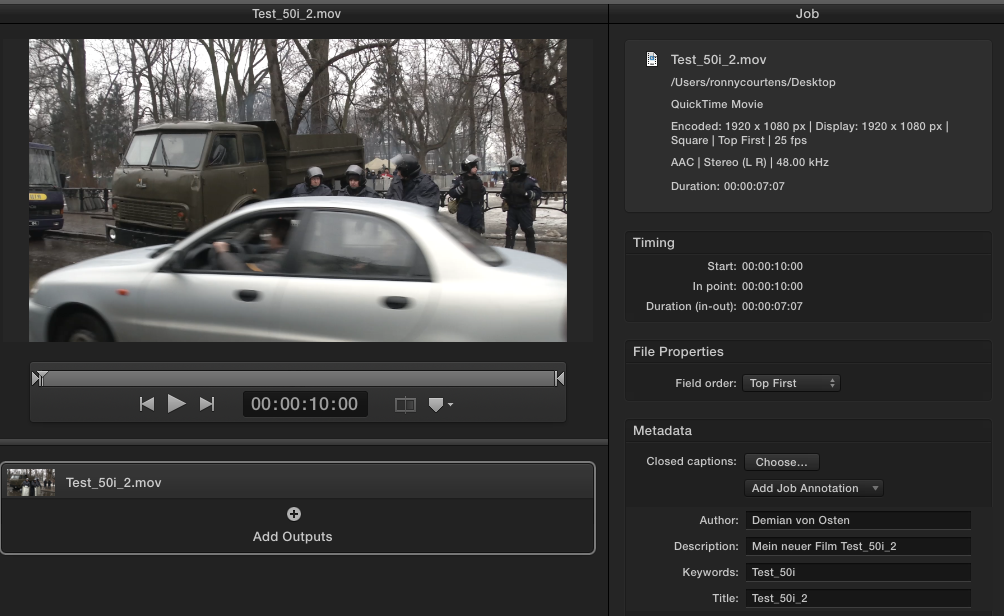
- Ronny
- Ronny
Please Log in to join the conversation.
- Tom Wolsky
-
- Offline
- Moderator
-
17 Feb 2014 21:31 #41323
by Tom Wolsky
Replied by Tom Wolsky on topic Export interlaced project as interlaced
Both Compressor and FCP think it's 25i. The only way I can see this happening is if the original media isn't interlaced and is placed in a 25i project.
Please Log in to join the conversation.
17 Feb 2014 21:35 #41324
by JOKER_th
Replied by JOKER_th on topic Export interlaced project as interlaced
I'm uploading the original file. It takes a while since it is 215 MB.
But I checked the original file in MediaInfo Mac and it says "Scan Type: Interlaced"...
But I checked the original file in MediaInfo Mac and it says "Scan Type: Interlaced"...
Please Log in to join the conversation.
17 Feb 2014 21:49 #41326
by JOKER_th
Replied by JOKER_th on topic Export interlaced project as interlaced
Still waiting for the file to finish uploading.
But I discovered an interesting point: the original file is in 1440 x 1080 (!). Can the different resolution cause the interlace/progressive problem?
And furthermore: The video material is from a Panasonic P2 card stored in MXF files. FCPX recognizes these files - but might the problem occur while converting MXF to FCPX compatible MOV containers?
But I discovered an interesting point: the original file is in 1440 x 1080 (!). Can the different resolution cause the interlace/progressive problem?
And furthermore: The video material is from a Panasonic P2 card stored in MXF files. FCPX recognizes these files - but might the problem occur while converting MXF to FCPX compatible MOV containers?
Please Log in to join the conversation.
17 Feb 2014 22:11 #41330
by JOKER_th
Replied by JOKER_th on topic Export interlaced project as interlaced
Here is the link to the original video file:
www.dropbox.com/s/csn336sm5jpqmbn/2014-0...36_02%20%28id%29.mov
Thanks a lot for your help. I hope that we find a solution.
Thanks a lot for your help. I hope that we find a solution.
Please Log in to join the conversation.
- Tom Wolsky
-
- Offline
- Moderator
-
17 Feb 2014 23:04 #41333
by Tom Wolsky
Replied by Tom Wolsky on topic Export interlaced project as interlaced
That's not interlaced. It would be good to know more exact information about the specifications. Is this MXF DVCPROHD, AVC Intra, I assume it's not XDCAM, but maybe.
I tested it with a bit of Panasonic sample media, DVCPROHD. It imported and output interlaced. I can clearly see the interlacing on the exported file. This MediaInfo Mac app doesn't say anything for the file about field order.
I tested it with a bit of Panasonic sample media, DVCPROHD. It imported and output interlaced. I can clearly see the interlacing on the exported file. This MediaInfo Mac app doesn't say anything for the file about field order.
Please Log in to join the conversation.
17 Feb 2014 23:06 #41334
by JOKER_th
Replied by JOKER_th on topic Export interlaced project as interlaced
It's MXF from a Panasonic P2 card. For more specifications I have to ask the cameraman tomorrow.
Please Log in to join the conversation.
