


3 Post Moderation Rule for New Boarders (25 Jan 2021)
New boarders will have their posts moderated - Don't worry if you cannot see your post immediately.
FCPX / Mavericks dynamic_cast error 1


28 Dec 2013 20:58 #37553
by -ND4SPD-
Multimedia & Social Media Manager
Sometimes I'll sound really smart & then turn around & ask a noob-ish question. Don't worry... that's perfectly normal haha!
Replied by -ND4SPD- on topic FCPX / Mavericks dynamic_cast error 1
dgwvideo - I just figured out what you meant by "Original Media" folder. I just located all the footage & it is on the drive, I dragged that to the "Final Cut Events" folder. re-started & searched for media... still nothing. :dry:
Multimedia & Social Media Manager
Sometimes I'll sound really smart & then turn around & ask a noob-ish question. Don't worry... that's perfectly normal haha!
Please Log in to join the conversation.

29 Dec 2013 04:45 #37587
by marchyman
Replied by marchyman on topic FCPX / Mavericks dynamic_cast error 1
Dragging stuff into events and projects from the finder will rarely do anything good with respect to FCPX.
It sounds like you missed a level when moving things from "old final cut projects & events" to where they need to be to be seen by FCPX. The "old final cut projects & events" folder is where FCPX stores things that it thinks it has converted to the library format. If it's not in your library that may be due to the crash you experienced. Moving the contents of that folder to appropriately named folders will restore it, but.... the locations and names have to be exactly correct.
Do you have a separate backup of your projects and events before starting FCPX 10.1? If so reload your projects and events from that backup and do the conversion again. It will be a lot easier than making sure everything is named and placed exactly right for FCPX to process.
It sounds like you missed a level when moving things from "old final cut projects & events" to where they need to be to be seen by FCPX. The "old final cut projects & events" folder is where FCPX stores things that it thinks it has converted to the library format. If it's not in your library that may be due to the crash you experienced. Moving the contents of that folder to appropriately named folders will restore it, but.... the locations and names have to be exactly correct.
Do you have a separate backup of your projects and events before starting FCPX 10.1? If so reload your projects and events from that backup and do the conversion again. It will be a lot easier than making sure everything is named and placed exactly right for FCPX to process.
Please Log in to join the conversation.


29 Dec 2013 05:08 - 29 Dec 2013 05:08 #37588
by dgwvideo
Creating history....one edit at a time !
Replied by dgwvideo on topic FCPX / Mavericks dynamic_cast error 1
As I understand the OP's original issue, he is not moving media into new folders, he is trying to bring the Final Cut Events contents that was there prior to the conversion. Since he located the event it should now be able to be moved back into a folder that he will have to make called Final Cut Events (which gets removed during the update). No media relinking should be necessary because this is the original media that was prior to the update in that very folder.
If this was done and locate didn't work for conversion, try launching FCPX again and select update projects and events and then choose Update All. Unless the original conversion actually did update those for you and you just can't find them in the new libraries, they should begin converting. If they don't I would suggest you look through all of the newly converted events to be sure they are not there. That is the only reason I could think that FCPX will not update events.
Hopefully I am understanding your situation correctly.
If this was done and locate didn't work for conversion, try launching FCPX again and select update projects and events and then choose Update All. Unless the original conversion actually did update those for you and you just can't find them in the new libraries, they should begin converting. If they don't I would suggest you look through all of the newly converted events to be sure they are not there. That is the only reason I could think that FCPX will not update events.
Hopefully I am understanding your situation correctly.
Creating history....one edit at a time !
Last edit: 29 Dec 2013 05:08 by dgwvideo.
Please Log in to join the conversation.
30 Dec 2013 21:08 - 30 Dec 2013 21:19 #37697
by -ND4SPD-
Multimedia & Social Media Manager
Sometimes I'll sound really smart & then turn around & ask a noob-ish question. Don't worry... that's perfectly normal haha!
Replied by -ND4SPD- on topic FCPX / Mavericks dynamic_cast error 1
Things have gone from strange to stranger. I fired up FCPX today to try some more of the recommendations & idea's. This is all that happens. Just stuck here.
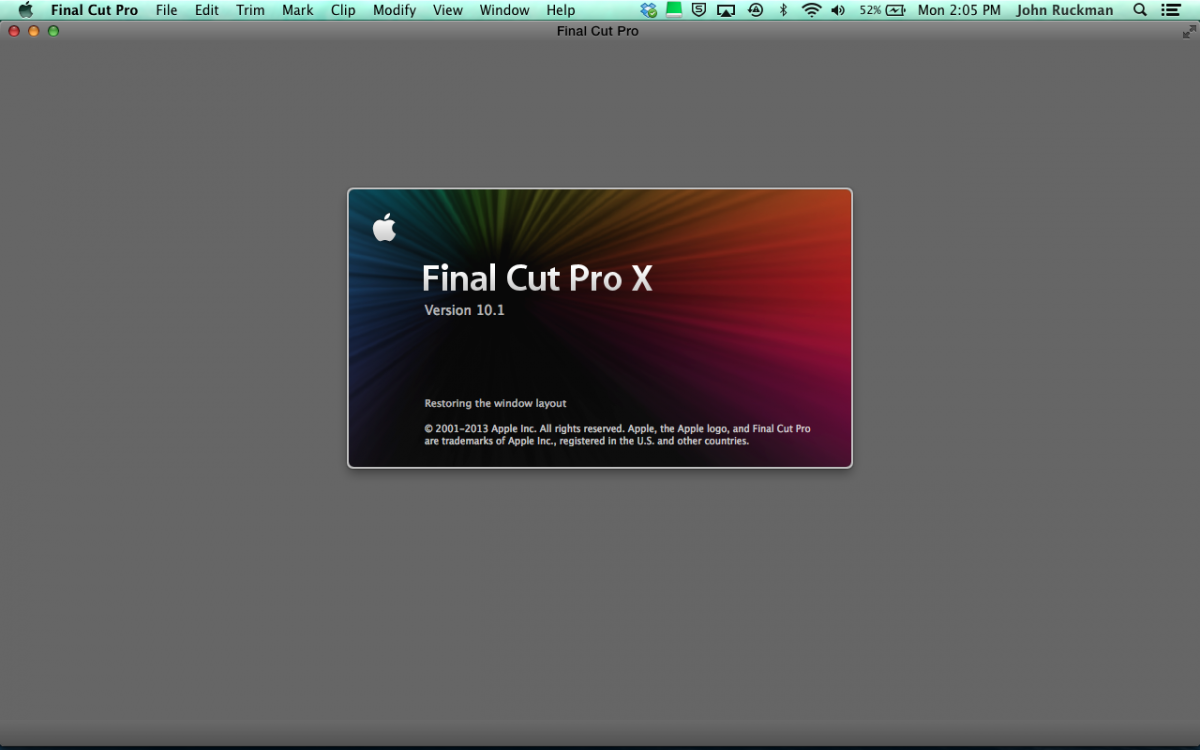
Here's what Console says
"Final Cut Pro[188]: CoreData: error: (3850) I/O error for database at /Volumes/2nd Drive HHD/2nd Drive HHD's projects and events 1.fcpbundle/V_Lab/CurrentVersion.fcpevent. SQLite error code:3850, 'not an error' errno:9"
Here's what Console says
"Final Cut Pro[188]: CoreData: error: (3850) I/O error for database at /Volumes/2nd Drive HHD/2nd Drive HHD's projects and events 1.fcpbundle/V_Lab/CurrentVersion.fcpevent. SQLite error code:3850, 'not an error' errno:9"
Multimedia & Social Media Manager
Sometimes I'll sound really smart & then turn around & ask a noob-ish question. Don't worry... that's perfectly normal haha!
Last edit: 30 Dec 2013 21:19 by -ND4SPD-.
Please Log in to join the conversation.
30 Dec 2013 23:05 - 30 Dec 2013 23:09 #37700
by Soundwise
Replied by Soundwise on topic FCPX / Mavericks dynamic_cast error 1
Try this, the Mountain Lion instructions should work with Mavericks as well:
support.apple.com/kb/TS4169?viewlocale=en_US&locale=en_US
support.apple.com/kb/TS4169?viewlocale=en_US&locale=en_US
Last edit: 30 Dec 2013 23:09 by Soundwise.
Please Log in to join the conversation.
31 Dec 2013 16:13 - 31 Dec 2013 17:22 #37742
by -ND4SPD-
Multimedia & Social Media Manager
Sometimes I'll sound really smart & then turn around & ask a noob-ish question. Don't worry... that's perfectly normal haha!
Replied by -ND4SPD- on topic FCPX / Mavericks dynamic_cast error 1
Thank You Soundwise! That at least got FCPX back up & running.
I'm still missing media & it won't let me view some of the Events inside the Library's I was previously able to view. Console is still giving this error which seems like a HD issue.
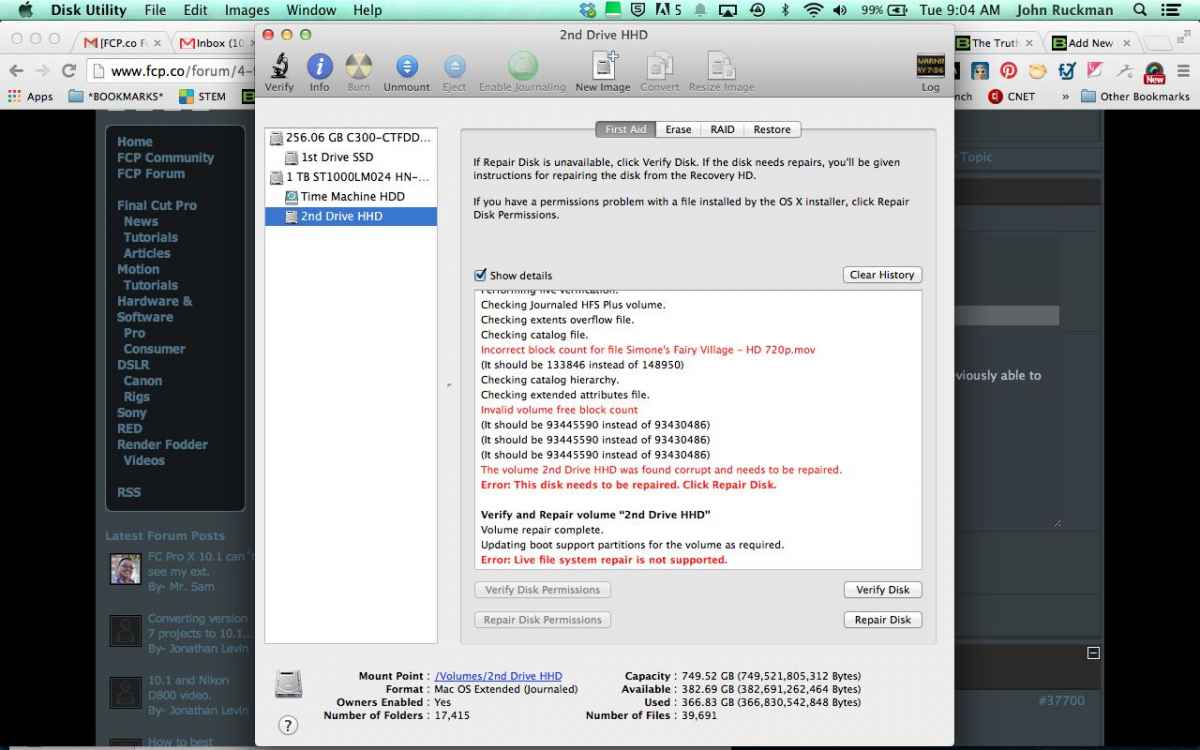
I pulled up Disk Utility > Verify Disk & it says that one of my video's is messed up. I try Repair Disk but I get an error "Disk Utility stopped repairing 2nd Drive - live system repair not supported"
Thoughts? Is the hard drive toast? I've been getting errors that Time Machine can't back up to this drive for about the same amount of time that FCPX has been messed up? I didn't want to mess with TM in case I need to revert to a backup.
I'm still missing media & it won't let me view some of the Events inside the Library's I was previously able to view. Console is still giving this error which seems like a HD issue.
I pulled up Disk Utility > Verify Disk & it says that one of my video's is messed up. I try Repair Disk but I get an error "Disk Utility stopped repairing 2nd Drive - live system repair not supported"
Thoughts? Is the hard drive toast? I've been getting errors that Time Machine can't back up to this drive for about the same amount of time that FCPX has been messed up? I didn't want to mess with TM in case I need to revert to a backup.
Multimedia & Social Media Manager
Sometimes I'll sound really smart & then turn around & ask a noob-ish question. Don't worry... that's perfectly normal haha!
Last edit: 31 Dec 2013 17:22 by -ND4SPD-.
Please Log in to join the conversation.
- ronny courtens
-

- Offline
- Moderator
-

Less
More
- Posts: 4455
- Thank you received: 962
31 Dec 2013 16:51 #37746
by ronny courtens
Replied by ronny courtens on topic FCPX / Mavericks dynamic_cast error 1
This certainly starts looking like a drive problem. If you have a backup of this drive I would advise using the backup instead. If you don't have a backup you might try to run Disk Warrior on that drive to see if DW can repair it. Disk Utility only has limited repair capacities.
- Ronny
- Ronny
Please Log in to join the conversation.

31 Dec 2013 17:48 - 01 Jan 2014 15:01 #37756
by BenB
Replied by BenB on topic FCPX / Mavericks dynamic_cast error 1
"Disk Utility stopped repairing 2nd Drive - live system repair not supported"
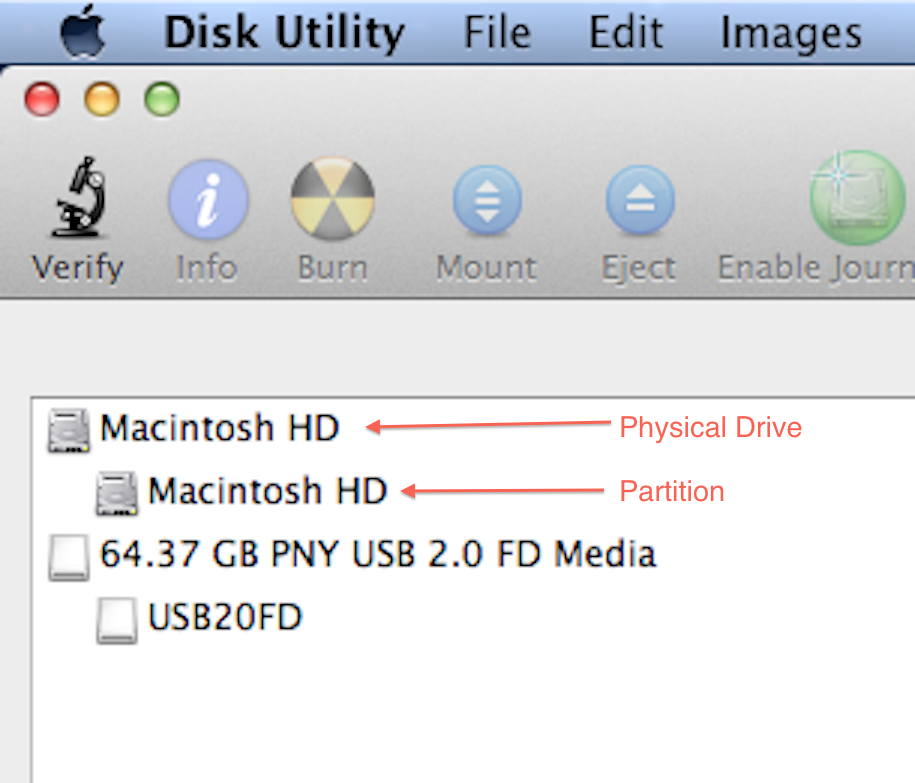
In Disk Utility, are you selecting the physical dive (the one on top with machine) or the Partition (one on bottom with actual name)? Select the one on bottom (volume).
In Disk Utility, are you selecting the physical dive (the one on top with machine) or the Partition (one on bottom with actual name)? Select the one on bottom (volume).
Last edit: 01 Jan 2014 15:01 by BenB. Reason: Corrected terminology
Please Log in to join the conversation.
31 Dec 2013 21:47 #37768
by -ND4SPD-
Multimedia & Social Media Manager
Sometimes I'll sound really smart & then turn around & ask a noob-ish question. Don't worry... that's perfectly normal haha!
Replied by -ND4SPD- on topic FCPX / Mavericks dynamic_cast error 1
There is no bottom volume.
Multimedia & Social Media Manager
Sometimes I'll sound really smart & then turn around & ask a noob-ish question. Don't worry... that's perfectly normal haha!
Please Log in to join the conversation.
01 Jan 2014 05:51 #37779
by dgwvideo
Creating history....one edit at a time !
Replied by dgwvideo on topic FCPX / Mavericks dynamic_cast error 1
Can you post a screen shot of your repair permissions panel showing your drives?
Creating history....one edit at a time !
Please Log in to join the conversation.
01 Jan 2014 15:00 #37794
by BenB
Replied by BenB on topic FCPX / Mavericks dynamic_cast error 1
Please Log in to join the conversation.
01 Jan 2014 15:45 #37799
by dgwvideo
Creating history....one edit at a time !
Replied by dgwvideo on topic FCPX / Mavericks dynamic_cast error 1
@ND4SPD
Are you not seeing both levels of the disk as Ben has shown in the screenshot? If so, it appears there is a real issue with that specific drive. I repair both levels of all my disks periodically as general maintenance. The boot volume only allows permissions repair, but all external and internal non-boot drives can be repaired at both levels and should show up in disk utility.
Are you not seeing both levels of the disk as Ben has shown in the screenshot? If so, it appears there is a real issue with that specific drive. I repair both levels of all my disks periodically as general maintenance. The boot volume only allows permissions repair, but all external and internal non-boot drives can be repaired at both levels and should show up in disk utility.
Creating history....one edit at a time !
Please Log in to join the conversation.
01 Jan 2014 18:29 #37801
by -ND4SPD-
Multimedia & Social Media Manager
Sometimes I'll sound really smart & then turn around & ask a noob-ish question. Don't worry... that's perfectly normal haha!
Replied by -ND4SPD- on topic FCPX / Mavericks dynamic_cast error 1
At first I couldn't & this morning I could. I quickly cloned the drive over to my external G-Raid before it dismounted or gave me an error. It's hit & miss at the moment. It still gives me the same error either way (see attached)
It's funny because I started hearing the drive clicking whenever I shut the computer off a few weeks ago & thought "that sounds like the infamous click of death". I'd scan the drives & everything would come back "OK" so I dismissed it.
It's funny because I started hearing the drive clicking whenever I shut the computer off a few weeks ago & thought "that sounds like the infamous click of death". I'd scan the drives & everything would come back "OK" so I dismissed it.
Multimedia & Social Media Manager
Sometimes I'll sound really smart & then turn around & ask a noob-ish question. Don't worry... that's perfectly normal haha!
Please Log in to join the conversation.
02 Jan 2014 09:27 #37826
by BenB
Replied by BenB on topic FCPX / Mavericks dynamic_cast error 1
Never dismiss clicking in a drive, not matter what any software tells you. Once you hear that noise, it is going to die soon, period. Yep, you've got a dead drive. Sucks...
Please Log in to join the conversation.
