


- Posts: 1
- Thank you received: 0
3 Post Moderation Rule for New Boarders (25 Jan 2021)
New boarders will have their posts moderated - Don't worry if you cannot see your post immediately.
FCPX / Mavericks dynamic_cast error 1
25 Oct 2013 15:29 - 25 Oct 2013 15:30 #33174
by chris27
FCPX / Mavericks dynamic_cast error 1 was created by chris27
Just updated to Mavericks. My Console log is full of the following error. Several times per second this error appears. Anyone seen this?
dynamic_cast error 1: Both of the following type_info's should have public visibility. At least one of them is hidden. 23PCSerializerWriteStream, 17PCHashWriteStream.
dynamic_cast error 1: Both of the following type_info's should have public visibility. At least one of them is hidden. 23PCSerializerWriteStream, 17PCHashWriteStream.
Last edit: 25 Oct 2013 15:30 by chris27.
Please Log in to join the conversation.

25 Oct 2013 16:38 #33176
by Navigator
Replied by Navigator on topic FCPX / Mavericks dynamic_cast error 1
Nope, no such a message in my Console. Maverick works fine here.
Please Log in to join the conversation.

25 Oct 2013 22:07 - 25 Oct 2013 22:13 #33183
by ateale
Replied by ateale on topic FCPX / Mavericks dynamic_cast error 1
Hey Chris,
Good to hear someone else is having this issue.
It appears when I have a colour correction - actually the viewer goes yellow!
dynamic_cast error 1: Both of the following type_info's should have public visibility. At least one of them is hidden. 23PCSerializerWriteStream, 17PCHashWriteStream.

Any ideas?
My sequence contains neat video and lock and load plugins - i'll try a sequence without to see if that makes a difference.
Hopefully we can solve this soon
cheers!
Adam
Good to hear someone else is having this issue.
It appears when I have a colour correction - actually the viewer goes yellow!
dynamic_cast error 1: Both of the following type_info's should have public visibility. At least one of them is hidden. 23PCSerializerWriteStream, 17PCHashWriteStream.
Any ideas?
My sequence contains neat video and lock and load plugins - i'll try a sequence without to see if that makes a difference.
Hopefully we can solve this soon
cheers!
Adam
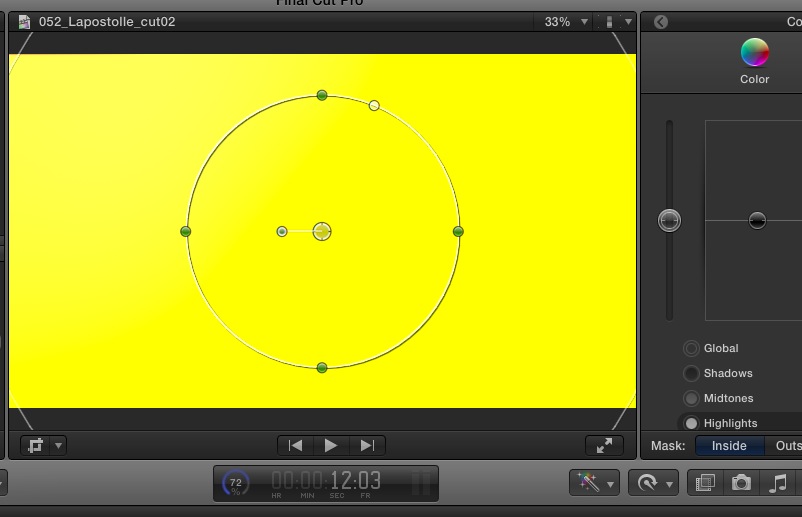
Last edit: 25 Oct 2013 22:13 by ateale. Reason: more info
Please Log in to join the conversation.

26 Oct 2013 07:47 #33203
by Soundwise
Replied by Soundwise on topic FCPX / Mavericks dynamic_cast error 1
I get those as well. Already sent feedback to Apple.
Please Log in to join the conversation.
- ronny courtens
-

- Offline
- Moderator
-

Less
More
- Posts: 4455
- Thank you received: 962
26 Oct 2013 07:49 - 26 Oct 2013 19:54 #33204
by ronny courtens
Replied by ronny courtens on topic FCPX / Mavericks dynamic_cast error 1
What system are you guys working on and how much RAM do you have? It would help to know on what kind of specific hardware this is happening.
- Ronny
- Ronny
Last edit: 26 Oct 2013 19:54 by ronny courtens.
Please Log in to join the conversation.
26 Oct 2013 08:23 #33205
by Soundwise
Replied by Soundwise on topic FCPX / Mavericks dynamic_cast error 1
Ronny, here's my setup: MBP late '11 with 16GB of RAM and AMD Radeon HD 6770M with 1024 Mt of VRAM.
Jari Innanen
Jari Innanen
Please Log in to join the conversation.
- ronny courtens
-
- Offline
- Moderator
-
Less
More
- Posts: 4455
- Thank you received: 962
26 Oct 2013 08:27 - 26 Oct 2013 20:43 #33206
by ronny courtens
Replied by ronny courtens on topic FCPX / Mavericks dynamic_cast error 1
Thank you Jari. I only had noticed it on systems with integrated GPU, but it obviously seems to be deeper that that. Good you already have reported the issue to Apple. I would advise anyone seeing this problem to do the same so we can get a bug fix.
- Ronny
- Ronny
Last edit: 26 Oct 2013 20:43 by ronny courtens.
Please Log in to join the conversation.
26 Oct 2013 11:54 #33214
by ateale
Replied by ateale on topic FCPX / Mavericks dynamic_cast error 1
hey Ronny I'm on a MacBook Air 1.8 GHz Intel Core i7, 4GB Memory.
I'll make a bug report now too
Cheers
Adam
I'll make a bug report now too
Cheers
Adam
Please Log in to join the conversation.
- ronny courtens
-
- Offline
- Moderator
-
Less
More
- Posts: 4455
- Thank you received: 962
26 Oct 2013 14:25 - 26 Oct 2013 20:42 #33220
by ronny courtens
Replied by ronny courtens on topic FCPX / Mavericks dynamic_cast error 1
Thank you Adam.
Have a nice weekend!
- Ronny
Have a nice weekend!
- Ronny
Last edit: 26 Oct 2013 20:42 by ronny courtens.
Please Log in to join the conversation.
26 Oct 2013 21:56 #33243
by jbaugh
Replied by jbaugh on topic FCPX / Mavericks dynamic_cast error 1
Same problem here with clean install of Mavericks on Mac Pro 4,1 with 32GB RAM.
I also get all sorts of other read out in console that is repeated many times:
10/26/13 3:30:02.236 PM Final Cut Pro[739]: void CGSUpdateManager::log() const: conn 0xa98b token 0x17fffffffffee3c
10/26/13 3:30:02.239 PM Final Cut Pro[739]: Backtrace (at 1198.28):
10/26/13 3:30:02.239 PM Final Cut Pro[739]: void CGSUpdateManager::log() const: 0 CoreGraphics 0x00007fff875aa211 CGSBacktraceCreate + 59
10/26/13 3:30:02.239 PM Final Cut Pro[739]: void CGSUpdateManager::log() const: 1 CoreGraphics 0x00007fff875ce0a8 _ZN16CGSUpdateManager14disable_updateEv + 98
10/26/13 3:30:02.239 PM Final Cut Pro[739]: void CGSUpdateManager::log() const: 2 AppKit 0x00007fff85b72272 -[NSClipView _immediateScrollToPoint:] + 86
10/26/13 3:30:02.239 PM Final Cut Pro[739]: void CGSUpdateManager::log() const: 3 AppKit 0x00007fff85b721da -[NSClipView scrollToPoint:] + 237
10/26/13 3:30:02.239 PM Final Cut Pro[739]: void CGSUpdateManager::log() const: 4 AppKit 0x00007fff85ccad8e -[NSScrollView scrollClipView:toPoint:] + 203
10/26/13 3:30:02.239 PM Final Cut Pro[739]: void CGSUpdateManager::log() const: 5 AppKit 0x00007fff85b76e39 -[NSClipView _scrollTo:animateScroll:flashScrollerKnobs:] + 1688
10/26/13 3:30:02.239 PM Final Cut Pro[739]: void CGSUpdateManager::log() const: 6 AppKit 0x00007fff85ca0b40 -[NSClipView _scrollTo:animate:] + 28
10/26/13 3:30:02.239 PM Final Cut Pro[739]: void CGSUpdateManager::log() const: 7 AppKit 0x00007fff85cf141f -[NSClipView _scrollTo:] + 19
10/26/13 3:30:02.239 PM Final Cut Pro[739]: void CGSUpdateManager::log() const: 8 AppKit 0x00007fff85cf1402 -[NSClipView _scrollPoint:fromView:] + 86
10/26/13 3:30:02.239 PM Final Cut Pro[739]: void CGSUpdateManager::log() const: 9 AppKit 0x00007fff85cf1386 -[NSView scrollPoint:] + 38
10/26/13 3:30:02.239 PM Final Cut Pro[739]: void CGSUpdateManager::log() const: 10 Flexo 0x0000000100a679f3 -[FFOrganizerFilmstripView _reflowChunks] + 2067
10/26/13 3:30:02.240 PM Final Cut Pro[739]: void CGSUpdateManager::log() const: 11 Flexo 0x0000000100a7294a -[FFOrganizerFilmstripView resizeWithOldSuperviewSize:] + 170
10/26/13 3:30:02.240 PM Final Cut Pro[739]: void CGSUpdateManager::log() const: 12 AppKit 0x00007fff85b6d584 -[NSView resizeSubviewsWithOldSize:] + 299
10/26/13 3:30:02.240 PM Final Cut Pro[739]: void CGSUpdateManager::log() const: 13 AppKit 0x00007fff85b4460b -[NSView setFrameSize:] + 1323
10/26/13 3:30:02.240 PM Final Cut Pro[739]: void CGSUpdateManager::log() const: 14 AppKit 0x00007fff85b6d0d2 -[NSClipView setFrameSize:] + 380
10/26/13 3:30:02.240 PM Final Cut Pro[739]: void CGSUpdateManager::log() const: 15 AppKit 0x00007fff85b44099 -[NSView setFrame:] + 294
10/26/13 3:30:02.240 PM Final Cut Pro[739]: void CGSUpdateManager::log() const: 16 AppKit 0x00007fff85b70038 -[NSScrollView _setContentViewFrame:] + 669
10/26/13 3:30:02.240 PM Final Cut Pro[739]: void CGSUpdateManager::log() const: 17 AppKit 0x00007fff85b6f98d -[NSScrollView _applyContentAreaLayout:] + 131
10/26/13 3:30:02.240 PM Final Cut Pro[739]: void CGSUpdateManager::log() const: 18 ProKit 0x0000000100360433 -[NSProScrollView _applyContentAreaLayout:] + 45
10/26/13 3:30:02.240 PM Final Cut Pro[739]: void CGSUpdateManager::log() const: 19 AppKit 0x00007fff85b6df64 -[NSScrollView tile] + 1943
10/26/13 3:30:02.240 PM Final Cut Pro[739]: void CGSUpdateManager::log() const: 20 AppKit 0x00007fff85b6d732 -[NSScrollView _tileWithoutRecursing] + 48
10/26/13 3:30:02.240 PM Final Cut Pro[739]: void CGSUpdateManager::log() const: 21 AppKit 0x00007fff85bc158c -[NSScrollView _update] + 27
10/26/13 3:30:02.240 PM Final Cut Pro[739]: void CGSUpdateManager::log() const: 22 AppKit 0x00007fff85b4460b -[NSView setFrameSize:] + 1323
10/26/13 3:30:02.240 PM Final Cut Pro[739]: void CGSUpdateManager::log() const: 23 AppKit 0x00007fff85c0400a -[NSScrollView setFrameSize:] + 800
10/26/13 3:30:02.241 PM Final Cut Pro[739]: void CGSUpdateManager::log() const: 24 AppKit 0x00007fff85b44099 -[NSView setFrame:] + 294
10/26/13 3:30:02.241 PM Final Cut Pro[739]: void CGSUpdateManager::log() const: 25 AppKit 0x00007fff85bc08c4 -[NSView resizeWithOldSuperviewSize:] + 1188
10/26/13 3:30:02.241 PM Final Cut Pro[739]: void CGSUpdateManager::log() const: 26 AppKit 0x00007fff85b6d584 -[NSView resizeSubviewsWithOldSize:] + 299
10/26/13 3:30:02.241 PM Final Cut Pro[739]: void CGSUpdateManager::log() const: 27 AppKit 0x00007fff85b4460b -[NSView setFrameSize:] + 1323
10/26/13 3:30:02.241 PM Final Cut Pro[739]: void CGSUpdateManager::log() const: 28 AppKit 0x00007fff85b44099 -[NSView setFrame:] + 294
10/26/13 3:30:02.241 PM Final Cut Pro[739]: void CGSUpdateManager::log() const: 29 Flexo 0x0000000100d29280 -[FFItemsContainerView layoutSubviewsAnimated:] + 1408
10/26/13 3:30:02.241 PM Final Cut Pro[739]: void CGSUpdateManager::log() const: 30 AppKit 0x00007fff85b4460b -[NSView setFrameSize:] + 1323
10/26/13 3:30:02.241 PM Final Cut Pro[739]: void CGSUpdateManager::log() const: 31 AppKit 0x00007fff85b44099 -[NSView setFrame:] + 294
10/26/13 3:30:02.248 PM WindowServer[189]: common_reenable_update: UI updates were finally reenabled by application "Final Cut Pro" after 19.84 seconds (server forcibly re-enabled them after 1.00 seconds)
10/26/13 3:30:02.251 PM Final Cut Pro[739]: dynamic_cast error 1: Both of the following type_info's should have public visibility. At least one of them is hidden. 23PCSerializerWriteStream, 17PCHashWriteStream.
How do I send a report to Apple?
John
I also get all sorts of other read out in console that is repeated many times:
10/26/13 3:30:02.236 PM Final Cut Pro[739]: void CGSUpdateManager::log() const: conn 0xa98b token 0x17fffffffffee3c
10/26/13 3:30:02.239 PM Final Cut Pro[739]: Backtrace (at 1198.28):
10/26/13 3:30:02.239 PM Final Cut Pro[739]: void CGSUpdateManager::log() const: 0 CoreGraphics 0x00007fff875aa211 CGSBacktraceCreate + 59
10/26/13 3:30:02.239 PM Final Cut Pro[739]: void CGSUpdateManager::log() const: 1 CoreGraphics 0x00007fff875ce0a8 _ZN16CGSUpdateManager14disable_updateEv + 98
10/26/13 3:30:02.239 PM Final Cut Pro[739]: void CGSUpdateManager::log() const: 2 AppKit 0x00007fff85b72272 -[NSClipView _immediateScrollToPoint:] + 86
10/26/13 3:30:02.239 PM Final Cut Pro[739]: void CGSUpdateManager::log() const: 3 AppKit 0x00007fff85b721da -[NSClipView scrollToPoint:] + 237
10/26/13 3:30:02.239 PM Final Cut Pro[739]: void CGSUpdateManager::log() const: 4 AppKit 0x00007fff85ccad8e -[NSScrollView scrollClipView:toPoint:] + 203
10/26/13 3:30:02.239 PM Final Cut Pro[739]: void CGSUpdateManager::log() const: 5 AppKit 0x00007fff85b76e39 -[NSClipView _scrollTo:animateScroll:flashScrollerKnobs:] + 1688
10/26/13 3:30:02.239 PM Final Cut Pro[739]: void CGSUpdateManager::log() const: 6 AppKit 0x00007fff85ca0b40 -[NSClipView _scrollTo:animate:] + 28
10/26/13 3:30:02.239 PM Final Cut Pro[739]: void CGSUpdateManager::log() const: 7 AppKit 0x00007fff85cf141f -[NSClipView _scrollTo:] + 19
10/26/13 3:30:02.239 PM Final Cut Pro[739]: void CGSUpdateManager::log() const: 8 AppKit 0x00007fff85cf1402 -[NSClipView _scrollPoint:fromView:] + 86
10/26/13 3:30:02.239 PM Final Cut Pro[739]: void CGSUpdateManager::log() const: 9 AppKit 0x00007fff85cf1386 -[NSView scrollPoint:] + 38
10/26/13 3:30:02.239 PM Final Cut Pro[739]: void CGSUpdateManager::log() const: 10 Flexo 0x0000000100a679f3 -[FFOrganizerFilmstripView _reflowChunks] + 2067
10/26/13 3:30:02.240 PM Final Cut Pro[739]: void CGSUpdateManager::log() const: 11 Flexo 0x0000000100a7294a -[FFOrganizerFilmstripView resizeWithOldSuperviewSize:] + 170
10/26/13 3:30:02.240 PM Final Cut Pro[739]: void CGSUpdateManager::log() const: 12 AppKit 0x00007fff85b6d584 -[NSView resizeSubviewsWithOldSize:] + 299
10/26/13 3:30:02.240 PM Final Cut Pro[739]: void CGSUpdateManager::log() const: 13 AppKit 0x00007fff85b4460b -[NSView setFrameSize:] + 1323
10/26/13 3:30:02.240 PM Final Cut Pro[739]: void CGSUpdateManager::log() const: 14 AppKit 0x00007fff85b6d0d2 -[NSClipView setFrameSize:] + 380
10/26/13 3:30:02.240 PM Final Cut Pro[739]: void CGSUpdateManager::log() const: 15 AppKit 0x00007fff85b44099 -[NSView setFrame:] + 294
10/26/13 3:30:02.240 PM Final Cut Pro[739]: void CGSUpdateManager::log() const: 16 AppKit 0x00007fff85b70038 -[NSScrollView _setContentViewFrame:] + 669
10/26/13 3:30:02.240 PM Final Cut Pro[739]: void CGSUpdateManager::log() const: 17 AppKit 0x00007fff85b6f98d -[NSScrollView _applyContentAreaLayout:] + 131
10/26/13 3:30:02.240 PM Final Cut Pro[739]: void CGSUpdateManager::log() const: 18 ProKit 0x0000000100360433 -[NSProScrollView _applyContentAreaLayout:] + 45
10/26/13 3:30:02.240 PM Final Cut Pro[739]: void CGSUpdateManager::log() const: 19 AppKit 0x00007fff85b6df64 -[NSScrollView tile] + 1943
10/26/13 3:30:02.240 PM Final Cut Pro[739]: void CGSUpdateManager::log() const: 20 AppKit 0x00007fff85b6d732 -[NSScrollView _tileWithoutRecursing] + 48
10/26/13 3:30:02.240 PM Final Cut Pro[739]: void CGSUpdateManager::log() const: 21 AppKit 0x00007fff85bc158c -[NSScrollView _update] + 27
10/26/13 3:30:02.240 PM Final Cut Pro[739]: void CGSUpdateManager::log() const: 22 AppKit 0x00007fff85b4460b -[NSView setFrameSize:] + 1323
10/26/13 3:30:02.240 PM Final Cut Pro[739]: void CGSUpdateManager::log() const: 23 AppKit 0x00007fff85c0400a -[NSScrollView setFrameSize:] + 800
10/26/13 3:30:02.241 PM Final Cut Pro[739]: void CGSUpdateManager::log() const: 24 AppKit 0x00007fff85b44099 -[NSView setFrame:] + 294
10/26/13 3:30:02.241 PM Final Cut Pro[739]: void CGSUpdateManager::log() const: 25 AppKit 0x00007fff85bc08c4 -[NSView resizeWithOldSuperviewSize:] + 1188
10/26/13 3:30:02.241 PM Final Cut Pro[739]: void CGSUpdateManager::log() const: 26 AppKit 0x00007fff85b6d584 -[NSView resizeSubviewsWithOldSize:] + 299
10/26/13 3:30:02.241 PM Final Cut Pro[739]: void CGSUpdateManager::log() const: 27 AppKit 0x00007fff85b4460b -[NSView setFrameSize:] + 1323
10/26/13 3:30:02.241 PM Final Cut Pro[739]: void CGSUpdateManager::log() const: 28 AppKit 0x00007fff85b44099 -[NSView setFrame:] + 294
10/26/13 3:30:02.241 PM Final Cut Pro[739]: void CGSUpdateManager::log() const: 29 Flexo 0x0000000100d29280 -[FFItemsContainerView layoutSubviewsAnimated:] + 1408
10/26/13 3:30:02.241 PM Final Cut Pro[739]: void CGSUpdateManager::log() const: 30 AppKit 0x00007fff85b4460b -[NSView setFrameSize:] + 1323
10/26/13 3:30:02.241 PM Final Cut Pro[739]: void CGSUpdateManager::log() const: 31 AppKit 0x00007fff85b44099 -[NSView setFrame:] + 294
10/26/13 3:30:02.248 PM WindowServer[189]: common_reenable_update: UI updates were finally reenabled by application "Final Cut Pro" after 19.84 seconds (server forcibly re-enabled them after 1.00 seconds)
10/26/13 3:30:02.251 PM Final Cut Pro[739]: dynamic_cast error 1: Both of the following type_info's should have public visibility. At least one of them is hidden. 23PCSerializerWriteStream, 17PCHashWriteStream.
How do I send a report to Apple?
John
Please Log in to join the conversation.
- ronny courtens
-
- Offline
- Moderator
-
Less
More
- Posts: 4455
- Thank you received: 962
26 Oct 2013 22:00 - 26 Oct 2013 22:00 #33244
by ronny courtens
Replied by ronny courtens on topic FCPX / Mavericks dynamic_cast error 1
Hi John,
In FCPX select Final Cut Pro > Provide Final Cut Pro Feedback.
- Ronny
In FCPX select Final Cut Pro > Provide Final Cut Pro Feedback.
- Ronny
Last edit: 26 Oct 2013 22:00 by ronny courtens.
Please Log in to join the conversation.
26 Oct 2013 22:25 #33246
by jbaugh
Replied by jbaugh on topic FCPX / Mavericks dynamic_cast error 1
Thanks, Ronny for answering my simplistic question. Once I saw your response I remembered having seen the feedback option. I've sent in a detailed report to Apple.
I don't know if it is of any relationship to the problem or not, but I have a CalDigit USB3 PCIe card and an OWC Mercury Accelsior PCIe SSD card installed. I'm NOT using the SSD card as my boot drive so I doubt that this would have anything to do with this issue. I've done the Mavericks install to an external FW drive for testing out. If it works out I will copy it to the SSD card.
I doubt that the PCIe cards have anything to do with the problem since others are reporting the problem with the MBP.
John
I don't know if it is of any relationship to the problem or not, but I have a CalDigit USB3 PCIe card and an OWC Mercury Accelsior PCIe SSD card installed. I'm NOT using the SSD card as my boot drive so I doubt that this would have anything to do with this issue. I've done the Mavericks install to an external FW drive for testing out. If it works out I will copy it to the SSD card.
I doubt that the PCIe cards have anything to do with the problem since others are reporting the problem with the MBP.
John
Please Log in to join the conversation.
- ronny courtens
-
- Offline
- Moderator
-
Less
More
- Posts: 4455
- Thank you received: 962
26 Oct 2013 22:28 #33247
by ronny courtens
Replied by ronny courtens on topic FCPX / Mavericks dynamic_cast error 1
I have no clue as to why this is happening. My impression is it could be related to the GPU. It is important to send the feedback reports.
- Ronny
- Ronny
Please Log in to join the conversation.
27 Oct 2013 20:09 #33301
by Clarke
Replied by Clarke on topic FCPX / Mavericks dynamic_cast error 1
Glad to see I was not the only one experiencing this. However, it looks like someone found a temporary workaround that actually worked for me.
Link: stockoto.com/final-cut-pro-x-stops-rende...ckground-processing/
In addition to how everyone described this error, for me rendering would stop right at 49% and just hang for about 7 or so minutes. After that, I would get all of those errors in console. My goal was simply sharing the video on YouTube via FCP and I would get that "Quicktime -50" message.
The next thing I did was to see if it would just render to the hard drive without uploading it. That actually worked (although I had no plans to use the YouTube site to upload an 8G video).
Lastly, I tried to export my FCP movie straight to Compressor and then share it to YouTube from there. That was also a complete fail because once again I got all the same errors.
Here's the video:
I tried about 5 times uploading my video to no avail. Once I made the change the video suggests, it worked like a charm.
I hope this works for you in the meantime.
Link: stockoto.com/final-cut-pro-x-stops-rende...ckground-processing/
In addition to how everyone described this error, for me rendering would stop right at 49% and just hang for about 7 or so minutes. After that, I would get all of those errors in console. My goal was simply sharing the video on YouTube via FCP and I would get that "Quicktime -50" message.
The next thing I did was to see if it would just render to the hard drive without uploading it. That actually worked (although I had no plans to use the YouTube site to upload an 8G video).
Lastly, I tried to export my FCP movie straight to Compressor and then share it to YouTube from there. That was also a complete fail because once again I got all the same errors.
Here's the video:
I tried about 5 times uploading my video to no avail. Once I made the change the video suggests, it worked like a charm.
I hope this works for you in the meantime.
Please Log in to join the conversation.
31 Oct 2013 05:46 #33523
by dcwells
Replied by dcwells on topic FCPX / Mavericks dynamic_cast error 1
I had the same problem and repaired the disk permissions using the disk utility. Works great now.
Please Log in to join the conversation.
07 Nov 2013 13:40 - 07 Nov 2013 13:48 #33804
by Pissy
Replied by Pissy on topic FCPX / Mavericks dynamic_cast error 1
Since installing Mavericks on my 9 month old 3.4 GHz Intel core fusion drive i7 with 32 GB of RAM I've had nothing but major troubles across the board, problems I didn't have before.
I've had overall issues that made the iMac act like it had a virus but even though I know the chances of such is low I still scanned for viruses and Malware and of course found none.
My biggest problems however are with Final Cut Pro X 10.0.9 and seeing as I am a professional editor this is a real issue.
Apart from the constant crashing, beach balls, video effects icons turning into bright mosaic boxes, super sluggish behaviour and the undo function disabling at will.
The worst problem is the Auto Save not auto saving (SOMETIMES).
I have on about five occasions lost up to three hours of work that I couldn't get back so it shows that sometimes Auto Save will be off for hours.
I have disabled App Nap, reset permissions, cleared cache's, used an earlier version of FCPX and the last thing I see now is on Console showing;
dynamic_cast error 1. One or more of the following type_info's has hidden visibility.
They should all have public visibility.
Is this an issue I can fix and if so does anyone know how to do this?
It seems like most people are doing Ok with Mavericks but for me it's a nightmare.
Can anyone please help.
Thanks.
I've had overall issues that made the iMac act like it had a virus but even though I know the chances of such is low I still scanned for viruses and Malware and of course found none.
My biggest problems however are with Final Cut Pro X 10.0.9 and seeing as I am a professional editor this is a real issue.
Apart from the constant crashing, beach balls, video effects icons turning into bright mosaic boxes, super sluggish behaviour and the undo function disabling at will.
The worst problem is the Auto Save not auto saving (SOMETIMES).
I have on about five occasions lost up to three hours of work that I couldn't get back so it shows that sometimes Auto Save will be off for hours.
I have disabled App Nap, reset permissions, cleared cache's, used an earlier version of FCPX and the last thing I see now is on Console showing;
dynamic_cast error 1. One or more of the following type_info's has hidden visibility.
They should all have public visibility.
Is this an issue I can fix and if so does anyone know how to do this?
It seems like most people are doing Ok with Mavericks but for me it's a nightmare.
Can anyone please help.
Thanks.
Last edit: 07 Nov 2013 13:48 by Pissy. Reason: Spelling error.
Please Log in to join the conversation.
- ronny courtens
-
- Offline
- Moderator
-
Less
More
- Posts: 4455
- Thank you received: 962
07 Nov 2013 14:18 #33808
by ronny courtens
Replied by ronny courtens on topic FCPX / Mavericks dynamic_cast error 1
I'm afraid that is the price we pay for updating to a newer OS as soon as it gets released. As you say many people don't have any issues with Mavs, some have big ones. I haven't seen any solutions posted for this specific issue, so I'm afraid there is nothing you can do but to wait for a bug fix or go back to Mountain Lion until this gets fixed. After reading the first posts here I have sent immediate feedback to Apple and in the meantime I have received confirmation that they are aware of the issue. Best you can do is to send feedback as well.
- Ronny
- Ronny
Please Log in to join the conversation.
07 Nov 2013 14:30 #33809
by Pissy
Replied by Pissy on topic FCPX / Mavericks dynamic_cast error 1
Thanks Ronny
Yeah! I must admit because all of the other upgrades I've done over the years were relatively pain free I foolishly thought that whatever bugs that Mavericks had that I could deal with.
Man was I wrong, so now I wait.
Final Cut Pro = One step forward, two steps back.
Thanks again.
Yeah! I must admit because all of the other upgrades I've done over the years were relatively pain free I foolishly thought that whatever bugs that Mavericks had that I could deal with.
Man was I wrong, so now I wait.
Final Cut Pro = One step forward, two steps back.
Thanks again.
Please Log in to join the conversation.
- ronny courtens
-
- Offline
- Moderator
-
Less
More
- Posts: 4455
- Thank you received: 962
07 Nov 2013 14:40 #33811
by ronny courtens
Replied by ronny courtens on topic FCPX / Mavericks dynamic_cast error 1
I hear you. But I'm afraid this has nothing to do with FCPX specifically. Other applications, especially the ones working on the old QuickTime playback structure, seem to suffer from similar issues running Mavericks on specific hardware. All we can do is wait for a bug fix, and the more people send feedback directly to Apple the more chance we have this will arrive soon.
- Ronny
- Ronny
Please Log in to join the conversation.

07 Nov 2013 14:46 #33814
by BenB
Replied by BenB on topic FCPX / Mavericks dynamic_cast error 1
OS X 10.9 bug fixes will be out soon. There are both 10.9.1 and 10.9.2 versions being tested internally at the moment (as per MacRumors.com).
Please Log in to join the conversation.
