


- Posts: 13
- Thank you received: 0
3 Post Moderation Rule for New Boarders (25 Jan 2021)
New boarders will have their posts moderated - Don't worry if you cannot see your post immediately.
FCPX / Mavericks dynamic_cast error 1
08 Nov 2013 14:14 #33854
by Pissy
Replied by Pissy on topic FCPX / Mavericks dynamic_cast error 1
Cheers BenB
Installed 10.9.1 today but it's only a patch for Gmail and iBooks and all the Mavericks issues still exist - unfortunately as usual Apple fixes the squeaky wheel.
Sometimes when new OS updates come out for reportedly other issues the problems that were never acknowledged or denied just seem to go away, but not on this occasion.
I for one wish that Apple would acknowledge and embrace the problems with their systems in the same way they celebrate the release of a new product.
Come on Apple!, you created Final Cut Pro and as a FCP editor for thirteen years you have to make this a priority and stop treating it as the drunken Uncle who keeps showing up at a family gathering that you throw a few beers at to shut him up and by the way he wasn't happy that you didn't even invite him to the party for the last three years (yeah we noticed the lack of interest and support).
The silence is deafening.
Sorry for the sermon guys but I know Apple monitors good sites like this and it is the quickest way to get a point across, so guys POST!.
I hope 10.9.2 comes out soon and fixes this Quicktime??? mess.
Installed 10.9.1 today but it's only a patch for Gmail and iBooks and all the Mavericks issues still exist - unfortunately as usual Apple fixes the squeaky wheel.
Sometimes when new OS updates come out for reportedly other issues the problems that were never acknowledged or denied just seem to go away, but not on this occasion.
I for one wish that Apple would acknowledge and embrace the problems with their systems in the same way they celebrate the release of a new product.
Come on Apple!, you created Final Cut Pro and as a FCP editor for thirteen years you have to make this a priority and stop treating it as the drunken Uncle who keeps showing up at a family gathering that you throw a few beers at to shut him up and by the way he wasn't happy that you didn't even invite him to the party for the last three years (yeah we noticed the lack of interest and support).
The silence is deafening.
Sorry for the sermon guys but I know Apple monitors good sites like this and it is the quickest way to get a point across, so guys POST!.
I hope 10.9.2 comes out soon and fixes this Quicktime??? mess.
Please Log in to join the conversation.
- ronny courtens
-

- Offline
- Moderator
-

Less
More
- Posts: 4455
- Thank you received: 962
09 Nov 2013 10:51 #33890
by ronny courtens
Replied by ronny courtens on topic FCPX / Mavericks dynamic_cast error 1
Hey Jeff,
I have no problem with the sermon, I really understand how frustrating this can be.
But I don't think just posting here or anywhere else for that matter wil speed up things with regard to Apple fixing this issue. Forums can be truly helpful if someone actually knows a solution and can share it. It seems there is no solution for this issue yet.
Some time ago another FCPX related problem was mentioned here and on a few other forums. So I contacted someone to ask if they were aware of this problem. I promptly received an e-mail back asking if I could send the links to the threads where the issue was mentioned. Which makes me conclude that no-one is actively monitoring these threads and the best way to speed things up is to use the feedback form. I think we can conclude from past experience that this feedback is taken very seriously, but I also think we have to accept that some really technical issues as this one may take a little more time to solve than g-mail problems. The silence may be deafening, but they do work hard behind the scenes
- Ronny
I have no problem with the sermon, I really understand how frustrating this can be.
But I don't think just posting here or anywhere else for that matter wil speed up things with regard to Apple fixing this issue. Forums can be truly helpful if someone actually knows a solution and can share it. It seems there is no solution for this issue yet.
Some time ago another FCPX related problem was mentioned here and on a few other forums. So I contacted someone to ask if they were aware of this problem. I promptly received an e-mail back asking if I could send the links to the threads where the issue was mentioned. Which makes me conclude that no-one is actively monitoring these threads and the best way to speed things up is to use the feedback form. I think we can conclude from past experience that this feedback is taken very seriously, but I also think we have to accept that some really technical issues as this one may take a little more time to solve than g-mail problems. The silence may be deafening, but they do work hard behind the scenes
- Ronny
Please Log in to join the conversation.
16 Nov 2013 12:18 - 16 Nov 2013 12:19 #34266
by jnobel
Replied by jnobel on topic FCPX / Mavericks dynamic_cast error 2
Hi I'm new here
My name is Johan, live in the Netherlands and I'm a software developer (+Photographer/Videographer wannabe)
I just registered after finding this thread searching for people with similar FCPX logging problems.
Mine look like this:
16-11-13 13:01:54,675 Final Cut Pro[2710]: dynamic_cast error 2: One or more of the following type_info's has hidden visibility. They should all have public visibility. 8OZEffect, 13OZFxGenerator, 10OZFxFilter.
16-11-13 13:01:54,676 Final Cut Pro[2710]: dynamic_cast error 2: One or more of the following type_info's has hidden visibility. They should all have public visibility. 16OZImageGenerator, 10OZFxFilter, 13OZFxGenerator.
with both lines repeated in groups several times a second.
As was suggested I just filed a bug report with Apple, hope this helps
My name is Johan, live in the Netherlands and I'm a software developer (+Photographer/Videographer wannabe)
I just registered after finding this thread searching for people with similar FCPX logging problems.
Mine look like this:
16-11-13 13:01:54,675 Final Cut Pro[2710]: dynamic_cast error 2: One or more of the following type_info's has hidden visibility. They should all have public visibility. 8OZEffect, 13OZFxGenerator, 10OZFxFilter.
16-11-13 13:01:54,676 Final Cut Pro[2710]: dynamic_cast error 2: One or more of the following type_info's has hidden visibility. They should all have public visibility. 16OZImageGenerator, 10OZFxFilter, 13OZFxGenerator.
with both lines repeated in groups several times a second.
As was suggested I just filed a bug report with Apple, hope this helps
Last edit: 16 Nov 2013 12:19 by jnobel.
Please Log in to join the conversation.
16 Nov 2013 13:12 - 16 Nov 2013 13:19 #34269
by jnobel
Replied by jnobel on topic FCPX / Mavericks dynamic_cast error 2
Being a programmer I did a search on the (more general) error message (dynamic cast error).
Not that it helps anyone, but the reason behind this message appears to be in the way som libraries are linked/compiled:
In general it means that the software calls methods/functions/data structures of which the type is not fully communicated to functions on a higher level. It then has to assume it is calling the correct function / data structure but it is not sure. It appears to be related to LLVM compilation settings...
Who knows if this helps someone (not that we have any influence over this ...)
The worst part about is that an error like this triggers a number of events, finally resulting in the 'error' to be logged. This chain of events takes up processor time. So instead of spending the majority of the time rendering/exporting, the process now spends the majority of the time handling the exception chain of events and reporting this in the log.
Since this is triggered several times a second, performance loss is enormous.
I started a share of a ~5 min fragment last night only to find it around 54% as of now. This is really ridiculous ...
Hope apple addresses this issue, fingers crossed
Not that it helps anyone, but the reason behind this message appears to be in the way som libraries are linked/compiled:
In general it means that the software calls methods/functions/data structures of which the type is not fully communicated to functions on a higher level. It then has to assume it is calling the correct function / data structure but it is not sure. It appears to be related to LLVM compilation settings...
Who knows if this helps someone (not that we have any influence over this ...)
The worst part about is that an error like this triggers a number of events, finally resulting in the 'error' to be logged. This chain of events takes up processor time. So instead of spending the majority of the time rendering/exporting, the process now spends the majority of the time handling the exception chain of events and reporting this in the log.
Since this is triggered several times a second, performance loss is enormous.
I started a share of a ~5 min fragment last night only to find it around 54% as of now. This is really ridiculous ...
Hope apple addresses this issue, fingers crossed
Last edit: 16 Nov 2013 13:19 by jnobel.
Please Log in to join the conversation.
16 Nov 2013 16:40 - 17 Nov 2013 00:56 #34274
by jnobel
Replied by jnobel on topic FCPX / Mavericks dynamic_cast error 2
Oh, and for completeness:
Running a Macbook Pro Mid 2012 (2,3 GHz Intel Core i7) with 16 GB of RAM, integrated NVIDIA GeForce GT 650M 512 MB, OS X 10.9 (13A603)
And I tried Clarks workaround, did not work
also looked at disk permission, no errors found
So the problem is still there
Running a Macbook Pro Mid 2012 (2,3 GHz Intel Core i7) with 16 GB of RAM, integrated NVIDIA GeForce GT 650M 512 MB, OS X 10.9 (13A603)
And I tried Clarks workaround, did not work
also looked at disk permission, no errors found
So the problem is still there
Last edit: 17 Nov 2013 00:56 by jnobel.
Please Log in to join the conversation.
- hansmestrum
-

- Offline
- New Member
-

20 Nov 2013 07:53 #34421
by hansmestrum
Replied by hansmestrum on topic FCPX / Mavericks dynamic_cast error 2
Hi,
I am on imac mid 2011 and have great problems on this mac since updated to Mavericks. Also the error which I found here. It cashed the system.
I have send in feedback report to apple and FCP X form.
These are my specs:
Hardware Information:
iMac (21.5-inch, Mid 2011)
iMac - model: iMac12,1
1 2.7 GHz Intel Core i5 CPU: 4 cores
12 GB RAM
Video Information:
AMD Radeon HD 6770M - VRAM: 512 MB
Audio Plug-ins:
BluetoothAudioPlugIn: Version: 1.0
AirPlay: Version: 1.9
AppleAVBAudio: Version: 2.0.0
iSightAudio: Version: 7.7.3
Startup Items:
ChmodBPF - Path: /Library/StartupItems/ChmodBPF
System Software:
OS X 10.9 (13A603) - Uptime: 0 days 0:25:32
Disk Information:
ST31000528AS disk0 : (1 TB)
EFI (disk0s1) <not mounted>: 209,7 MB
Macintosh HD (disk0s2) /: 999,35 GB (682,33 GB free)
Recovery HD (disk0s3) <not mounted>: 650 MB
OPTIARC DVD RW AD-5690H
USB Information:
Apple Inc. FaceTime HD Camera (Built-in)
Apple Inc. BRCM2046 Hub
Apple Inc. Bluetooth USB Host Controller
Apple Internal Memory Card Reader 32,33 GB
CAM_SD (disk1s1) /Volumes/CAM_SD: 32,32 GB (21,45 GB free)
Apple Computer, Inc. IR Receiver
FireWire Information:
Thunderbolt Information:
Apple Inc. thunderbolt_bus
Kernel Extensions:
com.oxsemi.driver.OxsemiDeviceType00 (1.28.13)
com.avatron.AVExVideo (1.7)
com.Cycling74.driver.Soundflower (1.5.2)
net.telestream.driver.TelestreamAudio (1.0.5)
com.avatron.AVExFramebuffer (1.7)
Problem System Launch Daemons:
Problem System Launch Agents:
Launch Daemons:
[loaded] com.adobe.fpsaud.plist
[loaded] com.google.keystone.daemon.plist
[loaded] com.intego.BackupAssistant.daemon.plist
[loaded] com.intego.BackupManagerPro.daemon.plist
[loaded] com.lacie.desktopmanager.service.plist
[loaded] com.microsoft.office.licensing.helper.plist
[not loaded] com.teamviewer.teamviewer_service.plist
Launch Agents:
[not loaded] com.adobe.AAM.Updater-1.0.plist
[failed] com.brother.LOGINserver.plist
[loaded] com.google.keystone.agent.plist
[loaded] com.intego.backupassistant.agent.plist
[loaded] com.intego.backupmanagerpro.agent.plist
[loaded] com.lacie.eventsactions.launcher.agent.plist
[loaded] com.lacie.raidmonitor.daemon.plist
[not loaded] com.teamviewer.teamviewer.plist
[not loaded] com.teamviewer.teamviewer_desktop.plist
[loaded] net.culater.SIMBL.Agent.plist
User Launch Agents:
[loaded] com.adobe.ARM.[...].plist
[failed] com.akamai.client.plist
[failed] com.apple.CSConfigDotMacCert-[redacted]@me.com-SharedServices.Agent.plist
[loaded] com.ecamm.printopia.plist
[loaded] com.facebook.videochat.[redacted].plist
[loaded] com.microsoft.LaunchAgent.SyncServicesAgent.plist
[loaded] com.spotify.webhelper.plist
[loaded] uk.co.markallan.clamxav.clamscan.plist
[loaded] uk.co.markallan.clamxav.freshclam.plist
User Login Items:
iTunesHelper
Hootsuite
Microsoft Database Daemon
LDMStatusItem
ClamXavSentry
Mail
Safari
PortholeFree
AirDisplayStatusItem
ClamXavSentry
ScreenCapture
Alfred 2
owncloud
HazelHelper
3rd Party Preference Panes:
Air Display Preferences
AppTrap
Flash Player
Flip4Mac WMV
Hazel
Java
Printopia
Akamai NetSession Preferences
Internet Plug-ins:
AdobePDFViewer.plugin
AdobePDFViewerNPAPI.plugin
Default Browser.plugin
DirectorShockwave.plugin
JavaAppletPlugin.plugin
Flash Player.plugin
FlashPlayer-10.6.plugin
Flip4Mac WMV Plugin.plugin
googletalkbrowserplugin.plugin
iPhotoPhotocast.plugin
JavaAppletPlugin.plugin
npgtpo3dautoplugin.plugin
nplastpass.plugin
o1dbrowserplugin.plugin
QuickTime Plugin.plugin
SharePointBrowserPlugin.plugin
Silverlight.plugin
User Internet Plug-ins:
Google Earth Web Plug-in.plugin
Bad Fonts:
None
Time Machine:
Skip System Files: NO
Mobile backups: OFF
Auto backup: YES
Volumes being backed up:
Macintosh HD: Disk size: 999,35 GB Disk used: 317,01 GB
Destinations:
timemachine [Network] (Last used)
Total size: 1,97 TB
Total number of backups: 3
Oldest backup: 2013-11-19 23:52:14 +0000
Last backup: 2013-11-20 07:18:46 +0000
Size of backup disk: Adequate
Backup size 1,97 TB > (Disk used 317,01 GB X 3)
Time Machine details may not be accurate.
All volumes being backed up may not be listed.
Top Processes by CPU:
1% WindowServer
1% EtreCheck
1% fontd
0% Final Cut Pro
0% Safari
0% dpd
Top Processes by Memory:
946 MB Final Cut Pro
258 MB Safari
160 MB com.apple.IconServicesAgent
135 MB mds_stores
111 MB Mail
98 MB Console
86 MB WindowServer
74 MB Dock
61 MB soagent
61 MB com.apple.DataDetectorsDynamicData
Virtual Memory Statistics:
6.70 GB Free RAM
3.68 GB Active RAM
339 MB Inactive RAM
1.29 GB Wired RAM
510 MB Page-ins
0 B Page-outs
I am on imac mid 2011 and have great problems on this mac since updated to Mavericks. Also the error which I found here. It cashed the system.
I have send in feedback report to apple and FCP X form.
These are my specs:
Hardware Information:
iMac (21.5-inch, Mid 2011)
iMac - model: iMac12,1
1 2.7 GHz Intel Core i5 CPU: 4 cores
12 GB RAM
Video Information:
AMD Radeon HD 6770M - VRAM: 512 MB
Audio Plug-ins:
BluetoothAudioPlugIn: Version: 1.0
AirPlay: Version: 1.9
AppleAVBAudio: Version: 2.0.0
iSightAudio: Version: 7.7.3
Startup Items:
ChmodBPF - Path: /Library/StartupItems/ChmodBPF
System Software:
OS X 10.9 (13A603) - Uptime: 0 days 0:25:32
Disk Information:
ST31000528AS disk0 : (1 TB)
EFI (disk0s1) <not mounted>: 209,7 MB
Macintosh HD (disk0s2) /: 999,35 GB (682,33 GB free)
Recovery HD (disk0s3) <not mounted>: 650 MB
OPTIARC DVD RW AD-5690H
USB Information:
Apple Inc. FaceTime HD Camera (Built-in)
Apple Inc. BRCM2046 Hub
Apple Inc. Bluetooth USB Host Controller
Apple Internal Memory Card Reader 32,33 GB
CAM_SD (disk1s1) /Volumes/CAM_SD: 32,32 GB (21,45 GB free)
Apple Computer, Inc. IR Receiver
FireWire Information:
Thunderbolt Information:
Apple Inc. thunderbolt_bus
Kernel Extensions:
com.oxsemi.driver.OxsemiDeviceType00 (1.28.13)
com.avatron.AVExVideo (1.7)
com.Cycling74.driver.Soundflower (1.5.2)
net.telestream.driver.TelestreamAudio (1.0.5)
com.avatron.AVExFramebuffer (1.7)
Problem System Launch Daemons:
Problem System Launch Agents:
Launch Daemons:
[loaded] com.adobe.fpsaud.plist
[loaded] com.google.keystone.daemon.plist
[loaded] com.intego.BackupAssistant.daemon.plist
[loaded] com.intego.BackupManagerPro.daemon.plist
[loaded] com.lacie.desktopmanager.service.plist
[loaded] com.microsoft.office.licensing.helper.plist
[not loaded] com.teamviewer.teamviewer_service.plist
Launch Agents:
[not loaded] com.adobe.AAM.Updater-1.0.plist
[failed] com.brother.LOGINserver.plist
[loaded] com.google.keystone.agent.plist
[loaded] com.intego.backupassistant.agent.plist
[loaded] com.intego.backupmanagerpro.agent.plist
[loaded] com.lacie.eventsactions.launcher.agent.plist
[loaded] com.lacie.raidmonitor.daemon.plist
[not loaded] com.teamviewer.teamviewer.plist
[not loaded] com.teamviewer.teamviewer_desktop.plist
[loaded] net.culater.SIMBL.Agent.plist
User Launch Agents:
[loaded] com.adobe.ARM.[...].plist
[failed] com.akamai.client.plist
[failed] com.apple.CSConfigDotMacCert-[redacted]@me.com-SharedServices.Agent.plist
[loaded] com.ecamm.printopia.plist
[loaded] com.facebook.videochat.[redacted].plist
[loaded] com.microsoft.LaunchAgent.SyncServicesAgent.plist
[loaded] com.spotify.webhelper.plist
[loaded] uk.co.markallan.clamxav.clamscan.plist
[loaded] uk.co.markallan.clamxav.freshclam.plist
User Login Items:
iTunesHelper
Hootsuite
Microsoft Database Daemon
LDMStatusItem
ClamXavSentry
Safari
PortholeFree
AirDisplayStatusItem
ClamXavSentry
ScreenCapture
Alfred 2
owncloud
HazelHelper
3rd Party Preference Panes:
Air Display Preferences
AppTrap
Flash Player
Flip4Mac WMV
Hazel
Java
Printopia
Akamai NetSession Preferences
Internet Plug-ins:
AdobePDFViewer.plugin
AdobePDFViewerNPAPI.plugin
Default Browser.plugin
DirectorShockwave.plugin
JavaAppletPlugin.plugin
Flash Player.plugin
FlashPlayer-10.6.plugin
Flip4Mac WMV Plugin.plugin
googletalkbrowserplugin.plugin
iPhotoPhotocast.plugin
JavaAppletPlugin.plugin
npgtpo3dautoplugin.plugin
nplastpass.plugin
o1dbrowserplugin.plugin
QuickTime Plugin.plugin
SharePointBrowserPlugin.plugin
Silverlight.plugin
User Internet Plug-ins:
Google Earth Web Plug-in.plugin
Bad Fonts:
None
Time Machine:
Skip System Files: NO
Mobile backups: OFF
Auto backup: YES
Volumes being backed up:
Macintosh HD: Disk size: 999,35 GB Disk used: 317,01 GB
Destinations:
timemachine [Network] (Last used)
Total size: 1,97 TB
Total number of backups: 3
Oldest backup: 2013-11-19 23:52:14 +0000
Last backup: 2013-11-20 07:18:46 +0000
Size of backup disk: Adequate
Backup size 1,97 TB > (Disk used 317,01 GB X 3)
Time Machine details may not be accurate.
All volumes being backed up may not be listed.
Top Processes by CPU:
1% WindowServer
1% EtreCheck
1% fontd
0% Final Cut Pro
0% Safari
0% dpd
Top Processes by Memory:
946 MB Final Cut Pro
258 MB Safari
160 MB com.apple.IconServicesAgent
135 MB mds_stores
111 MB Mail
98 MB Console
86 MB WindowServer
74 MB Dock
61 MB soagent
61 MB com.apple.DataDetectorsDynamicData
Virtual Memory Statistics:
6.70 GB Free RAM
3.68 GB Active RAM
339 MB Inactive RAM
1.29 GB Wired RAM
510 MB Page-ins
0 B Page-outs
Please Log in to join the conversation.

22 Dec 2013 08:02 #36915
by Soundwise
Replied by Soundwise on topic FCPX / Mavericks dynamic_cast error 2
This dynamic_cast error bug has been fixed now in 10.1!
Please Log in to join the conversation.
- hansmestrum
-
- Offline
- New Member
-
22 Dec 2013 09:55 #36931
by hansmestrum
Replied by hansmestrum on topic FCPX / Mavericks dynamic_cast error 2
Yes I upgraded and noticed that it is gone.
Please Log in to join the conversation.

27 Dec 2013 16:40 - 27 Dec 2013 16:41 #37425
by -ND4SPD-
Multimedia & Social Media Manager
Sometimes I'll sound really smart & then turn around & ask a noob-ish question. Don't worry... that's perfectly normal haha!
Replied by -ND4SPD- on topic FCPX / Mavericks dynamic_cast error 1
So I upgraded to Mavericks & was having pages full of the "Dynamic Cast Errors" in Console. I found this thread & upgraded to FCPX 10.1 like others have done due to the updates specifically meant to fix this.
FCPX crashed upon install. I re-opened & tried adding back projects through Event Manager X. When FCPX re-opens, there is nothing in the library? Uh oh... that's bad.
I open Console & see this error. I'm starting to think I'm in trouble now. Any ideas?
Final Cut Pro[573]: Unable to find filter reference documentation "index".
FCPX crashed upon install. I re-opened & tried adding back projects through Event Manager X. When FCPX re-opens, there is nothing in the library? Uh oh... that's bad.
I open Console & see this error. I'm starting to think I'm in trouble now. Any ideas?
Final Cut Pro[573]: Unable to find filter reference documentation "index".
Multimedia & Social Media Manager
Sometimes I'll sound really smart & then turn around & ask a noob-ish question. Don't worry... that's perfectly normal haha!
Last edit: 27 Dec 2013 16:41 by -ND4SPD-.
Please Log in to join the conversation.
27 Dec 2013 17:17 #37430
by Soundwise
I don't think you are in any trouble. If FCPX does not prompt you to update your Events and Projects upon first launch, you won't see your old events or projects. You can manually update by going to File-> Update Projects and Events.
But first read this:
www.philiphodgetts.com/2013/12/upgrade-y...ries-the-better-way/
Replied by Soundwise on topic FCPX / Mavericks dynamic_cast error 1
-ND4SPD- wrote: So I upgraded to Mavericks & was having pages full of the "Dynamic Cast Errors" in Console. I found this thread & upgraded to FCPX 10.1 like others have done due to the updates specifically meant to fix this.
FCPX crashed upon install. I re-opened & tried adding back projects through Event Manager X. When FCPX re-opens, there is nothing in the library? Uh oh... that's bad.
I open Console & see this error. I'm starting to think I'm in trouble now. Any ideas?
Final Cut Pro[573]: Unable to find filter reference documentation "index".
I don't think you are in any trouble. If FCPX does not prompt you to update your Events and Projects upon first launch, you won't see your old events or projects. You can manually update by going to File-> Update Projects and Events.
But first read this:
www.philiphodgetts.com/2013/12/upgrade-y...ries-the-better-way/
Please Log in to join the conversation.
27 Dec 2013 17:20 #37431
by -ND4SPD-
Multimedia & Social Media Manager
Sometimes I'll sound really smart & then turn around & ask a noob-ish question. Don't worry... that's perfectly normal haha!
Replied by -ND4SPD- on topic FCPX / Mavericks dynamic_cast error 1
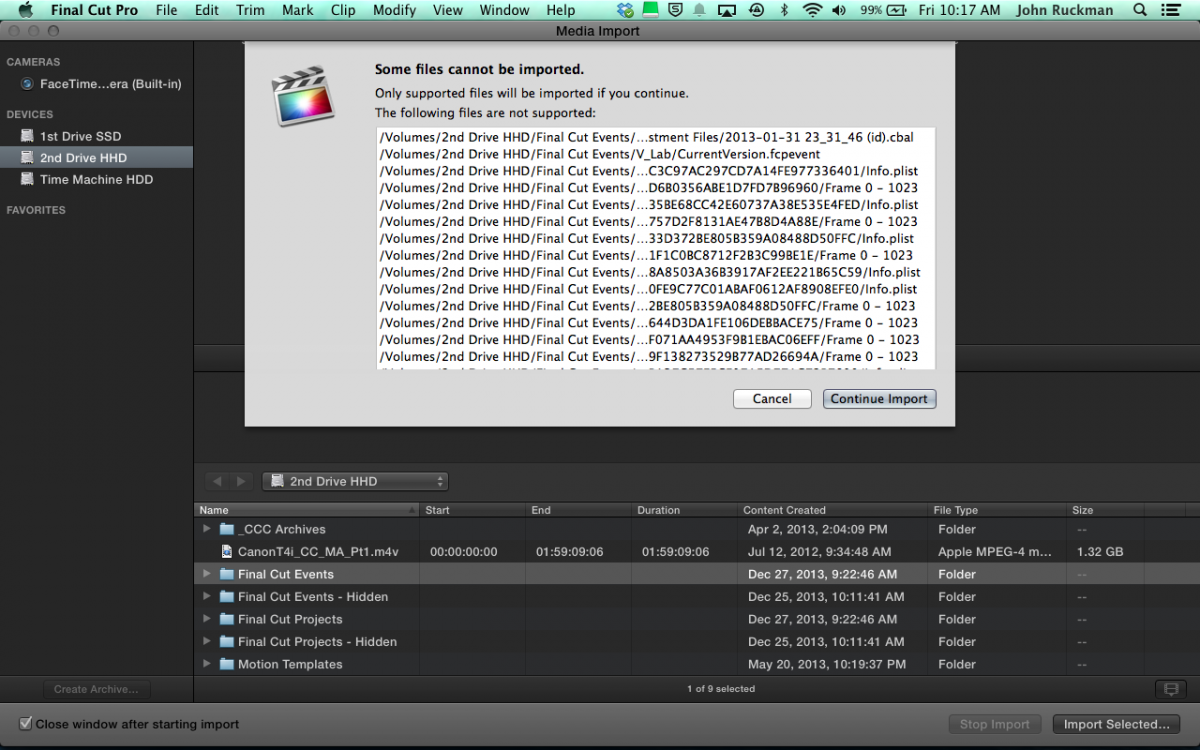
This is what happens when I try to import media. Am I not doing this correctly?
Multimedia & Social Media Manager
Sometimes I'll sound really smart & then turn around & ask a noob-ish question. Don't worry... that's perfectly normal haha!
Please Log in to join the conversation.

- ronny courtens
-
- Offline
- Moderator
-
Less
More
- Posts: 4455
- Thank you received: 962
27 Dec 2013 18:36 #37437
by ronny courtens
Replied by ronny courtens on topic FCPX / Mavericks dynamic_cast error 1
Soundwise is correct. You are not in trouble, you just need to update your old FCPX Projects and Events to the new Library structure in 10.1., this is a fast and straightforward procedure if you first read the instructions.
- Ronny
- Ronny
Please Log in to join the conversation.

28 Dec 2013 02:53 #37468
by BenB
Replied by BenB on topic FCPX / Mavericks dynamic_cast error 1
Another reference for updating.
www.macprovideo.com/hub/final-cut/fcp-x-...-to-libraries-part-1
www.macprovideo.com/hub/final-cut/fcp-x-...-to-libraries-part-1
Please Log in to join the conversation.
28 Dec 2013 03:58 - 28 Dec 2013 03:59 #37470
by -ND4SPD-
I actually found that post yesterday & that's what motivated me to use EMX to do the upload. I re-read it again today & realized I was missing a step so I tried it again.
Thanks you for the help as that did work to load 2/3rds of my events & projects but I have a few that are no longer showing up in EMX. I do still have them on my hard drive, looks like they were moved to a folder called "old final cut projects & events" What is the appropriate steps to get those loaded from here.
Sorry for such noob-ish questions. I was 90% done with a promo project that was supposed to be used on Christmas day. Needless to say, my Boss is a little upset. I've only been using FCPX for a year now & it's been absolutely trouble free until I updated to Mavericks Grrrr... I'm learning the trouble shooting lesson the hard way haha!
Multimedia & Social Media Manager
Sometimes I'll sound really smart & then turn around & ask a noob-ish question. Don't worry... that's perfectly normal haha!
Replied by -ND4SPD- on topic FCPX / Mavericks dynamic_cast error 1
Soundwise wrote: You don't need to reimport your Event files. Calm down and read the link for instructions
I actually found that post yesterday & that's what motivated me to use EMX to do the upload. I re-read it again today & realized I was missing a step so I tried it again.
Thanks you for the help as that did work to load 2/3rds of my events & projects but I have a few that are no longer showing up in EMX. I do still have them on my hard drive, looks like they were moved to a folder called "old final cut projects & events" What is the appropriate steps to get those loaded from here.
Sorry for such noob-ish questions. I was 90% done with a promo project that was supposed to be used on Christmas day. Needless to say, my Boss is a little upset. I've only been using FCPX for a year now & it's been absolutely trouble free until I updated to Mavericks Grrrr... I'm learning the trouble shooting lesson the hard way haha!
Multimedia & Social Media Manager
Sometimes I'll sound really smart & then turn around & ask a noob-ish question. Don't worry... that's perfectly normal haha!
Last edit: 28 Dec 2013 03:59 by -ND4SPD-.
Please Log in to join the conversation.


28 Dec 2013 04:16 #37471
by dgwvideo
Creating history....one edit at a time !
Replied by dgwvideo on topic FCPX / Mavericks dynamic_cast error 1
In the future it will be best to complete any started projects before updating FCPX, but you probably know that now. As far as any missing events in 10.1, you can move the events from the "old final cut events" folder to a folder named "Final Cut Events" and launch FCPX and then select "update projects and events". It will take those events and create the new Library with them inside. That should get them back for you to edit in 10.1 if they are currently missing. Alternatively, you can choose "locate" within the update events menu and point to them.
Creating history....one edit at a time !
Please Log in to join the conversation.
28 Dec 2013 04:35 #37474
by -ND4SPD-
I figured that manually moving the files would work but just wanted confirmation. Thanks
Just for the record: I updated to Mavericks 2 weeks ago & had no issues but hadn't used FCPX yet. I started editing a new project & everything was going as normal until the following day when I fired it up & started having jerkiness & dropping frames upon playback. Eventually it crashed & that's when I did some research & found out my issue was solved with the latest release of FCPX 10.1 I was going to wait a few more weeks to upgrade but had no choice at this point.
Multimedia & Social Media Manager
Sometimes I'll sound really smart & then turn around & ask a noob-ish question. Don't worry... that's perfectly normal haha!
Replied by -ND4SPD- on topic FCPX / Mavericks dynamic_cast error 1
dgwvideo wrote: In the future it will be best to complete any started projects before updating FCPX, but you probably know that now. As far as any missing events in 10.1, you can move the events from the "old final cut events" folder to a folder named "Final Cut Events" and launch FCPX and then select "update projects and events". It will take those events and create the new Library with them inside. That should get them back for you to edit in 10.1 if they are currently missing. Alternatively, you can choose "locate" within the update events menu and point to them.
I figured that manually moving the files would work but just wanted confirmation. Thanks
Just for the record: I updated to Mavericks 2 weeks ago & had no issues but hadn't used FCPX yet. I started editing a new project & everything was going as normal until the following day when I fired it up & started having jerkiness & dropping frames upon playback. Eventually it crashed & that's when I did some research & found out my issue was solved with the latest release of FCPX 10.1 I was going to wait a few more weeks to upgrade but had no choice at this point.
Multimedia & Social Media Manager
Sometimes I'll sound really smart & then turn around & ask a noob-ish question. Don't worry... that's perfectly normal haha!
Please Log in to join the conversation.
28 Dec 2013 17:15 #37533
by -ND4SPD-
Multimedia & Social Media Manager
Sometimes I'll sound really smart & then turn around & ask a noob-ish question. Don't worry... that's perfectly normal haha!
Replied by -ND4SPD- on topic FCPX / Mavericks dynamic_cast error 1
I tried manually moving the files as described above. When I restarted & had FCPX "update projects & events", it says that "final cut pro can not find any new projects or events to update".
When I navigate to the Final Cut Events folder I can see the folder containing the Render, backups, & currentversion.fcpproject files.
Now when I go to Event Manager X I can't see any projects or events under any of my drives.
When I navigate to the Final Cut Events folder I can see the folder containing the Render, backups, & currentversion.fcpproject files.
Now when I go to Event Manager X I can't see any projects or events under any of my drives.
Multimedia & Social Media Manager
Sometimes I'll sound really smart & then turn around & ask a noob-ish question. Don't worry... that's perfectly normal haha!
Please Log in to join the conversation.
28 Dec 2013 17:24 #37535
by dgwvideo
Creating history....one edit at a time !
Replied by dgwvideo on topic FCPX / Mavericks dynamic_cast error 1
Do you know where your Original Media folder is? Could you have possibly deleted that? That is where the actual media should have resided.
Creating history....one edit at a time !
Please Log in to join the conversation.
28 Dec 2013 17:55 #37543
by -ND4SPD-
I haven't deleted anything other then cache this week.
When I search "this mac" in finder that's the folder/ files that show up.
/Volumes/2nd Drive HHD/2nd Drive HHD Old Final Cut Projects/BodyLab Promos
with Event Manager X it seems like every time I've clicked a project to import into FCPX, it's disappears from EMX?
Multimedia & Social Media Manager
Sometimes I'll sound really smart & then turn around & ask a noob-ish question. Don't worry... that's perfectly normal haha!
Replied by -ND4SPD- on topic FCPX / Mavericks dynamic_cast error 1
dgwvideo wrote: Do you know where your Original Media folder is? Could you have possibly deleted that? That is where the actual media should have resided.
I haven't deleted anything other then cache this week.
When I search "this mac" in finder that's the folder/ files that show up.
/Volumes/2nd Drive HHD/2nd Drive HHD Old Final Cut Projects/BodyLab Promos
with Event Manager X it seems like every time I've clicked a project to import into FCPX, it's disappears from EMX?
Multimedia & Social Media Manager
Sometimes I'll sound really smart & then turn around & ask a noob-ish question. Don't worry... that's perfectly normal haha!
Please Log in to join the conversation.
