


3 Post Moderation Rule for New Boarders (25 Jan 2021)
New boarders will have their posts moderated - Don't worry if you cannot see your post immediately.
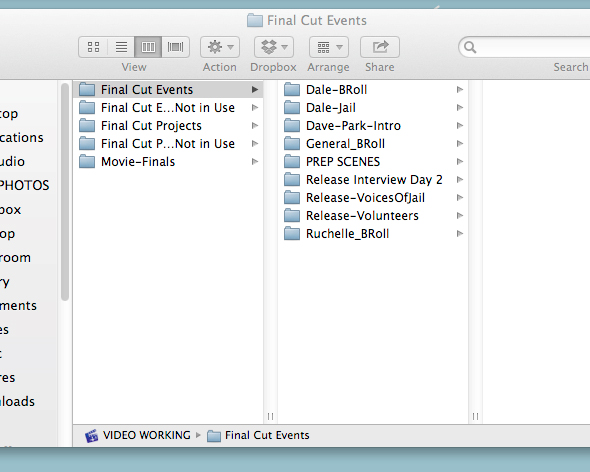
Issues using External Hard Drive with Final Cut Pro X
- Darren Roark
-

- Offline
- Platinum Member
-

Also, what is the drive formatted as? Mac? exFAT?
Please Log in to join the conversation.

Please Log in to join the conversation.

Please Log in to join the conversation.
- Using Mountain Lion OSX 8.5
- WD My Passport USB 3.0 drive via Anker® USB 3.0 7-Port Hub
- Drive formatted Mac OS Extended (Journaled)
Please Log in to join the conversation.
- Tom Wolsky
-

- Offline
- Moderator
-

Please Log in to join the conversation.
I have two drives that this problem is affecting. Before I removed the hub, I was able to get one drive (it would switch occasionally to the other one). But after removing the hub, I'm back to zero. Neither drive is showing up (even though I see them both when it's loading).
Please Log in to join the conversation.
Please Log in to join the conversation.
- Tom Wolsky
-
- Offline
- Moderator
-
Please Log in to join the conversation.
Please Log in to join the conversation.
- Tom Wolsky
-
- Offline
- Moderator
-
Please Log in to join the conversation.
- jjsanderson
-
- Offline
- Elite Member
-

www.macrumors.com/2013/11/26/western-dig...mavericks-data-loss/
I have one WD MyPassport USB2 drive I use for Time Machine backups, and (fingers crossed) I haven't had any problems with it. However, I've refused to buy more on account of not being able to nuke the stupid SmartWare partition. Glad I didn't, now.
This may have nothing to do with your situation, but it's worth checking.
Please Log in to join the conversation.
Please Log in to join the conversation.

- Darren Roark
-
- Offline
- Platinum Member
-
In the past when I have had something like this happen is when I get a drive formatted for windows from a client. I have to copy the events/projects to a mac formatted drive. (This is the only time where using the finder for fcpx projects is advised) Windows exfat is supposed to work, I just don't trust it with FCP X.
Can you try copying an event or project over to another drive that is working using the finder as a test? If that works consistently then you know it's the drive. Yeah science! (Sorry, still suffering Breaking Bad withdrawal.)
Please Log in to join the conversation.
Please Log in to join the conversation.
Please Log in to join the conversation.
- Darren Roark
-
- Offline
- Platinum Member
-
This would be pretty much the only time you would use the finder to do something FCP X related.
The main question though is what are the drives formatted as? Most drives are formatted for windows out of the box. If that's the case you need to reformat them with a GUID partition, and Mac OS. (Make sure you copy everything off them first obv) If it is formatted for Windows, it's entirely possible there is a hidden file that causes FCPX to think it's a camera or something it just doesn't like.
Please Log in to join the conversation.
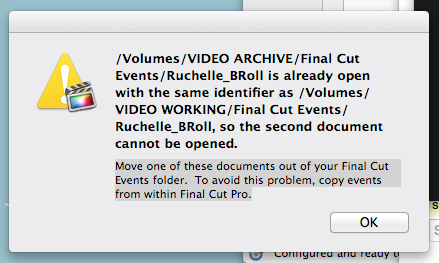
That makes me think the identical ID isn't the problem. Especially when its visible and then suddenly not visible with no error message. This is what I see when it's loading (sometimes).
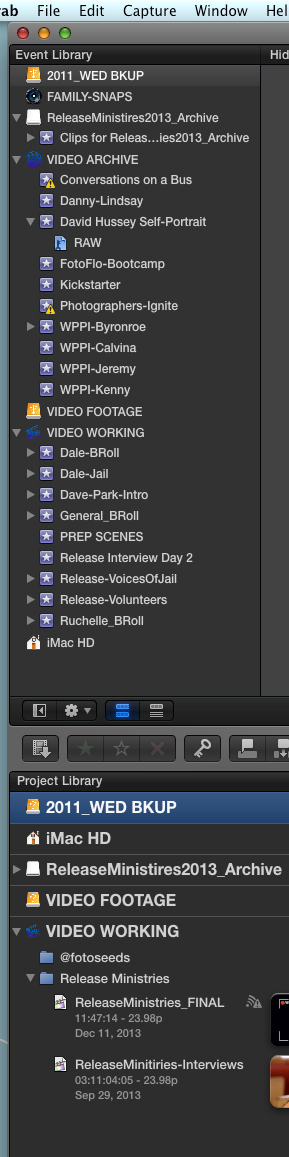
UPDATE: I moved info from my WORKING drive to my ARCHIVE drive through the Finder. I formatted my original WORKING drive and magically everything worked when I opened FCP. I closed it down and opened FPC a second time and suddenly my ARCHIVE drive (where I moved the data from my WORKING drive) disappeared again. I used Event Manager X to hide everything on the drive and it still did not reappear.
My next step is to delete the project and event data from the ARCHIVE drive and see if the issue is some hidden file, identical ID or permissions issue buried within the drive. At this point, instead of randomly switching which drive I see, it's become predictable that it's the drive that carries the data of my original WORKING drive.
Please Log in to join the conversation.
- Darren Roark
-
- Offline
- Platinum Member
-
Please Log in to join the conversation.
I know 10.1 is out and all but our production environment is still running 10.8 off course.
I noticed that when logging in with a different user FCP X does see the external drive.
Is this also the case with you?
Or did 10.1 solve this for you?
Please Log in to join the conversation.
