


- Posts: 9
- Thank you received: 0
3 Post Moderation Rule for New Boarders (25 Jan 2021)
New boarders will have their posts moderated - Don't worry if you cannot see your post immediately.
Issues using External Hard Drive with Final Cut Pro X
- Sherlock75
-
 Topic Author
- Offline
- New Member
-

Less
More
02 Apr 2013 10:07 - 02 Apr 2013 10:10 #23600
by Sherlock75
Issues using External Hard Drive with Final Cut Pro X was created by Sherlock75
Hi,
I have been using FCPX for a few months now, and have always saved my events onto my external hard drive. Last week, it simply disappeared from my event library and anytime I tried to import from my external hard drive, I no longer had the option to save to my hard drive. I can import from my external hard drive fine.
I don't know if there is any correlation, but it all started after I changed my import settings and unchecked 'Create proxy media' and 'create optimized media'
Has anyone had a similiar issue? I've got all the latest updates...
Many thanks,
Sherlock75
I have been using FCPX for a few months now, and have always saved my events onto my external hard drive. Last week, it simply disappeared from my event library and anytime I tried to import from my external hard drive, I no longer had the option to save to my hard drive. I can import from my external hard drive fine.
I don't know if there is any correlation, but it all started after I changed my import settings and unchecked 'Create proxy media' and 'create optimized media'
Has anyone had a similiar issue? I've got all the latest updates...
Many thanks,
Sherlock75
Last edit: 02 Apr 2013 10:10 by Sherlock75.
Please Log in to join the conversation.

02 Apr 2013 12:20 #23614
by BenB
Replied by BenB on topic Issues using External Hard Drive with Final Cut Pro X
Does FCP X list the drive in the Event and Project Libraries?
The settings in the Preferences for Import only pertain to items you drag-and-drop into FCP X from a Finder window. They won't effect what drives are or are not saved. Set them back to as they were before, I bet the issue is the same.
Are you doing regular backups of your data?
The settings in the Preferences for Import only pertain to items you drag-and-drop into FCP X from a Finder window. They won't effect what drives are or are not saved. Set them back to as they were before, I bet the issue is the same.
Are you doing regular backups of your data?
Please Log in to join the conversation.
- Tom Wolsky
-

- Offline
- Moderator
-

02 Apr 2013 13:00 #23623
by Tom Wolsky
Replied by Tom Wolsky on topic Issues using External Hard Drive with Final Cut Pro X
Make sure there is no folder with a name like Private or Video at the root level of the drive that FCP might read as a camera drive. In which case the drive will not appear in the event and project libraries, but will often appear in the import window under Devices.
Please Log in to join the conversation.
- Sherlock75
-
Topic Author
- Offline
- New Member
-
Less
More
- Posts: 9
- Thank you received: 0
03 Apr 2013 07:32 #23662
by Sherlock75
Replied by Sherlock75 on topic Issues using External Hard Drive with Final Cut Pro X
Hi,
No, FCPX does not list the drive in the Event and Project Libraries.
I have tried changing my import settings back and as you predicted, this had no effect on the saving settings, so my EHD still is nowhere to be found.
Until this issue occurred, I saved all my projects onto my EHD and used a second EHD as back up.
I hope I've answered your questions.
Thanks again!
No, FCPX does not list the drive in the Event and Project Libraries.
I have tried changing my import settings back and as you predicted, this had no effect on the saving settings, so my EHD still is nowhere to be found.
Until this issue occurred, I saved all my projects onto my EHD and used a second EHD as back up.
I hope I've answered your questions.
Thanks again!
Please Log in to join the conversation.
- Sherlock75
-
Topic Author
- Offline
- New Member
-
Less
More
- Posts: 9
- Thank you received: 0
03 Apr 2013 07:59 #23667
by Sherlock75
Replied by Sherlock75 on topic Issues using External Hard Drive with Final Cut Pro X
Hi Tom,
I've just gone through all my files and renamed anything called video or private. I restarted my computer and unfortunately, this made no difference.
I tried moving a test event to trash and then dragging it on to my EHD. That worked, but it's not ideal, really!
Any other ideas?
Thanks for your help!!
I've just gone through all my files and renamed anything called video or private. I restarted my computer and unfortunately, this made no difference.
I tried moving a test event to trash and then dragging it on to my EHD. That worked, but it's not ideal, really!
Any other ideas?
Thanks for your help!!
Please Log in to join the conversation.


03 Apr 2013 12:40 #23673
by anickt
Replied by anickt on topic Issues using External Hard Drive with Final Cut Pro X
Get info on the drive and see if you can check "ignore ownership on this volume". Something like this happened to me when moving a drive between two computers and that took care of it.
Please Log in to join the conversation.
- Tom Wolsky
-
- Offline
- Moderator
-
03 Apr 2013 13:25 #23676
by Tom Wolsky
Replied by Tom Wolsky on topic Issues using External Hard Drive with Final Cut Pro X
Please post a screen shot of the root level of your hard drive.
Please Log in to join the conversation.
- Sherlock75
-
Topic Author
- Offline
- New Member
-
Less
More
- Posts: 9
- Thank you received: 0
03 Apr 2013 21:58 #23701
by Sherlock75
Replied by Sherlock75 on topic Issues using External Hard Drive with Final Cut Pro X
Hi Tom,
I hope this helps?
Thanks!
I hope this helps?
Thanks!

Please Log in to join the conversation.
- Sherlock75
-
Topic Author
- Offline
- New Member
-
Less
More
- Posts: 9
- Thank you received: 0
03 Apr 2013 22:02 #23702
by Sherlock75
Replied by Sherlock75 on topic Issues using External Hard Drive with Final Cut Pro X
I can't find the option in the info...but Sharing and Permissions says" You can read and write"...should I try something else? I looked at the disk utility but didn't really know what to do form there.
thanks
thanks
Please Log in to join the conversation.
- Tom Wolsky
-
- Offline
- Moderator
-
03 Apr 2013 22:02 #23703
by Tom Wolsky
Replied by Tom Wolsky on topic Issues using External Hard Drive with Final Cut Pro X
Try renaming the folders called Misc and HD. There are no projects on that hard drive.
Please Log in to join the conversation.
- Sherlock75
-
Topic Author
- Offline
- New Member
-
Less
More
- Posts: 9
- Thank you received: 0
04 Apr 2013 07:10 #23712
by Sherlock75
Replied by Sherlock75 on topic Issues using External Hard Drive with Final Cut Pro X
Hi Tom,
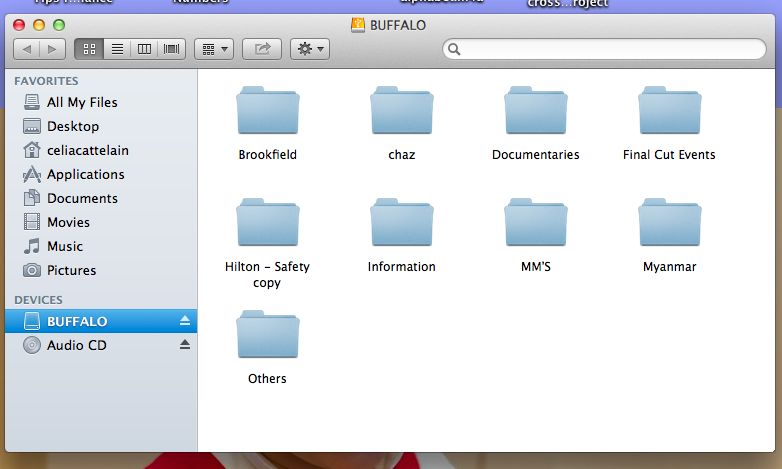
I've renamed the files - please see the attached screenshot. What do you mean when you say there are no projects on this drive. In 'Final Cut Events' is an .fcp event...and all the files for backup.
I've actually tried clicking on the event to open it up but I get a message saying events have to be opened in Final Cut...a new feature, I assume?
Thanks for your patience!
I've renamed the files - please see the attached screenshot. What do you mean when you say there are no projects on this drive. In 'Final Cut Events' is an .fcp event...and all the files for backup.
I've actually tried clicking on the event to open it up but I get a message saying events have to be opened in Final Cut...a new feature, I assume?
Thanks for your patience!
Please Log in to join the conversation.

04 Apr 2013 08:18 #23716
by MattDavis
Replied by MattDavis on topic Issues using External Hard Drive with Final Cut Pro X
Just a silly thought - try creating a folder on that drive called Final Cut Projects. I think that's what Tom's hinting at.
Also, at some point (sooner rather than later IMHO), you may find doing a 'Clean Install' of your Mac's OS.
I had a system that appeared to be good, reliable, stable. However, I started to get serious problems with files disappearing, SymLinks going bad and links breaking in FCPX. Then I lost a project, and the backups were bad too.
Bottom line: problem cured by doing a clean system reinstall.
Also, at some point (sooner rather than later IMHO), you may find doing a 'Clean Install' of your Mac's OS.
I had a system that appeared to be good, reliable, stable. However, I started to get serious problems with files disappearing, SymLinks going bad and links breaking in FCPX. Then I lost a project, and the backups were bad too.
Bottom line: problem cured by doing a clean system reinstall.
Please Log in to join the conversation.
04 Apr 2013 11:14 #23728
by Seanus
Sean Lander - Editing since 1982 - AVID 1991 - FCP 1999 - FCPX 2011
Replied by Seanus on topic Issues using External Hard Drive with Final Cut Pro X
Final Cut Events and Final Cut Projects are two different things.
Projects are where your edits and renders go and Events are where your media is stored.
I'm wondering if possibly you haven't created an Event with the same name by accident on your internal drive?
Can you please take a screen shot of your Events sidebar showing the drives and events?
Projects are where your edits and renders go and Events are where your media is stored.
I'm wondering if possibly you haven't created an Event with the same name by accident on your internal drive?
Can you please take a screen shot of your Events sidebar showing the drives and events?
Sean Lander - Editing since 1982 - AVID 1991 - FCP 1999 - FCPX 2011
Please Log in to join the conversation.
- Tom Wolsky
-
- Offline
- Moderator
-
04 Apr 2013 13:16 #23761
by Tom Wolsky
Replied by Tom Wolsky on topic Issues using External Hard Drive with Final Cut Pro X
You can't open FCP projects and events by double clicking on them. The application opens them by reading the files that are in the correct location on the hard drive.
Going back to your original post, I'm wondering about this: " I tried to import from my external hard drive, I no longer had the option to save to my hard drive. I can import from my external hard drive fine."
Not sure what you're trying to say there. How do you import from the drive if FCP doesn't see it, or does it appear in the import window but not in the event library? If the later is the case something may have changed in the events folder that prevents FCP from recognizing the events. How many events are in there? Any duplicate events from other drives? Where they duplicated from inside FCP?
Going back to your original post, I'm wondering about this: " I tried to import from my external hard drive, I no longer had the option to save to my hard drive. I can import from my external hard drive fine."
Not sure what you're trying to say there. How do you import from the drive if FCP doesn't see it, or does it appear in the import window but not in the event library? If the later is the case something may have changed in the events folder that prevents FCP from recognizing the events. How many events are in there? Any duplicate events from other drives? Where they duplicated from inside FCP?
Please Log in to join the conversation.
- Sherlock75
-
Topic Author
- Offline
- New Member
-
Less
More
- Posts: 9
- Thank you received: 0
05 Apr 2013 08:10 #23820
by Sherlock75
Replied by Sherlock75 on topic Issues using External Hard Drive with Final Cut Pro X
Hi Tom and Seanus,
I'm performing a anti-virus scan so will get back to you as soon as that's done...
Thanks again!
I'm performing a anti-virus scan so will get back to you as soon as that's done...
Thanks again!
Please Log in to join the conversation.
- Lee Patterson
-
- Offline
- Elite Member
-

Less
More
- Posts: 239
- Thank you received: 20
26 Jul 2013 10:30 #29112
by Lee Patterson
Replied by Lee Patterson on topic Issues using External Hard Drive with Final Cut Pro X
Hi, my internal hd died:(
replaced it with an ssd:)
Open fcpx, it loads my 2tb external drive (which is my main fcpx working drive) then jettisons it!
I can do no work, I have repaired and rebuilt and reinstalled. Still I have initial load then jettisoning of the drive within fcpx:(
Any thoughts/suggestions would be appreciated, thanks
Lee
replaced it with an ssd:)
Open fcpx, it loads my 2tb external drive (which is my main fcpx working drive) then jettisons it!
I can do no work, I have repaired and rebuilt and reinstalled. Still I have initial load then jettisoning of the drive within fcpx:(
Any thoughts/suggestions would be appreciated, thanks
Lee
Please Log in to join the conversation.
- Tom Wolsky
-
- Offline
- Moderator
-
26 Jul 2013 10:44 #29113
by Tom Wolsky
Replied by Tom Wolsky on topic Issues using External Hard Drive with Final Cut Pro X
Most likely cause is there is a folder at the root level that FCP sees and thinks to be a camera drive. Folder with a name like Video or Private or DCIM or others used in folder structures.
Please Log in to join the conversation.
- Lee Patterson
-
- Offline
- Elite Member
-
Less
More
- Posts: 239
- Thank you received: 20
26 Jul 2013 12:54 #29115
by Lee Patterson
Replied by Lee Patterson on topic Issues using External Hard Drive with Final Cut Pro X
Hey Tom thanks. One of the Cameras for new project wrapped up its footage in a PRIVATE folder, renamed and all is well. 
Please Log in to join the conversation.
09 Dec 2013 22:03 #35434
by kbistudio
Replied by kbistudio on topic Issues using External Hard Drive with Final Cut Pro X
I'm having a similar issue with the external hard drives disappearing. What makes this VERY strange is they will be visible as FCPX is loading, but as soon as it's ready to go, they disappear again. Has anyone ever had this happen before? Is my only option to do a clean install of everything?
Please Log in to join the conversation.
- Tom Wolsky
-
- Offline
- Moderator
-
09 Dec 2013 22:13 #35435
by Tom Wolsky
Replied by Tom Wolsky on topic Issues using External Hard Drive with Final Cut Pro X
Post screen shot of root level of disappearing drive? Any duplicate events?
Please Log in to join the conversation.
