


- Posts: 21
- Thank you received: 1
3 Post Moderation Rule for New Boarders (25 Jan 2021)
New boarders will have their posts moderated - Don't worry if you cannot see your post immediately.
Motion 5 Text Transparency Weirdness - Anybody Else Besides Me (or a solution?)
- rocknrollchef
-
 Topic Author
- Offline
- Junior Member
-

Less
More
06 Jul 2012 01:40 #10961
by rocknrollchef
Motion 5 Text Transparency Weirdness - Anybody Else Besides Me (or a solution?) was created by rocknrollchef
Hello:
I'm brand new to Motion 5, using it with FCP 7 until further notice, it's going okay so far BUT...
I do know how to export a Quicktime .mov as a transparent file, which I add to my FCP video project (hit the "transparent" setting under "channel", "share" as Pro Res 4444 or Pro Res 4444 HQ). Here's the weirdness: The text I create in Motion 5 works fine as a transparency BUT... I imported some text from Word into a scrolling text box, and that text does not come through as a transparency. WTF?!?!?!? Do I have to create all that text inside Motion, or is there some trick with the scrolling text behavior or WHAT?
Thanks & let me know
chef
I'm brand new to Motion 5, using it with FCP 7 until further notice, it's going okay so far BUT...
I do know how to export a Quicktime .mov as a transparent file, which I add to my FCP video project (hit the "transparent" setting under "channel", "share" as Pro Res 4444 or Pro Res 4444 HQ). Here's the weirdness: The text I create in Motion 5 works fine as a transparency BUT... I imported some text from Word into a scrolling text box, and that text does not come through as a transparency. WTF?!?!?!? Do I have to create all that text inside Motion, or is there some trick with the scrolling text behavior or WHAT?
Thanks & let me know
chef
Please Log in to join the conversation.
06 Jul 2012 04:08 #10964
by cgbier
Replied by cgbier on topic Re: Motion 5 Text Transparency Weirdness - Anybody Else Besides Me (or a solution?)
You have to export it as an animation.
I had the same problem years ago... Cursing for hours...
I had the same problem years ago... Cursing for hours...
Please Log in to join the conversation.

06 Jul 2012 04:39 #10968
by BenB
Replied by BenB on topic Re: Motion 5 Text Transparency Weirdness - Anybody Else Besides Me (or a solution?)
Text imported must be RTF or TXT files.
Motion 5 is not 100% compatible with FCP 7, there's going to be some major glitches in that workflow.
You should only have to export as ProRes 422, no higher. I do this daily and never have problems. As long as the background in the Project settings is "transparent", nothing else matters.
Motion 5 is not 100% compatible with FCP 7, there's going to be some major glitches in that workflow.
You should only have to export as ProRes 422, no higher. I do this daily and never have problems. As long as the background in the Project settings is "transparent", nothing else matters.
Please Log in to join the conversation.
- Scrubelicious
-

- Offline
- Platinum Member
-

Less
More
- Posts: 1228
- Thank you received: 114
06 Jul 2012 10:34 #10975
by Scrubelicious
Replied by Scrubelicious on topic Re: Motion 5 Text Transparency Weirdness - Anybody Else Besides Me (or a solution?)
So when exporting your QT movie the background has no tranparency right?
Also take look in Text properties after copying form Word. Just a recap you are using ProRes 4444 or Animation with colors set to Millions+?
Also take look in Text properties after copying form Word. Just a recap you are using ProRes 4444 or Animation with colors set to Millions+?
Please Log in to join the conversation.
06 Jul 2012 15:13 #10985
by BenB
Replied by BenB on topic Re: Motion 5 Text Transparency Weirdness - Anybody Else Besides Me (or a solution?)
Normally in FCP 7 you'd use Motion 4 and just bring the Motion project file into your Sequence. Solves tons of problems. I'd do your Motion project in version 4.
Please Log in to join the conversation.
- rocknrollchef
-
Topic Author
- Offline
- Junior Member
-
Less
More
- Posts: 21
- Thank you received: 1
06 Jul 2012 15:31 #10991
by rocknrollchef
Replied by rocknrollchef on topic Re: Motion 5 Text Transparency Weirdness - Anybody Else Besides Me (or a solution?)
OKAY: I tried importing text from both txt and rtf formats (from Word). Did not work for me, the scrolling text box area still isn't transparent.
AGAIN: The transparency works fine with the text I create from inside Motion 5, so it's still a head-scratcher. Unless I need to do something more with the "scrolling" behavior or something?
AGAIN: The transparency works fine with the text I create from inside Motion 5, so it's still a head-scratcher. Unless I need to do something more with the "scrolling" behavior or something?
Please Log in to join the conversation.
- rocknrollchef
-
Topic Author
- Offline
- Junior Member
-
Less
More
- Posts: 21
- Thank you received: 1
06 Jul 2012 15:33 #10992
by rocknrollchef
Replied by rocknrollchef on topic Re: Motion 5 Text Transparency Weirdness - Anybody Else Besides Me (or a solution?)
When you say "export as an animation"... is there some specific setting that says "export as an animation" somewhere? Or is it under the "share" command? Or is it "save as sequence" or something? It's a little unclear and thanks for the quick response
chef
chef
Please Log in to join the conversation.
06 Jul 2012 16:29 #11002
by BenB
Replied by BenB on topic Re: Motion 5 Text Transparency Weirdness - Anybody Else Besides Me (or a solution?)
Export as ProRes 422, which does not support an alpha channel, and a simple Chroma Key set to black will give you proper transparency.
Export as ProRes 4444 and you will have an alpha channel. That's the only version of ProRes that supports alpha channel. It's that the fourth "4" stands for.
In FCP X and Motion 5 there is no more Animation codec, since it's outdated and ProRes 4444 (pronounced 4-by-4) does a much nicer job with transparency much easily.
But if you create your project in Motion 4, and take the project file itself into FCP 7, there's no issue, the transparency is there, and you can tweak the text with live updates. Much nicer workflow than exporting QT movie files.
Export as ProRes 4444 and you will have an alpha channel. That's the only version of ProRes that supports alpha channel. It's that the fourth "4" stands for.
In FCP X and Motion 5 there is no more Animation codec, since it's outdated and ProRes 4444 (pronounced 4-by-4) does a much nicer job with transparency much easily.
But if you create your project in Motion 4, and take the project file itself into FCP 7, there's no issue, the transparency is there, and you can tweak the text with live updates. Much nicer workflow than exporting QT movie files.
Please Log in to join the conversation.
- rocknrollchef
-
Topic Author
- Offline
- Junior Member
-
Less
More
- Posts: 21
- Thank you received: 1
07 Jul 2012 15:59 #11047
by rocknrollchef
Replied by rocknrollchef on topic Re: Motion 5 Text Transparency Weirdness - Anybody Else Besides Me (or a solution?)
Hi:
I'm still curious how to "export as animation" from Motion 5 - is it called something else? Is it done through the "share" button, export or something else?
thanks for the help BTW really appreciate it
chef
I'm still curious how to "export as animation" from Motion 5 - is it called something else? Is it done through the "share" button, export or something else?
thanks for the help BTW really appreciate it
chef
Please Log in to join the conversation.
07 Jul 2012 16:38 - 07 Jul 2012 16:39 #11049
by BenB
Replied by BenB on topic Re: Motion 5 Text Transparency Weirdness - Anybody Else Besides Me (or a solution?)
"In FCP X and Motion 5 there is no more Animation codec, since it's outdated and ProRes 4444 (pronounced 4-by-4) does a much nicer job with transparency much easily."
The only other alternative is to export an Image Sequence.
It all depends on what app it's going to and what you plan to do with it.
The only other alternative is to export an Image Sequence.
It all depends on what app it's going to and what you plan to do with it.
Last edit: 07 Jul 2012 16:39 by BenB.
Please Log in to join the conversation.
- rocknrollchef
-
Topic Author
- Offline
- Junior Member
-
Less
More
- Posts: 21
- Thank you received: 1
07 Jul 2012 18:16 #11051
by rocknrollchef
Replied by rocknrollchef on topic Re: Motion 5 Text Transparency Weirdness - Anybody Else Besides Me (or a solution?)
First, thanks to everyone here for the fast responses - although I'm a little too new with Motion 5 to be able to confirm or refute some of the contradicting info I've already gotten.
While I'm not quite ready to embrace FCX yet, neither do I want to mess with Motion 4 anymore - I'm digging Motion 5 a lot more so far.
The transparency issues continue for me, this time with animated lower thirds using masks etc - odd. "Shared" as a .mov file with channel transparency, it isn't transparent when imported into my FCP7 project. And so:
1. Are there any workarounds anyone knows of with this issue (Motion 5/FCP 7?).
2. If I end up cutting my final segment in FCP7, importing it into Motion 5 and then adding graphics and then rendering the final version from there... should I anticipate any kind of compression issues that will diminish the overall quality or... no worries?
thanks
chef
While I'm not quite ready to embrace FCX yet, neither do I want to mess with Motion 4 anymore - I'm digging Motion 5 a lot more so far.
The transparency issues continue for me, this time with animated lower thirds using masks etc - odd. "Shared" as a .mov file with channel transparency, it isn't transparent when imported into my FCP7 project. And so:
1. Are there any workarounds anyone knows of with this issue (Motion 5/FCP 7?).
2. If I end up cutting my final segment in FCP7, importing it into Motion 5 and then adding graphics and then rendering the final version from there... should I anticipate any kind of compression issues that will diminish the overall quality or... no worries?
thanks
chef
Please Log in to join the conversation.
07 Jul 2012 18:22 - 07 Jul 2012 18:47 #11052
by BenB
Replied by BenB on topic Re: Motion 5 Text Transparency Weirdness - Anybody Else Besides Me (or a solution?)
I work in Motion 5 daily. I export projects that require an alpha channel at ProRes 4444. Make sure the background is set to Transparent in the Project settings. In FCP X I get full transparency with no problems. I have also tested in FCP 7 and there are no issues with this either.
All I can think of is that you're not doing one of two things. First, be sure background is set to Transparent in the project settings. And be sure when you export you're set to Color+Alpha and have Premultiply checked.
Outside of that, I have no issues with alpha channels in 4x4 QT exports at all in either X or 7 from either Motion 4 or 5.
All I can think of is that you're not doing one of two things. First, be sure background is set to Transparent in the project settings. And be sure when you export you're set to Color+Alpha and have Premultiply checked.
Outside of that, I have no issues with alpha channels in 4x4 QT exports at all in either X or 7 from either Motion 4 or 5.
Last edit: 07 Jul 2012 18:47 by BenB.
Please Log in to join the conversation.
- rocknrollchef
-
Topic Author
- Offline
- Junior Member
-
Less
More
- Posts: 21
- Thank you received: 1
07 Jul 2012 18:33 #11053
by rocknrollchef
Replied by rocknrollchef on topic Re: Motion 5 Text Transparency Weirdness - Anybody Else Besides Me (or a solution?)
I will triple-check and hope for the best (fingers crossed). HEY - have you ever considered giving remote online Motion 5 lessons? (assuming we're not in the same town). I use Mikogo.com when I'm doing stuff with other clients/people, works great; I also use PayPal.
Lemme know!
chef
Lemme know!
chef
Please Log in to join the conversation.
07 Jul 2012 18:45 #11055
by BenB
Replied by BenB on topic Re: Motion 5 Text Transparency Weirdness - Anybody Else Besides Me (or a solution?)
Best bang for your buck is here:
www.rippletraining.com/categories/apple-...ion-5-tutorials.html
www.macprovideo.com/hub/author/Ben-Balser
www.rippletraining.com/categories/apple-...ion-5-tutorials.html
www.macprovideo.com/hub/author/Ben-Balser
Please Log in to join the conversation.
- Scrubelicious
-
- Offline
- Platinum Member
-
Less
More
- Posts: 1228
- Thank you received: 114
08 Jul 2012 01:02 #11074
by Scrubelicious
Replied by Scrubelicious on topic Re: Motion 5 Text Transparency Weirdness - Anybody Else Besides Me (or a solution?)
Did you get this resolved? Let us know or hit me up.
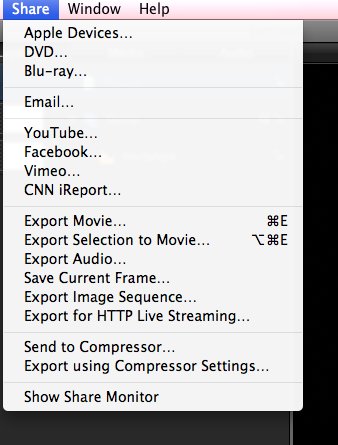
If you want to export a Animation version from Motion 5 do the following:
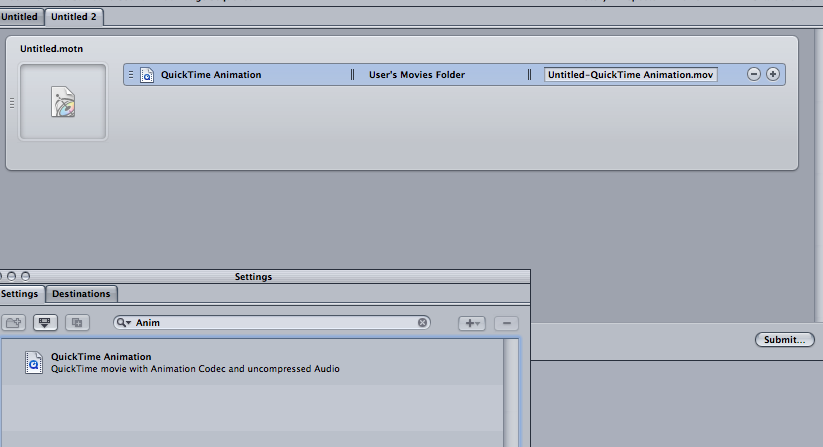
When you are done with your project and ready to send it out hit the Share in menu bar and then Send to Compressor, in Compressor dig out the QuickTime Animation preset and drop it on your Batch.
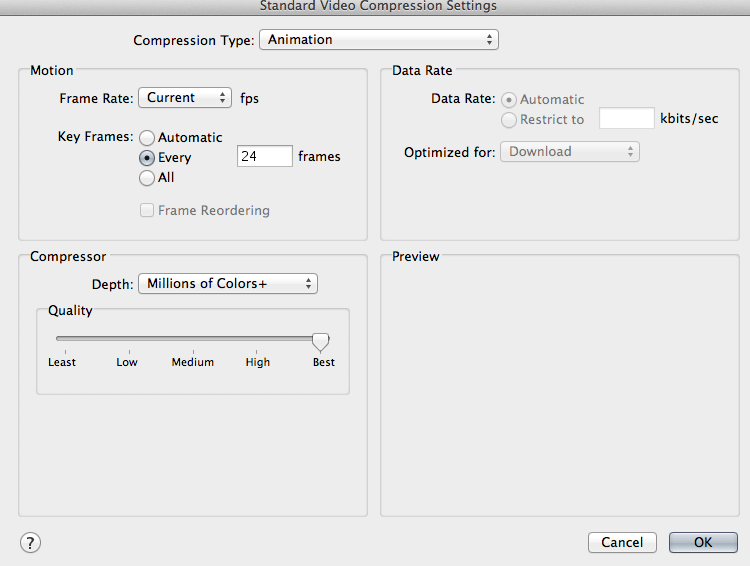
Just make sure you have Millions of Colors+ selected in the Video Settings.
If you want to export a Animation version from Motion 5 do the following:
When you are done with your project and ready to send it out hit the Share in menu bar and then Send to Compressor, in Compressor dig out the QuickTime Animation preset and drop it on your Batch.
Just make sure you have Millions of Colors+ selected in the Video Settings.
Please Log in to join the conversation.
08 Jul 2012 01:21 #11075
by BenB
Replied by BenB on topic Re: Motion 5 Text Transparency Weirdness - Anybody Else Besides Me (or a solution?)
Animation codec again is outdated and will do nothing that ProRes 4444 wont' do better.
Please Log in to join the conversation.
- Scrubelicious
-
- Offline
- Platinum Member
-
Less
More
- Posts: 1228
- Thank you received: 114
08 Jul 2012 13:14 #11096
by Scrubelicious
Replied by Scrubelicious on topic Re: Motion 5 Text Transparency Weirdness - Anybody Else Besides Me (or a solution?)
Okay Ben we know Apple Animation codec wish still used widely on the Windows side of the house is more outdated then ProRes 4444 but this doesn't fix the issue.
rockrollchef export your project as a Animation version pop it into FCP7 and let us know if you still have any issues from there we can direct you in a better rout or if all fail send me your Motion project file an I will dissect it.
rockrollchef export your project as a Animation version pop it into FCP7 and let us know if you still have any issues from there we can direct you in a better rout or if all fail send me your Motion project file an I will dissect it.
Please Log in to join the conversation.
08 Jul 2012 15:27 - 08 Jul 2012 15:28 #11103
by BenB
Replied by BenB on topic Re: Motion 5 Text Transparency Weirdness - Anybody Else Besides Me (or a solution?)
I'm duplicating this situation with ProRes 4444 and it is in fact solving the problem. I'm carrying alpha channels from both Motion 4 and 5 into FCP 7 and X. What's the issue?
Have we verified the background settings for the Motion project itself?
Have we verified the background settings for the Motion project itself?
Last edit: 08 Jul 2012 15:28 by BenB.
Please Log in to join the conversation.
- Scrubelicious
-
- Offline
- Platinum Member
-
Less
More
- Posts: 1228
- Thank you received: 114
08 Jul 2012 17:24 #11115
by Scrubelicious
Replied by Scrubelicious on topic Re: Motion 5 Text Transparency Weirdness - Anybody Else Besides Me (or a solution?)
Never had a issue with ether but I guess we are trying to figure out what the issue is.
Please Log in to join the conversation.
- rocknrollchef
-
Topic Author
- Offline
- Junior Member
-
Less
More
- Posts: 21
- Thank you received: 1
09 Jul 2012 12:56 #11170
by rocknrollchef
Replied by rocknrollchef on topic Re: Motion 5 Text Transparency Weirdness - Anybody Else Besides Me (or a solution?)
First: I want to thank you ALL for your very very speedy help & input, not to mention the offer of dissecting the Motion file (sweet). Now, check this out: After trying all the things that were suggested, as if by mojo magic, everything started working exactly as it is supposed to - text, imported text, animation, massks. WTF right?!?@?@? I did have a virus on my Mac recently, who knows - maybe there was some kind of glitch that somehow corrected itself? I was getting ready to re-install FCP 7 and/or Motion 5 just to see what happened, but didn't have to. Really really weird, but the bottom line here - YOU GUYS ARE GREAT and thank you so much. (I still might want to take Motion 5 lessons from someone)
Please Log in to join the conversation.
