


3 Post Moderation Rule for New Boarders (25 Jan 2021)
New boarders will have their posts moderated - Don't worry if you cannot see your post immediately.
Video/Image very small after export
- Starfox
-
 Topic Author
- Offline
- Senior Member
-

- Music, Djing, Music production, fitness. ◄◄ rewind ► play ▌▌pause ■ Stop ►► fast forward
ronny courtens wrote: Resizing your stills before bringing them in FCP will in no way solve the problem you are having (black borders on both sides in Youtube video). You can easily scale any still up or down right inside FCP anyway.
Having set your sequence settings correctly is the first step. When your picture looks okay in FCP using the settings I posted, the next step is to export it correctly for YouTube. There are different ways you can do this in FCP7.
When you use the Share to Youtube option your H.264 file is exported straight from the timeline. And YES this can cause unexpected display results if your sequence Pixel Aspect Ratio is not set correctly (especially when your sequence is set to Anamorphic like you did in your original settings). So the first thing I would do is export your video from the new sequence (using the appropriate settings) and see if this solves your problem. If this does not solve your problem we can give you some other methods for exporting to Youtube. But please try this first so we can find out where the problem is.
Best wishes,
Ronny
Hi Ronny,
I am now a few weeks into using these settings and i have a few mixes uploaded to youtube, and they are perfect
 You Tube video
But now, i am putting together a new kind of project, which like before has an audio mix track, and i still have my still image, but that is only going to be used for a small piece of the project, whats new is the rest of this will be filled up with HD videos.
The problem i am having now is that when i drag them (HD videos) into the project and render them, with the settings you advised on, the videos come out blocky, they lose their quality which they had before i dragged them in, the image and everything else is fine, just the videos seem off, so can you or anyone else advise me what i need to do
So i can use both still image, hd 720p videos, and audio to the best quality. Sorry for the newby questions, but video is not my area.
Thanks for any advise
Please Log in to join the conversation.
- ronny courtens
-

- Offline
- Moderator
-

- Posts: 4455
- Thank you received: 962
Your video indeed looks fine now in Youtube
If you are using exactly the same settings to make your new projects with video and the video comes out badly the logical question is: what is wrong with the video. So we would need some information on this.
Open a project where you use the video files. R-click an imported video in your FCP Browser and select Item Properties > Format. The Properties window will open. Make a screenshot of it and post it here so we can have a look at it.
Best wishes,
Ronny
Please Log in to join the conversation.
ronny courtens wrote: Hi Starfox,
Your video indeed looks fine now in Youtube
If you are using exactly the same settings to make your new projects with video and the video comes out badly the logical question is: what is wrong with the video. So we would need some information on this.
Open a project where you use the video files. R-click an imported video in your FCP Browser and select Item Properties > Format. The Properties window will open. Make a screenshot of it and post it here so we can have a look at it.
Best wishes,
Ronny
Hi Ronny,
I am using a number of different video clips ,all in HD and they vary in settings, frame rate ect but they are all pretty similar to the attached picture
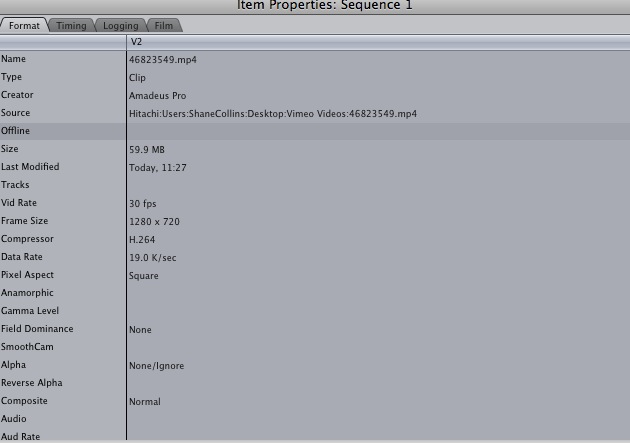
Please Log in to join the conversation.
- ronny courtens
-
- Offline
- Moderator
-
- Posts: 4455
- Thank you received: 962
Please Log in to join the conversation.


Creating history....one edit at a time !
Please Log in to join the conversation.
The video clips i am using are all mp4 format downloaded from vimeo.
Original clip

Rendered Clip

Please Log in to join the conversation.
- ronny courtens
-
- Offline
- Moderator
-
- Posts: 4455
- Thank you received: 962
That's what I thought when I first saw your specs. I think you have recorded videos posted on Vimeo using a screen recorder? That's a guarantee for bad quality in the first place. If you look at the screenshot from your original clip you already can see that it is very low quality and there are lots of artifacts.
Although videos posted on a movie platform such as youtube or video may look quite good when viewed on the platform they are already very compressed. Further compression, once by your video capture device using H.264 at a low bitrate of 17kbs, once again when rendering and finally when recompressing again for Vimeo, will quickly further degrade the original.
If you want to produce good looking video for the web you really must start with the best quality original media you can get. Screen captures from a video platform are not good enough.
Best wishes,
Ronny
Please Log in to join the conversation.
ronny courtens wrote: The video clips i am using are all mp4 format downloaded from vimeo.
That's what I thought when I first saw your specs. I think you have recorded videos posted on Vimeo using a screen recorder? That's a guarantee for bad quality in the first place. If you look at the screenshot from your original clip you already can see that it is very low quality and there are lots of artifacts.
Although videos posted on a movie platform such as youtube or video may look quite good when viewed on the platform they are already very compressed. Further compression, once by your video capture device using H.264 at a low bitrate of 17kbs, once again when rendering and finally when recompressing again for Vimeo, will quickly further degrade the original.
If you want to produce good looking video for the web you really must start with the best quality original media you can get. Screen captures from a video platform are not good enough.
Best wishes,
Ronny
Hi Ronny,
I don't record from vimeo i download the videos from vimeo
download vimeo link
I have rendered a few more video clips and it seems some video clips do not lose their quality and some do, it is probably like you said, with re-compressing videos, i will just use the ones where their quality is not effected. It wont be perfect quality but its the best i can do
Cheers
Shane
Please Log in to join the conversation.
- ronny courtens
-
- Offline
- Moderator
-
- Posts: 4455
- Thank you received: 962
Yes you will get variable results when downloading from Vimeo. It all depends on how good (or bad) the originally uploaded file was.
BTW if you only need video backgrounds for your music there are some sites around that offer free loopable video backgrounds that have a much higher quality than you will get from Vimeo. Just google video backgrounds and see if you find anything that you could use.
Best wishes,
Ronny
Please Log in to join the conversation.
ronny courtens wrote: your video capture device using H.264 at a low bitrate of 17kbs
Wow, how'd I miss that! I looked quickly and thought it was 19Mbps. My mistake :ohmy:
Creating history....one edit at a time !
Please Log in to join the conversation.
- ronny courtens
-
- Offline
- Moderator
-
- Posts: 4455
- Thank you received: 962
Please Log in to join the conversation.
Shane
Please Log in to join the conversation.
- ronny courtens
-
- Offline
- Moderator
-
- Posts: 4455
- Thank you received: 962

BTW I like your music. Trance is hot over here in Belgium.
Kind regards,
Ronny
Please Log in to join the conversation.
