



- Posts: 215
- Thank you received: 2
3 Post Moderation Rule for New Boarders (25 Jan 2021)
New boarders will have their posts moderated - Don't worry if you cannot see your post immediately.
Need A Lag Fix
21 Apr 2012 13:09 - 21 Apr 2012 13:10 #7370
by Shane M
Need A Lag Fix was created by Shane M
Ive edited many small projects on my newish Macbook Pro and G-Raid (Firewire 800) and its done pretty well. It used to get bogged down with 4 or 8gb ram but i upgraded to 16gb and its like night and day...
that is...
Until this past week. I was cutting a 30 second commercial and it started getting SOOOO bogged down. It was a fairly simple commercial, a couple of layers of video in some spots but thats it. Did some effect filters and titles and that was pretty much it..it got to the point where any time you would make a change the whole thing would nearly lock up and refuse to respond until it rendered everything.
Ive tried to figure out why its doing this now but nothing works...changing to proxy has minimal effect at best...disconnecting other drives, hiding other events and projects, etc...all doesn't have any effect more or less.
I have a...
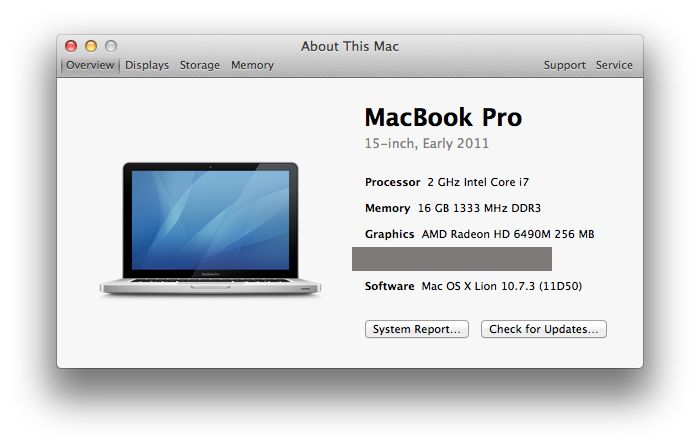
I think that this machine should be fine for editing 30 second commercials and actually quite a bit more than that...
I don't know if the slow down is software based or hardware based but I'm kind of starting to guess maybe its the G-RAID? Because of the firewire 800 or...?
What do you suggest trying?
that is...
Until this past week. I was cutting a 30 second commercial and it started getting SOOOO bogged down. It was a fairly simple commercial, a couple of layers of video in some spots but thats it. Did some effect filters and titles and that was pretty much it..it got to the point where any time you would make a change the whole thing would nearly lock up and refuse to respond until it rendered everything.
Ive tried to figure out why its doing this now but nothing works...changing to proxy has minimal effect at best...disconnecting other drives, hiding other events and projects, etc...all doesn't have any effect more or less.
I have a...
I think that this machine should be fine for editing 30 second commercials and actually quite a bit more than that...
I don't know if the slow down is software based or hardware based but I'm kind of starting to guess maybe its the G-RAID? Because of the firewire 800 or...?
What do you suggest trying?
Last edit: 21 Apr 2012 13:10 by Shane M.
Please Log in to join the conversation.

21 Apr 2012 13:38 #7371
by NocoDave
Replied by NocoDave on topic Re: Need A Lag Fix
The first thing that jumps out to me is the 256MB VRAM it meets the min spec, but they recommend 512MB.
If you disable the filters and titles does it perform as well as before.?
I'm doing a lot with filters and effects in FCPX and I'm looking at what is taking up what resources as I go. Some stuff is obviously more demanding than others, so it's not necessarily how little is being used and often more related to what is being used.
I disable background rendering and run it myself if necessary. If I playback through rendering, and it's something that would cause problems, the playback takes priority and the rendering pauses. Maybe that could help.
I'm also using a firewire 800 raid for the moment which isn't ideal. It's set to raid 0, if this is your bottle neck and if your running raid 1 that could maybe help.
If you disable the filters and titles does it perform as well as before.?
I'm doing a lot with filters and effects in FCPX and I'm looking at what is taking up what resources as I go. Some stuff is obviously more demanding than others, so it's not necessarily how little is being used and often more related to what is being used.
I disable background rendering and run it myself if necessary. If I playback through rendering, and it's something that would cause problems, the playback takes priority and the rendering pauses. Maybe that could help.
I'm also using a firewire 800 raid for the moment which isn't ideal. It's set to raid 0, if this is your bottle neck and if your running raid 1 that could maybe help.
Please Log in to join the conversation.
21 Apr 2012 13:58 #7372
by Shane M
So your saying disabling background rendering will still allow me to see my new changes normally?
Im using this www.colorgradingcentral.com/products-cinelook-for-hdslrs on some of the clips...i dono if thats the difference or what. I just tried changing a bunch of things and playing the video back and it starting and stoping and clicking all around and it seemed to work ok...weird.
Something i just noticed though...if i move some text around and it has to re-render, and i try to play back before its rendered, it will play through it with audio, but the video is essentially non working...its somewhat laggy moving the text elements too. Not as bad as earlier today, but still not super snappy like i remember it before...
Replied by Shane M on topic Re: Need A Lag Fix
NocoDave wrote: The first thing that jumps out to me is the 256MB VRAM it meets the min spec, but they recommend 512MB.
If you disable the filters and titles does it perform as well as before.?
I'm doing a lot with filters and effects in FCPX and I'm looking at what is taking up what resources as I go. Some stuff is obviously more demanding than others, so it's not necessarily how little is being used and often more related to what is being used.
I disable background rendering and run it myself if necessary. If I playback through rendering, and it's something that would cause problems, the playback takes priority and the rendering pauses. Maybe that could help.
I'm also using a firewire 800 raid for the moment which isn't ideal. It's set to raid 0, if this is your bottle neck and if your running raid 1 that could maybe help.
So your saying disabling background rendering will still allow me to see my new changes normally?
Im using this www.colorgradingcentral.com/products-cinelook-for-hdslrs on some of the clips...i dono if thats the difference or what. I just tried changing a bunch of things and playing the video back and it starting and stoping and clicking all around and it seemed to work ok...weird.
Something i just noticed though...if i move some text around and it has to re-render, and i try to play back before its rendered, it will play through it with audio, but the video is essentially non working...its somewhat laggy moving the text elements too. Not as bad as earlier today, but still not super snappy like i remember it before...
Please Log in to join the conversation.
21 Apr 2012 14:02 #7375
by Shane M
Replied by Shane M on topic Re: Need A Lag Fix
shane82388 wrote:
NocoDave wrote: I'm also using a firewire 800 raid for the moment which isn't ideal. It's set to raid 0, if this is your bottle neck and if your running raid 1 that could maybe help.
Its a 1TB G-RAID running in RAID-0. If thats a likely culprit, I'm looking at getting a firewire drive like the Pegasus R4...but at $1000 i want to KNOW that its going to solve all my problems and then some...not be just another thing waiting for something else...
The VRAM is interesting...but i just thought it couldn't be that really because its such a simple and short timeline...but i dono...could be wrong.
I hope I'm wrong, since theres no fixing that really...at least a thunderbolt drive would be a good investment and future proof...
Please Log in to join the conversation.
21 Apr 2012 14:09 #7377
by NocoDave
Yes, the changes still happen and can be played back if the system is powerful enough. Background rendering just kicks in automatically to render your work so it plays back normally on a system that isn't powerful enough to play it back otherwise.
I disable it and work away as normal, then if there's any effects that won't play back smoothly that I need to see properly I manually set the render if I really need to see it.
I've not used them but those Cinelook filters must be very demanding on your system. Film style looks generally are. Try disabling them for a bit just to see if your problems go away.
If so you can still find a workflow, you want to grade last anyway. Disable background rendering, at least to do your grading, if you really want to see what anything plays back like you can manually render the specific clip to see it.
Replied by NocoDave on topic Re: Need A Lag Fix
So your saying disabling background rendering will still allow me to see my new changes normally?
Yes, the changes still happen and can be played back if the system is powerful enough. Background rendering just kicks in automatically to render your work so it plays back normally on a system that isn't powerful enough to play it back otherwise.
I disable it and work away as normal, then if there's any effects that won't play back smoothly that I need to see properly I manually set the render if I really need to see it.
I've not used them but those Cinelook filters must be very demanding on your system. Film style looks generally are. Try disabling them for a bit just to see if your problems go away.
If so you can still find a workflow, you want to grade last anyway. Disable background rendering, at least to do your grading, if you really want to see what anything plays back like you can manually render the specific clip to see it.
Please Log in to join the conversation.
- Lee Patterson
-

- Offline
- Elite Member
-

Less
More
- Posts: 239
- Thank you received: 20
21 Apr 2012 14:12 #7378
by Lee Patterson
Replied by Lee Patterson on topic Re: Need A Lag Fix
Hi Shane, fully agree with dave, i neve have background rendering on and ive never missed it.
Please Log in to join the conversation.
21 Apr 2012 14:13 - 21 Apr 2012 14:14 #7379
by NocoDave
Replied by NocoDave on topic Re: Need A Lag Fix
I'm pretty certain a thunderbolt raid would help, I'm holding off a bit until there are more options available. But I also recon the VRAM could be more so, can anyone confirm/dispel this in relation to the Cinelook filters?
Last edit: 21 Apr 2012 14:14 by NocoDave.
Please Log in to join the conversation.
21 Apr 2012 15:18 #7382
by Shane M
Yeah, i mean i could see the VRAM being an issue in complex motion graphics type of stuff...but simply moving text titles around and stuff is making the computer totally choke...i think its just something i used in the project or maybe the HDV footage that i normally don't use... (normally use Canon DSLR h.264 optimized to ProRes 422)
As far as the thunderbolt RAID...i wish could go somewhere and play around with one or something. No one i know has one and no where has them except online it seems like. Im sure it would be night and day vs this FW800 RAID but i just am paranoid since its soooo expensive.
Id definitely be willing to invest in one of those Pegasus enclosures (or if G-Technology comes out with one soon) if i can come up with the dough.
I need a new work drive badly...1TB G-RAID through FW800 just doesn't cut it really...I thought about getting that Sonnet adapter for eSata to thunderbolt but its $150 plus a $50 thunderbolt cable, which is a significant chunk of what id pay for a thunderbolt raid anyway...which is why I'm stuck between a rock and hard place as for what to do...
Option 1 - Upgrade current G-RAID to 4TB and add the thunderbolt to esata adapter = $415 or so, but still have to upgrade to thunderbolt eventually
Option 2 - Buy future proof and upgradeable thunderbolt RAID from Pegasus = $1075 or so with cable
:S
Replied by Shane M on topic Re: Need A Lag Fix
NocoDave wrote: I'm pretty certain a thunderbolt raid would help, I'm holding off a bit until there are more options available. But I also recon the VRAM could be more so, can anyone confirm/dispel this in relation to the Cinelook filters?
Yeah, i mean i could see the VRAM being an issue in complex motion graphics type of stuff...but simply moving text titles around and stuff is making the computer totally choke...i think its just something i used in the project or maybe the HDV footage that i normally don't use... (normally use Canon DSLR h.264 optimized to ProRes 422)
As far as the thunderbolt RAID...i wish could go somewhere and play around with one or something. No one i know has one and no where has them except online it seems like. Im sure it would be night and day vs this FW800 RAID but i just am paranoid since its soooo expensive.
Id definitely be willing to invest in one of those Pegasus enclosures (or if G-Technology comes out with one soon) if i can come up with the dough.
I need a new work drive badly...1TB G-RAID through FW800 just doesn't cut it really...I thought about getting that Sonnet adapter for eSata to thunderbolt but its $150 plus a $50 thunderbolt cable, which is a significant chunk of what id pay for a thunderbolt raid anyway...which is why I'm stuck between a rock and hard place as for what to do...
Option 1 - Upgrade current G-RAID to 4TB and add the thunderbolt to esata adapter = $415 or so, but still have to upgrade to thunderbolt eventually
Option 2 - Buy future proof and upgradeable thunderbolt RAID from Pegasus = $1075 or so with cable
:S
Please Log in to join the conversation.
21 Apr 2012 15:25 #7383
by NocoDave
Is moving the titles around still causing the choke when the Cinelooks are disabled?
It shouldn't make any difference if your using HDV or h.264 footage if both are optimised to ProRes 422, if your working with the HDV without optimising then that's a big issue and optimising it will make an enormous difference. But you said earlier that you still had the problem with proxy. Again, is this the same with the Cinelooks disabled?
Replied by NocoDave on topic Re: Need A Lag Fix
Yeah, i mean i could see the VRAM being an issue in complex motion graphics type of stuff...but simply moving text titles around and stuff is making the computer totally choke...i think its just something i used in the project or maybe the HDV footage that i normally don't use... (normally use Canon DSLR h.264 optimized to ProRes 422)
Is moving the titles around still causing the choke when the Cinelooks are disabled?
It shouldn't make any difference if your using HDV or h.264 footage if both are optimised to ProRes 422, if your working with the HDV without optimising then that's a big issue and optimising it will make an enormous difference. But you said earlier that you still had the problem with proxy. Again, is this the same with the Cinelooks disabled?
Please Log in to join the conversation.

21 Apr 2012 21:17 #7393
by BenB
Replied by BenB on topic Re: Need A Lag Fix
I didn't know you could put 16GB or RAM into a MacBook Pro. Where does it fit?
I have actually worked with a maxed out MPB 17" with an Apple T'bolt Display and a LaCie 2TB T'bolt drive, and it by far outperformed my Mac Pro tower with a much more powerful graphics card.
On your system, turn off rendering and try using proxies to edit with if drive space is an issue.
Pegasus is not the only T'bolt drive system on the market. Look at LaCie, G-Tech, etc.
My next upgrade this summer will be a 17" MBP maxed out (when the new crop hits the market), T'Bolt drive, T-Tap, T'Bolt monitor, Apogee Duet 2. I'm going to dump my Mac Pro tower, just don't see the need for it anymore since Resolve and Smoke will run on a laptop just fine now.
I have actually worked with a maxed out MPB 17" with an Apple T'bolt Display and a LaCie 2TB T'bolt drive, and it by far outperformed my Mac Pro tower with a much more powerful graphics card.
On your system, turn off rendering and try using proxies to edit with if drive space is an issue.
Pegasus is not the only T'bolt drive system on the market. Look at LaCie, G-Tech, etc.
My next upgrade this summer will be a 17" MBP maxed out (when the new crop hits the market), T'Bolt drive, T-Tap, T'Bolt monitor, Apogee Duet 2. I'm going to dump my Mac Pro tower, just don't see the need for it anymore since Resolve and Smoke will run on a laptop just fine now.
Please Log in to join the conversation.
22 Apr 2012 01:02 #7410
by Shane M
On the entire timeline or just on the clips I'm trying to interact with? The stuff I'm talking about has nothing done to it at all. Its a final clip with the places logo, number, website, etc all layer over it as a text layer.
Replied by Shane M on topic Re: Need A Lag Fix
NocoDave wrote:
Yeah, i mean i could see the VRAM being an issue in complex motion graphics type of stuff...but simply moving text titles around and stuff is making the computer totally choke...i think its just something i used in the project or maybe the HDV footage that i normally don't use... (normally use Canon DSLR h.264 optimized to ProRes 422)
Is moving the titles around still causing the choke when the Cinelooks are disabled?
It shouldn't make any difference if your using HDV or h.264 footage if both are optimised to ProRes 422, if your working with the HDV without optimising then that's a big issue and optimising it will make an enormous difference. But you said earlier that you still had the problem with proxy. Again, is this the same with the Cinelooks disabled?
On the entire timeline or just on the clips I'm trying to interact with? The stuff I'm talking about has nothing done to it at all. Its a final clip with the places logo, number, website, etc all layer over it as a text layer.
Please Log in to join the conversation.
22 Apr 2012 01:07 #7412
by Shane M
Yes you can get 16gb in a MacBook Pro, although it doesn't officially say you can. Just need two 8GB sticks of ram and it runs it absolutely beautifully. Best purchase I've made, computer-wise in a long time.
I have a thunderbolt display as well. This thing is awesome. My old cinema display died right after i bought my new MacBook Pro and i couldn't bring myself to spend another $1000 right after spending $2300 on a new computer so i was editing on my laptop only for a while...not fun.
I know theres other options but i like the Pegasus 4 drive bay enclosure because you can easily upgrade the drive sizes in there at a later time without voiding a warranty, etc like on a G-RAID or something. Id consider a G-RAID thunderbolt but you can't buy them anywhere yet and they are still over $700 and the more expandable Pegasus R4 is only about $300 more...i dono...just dono where to go.
Replied by Shane M on topic Re: Need A Lag Fix
BenB wrote: I didn't know you could put 16GB or RAM into a MacBook Pro. Where does it fit?
I have actually worked with a maxed out MPB 17" with an Apple T'bolt Display and a LaCie 2TB T'bolt drive, and it by far outperformed my Mac Pro tower with a much more powerful graphics card.
On your system, turn off rendering and try using proxies to edit with if drive space is an issue.
Pegasus is not the only T'bolt drive system on the market. Look at LaCie, G-Tech, etc.
My next upgrade this summer will be a 17" MBP maxed out (when the new crop hits the market), T'Bolt drive, T-Tap, T'Bolt monitor, Apogee Duet 2. I'm going to dump my Mac Pro tower, just don't see the need for it anymore since Resolve and Smoke will run on a laptop just fine now.
Yes you can get 16gb in a MacBook Pro, although it doesn't officially say you can. Just need two 8GB sticks of ram and it runs it absolutely beautifully. Best purchase I've made, computer-wise in a long time.
I have a thunderbolt display as well. This thing is awesome. My old cinema display died right after i bought my new MacBook Pro and i couldn't bring myself to spend another $1000 right after spending $2300 on a new computer so i was editing on my laptop only for a while...not fun.
I know theres other options but i like the Pegasus 4 drive bay enclosure because you can easily upgrade the drive sizes in there at a later time without voiding a warranty, etc like on a G-RAID or something. Id consider a G-RAID thunderbolt but you can't buy them anywhere yet and they are still over $700 and the more expandable Pegasus R4 is only about $300 more...i dono...just dono where to go.
Please Log in to join the conversation.
22 Apr 2012 01:09 #7413
by Shane M
it actually won't even let me optimize the HDV further...?
Replied by Shane M on topic Re: Need A Lag Fix
NocoDave wrote:
Yeah, i mean i could see the VRAM being an issue in complex motion graphics type of stuff...but simply moving text titles around and stuff is making the computer totally choke...i think its just something i used in the project or maybe the HDV footage that i normally don't use... (normally use Canon DSLR h.264 optimized to ProRes 422)
Is moving the titles around still causing the choke when the Cinelooks are disabled?
It shouldn't make any difference if your using HDV or h.264 footage if both are optimised to ProRes 422, if your working with the HDV without optimising then that's a big issue and optimising it will make an enormous difference. But you said earlier that you still had the problem with proxy. Again, is this the same with the Cinelooks disabled?
it actually won't even let me optimize the HDV further...?
Please Log in to join the conversation.
22 Apr 2012 01:10 #7414
by NocoDave
Replied by NocoDave on topic Re: Need A Lag Fix
You haven't filled your raid have you?
Please Log in to join the conversation.
22 Apr 2012 01:15 #7415
by Shane M
No its got 291GB available...i cleared some stuff off too.
Replied by Shane M on topic Re: Need A Lag Fix
NocoDave wrote: You haven't filled your raid have you?
No its got 291GB available...i cleared some stuff off too.
Please Log in to join the conversation.
22 Apr 2012 01:16 #7416
by NocoDave
Replied by NocoDave on topic Re: Need A Lag Fix
And your projects and events are on the raid, not the laptop?
Please Log in to join the conversation.
22 Apr 2012 01:17 #7417
by Shane M
Yep. Everything on the RAID.
Replied by Shane M on topic Re: Need A Lag Fix
NocoDave wrote: And your projects and events are on the raid, not the laptop?
Yep. Everything on the RAID.
Please Log in to join the conversation.
22 Apr 2012 01:19 #7418
by NocoDave
What do you mean by this? That you have optimised some and won't let you do the rest, or you've optimised it all and it won't let you optimise it further? If the later then it won't right enough. If the former then there's a big problem.
Replied by NocoDave on topic Re: Need A Lag Fix
it actually won't even let me optimize the HDV further...?
What do you mean by this? That you have optimised some and won't let you do the rest, or you've optimised it all and it won't let you optimise it further? If the later then it won't right enough. If the former then there's a big problem.
Please Log in to join the conversation.
22 Apr 2012 01:38 #7419
by Shane M
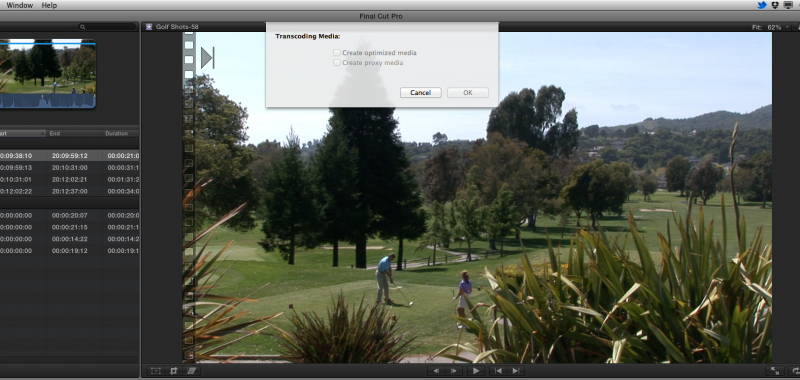
Heres a screen shot. When i import ANY footage i have it set to optimize...i don't mind waiting or anything.
I imported all the HDV footage and it didn't create optimized media. Here is the screen shot when you try to tell it to optimize manually by right clicking the clip in the Event and clicking "Transcode Media".
Replied by Shane M on topic Re: Need A Lag Fix
NocoDave wrote:
it actually won't even let me optimize the HDV further...?
What do you mean by this? That you have optimised some and won't let you do the rest, or you've optimised it all and it won't let you optimise it further? If the later then it won't right enough. If the former then there's a big problem.
Heres a screen shot. When i import ANY footage i have it set to optimize...i don't mind waiting or anything.
I imported all the HDV footage and it didn't create optimized media. Here is the screen shot when you try to tell it to optimize manually by right clicking the clip in the Event and clicking "Transcode Media".
Please Log in to join the conversation.
22 Apr 2012 01:50 - 22 Apr 2012 01:51 #7421
by NocoDave
Replied by NocoDave on topic Re: Need A Lag Fix
This might be your problem, normally it doesn't create optimised media, even if selected, if it's a type of media that doesn't need optimised, i.e. ProRes 422.
I haven't worked with HDV in FCPX, I just assumed as it is Long GOP it would create it. I don't know if it's standard for FCPX to ignore it or if you have a problem that it's not. Hopefully someone who has can say how it goes for them.
If it's standard not to, I think that's a bad thing. I'd transcode the footage in something else to ProRes first if this is the case.
Putting the Cinelooks on HDV isn't going to be easy on your system, but you say you have issues away from those clips. I'm not sure if this could relate.
I'd disable all the effects in the inspector and see if it plays along better, or recreate the project without effects, at least to find out or rule it out.
I haven't worked with HDV in FCPX, I just assumed as it is Long GOP it would create it. I don't know if it's standard for FCPX to ignore it or if you have a problem that it's not. Hopefully someone who has can say how it goes for them.
If it's standard not to, I think that's a bad thing. I'd transcode the footage in something else to ProRes first if this is the case.
Putting the Cinelooks on HDV isn't going to be easy on your system, but you say you have issues away from those clips. I'm not sure if this could relate.
I'd disable all the effects in the inspector and see if it plays along better, or recreate the project without effects, at least to find out or rule it out.
Last edit: 22 Apr 2012 01:51 by NocoDave. Reason: rewording
Please Log in to join the conversation.
