


- Posts: 131
- Thank you received: 15
3 Post Moderation Rule for New Boarders (25 Jan 2021)
New boarders will have their posts moderated - Don't worry if you cannot see your post immediately.
Clip timecode in Project
26 Mar 2012 13:08 - 26 Mar 2012 13:13 #6187
by Jimmyfinn
Replied by Jimmyfinn on topic Re: Clip timecode in Project
I've been using FCPX since release and haven't had any phone calls about naked men.
If everyone else is getting them, what's wrong with my rushes!
Seriously, FCPX had the ability to display clip time code in the timeline when a tool such as trim was selected. This feature was broken when 10.0.3 was released, probably related to the Clip Skimming feature that was added. Feedback to Apple to bring it back has been sent
If everyone else is getting them, what's wrong with my rushes!
Seriously, FCPX had the ability to display clip time code in the timeline when a tool such as trim was selected. This feature was broken when 10.0.3 was released, probably related to the Clip Skimming feature that was added. Feedback to Apple to bring it back has been sent
Last edit: 26 Mar 2012 13:13 by Jimmyfinn.
Please Log in to join the conversation.
26 Mar 2012 13:57 #6188
by NocoDave
Replied by NocoDave on topic Re: Clip timecode in Project
Ideally I'd like the match frame to work both ways, i.e "Reveal in Events Browser", "Shift-F" to be abled from the Events Browser to be "Reveal in Current Project".
Please Log in to join the conversation.
26 Mar 2012 14:08 #6189
by Seanus
Sean Lander - Editing since 1982 - AVID 1991 - FCP 1999 - FCPX 2011
Replied by Seanus on topic Re: Clip timecode in Project
Well it's not really that big an issue because whenever I get client changes they relate to the sequence time. In fact I can't figure out how the client would ever see the source timecode unless they had access to the rushes. In which then you'd be going through them and not your sequence so not really an issue.
The database tools in FCP X are so much better that finding stuff is ridiculously easy. It just amazes me how much faster I can cut without even noticing it.
In fact a colleague of mine how I convinced to give FCP X a try for a multi cam video clip he's doing rang me today that he couldn't believe how fast he had finished the job. He had allowed 3 days and did it in one.
The database tools in FCP X are so much better that finding stuff is ridiculously easy. It just amazes me how much faster I can cut without even noticing it.
In fact a colleague of mine how I convinced to give FCP X a try for a multi cam video clip he's doing rang me today that he couldn't believe how fast he had finished the job. He had allowed 3 days and did it in one.
Sean Lander - Editing since 1982 - AVID 1991 - FCP 1999 - FCPX 2011
Please Log in to join the conversation.
26 Mar 2012 14:27 - 26 Mar 2012 14:29 #6192
by NocoDave
It all depends on what type of work your doing, sometimes the rushes come from the client, who in turn may also have a client who is in more of the position to only see the sequence timecode.
In this case having the match frame work both ways is ideal, find the timecode easily in the event library, then where it is used in the project.
Replied by NocoDave on topic Re: Clip timecode in Project
Well it's not really that big an issue because whenever I get client changes they relate to the sequence time. In fact I can't figure out how the client would ever see the source timecode unless they had access to the rushes.
It all depends on what type of work your doing, sometimes the rushes come from the client, who in turn may also have a client who is in more of the position to only see the sequence timecode.
In this case having the match frame work both ways is ideal, find the timecode easily in the event library, then where it is used in the project.
Last edit: 26 Mar 2012 14:29 by NocoDave. Reason: addition
Please Log in to join the conversation.
26 Mar 2012 14:34 #6193
by Seanus
Sean Lander - Editing since 1982 - AVID 1991 - FCP 1999 - FCPX 2011
Replied by Seanus on topic Re: Clip timecode in Project
Yes I work with clients who have the rushes. My point being that when they want a shot it will be in the browser not the project, if they want a shot changed in a sequence then they're going to be reading off the sequence timecode, and say they want me to replace a shot with a shot from Reel X at timecode xx:xx:xx:xx then it's going to be easy to find in my browser.
The only time I ever want to know the timecode from the source in my sequence is usually to identify the time of day it was shot so I can look for other shots from around the same time.
A great example of this is a job like The Amazing Race where you might be focussing on one team but then want to know what the other team was doing at this same moment.
The only time I ever want to know the timecode from the source in my sequence is usually to identify the time of day it was shot so I can look for other shots from around the same time.
A great example of this is a job like The Amazing Race where you might be focussing on one team but then want to know what the other team was doing at this same moment.
Sean Lander - Editing since 1982 - AVID 1991 - FCP 1999 - FCPX 2011
Please Log in to join the conversation.
26 Mar 2012 14:50 - 26 Mar 2012 14:52 #6194
by NocoDave
Replied by NocoDave on topic Re: Clip timecode in Project
I know what you mean Seanus, most often it is when something is noticed in a sequence. But not only and often relates to a shot that wasn't used, or feedback/information before seeing any edit.
I appreciate that you don't get this, but different people doing different types of work encounter some things more than others.
There is a way to roughly do reverse match framing in FCPX. But it's a bit long winded.
Find the clip in the "Event Browser", open the "Timeline Index", and type the name of the clip, or an associated keyword in to the index search field, this way the relevant clip can be found in the project.
I appreciate that you don't get this, but different people doing different types of work encounter some things more than others.
There is a way to roughly do reverse match framing in FCPX. But it's a bit long winded.
Find the clip in the "Event Browser", open the "Timeline Index", and type the name of the clip, or an associated keyword in to the index search field, this way the relevant clip can be found in the project.
Last edit: 26 Mar 2012 14:52 by NocoDave. Reason: typo/reword
Please Log in to join the conversation.
26 Mar 2012 14:56 - 26 Mar 2012 14:58 #6196
by Seanus
Sean Lander - Editing since 1982 - AVID 1991 - FCP 1999 - FCPX 2011
Replied by Seanus on topic Re: Clip timecode in Project
Oh sorry.
I should stipulated what I was referring to. I absolutely think reverse match frame is essential and it's something I use all the time in Avid and FCP 7.
I was actually referring to the OP and oldbrownjava's post. Sorry for the confusion.
I should stipulated what I was referring to. I absolutely think reverse match frame is essential and it's something I use all the time in Avid and FCP 7.
I was actually referring to the OP and oldbrownjava's post. Sorry for the confusion.
Sean Lander - Editing since 1982 - AVID 1991 - FCP 1999 - FCPX 2011
Last edit: 26 Mar 2012 14:58 by Seanus.
Please Log in to join the conversation.

15 Jun 2012 23:24 #9876
by rickytin
Replied by rickytin on topic Re: Clip timecode in Project
With FCP 10.0.5 if you are in trim mode or range selection in the timeline yo can view the clip timecode in the timeline.
Please Log in to join the conversation.
16 Jun 2012 00:04 #9878
by plysat
Can't sleep? Try this: fcpxpert.net ;-)
Replied by plysat on topic Re: Clip timecode in Project
Well, I'm still in 10.0.4 and when i have clip skimming on it absolutely shows the *clip* TC in the dashboard. Not sure why it's not working for some folks...
Can't sleep? Try this: fcpxpert.net ;-)
Please Log in to join the conversation.
- Tom Wolsky
-

- Offline
- Moderator
-

16 Jun 2012 00:37 #9880
by Tom Wolsky
Replied by Tom Wolsky on topic Re: Clip timecode in Project
Yes, it's not new to 0.5. The clip skimmer gives clip TC. Trimming has always given clip TC.
Please Log in to join the conversation.
- Disproportionate Pictures
-

- Offline
- Platinum Member
-

Less
More
- Posts: 1433
- Thank you received: 64
16 Jun 2012 00:41 #9881
by Disproportionate Pictures
Replied by Disproportionate Pictures on topic Re: Clip timecode in Project
Me too. With clip skimming turned in I get clip TC unquestionably.
Please Log in to join the conversation.


18 Jun 2012 06:30 #9930
by mmorache
Replied by mmorache on topic Re: Clip timecode in Project
I could be confused about this but I believe that the trim tool originally gave us clip timecode as we skimmed (as well as the blade tool) and that went away in 10.0.4 (or 10.0.3) and it's been brought back in 10.0.5.
Hooray! I'm glad to have it back.
Now I just wish they would get around to some of those big feature changes we're waiting for.
Hooray! I'm glad to have it back.
Now I just wish they would get around to some of those big feature changes we're waiting for.
Please Log in to join the conversation.

07 Sep 2012 16:20 - 07 Sep 2012 16:27 #13827
by mea1top
Replied by mea1top on topic Re: Clip timecode in Project
I've read this discussion and I'm probably doing something stupid, but I"m not able to get the original timecode ANYWHERE in FCPX - this is my first big project in FCPX - I'm experienced in FCP7. Just to outline, there is original timecode on the clips since I had to make DVDs for translation purposes on FCP7, with the same material.
I have turned on clip skimming in view, I skim the clips in the event browser and I do NOT see the oroginal timecode. Every clip in the event browser I notice has timecode beginning at 00 for each clip - and this is what I read.
Please help - since I have hundreds of clips imported and I need those references to dig out the segments of interviews in Arabic that I need.
thanks
I'm now wondering if it's not a more basic problem - is there something in the import settings that is an issue here - why are all the clips in the event browser starting at 00?
I have turned on clip skimming in view, I skim the clips in the event browser and I do NOT see the oroginal timecode. Every clip in the event browser I notice has timecode beginning at 00 for each clip - and this is what I read.
Please help - since I have hundreds of clips imported and I need those references to dig out the segments of interviews in Arabic that I need.
thanks
I'm now wondering if it's not a more basic problem - is there something in the import settings that is an issue here - why are all the clips in the event browser starting at 00?
Last edit: 07 Sep 2012 16:27 by mea1top.
Please Log in to join the conversation.
- Tom Wolsky
-
- Offline
- Moderator
-
07 Sep 2012 16:29 #13828
by Tom Wolsky
Replied by Tom Wolsky on topic Re: Clip timecode in Project
What are the clips? Where'd they come from? How were they imported? What shot them?
Please Log in to join the conversation.
07 Sep 2012 16:42 - 07 Sep 2012 16:42 #13830
by mea1top
Replied by mea1top on topic Re: Clip timecode in Project
Hi Tom - thanks for answering. Shot on Canon 5D. I imported them using I think the standard settings on FCPX
Last edit: 07 Sep 2012 16:42 by mea1top.
Please Log in to join the conversation.
- Tom Wolsky
-
- Offline
- Moderator
-
07 Sep 2012 16:46 #13832
by Tom Wolsky
Replied by Tom Wolsky on topic Re: Clip timecode in Project
A Canon 5D shots individual clips. Each clips starts at zero.
Please Log in to join the conversation.
07 Sep 2012 17:28 - 07 Sep 2012 17:32 #13834
by mea1top
Replied by mea1top on topic Re: Clip timecode in Project
Actually no Tom - the Canon 5d does have timecode - it's actually based on the time of day - but still useful nonetheless.(ie it is sequential and picks up at the new time of day for the new clip) I think I explained earlier that there was no problem in getting and seeing the original timecode in FCP7 - I did that, since I needed to make timecode burned DVDs for translation purposes. The problem is entirely in FCPX - I attach a screenshot of the settings I had for "import files"
so any thoughts would be welcome
so any thoughts would be welcome
Last edit: 07 Sep 2012 17:32 by mea1top.
Please Log in to join the conversation.
- Tom Wolsky
-
- Offline
- Moderator
-
07 Sep 2012 17:50 #13835
by Tom Wolsky
Replied by Tom Wolsky on topic Re: Clip timecode in Project
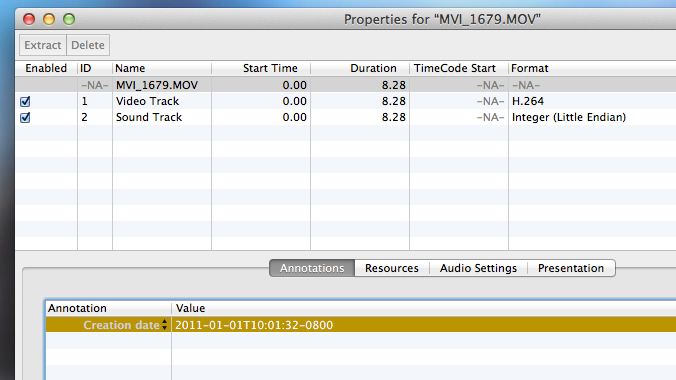
That's not what I see on the 5D clips I have when the clips are opened directly from the card into the QT player. There is no timecode track only a date/time creation annotation.
Please Log in to join the conversation.
07 Sep 2012 17:55 #13836
by mea1top
Replied by mea1top on topic Re: Clip timecode in Project
you don't see the timecode in quicktime player - but I can assure you when they are opened in FCP7 you see the original timecode - I'll do a screen grab for you if you really want it - but as I said I actually made a DVD WITH the original timecode - and somebody did the translations for me - so unless I'm hallucinating....
no seriously, it's something with FCPx - and maybe to do with how they are imported - I'm wondering if anyone else has had this problem
no seriously, it's something with FCPx - and maybe to do with how they are imported - I'm wondering if anyone else has had this problem
Please Log in to join the conversation.
- Tom Wolsky
-
- Offline
- Moderator
-
07 Sep 2012 18:07 #13837
by Tom Wolsky
Replied by Tom Wolsky on topic Re: Clip timecode in Project
This is the clip opened from the card into the QT7 pro player. I don't see any timecode track.
Please Log in to join the conversation.
