


- Posts: 178
- Thank you received: 9
3 Post Moderation Rule for New Boarders (25 Jan 2021)
New boarders will have their posts moderated - Don't worry if you cannot see your post immediately.
Clip timecode in Project
23 Mar 2012 03:11 #6070
by rickytin
Clip timecode in Project was created by rickytin
How do I see my clip original Timecode in a Project / timeline.
Thanks,
Ricky Dominguez
Luna Films
Puerto Rico
Thanks,
Ricky Dominguez
Luna Films
Puerto Rico
Please Log in to join the conversation.

23 Mar 2012 20:56 #6095
by rickytin
Replied by rickytin on topic Re: Clip timecode in Project
Thanks Ben for replay, do you mean show detail trimming feedback, but it dosent show my clip timecode us in my timeline/project.
Please Log in to join the conversation.
23 Mar 2012 22:13 #6099
by BenB
Replied by BenB on topic Re: Clip timecode in Project
When "skimming" a clip in the Timeline, watch the Dashboard, it shows the clips TC, not the Timeline TC.
Please Log in to join the conversation.
- Tom Wolsky
-

- Offline
- Moderator
-

23 Mar 2012 22:30 #6100
by Tom Wolsky
Replied by Tom Wolsky on topic Re: Clip timecode in Project
Not on my system it doesn't. The dashboard always shows the skimmer timecode in the project. It never shows the clip timecode.
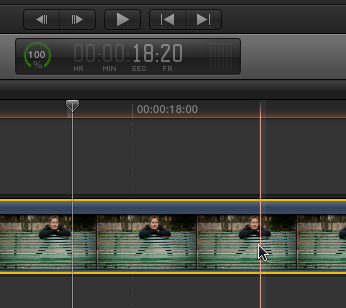
That's the project time in the dashboard, not the clip time.
That's the project time in the dashboard, not the clip time.
Please Log in to join the conversation.
23 Mar 2012 22:39 #6101
by rickytin
Replied by rickytin on topic Re: Clip timecode in Project
Yes Tom it's the same for me.
Please Log in to join the conversation.
23 Mar 2012 22:41 - 23 Mar 2012 22:41 #6102
by BenB
Replied by BenB on topic Re: Clip timecode in Project
I am sitting here in front of FCP X with Clip Skimming turned on, and when I skim a "clip", not the Timeline, but a CLIP, it shows the clip Timecode.
It is very logical:
1- Skim the Timeline, get Timeline TC.
2- Skim a Clip, get the Clip TC.
3- You can only skim a Clip with Clip Skimming.
It is very logical:
1- Skim the Timeline, get Timeline TC.
2- Skim a Clip, get the Clip TC.
3- You can only skim a Clip with Clip Skimming.
Last edit: 23 Mar 2012 22:41 by BenB.
Please Log in to join the conversation.
- Tom Wolsky
-
- Offline
- Moderator
-
23 Mar 2012 23:04 - 23 Mar 2012 23:05 #6105
by Tom Wolsky
Replied by Tom Wolsky on topic Re: Clip timecode in Project
In the image I showed, the pointer is on the clip. It's skimming the clip. The timecode in the dashboard is the project timecode. The same number in the dashboard corresponds to the position on the timeline ruler. It doesn't matter if I use skimming or the clip skimmer. They both show the same result.
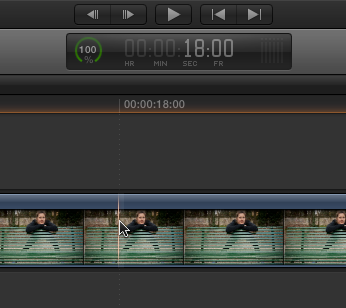
That's the clip skimmer on the clip. It's lined up with 18:00 in the timeline ruler. That's the time that's displayed in the dashboard. I have never seen the application work any other way.
That's the clip skimmer on the clip. It's lined up with 18:00 in the timeline ruler. That's the time that's displayed in the dashboard. I have never seen the application work any other way.
Last edit: 23 Mar 2012 23:05 by Tom Wolsky.
Please Log in to join the conversation.
23 Mar 2012 23:14 #6106
by rickytin
Replied by rickytin on topic Re: Clip timecode in Project
Thanks BenB to take time to response, I have Clip Skimming turned on but it dosen't give me the clip timecode, if I make a connected clip a storyline then it give me the timecode of that storyline.
Please Log in to join the conversation.
- Tom Wolsky
-
- Offline
- Moderator
-
23 Mar 2012 23:17 #6107
by Tom Wolsky
Replied by Tom Wolsky on topic Re: Clip timecode in Project
"2- Skim a Clip, get the Clip TC."
Where are you skimming the clip? In the browser? Yes, you'll get the clip timecode. The point is the OP wants to see the clip timecode while skimming the clip in the timeline.
You said feedback turned on in prefs in your first message. What do you mean by that? Do you mean: "Show detailed trimming feedback"? That does not effect clip timecode display in the timeline panel. If you're referring to trimming, there is no timecode seen in the two-up display. The only timecode that moves is the project timecode if you're rippling a clip.
Where are you skimming the clip? In the browser? Yes, you'll get the clip timecode. The point is the OP wants to see the clip timecode while skimming the clip in the timeline.
You said feedback turned on in prefs in your first message. What do you mean by that? Do you mean: "Show detailed trimming feedback"? That does not effect clip timecode display in the timeline panel. If you're referring to trimming, there is no timecode seen in the two-up display. The only timecode that moves is the project timecode if you're rippling a clip.
Please Log in to join the conversation.
23 Mar 2012 23:20 - 14 Aug 2012 10:57 #6108
by BenB
Replied by BenB on topic Re: Clip timecode in Project
It works, I'm doing it now in the Timeline, "turn on Clip Skimming".
Last edit: 14 Aug 2012 10:57 by peteramwiggins.
Please Log in to join the conversation.
- Tom Wolsky
-
- Offline
- Moderator
-
23 Mar 2012 23:55 #6110
by Tom Wolsky
Replied by Tom Wolsky on topic Re: Clip timecode in Project
You're seeing the timecode of the secondary storyline, not of the clip. That's why it's showing 1:23. You're two seconds from the beginning of the secondary.
Please Log in to join the conversation.
24 Mar 2012 00:52 #6113
by BenB
Replied by BenB on topic Re: Clip timecode in Project
Funny, cause it matches the TC of the clip when checked in the Browser. And when I skim the clip after it, the TC changes to that specific clip's TC, it's not congruent.
Please Log in to join the conversation.
- Tom Wolsky
-
- Offline
- Moderator
-
24 Mar 2012 01:13 #6115
by Tom Wolsky
Replied by Tom Wolsky on topic Re: Clip timecode in Project
The timecode as I skim across the secondary storyline clips starts at zero, which has no relationship to the clip in the timeline, and as I skim the secondary with the clip skimmer I see the timecode of the secondary as if it was an open timeline. The timecode numbers are contiguous through the edits in the secondary and bear no relation to the timecode of the clips.
Please Log in to join the conversation.


25 Mar 2012 00:25 #6135
by dgwvideo
Creating history....one edit at a time !
Replied by dgwvideo on topic Re: Clip timecode in Project
The detailed trimming feedback option, as far as I can tell, only provides the two up display in the viewer when rippling, sliding, etc. clips, or when using the precision editor. It has no bearing on how timecode is read.
And the only time I can seem to get clip specific timecode is when skimming in the event browser. My system always shows project timecode (or second storyline timecode) when skimming through a timeline. This is actually the way I prefer it to work anyway. Not sure I would want my project timecode jumping around as it plays different clips.
And the only time I can seem to get clip specific timecode is when skimming in the event browser. My system always shows project timecode (or second storyline timecode) when skimming through a timeline. This is actually the way I prefer it to work anyway. Not sure I would want my project timecode jumping around as it plays different clips.
Creating history....one edit at a time !
Please Log in to join the conversation.
25 Mar 2012 02:48 #6138
by Seanus
Sean Lander - Editing since 1982 - AVID 1991 - FCP 1999 - FCPX 2011
Replied by Seanus on topic Re: Clip timecode in Project
Yes the only way I've been able to determine the timecode of a clip in the timeline is to select the clip and hit SHIFT F and then use detailed skimming in the browser. Not ideal.
Sean Lander - Editing since 1982 - AVID 1991 - FCP 1999 - FCPX 2011
Please Log in to join the conversation.
25 Mar 2012 05:16 #6139
by RonPriest
Well Seanus, I think you've answered the OP question, right? SHIFT-F in FCPX is basically the same as Match Frame was in FCP7, and isn't that what the OP is wanting to do, find a specific timecode of the original clip in the browser? So if you place the playhead at the exact spot in the project that you are wanting to find the timecode for in the original clip and press SHIFT-F, it will take to you to that exact frame in the original clip. I mean... what more could you ask for, unless I'm not understanding the OP motive in asking the question. Right?
Replied by RonPriest on topic Re: Clip timecode in Project
Seanus wrote: Yes the only way I've been able to determine the timecode of a clip in the timeline is to select the clip and hit SHIFT F and then use detailed skimming in the browser. Not ideal.
Well Seanus, I think you've answered the OP question, right? SHIFT-F in FCPX is basically the same as Match Frame was in FCP7, and isn't that what the OP is wanting to do, find a specific timecode of the original clip in the browser? So if you place the playhead at the exact spot in the project that you are wanting to find the timecode for in the original clip and press SHIFT-F, it will take to you to that exact frame in the original clip. I mean... what more could you ask for, unless I'm not understanding the OP motive in asking the question. Right?
Please Log in to join the conversation.
25 Mar 2012 06:25 - 25 Mar 2012 08:46 #6140
by RonPriest
Okay, so the option to turn on "Clip Skimming" from the view menu got me to wondering what exactly that command was for. I couldn't find it documented anywhere in the FCPX manual, or the APTS-FCPX training book. Turns out, this was added to version 10.0.3 and I found Larry Jordon talking about it here, interesting!
www.larryjordan.biz/fcpx-clip-skimming/
Replied by RonPriest on topic Re: Clip timecode in Project
BenB wrote: ...with Clip Skimming turned on....
Okay, so the option to turn on "Clip Skimming" from the view menu got me to wondering what exactly that command was for. I couldn't find it documented anywhere in the FCPX manual, or the APTS-FCPX training book. Turns out, this was added to version 10.0.3 and I found Larry Jordon talking about it here, interesting!
www.larryjordan.biz/fcpx-clip-skimming/
Last edit: 25 Mar 2012 08:46 by RonPriest.
Please Log in to join the conversation.
25 Mar 2012 08:41 #6142
by dgwvideo
Creating history....one edit at a time !
Replied by dgwvideo on topic Re: Clip timecode in Project
Yes, unfortunately not all of the features implemented in 10.0.3 are documented in the updated manual. I often have to google for clarification on fcpx functions, shortcuts, etc.
Creating history....one edit at a time !
Please Log in to join the conversation.
- oldbrownjava
-

- Offline
- New Member
-

Less
More
- Posts: 1
- Thank you received: 0
26 Mar 2012 12:45 #6186
by oldbrownjava
Replied by oldbrownjava on topic Re: Clip timecode in Project
I've been using FCPX as a toy since it came out, for me one of the many hurdles for pro work is this source TC issue.
Surely everyone gets phone calls to saying cut from xx:xx:xx:xx to yy:yy:yy:yy and from etc etc because I've just noticed a naked man in the BG on the rushes. This was easy to cope with on FCP7 but I've not found a way to do it on X
Surely everyone gets phone calls to saying cut from xx:xx:xx:xx to yy:yy:yy:yy and from etc etc because I've just noticed a naked man in the BG on the rushes. This was easy to cope with on FCP7 but I've not found a way to do it on X
Please Log in to join the conversation.
